1. Introduzzjoni
Thank you for choosing the DACOM Q10 Neckband Headphones. These open-ear earbuds are designed for comfort, durability, and high-quality audio, perfect for active lifestyles. This manual provides detailed instructions to help you get the most out of your new headphones.

Image 1.1: DACOM Q10 Neckband Headphones and Charging Case. The headphones are shown in their open charging case, highlighting their sleek black design and compact form factor.
2. Karatteristiċi ewlenin
- Disinn tal-Widna Miftuħa: Provides a breathable listening experience, allowing for better awareness of surroundings.
- Tajjeb Ergonomiku: Liquid silicone ear hooks ensure a secure and comfortable fit, ideal for sports and active use.
- Klassifikazzjoni IPX7 li ma jgħaddix ilma minnha: Offers robust protection against sweat and water, making them suitable for various environments.
- Ħin twil tal-logħob: Up to 12 hours of continuous playback on a single charge, with extended playtime using the charging case.
- Ħfief: Each earbud weighs approximately 10.6g, ensuring minimal discomfort during prolonged wear.
- Konnettività Bluetooth mingħajr fili: Stable and reliable connection for seamless audio streaming.
- Touch Control: Intuitive touch controls for media playback and call management.

Image 2.1: Open Ear Design for Situational Awareness. A man is shown wearing the DACOM Q10 headphones, illustrating how the open-ear design allows for better awareness of ambient sounds.

Image 2.2: Extended Playtime Capabilities. This image displays the headphones and charging case, highlighting the 10-12 hours of single charge playtime and up to 36 hours with the charging case.

Image 2.3: Comfortable and Lightweight Wearing. A woman is shown relaxing while wearing the headphones, emphasizing their ergonomic design, ear-free comfort, and lightweight nature.
3. X'hemm fil-Kaxxa
Upon opening your DACOM Q10 package, you should find the following items:
- DACOM Q10 Neckband Headphones (Left and Right Earbuds)
- Kawża tal-Iċċarġjar
- Cable tal-Iċċarġjar tal-USB
- Manwal għall-Utent
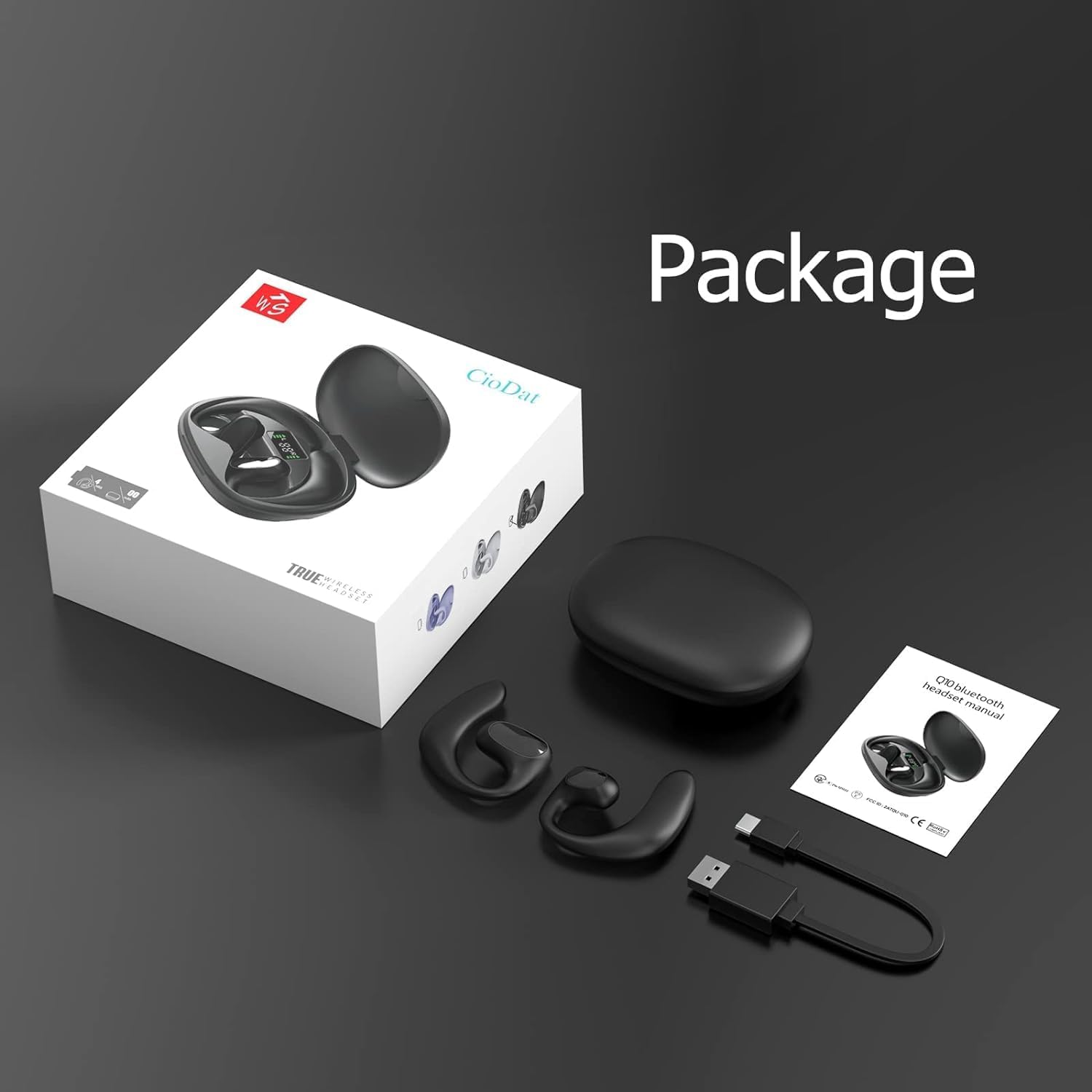
Image 3.1: Package Contents. This image displays all items included in the DACOM Q10 retail package: the headphones, charging case, USB cable, and user manual.
4. Setup
4.1 Iċċarġjar tal-Headphones u l-Kaxxa
- Ħlas Inizjali: Qabel l-ewwel użu, iċċarġja kompletament kemm il-headphones kif ukoll il-kaxxa tal-iċċarġjar.
- Qabbad: Plug the USB charging cable into the charging port on the case and connect the other end to a USB power source (e.g., computer, wall adapter).
- Indikaturi: The LED indicators on the charging case will show the charging status. Once fully charged, the indicators will typically turn solid or turn off.
4.2 Tqabbil ma' Apparat Bluetooth
- Qawwa Mixgħul: Open the charging case or take out the earbuds. They will automatically enter pairing mode (indicated by flashing LED lights on the earbuds).
- Ippermetti Bluetooth: On your device (smartphone, tablet, computer), go to the Bluetooth settings and ensure Bluetooth is enabled.
- Agħżel Apparat: In the list of available Bluetooth devices, select "DACOM Q10" (or similar name).
- Ikkonferma l-Konnessjoni: Once connected, the earbud LEDs will stop flashing, and you may hear a confirmation tone.
- Ikkonnettja mill-ġdid: Il-headphones jerġgħu jikkonnettjaw awtomatikament mal-aħħar apparat imqabbad meta joħorġu mill-kaxxa, jekk il-Bluetooth ikun attivat fuq l-apparat.
5. Istruzzjonijiet Operattivi
The DACOM Q10 headphones feature intuitive touch controls for easy management of your audio and calls.

Image 5.1: Earbud Control Points. This diagram illustrates the LED/MIC, Trumpet (speaker), and MFB (Multi-Function Button) areas on the DACOM Q10 earbud, indicating where touch controls are located.
5.1 Daqq tal-Mużika
- Play/Pawsa: Single tap on either earbud's MFB.
- Track li jmiss: Double tap on the right earbud's MFB.
- Track preċedenti: Double tap on the left earbud's MFB.
- Volum 'il fuq: Triple tap on the right earbud's MFB.
- Volum 'l isfel: Triple tap on the left earbud's MFB.
5.2 Ġestjoni tas-Sejħiet
- Tweġiba/Tmiem Sejħa: Single tap on either earbud's MFB.
- Irrifjuta Sejħa: Press and hold either earbud's MFB for 2 seconds.
5.3 Assistent tal-Vuċi
- Attiva l-Assistent tal-Vuċi: Press and hold either earbud's MFB for 3 seconds.
6. Manutenzjoni
6.1 Tindif
- Imsaħ il-earbuds u l-kaxxa tal-iċċarġjar regolarment b'ċarruta ratba, niexfa u mingħajr suf.
- Tużax prodotti tat-tindif li joborxu, alkoħol, jew solventi kimiċi.
- Kun żgur li l-kuntatti tal-iċċarġjar huma nodfa u ħielsa minn debris.
6.2 Ħażna
- Aħżen il-headphones fil-kaxxa tal-iċċarġjar tagħhom meta ma tkunx qed tużahom biex tipproteġihom u żżommhom iċċarġjati.
- Evita li taħżen f'temperaturi estremi (sħan jew kiesaħ) jew umdità għolja.
6.3 Kura tal-Batterija
- Biex ittawwal il-ħajja tal-batterija, evita li l-headphones jiċċarġjaw kompletament ta’ spiss.
- Charge the case and earbuds regularly, even if not used for extended periods.
7 Issolvi l-problemi
| Problema | Kawża Possibbli | Soluzzjoni |
|---|---|---|
| Il-headphones mhux se jixegħlu. | Batterija baxxa. | Iċċarġja l-headphones u l-kaxxa tal-iċċarġjar kompletament. |
| Ma tistax tqabbad mat-tagħmir. | Bluetooth is off; headphones not in pairing mode; device list cluttered. | Ensure Bluetooth is on. Place headphones in pairing mode. Forget "DACOM Q10" from device's Bluetooth list and try pairing again. |
| L-ebda ħoss jew volum baxx. | Volum baxx wisq; mhux konness; il-midja waqfet. | Increase volume on both headphones and device. Ensure headphones are connected. Check if media is paused. |
| Konnessjoni intermittenti. | Wisq 'il bogħod mill-apparat; interferenza. | Move closer to your device. Avoid strong Wi-Fi signals or other Bluetooth devices. |
8. Speċifikazzjonijiet
| Karatteristika | Dettall |
|---|---|
| Isem tal-Mudell | Q10 |
| Brand | DACOM |
| Teknoloġija tal-Konnettività | Wireless (Bluetooth) |
| Tqegħid tal-widnejn | Widna Miftuħa |
| Tip ta' Kontroll | Kontroll tal-Midja, Mess |
| Klassifikazzjoni li ma jgħaddix ilma minnha | IPX7 |
| Ħin tal-Logħob (Ċarġ Uniku) | Sa 12-il Siegħa |
| Piż tal-Earbud | Approx. 10.6g (0.37 oz) per earbud |
| Piż tal-Oġġett (Total) | 4.2 uqija |
| Kulur | Iswed |
| Komponenti Inklużi | Charging Station, USB Cable |
9. Vidjo Uffiċjali tal-Prodott
Video 9.1: DACOM Q10 Neckband Headphones Overview. This official product video provides a visual overview of the DACOM Q10 headphones, showcasing their key features, design, and benefits for active users.
10. Garanzija u Appoġġ
For warranty information and customer support, please refer to the official DACOM webis-sit jew ikkuntattja lis-servizz tal-konsumatur tagħhom direttament. Żomm l-irċevuta tax-xiri tiegħek bħala prova tax-xiri għal kwalunkwe talba ta' garanzija.
For further assistance, you may also visit the product's detail page on Amazon.com: DACOM Q10 on Amazon


