1. Prodott Aktarview
The Wantek 682NUSB/3.5mm Headset is designed for clear communication and comfortable use across various devices. It features a noise-cancelling microphone and multiple connectivity options for versatility.
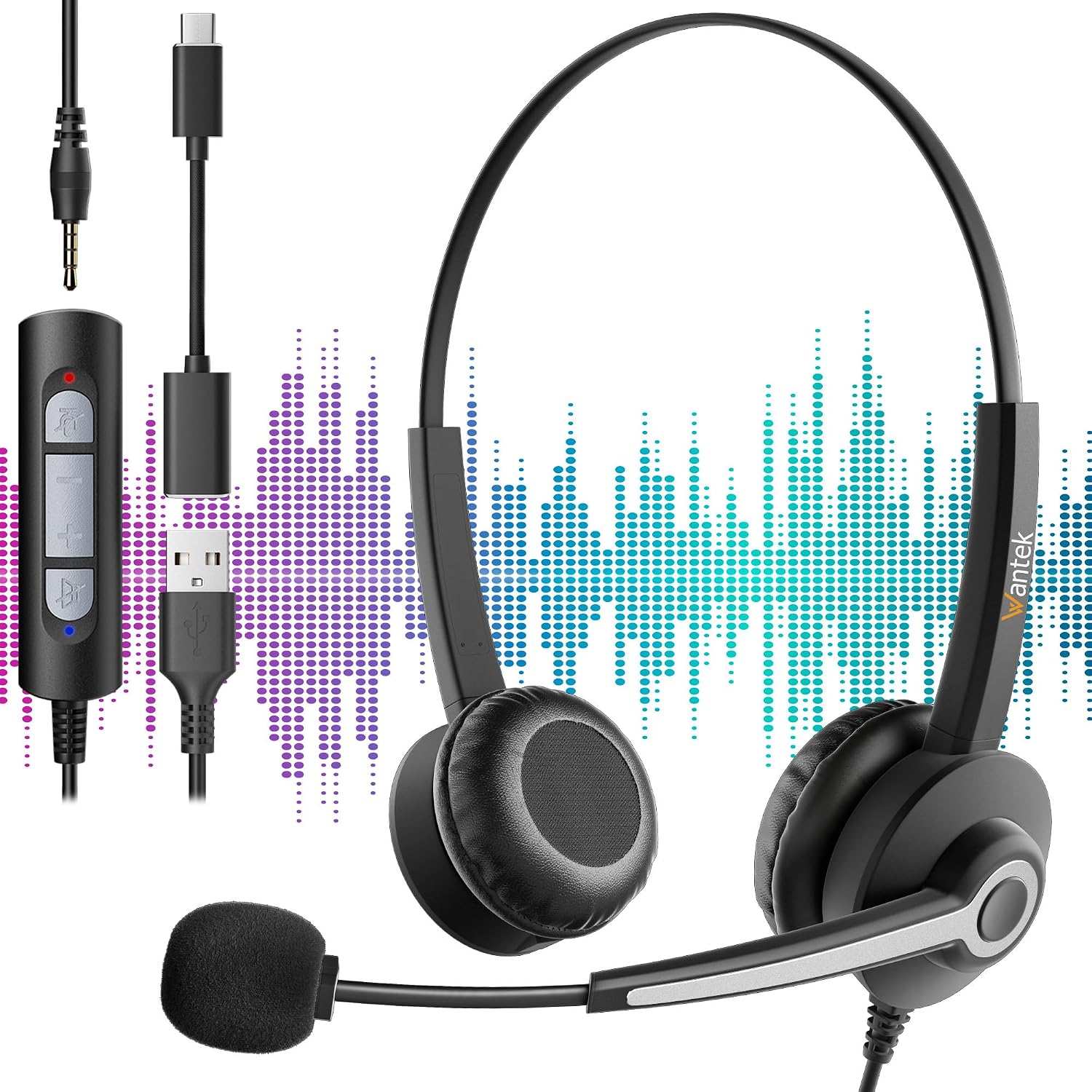
Figure 1: Wantek 682NUSB/3.5mm Headset with its 3.5mm, USB-A, and USB-C connectors, illustrating its multi-device compatibility.
2. Setup u Konnessjoni
The headset offers flexible connectivity options to suit different devices.
2.1 Konnessjoni permezz ta' Jack ta' 3.5mm
- Locate the 3.5mm audio jack on your device (e.g., smartphone, tablet, laptop).
- Insert the 3.5mm connector of the headset into the device's audio jack.
- Ensure the connection is secure. Your device should automatically detect the headset.
2.2 Connecting via USB-A or USB-C
- The headset includes adapters for USB-A and USB-C connectivity.
- Connect the 3.5mm jack of the headset to the appropriate USB adapter (USB-A or USB-C).
- Insert the USB-A or USB-C adapter into a compatible port on your computer or laptop.
- The device should recognize the headset as an audio input/output device. You may need to select it as the default communication device in your operating system's sound settings.
3. Istruzzjonijiet Operattivi
3.1 L-Ilbies tal-Headset
- Aġġusta l-faxxa tar-ras biex toqgħod komdu fuq rasek. Il-faxxa tar-ras hija aġġustabbli biex takkomoda diversi daqsijiet tar-ras.
- Position the ear cushions over your ears. The cushions are made from soft, breathable synthetic leather for extended comfort.

Figure 2: Key features of the headset, including the adjustable headband, soft ear cushions, flexible microphone boom, and 270-degree microphone rotation.
3.2 Microphone Adjustment
- The microphone boom is flexible. Position it approximately 1-2 inches from your mouth for optimal voice pickup.
- The microphone arm can rotate 270 degrees, allowing you to position it on either your left or right side, or rotate it upwards and out of the way when not in use.
- The integrated noise-cancelling chip helps to reduce background noise, ensuring clear voice transmission.

Figure 3: Visual representation of the noise-cancelling technology, showing how it filters out background noise for clearer communication.
3.3 Kontrolli fil-Linja
The headset features an in-line control unit for easy management of calls and audio.
- Volum 'il fuq/Niżżel: Uża l-buttuni '+' u '-' biex taġġusta l-volum tas-smigħ.
- Tweġiba/Tmiem Sejħa: Press the call button to answer an incoming call or end an active call.
- Mute tal-mikrofonu: Press the microphone button to mute or unmute the microphone.
A small clip is attached to the cable to secure the control unit to your clothing, preventing it from dangling.
4. Manutenzjoni u Kura
- Tindif: Use a soft, dry cloth to wipe the headset. For ear cushions, a slightly damp Ċarruta tista’ tintuża, iżda kun żgur li jkunu niexfa għalkollox qabel l-użu. Evita kimiċi ħarxa jew prodotti tat-tindif li joborxu.
- Ħażna: Aħżen il-headset f'post nadif u niexef 'il bogħod minn temperaturi estremi u dawl tax-xemx dirett.
- Kura tal-Cable: Evita liwjiet qawwija jew ġbid eċċessiv tal-kejbils biex tevita l-ħsara.
- Mikrofonu: Handle the microphone boom gently when adjusting its position.
5 Issolvi l-problemi
5.1 L-ebda ħoss mill-Headset
- Iċċekkja l-Konnessjonijiet: Ensure the 3.5mm jack or USB adapter is fully inserted into the device.
- Livelli tal-Volum: Verify that the volume on the in-line control and on your device is not muted or set too low.
- Settings tal-Apparat: For USB connections, check your computer's sound settings to ensure the headset is selected as the default playback device.
- Test fuq Apparat Ieħor: Try connecting the headset to a different device to determine if the issue is with the headset or the original device.
5.2 Il-Mikrofonu Mhux Jaħdem
- Iċċekkja l-Buttuna Mute: Ensure the microphone mute button on the in-line control is not activated.
- Pożizzjoni tal-mikrofonu: Verify the microphone boom is positioned correctly and not rotated out of the way.
- Settings tal-Apparat: For USB connections, check your computer's sound settings to ensure the headset microphone is selected as the default recording device and that its input volume is adequate.
- Settings tal-Applikazzjoni: Some communication applications (e.g., Zoom, Skype) have their own microphone settings. Check these settings within the application.
6. Speċifikazzjonijiet
| Karatteristika | Deskrizzjoni |
|---|---|
| Numru tal-Mudell | 682NUSB/3.5mm |
| Brand | Wantek |
| Teknoloġija tal-Konnettività | Bil-fili |
| Għażliet ta' Konnettività | 3.5mm, USB-A (via adapter), USB-C (via adapter) |
| Apparati Kompatibbli | Gaming Console, Laptop, Tablet, Phone, Music Production Equipment |
| Mikrofonu | Noise-cancelling, 270-degree rotation, Flexible boom |
| Tqegħid tal-widnejn | Supra-aural (On-Ear) |
| Impedenza | 1 ohms |
| Iżolament tal-Ħoss | Tnaqqis tal-Ħoss Passiv |
| Materjali | Aluminum, Metal, Plastic, Polycarbonate (PC), Synthetic Leather |
| Komponenti Inklużi | Headset, USB-A Adapter, USB-C Adapter, User Manual |
| Użi Rakkomandati | Professional use, Video Gaming, Call Center, Online Chat |
7. Garanzija u Appoġġ
Wantek products are designed for reliability and performance. For warranty information, please refer to the documentation included with your purchase or visit the official Wantek websit.
If you encounter any issues or require technical assistance, please contact Wantek customer support through their official channels. Have your product model number (682NUSB/3.5mm) and purchase details ready when contacting support.


