1. Introduzzjoni
Welcome to the WalkerFit M6 Ultra Smart Watch user manual. This guide provides comprehensive instructions for setting up, operating, maintaining, and troubleshooting your new smart watch. The WalkerFit M6 Ultra is designed for durability and advanced functionality, featuring call capabilities, extensive sport modes, and comprehensive health monitoring.
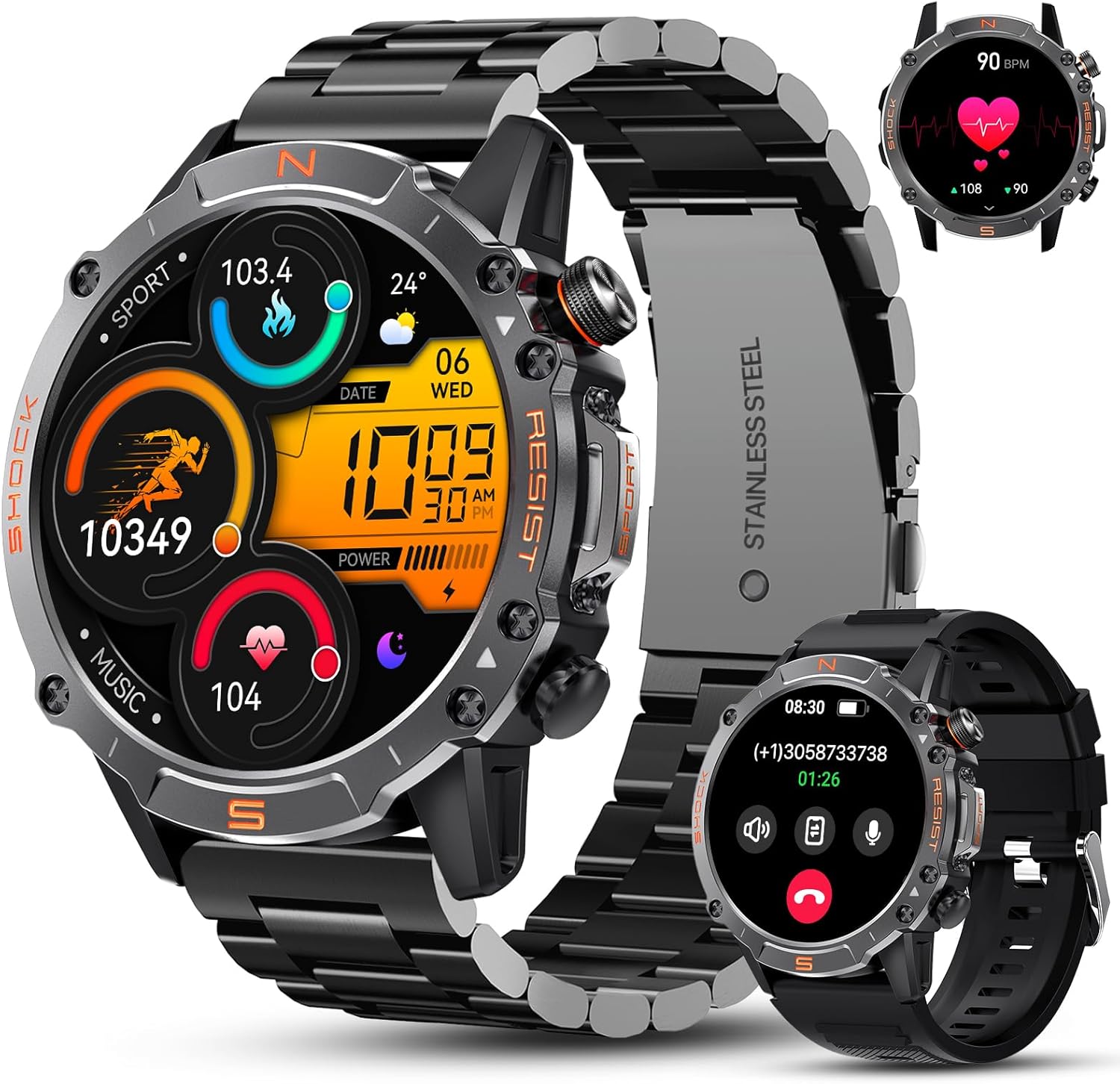
Image: The WalkerFit M6 Ultra Smart Watch, showcasing its robust design and vibrant display.
2. X'hemm fil-Kaxxa
Upon opening your WalkerFit M6 Ultra Smart Watch package, you should find the following items:
- Smartwatch x 1
- Ċarġer tal-Cable x 1
- Manwal għall-Utent x 1

Image: A visual representation of the WalkerFit M6 Ultra Smart Watch, its charging cable, and the user manual included in the packaging.
3. Gwida ta' Setup
3.1. Iċċarġjar tal-Arloġġ Intelliġenti
Before first use, fully charge your WalkerFit M6 Ultra Smart Watch. Connect the magnetic charging cable to the charging points on the back of the watch and plug the USB end into a compatible power source (e.g., computer USB port, USB wall adapter).
3.2. It-tqabbil mal-Ismartphone Tiegħek
To unlock the full potential of your smart watch, pair it with your smartphone using the FitCloudPro app.
- Niżżel il- FitCloudPro app mill-Google Play Store (għal Android) jew mill-Apple App Store (għal iOS).
- Kun żgur li l-Bluetooth huwa attivat fuq l-ismartphone tiegħek.
- Iftaħ l-app FitCloudPro u segwi l-istruzzjonijiet fuq l-iskrin biex toħloq kont jew tidħol.
- In the app, navigate to the 'Device' section and select 'Bind Device'.
- Select 'M6 Ultra' from the list of available devices.
- Ikkonferma t-talba għall-akkoppjar kemm fuq it-telefon tiegħek kif ukoll fuq l-arloġġ intelliġenti.
- Once paired, turn on the call switch within the watch settings to enable call functionality.

Image: A step-by-step visual guide demonstrating how to connect the WalkerFit M6 Ultra Smart Watch to your mobile phone via the FitCloudPro app and Bluetooth.
4. Kif Tħaddem l-Arloġġ Intelliġenti Tiegħek
4.1. Karatteristiċi tal-Wiri
The M6 Ultra features a 1.43-inch HD AMOLED always-on color screen with a resolution of 466x466 pixels and 1000NIT brightness, ensuring clear visibility even under direct sunlight. The Always-on Display feature allows you to check the time without lifting your wrist or touching the screen.

Image: The vibrant 1.43-inch AMOLED display of the WalkerFit M6 Ultra, highlighting its clarity, always-on capability, and energy efficiency compared to other displays.
4.2. Call Functionality and AI Voice Assistant
With the M6 Ultra, you can answer and dial calls directly from your wrist. The integrated AI Voice Assistant allows for hands-free control. Simply use your voice to ask questions, play music, check the weather, or initiate calls, making communication convenient in various situations.

Image: A visual demonstrating the AI Voice Assistant and Bluetooth calling features of the WalkerFit M6 Ultra, showing interaction with the watch for commands and calls.
4.3. Modi Sportivi
The smart watch supports over 110 professional fitness modes, including cycling, running, walking, mountaineering, and hiking. It accurately analyzes multiple data points such as steps taken and calories burned, providing comprehensive insights into your physical activity.

Image: An illustration of the WalkerFit M6 Ultra's extensive range of over 110 sport modes, showing various activities like cycling, swimming, walking, running, hiking, golf, and rowing.
4.4. Monitoraġġ tas-Saħħa
Equipped with a high-precision sensor, the M6 Ultra provides 24-hour heart rate tracking and saves your resting heart rate data for long-term analysis. It also monitors blood oxygen (SpO2) and blood pressure, and offers detailed sleep tracking to help you understand and improve your sleep quality.

Image: The WalkerFit M6 Ultra displaying various health metrics, including blood oxygen levels, 24-hour heart rate, blood pressure, and sleep duration, indicating its comprehensive health tracking capabilities.
4.5. Karatteristiċi addizzjonali
The WalkerFit M6 Ultra offers a wide array of convenient features:
- Uċuħ ta' l-arloġġi personalizzabbli: Agħżel minn aktar minn 100 wiċċ tal-arloġġ jew ittella’ r-ritratti tiegħek stess.
- Ġestjoni tal-Ħin: Set time, use stopwatch, and timer functions.
- Utility Tools: Weather updates, music control, Find Phone feature.
- Notifiki: Receive SMS text messages and alerts from social media apps like Facebook, Twitter, WhatsApp, Skype, and InstagRAM.
- Benessri: Pressure monitor and breath training.
- Konnettività: Bluetooth for seamless connection.
- Modi: Alarm Clock and do-not-disturb mode.
5. Manutenzjoni
5.1. Durabilità u Reżistenza għall-Ilma
The WalkerFit M6 Ultra is built with an incredibly strong and corrosion-resistant metal case. It has undergone rigorous testing, including 72 hours of salt spray, 50,000 button presses, temperatures from -40℉ to 158℉, 1-meter waterproofing, and surviving 100 drops from 2 meters. It is IP68 waterproof, making it suitable for swimming and use in various harsh conditions.
Vidjo: Wirja qasira ta' dimostrazzjoniasing the WalkerFit M6 Ultra Smart Watch's resistance to water immersion and extreme temperatures, highlighting its robust build quality.

Image: Visuals illustrating the WalkerFit M6 Ultra's resistance to shock, humidity, salt spray, heat, cold, and ice/freezing, emphasizing its military-grade durability.
5.2. Ħajja tal-batterija
The M6 Ultra is equipped with a 410mAh pure cobalt-based battery, offering exceptional longevity. Under normal use, the battery can last up to 2 weeks, and in power-saving mode, it can extend to over 60 days while still supporting sports and health tracking functions. A power-saving AI algorithm minimizes consumption for optimal performance.

Image: A graphic detailing the impressive battery life of the WalkerFit M6 Ultra, showing usage durations for heavy usage (8-12 days), daily usage (10-15 days), and low-battery mode (60+ days).
5.3. Tindif u Kura
To maintain your smart watch, regularly wipe the screen and strap with a soft, dry cloth. For stubborn dirt, a slightly damp cloth can be used. Avoid using harsh chemicals or abrasive materials. Ensure the charging contacts are clean and dry before charging.
6 Issolvi l-problemi
If you encounter issues with your WalkerFit M6 Ultra Smart Watch, please refer to the following common solutions:
| Problema | Soluzzjoni Possibbli |
|---|---|
| L-arloġġ mhux qed jixgħel jew jiċċarġja | Ensure the charging cable is securely connected to both the watch and a working power source. Check if the charging contacts on the watch and cable are clean. Try a different USB port or adapter. |
| Ma tistax tqabbad ma' smartphone | Make sure Bluetooth is enabled on your phone and the watch is within range. Restart both your phone and the watch. Ensure the FitCloudPro app has necessary permissions (Bluetooth, location). Try unbinding and re-pairing the device in the app. |
| Il-funzjoni tas-sejħa mhix qed taħdem | Verify that the call switch is enabled in the watch settings after pairing. Check Bluetooth connection stability. Ensure the watch is connected to your phone's Bluetooth for calls, not just data. |
| Health data (HR, SpO2) inaccurate or not recording | Ensure the watch is worn snugly on your wrist, not too loose or too tight. Clean the sensor on the back of the watch. Avoid excessive movement during measurements. |
| Notifiki ma jidhrux | Check notification settings within the FitCloudPro app to ensure desired apps are enabled. Verify that your phone's notification permissions are granted to the FitCloudPro app. Disable 'Do Not Disturb' mode on both the watch and phone. |
| App connectivity issues (e.g., weather/contacts not syncing) | Ensure the FitCloudPro app is running in the background and has all necessary permissions (contacts, location, etc.). Reboot both devices. Unbind and re-pair the watch. Update the app to the latest version. |
7. Speċifikazzjonijiet
Detailed technical specifications for the WalkerFit M6 Ultra Smart Watch:
- Numru tal-Mudell: M6 Ultra
- Dimensjonijiet tal-Prodott: 1.93 x 1.81 x 0.55 pulzieri
- Piż tal-oġġett: 4 uqija
- Daqs tal-iskrin: 1.43 Pulzier
- Tip ta' wiri: AMOLED
- Riżoluzzjoni: 466x466 pixel
- Batterija: 1 batterija tal-Lithium Polymer meħtieġa (inkluża)
- Kapaċità tal-batterija: 410 Milliamp Sigħat
- Sistema Operattiva: Android (kompatibbli mal-iOS)
- Teknoloġija tal-Konnettività: Bluetooth
- Standard tal-Komunikazzjoni mingħajr Fili: Bluetooth
- Reżistenza għall-Ilma: IP68
- Karatteristiċi Speċjali: Activity Tracker, Always On Display, Music Player, Phone Call, Voice Control
- GPS: L-ebda GPS
- Forma: Round

Image: A comparative chart highlighting the superior specifications of the WalkerFit M6 Ultra, including its HD AMOLED display, higher resolution, larger screen size, extended battery life, increased exercise modes, and IP68 waterproof rating, against other smart watches.
8. Garanzija u Appoġġ
WalkerFit is committed to providing high-quality products and excellent customer service. While specific warranty details are not provided in this manual, our customer service team is always ready to provide you with a prompt and satisfactory solution for any questions or suggestions you may have regarding your M6 Ultra Smart Watch.
For assistance, please refer to the contact information provided with your purchase or visit the official WalkerFit websit.


