Manwal tal-Utent tal-Proġettur Mini BlitzWolf BW-VT2
Your comprehensive guide to setting up, operating, and maintaining your BlitzWolf BW-VT2 Mini Projector.
1. Prodott Aktarview
1.1 Kontenut tal-Pakkett
Jekk jogħġbok ivverifika li l-oġġetti kollha huma preżenti fil-pakkett tiegħek:
- Proġettur Mini BlitzWolf BW-VT2
- Kontroll mill-bogħod
- Adapter tal-Enerġija
- Cable HDMI
- Manwal għall-Utent (dan id-dokument)
1.2 Layout tal-Apparat
Familiarize yourself with the various parts and ports of your projector.
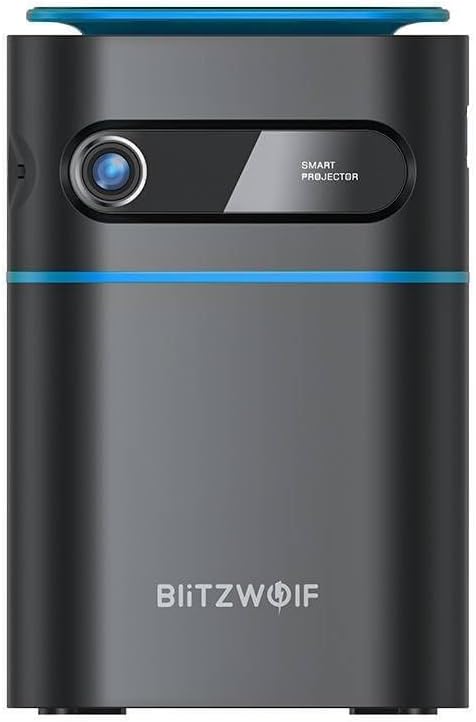
Figura 1.1: Quddiem View. This image displays the front of the BlitzWolf BW-VT2 Mini Projector, highlighting the projection lens and the 'SMART PROJECTOR' branding.

Figure 1.2: Projector with Remote Control. This image shows the BlitzWolf BW-VT2 Mini Projector alongside its dedicated remote control, illustrating the compact size of both devices.
Figura 1.3: Wara View. The rear of the projector is shown, featuring ventilation grilles and various input/output ports.

Figura 1.4: Ġenb View. This image highlights the side of the projector where additional connectivity options such as USB and HDMI ports are located.

Figura 1.5: Fuq View. The top surface of the projector is visible, featuring the integrated touch control panel for direct interaction.
1.3 Portijiet u Kontrolli
- Port HDMI: Connect to laptops, game consoles, Blu-ray players, etc.
- Port USB: Qabbad flash drives tal-USB għad-daqq tal-midja.
- Audio Out (3.5mm) Port: Qabbad kelliema jew headphones esterni.
- Port DC IN: Qabbad l-adapter tal-enerġija.
- Buttuna tal-Qawwa: Ixgħel/itfi l-proġekter.
- Rota tal-Focus: Aġġusta ċ-ċarezza tal-immaġni.
- Touch Control Panel: Navigate menus and control playback directly on the device.
2. Gwida ta' Setup
2.1 Tixgħel
- Qabbad l-adapter tal-enerġija mal-port DC IN fuq il-proġettazzjoni.
- Ipplaggja l-adapter tal-enerġija f'iżbokk tal-ħajt.
- Press and hold the Power Button on the projector or the remote control until the device powers on.
2.2 Tqegħid Inizjali
Għall-aħjar viewesperjenza ta' ing, ikkunsidra dan li ġej:
- Poġġi l-proġettur fuq wiċċ stabbli u ċatt.
- Ensure there is adequate ventilation around the projector to prevent overheating.
- Position the projector perpendicular to the projection surface (wall or screen) for a rectangular image.
- Aġġusta d-distanza biex tikseb id-daqs tal-iskrin mixtieq tiegħek.
2.3 Aġġustament tal-Focus
After powering on, adjust the focus to ensure a clear image:
- Rotate the focus wheel located near the lens until the projected image appears sharp and clear.
2.4 Setup tal-Kontroll mill-Bogħod
Insert batteries into the remote control before first use:
- Iftaħ l-għatu tal-kompartiment tal-batterija fuq wara tal-kontroll mill-bogħod.
- Insert two AAA batteries (not included), ensuring correct polarity (+/-).
- Agħlaq l-għatu tal-kompartiment tal-batterija.
3. Istruzzjonijiet Operattivi
3.1 Navigazzjoni
You can navigate the projector's interface using either the remote control or the touch control panel on top of the device.
- Kontroll mill-bogħod: Use the directional buttons (up, down, left, right) to move through menus and the 'OK' button to select.
- Touch Control Panel: Swipe and tap on the touch-sensitive surface to navigate.
3.2 Apparat li jgħaqqad
The BW-VT2 supports various input sources:
- Input HDMI: Connect your laptop, game console, or other HDMI-enabled devices using an HDMI cable. Select the HDMI input source from the projector's menu.
- Input USB: Insert a USB flash drive into the USB port. The projector's media player will typically detect the drive automatically, allowing you to browse and play supported media files (videos, photos, music).
- Konnettività Wi-Fi: Navigate to the 'Settings' menu, then 'Network' or 'Wi-Fi'. Select your Wi-Fi network and enter the password to connect the projector to the internet. This enables access to online streaming apps and updates.
3.3 Android OS Features
As an Android-powered projector, the BW-VT2 offers smart functionalities:
- Aċċess għall-App: Download and install various streaming apps (e.g., Netflix, YouTube) directly from the pre-installed app store or by sideloading APKs.
- Settings: Customize display settings, audio output, network configurations, and system preferences through the Android settings menu.
- Mirror tal-iskrin: Utilize built-in screen mirroring features (e.g., Miracast, AirPlay compatible apps) to project content from your smartphone or tablet wirelessly.
3.4 Output Awdjo
The projector has built-in speakers, but you can also connect external audio devices:
- 3.5mm Awdjo Out: Connect headphones or external speakers via the 3.5mm audio jack for enhanced sound.
4. Manutenzjoni
Manutenzjoni xierqa tiżgura l-lonġevità u l-prestazzjoni ottimali tal-proġettazzjoni tiegħek.
4.1 Tindif tal-Lentijiet
To maintain clear image quality, clean the projector lens regularly:
- Uża drapp artab u mingħajr suf iddisinjat speċifikament għal lentijiet ottiċi.
- Imsaħ il-lenti bil-mod b'moviment ċirkolari.
- Avoid using abrasive cleaners or excessive force, which can scratch the lens.
4.2 Ventilazzjoni
Ensure proper airflow to prevent overheating:
- Do not block the ventilation vents on the projector.
- Ħaddem il-proġettur f'żona ventilata sew.
- Periodically clean dust from the vents using a soft brush or compressed air.
4.3 Ħażna
When not in use, store your projector properly:
- Store the projector in a cool, dry place, away from direct sunlight and extreme temperatures.
- Use the original packaging or a protective case to prevent dust accumulation and physical damage.
5 Issolvi l-problemi
Irreferi għal din it-taqsima għal kwistjonijiet komuni u s-soluzzjonijiet tagħhom.
| Problema | Kawża Possibbli | Soluzzjoni |
|---|---|---|
| Il-proġettur ma jixgħelx. | No power connection; faulty power adapter. | Ensure power adapter is securely connected to both projector and outlet. Try a different outlet. |
| No image projected. | Incorrect input source selected; loose HDMI/USB cable. | Verify the correct input source is selected in the menu. Check cable connections. |
| L-immaġni hija mċajpra. | Focus not adjusted; projector too close/far. | Rotate the focus wheel until the image is clear. Adjust projection distance if necessary. |
| L-ebda ħoss. | Volume too low; external audio device not connected properly. | Increase volume. Check connections to external speakers/headphones. Ensure audio output is set correctly in settings. |
| Problemi bil-konnessjoni tal-Wi-Fi. | Password mhux korretta; problemi bir-router; interferenza tas-sinjal. | Re-enter Wi-Fi password. Restart router. Move projector closer to router. |
| Il-kontroll mill-bogħod ma jaħdimx. | Batteriji mejta; ostruzzjoni; remot mhux imqabbad. | Replace batteries. Ensure no obstruction between remote and projector. |
6. Speċifikazzjonijiet Tekniċi
Key specifications of the BlitzWolf BW-VT2 Mini Projector:
| Karatteristika | Speċifikazzjoni |
|---|---|
| Brand | BlitzWolf |
| Numru tal-Mudell | BW-VT2EU |
| Kulur | Iswed |
| Teknoloġija tal-Konnettività | HDMI, USB, VGA, Wi-Fi |
| Riżoluzzjoni tal-Wiri | 1920 x 1080 (Full HD) |
| Tip ta 'Wiri | LCD, LED |
| Fattur tal-Formola | Portabbli |
| Karatteristiċi Speċjali | Portable, Android OS, Wi-Fi, HDMI, USB, VGA |
| Apparati Kompatibbli | Laptops, Smartphones, Game Consoles, Blu-ray Players, Media Players, Wi-Fi enabled devices |
| Użi Rakkomandati | Home Cinema |
7. Garanzija u Appoġġ
7.1 Garanzija tal-Manifattur
The BlitzWolf BW-VT2 Mini Projector comes with a Garanzija ta' 2 snin mill-manifatturDin il-garanzija tkopri difetti fil-materjali u fix-xogħol taħt użu normali. Jekk jogħġbok żomm il-prova tax-xiri tiegħek għal talbiet ta' garanzija.
7.2 Appoġġ għall-Klijent
If you encounter issues not covered in the troubleshooting section or require further assistance, please contact BlitzWolf customer support. Refer to the product packaging or the official BlitzWolf webis-sit għall-aktar informazzjoni ta' kuntatt aġġornata.


