1. Introduzzjoni
The EK-Loop OmniLink 6-pin Power Cable (Dual PWM) is a foundational component of the OmniLink cable harness system. It is designed to provide efficient and reliable power and signal distribution for various components within a PC liquid cooling setup, including D-RGB lighting and fans/pumps.
This cable simplifies wiring by consolidating multiple connections into a single, streamlined solution. It features a sleek black ribbon cable design for easy integration and superior cable management, enhancing the aesthetic appeal of your build. A key advantage of this cable is its ability to draw power directly from the power supply (+5V and +12V lines), bypassing motherboard/controller power limitations and significantly increasing the maximum available current for connected devices.
2. Kontenut tal-Pakkett
- 1x EK-Loop OmniLink 6-pin Power Cable (Dual PWM)
Note: Additional OmniLink splitter cables or devices are sold separately and may be required for full system functionality.
3. Prodott Aktarview u Konnetturi
The EK-Loop OmniLink 6-pin Power Cable integrates several critical connectors for comprehensive system control. Understanding each connector's function is essential for proper installation and operation.
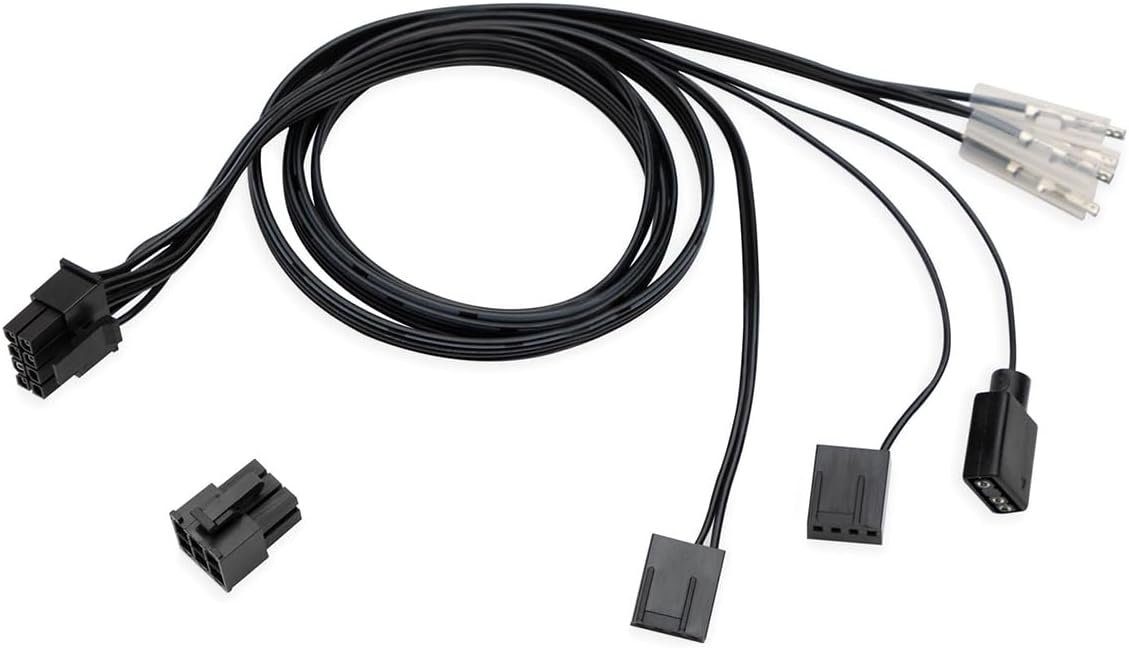
Figura 3.1: The EK-Loop OmniLink 6-pin Power Cable, featuring its main 8-pin Molex Micro-fit connector, a 6-pin power connector, two 4-pin PWM fan connectors, and a 3-pin D-RGB LED connector. The cable is black and designed for efficient power and signal distribution in PC liquid cooling systems.

Figura 3.2: This diagram illustrates the pinout configuration for the EK-Loop OmniLink 6-pin Power Cable. It details the connections for the 8-pin Molex Micro-fit connector (A), the 4-pin PWM fan connectors (B and C), the 3-pin D-RGB connector (D), and the 6-pin power connector (E). The diagram provides essential information for understanding signal and power distribution.
The cable includes:
- Molex Micro-fit 3.0 8-pin Female Connector: This is the primary input connector for the OmniLink system.
- 6-pin Power Connector: Connects to your power supply unit (PSU) to draw +12V and +5V power directly. Pinout may vary based on PSU.
- 4-pin PWM Fan Female Connector (Source 1): Provides PWM signal and TACHO feedback. Labeled "PWM 5.1 cm" in some diagrams.
- 4-pin PWM Fan Female Connector (Source 2): Provides PWM signal only. Labeled "PWM 2.5 cm" in some diagrams.
- 3-pin D-RGB LED Source Connector: For connecting D-RGB lighting components.
4. Setup u Installazzjoni
Follow these steps to properly install your EK-Loop OmniLink 6-pin Power Cable:
- Sistema ta' Mitfija: Before beginning installation, ensure your computer system is completely powered off and disconnected from the main power supply.
- Connect to PSU: Connect the 6-pin power connector of the OmniLink cable directly to a compatible 6-pin power output from your Power Supply Unit (PSU). This cable draws +5V and +12V power directly from the PSU, ensuring stable and sufficient power for connected devices.
- Connect to OmniLink Hub/Controller: Connect the 8-pin Molex Micro-fit 3.0 female connector to the corresponding male connector on your EK-Loop OmniLink hub or compatible controller. This serves as the central point for signal distribution.
- Connect PWM Devices:
- Connect your primary PWM-controlled fan or pump to the 4-pin PWM Fan Female Connector (Source 1). This connector provides both PWM control and TACHO feedback.
- Connect secondary PWM-controlled devices to the 4-pin PWM Fan Female Connector (Source 2). This connector provides PWM control only.
- Connect D-RGB Devices: Connect your D-RGB LED components to the 3-pin D-RGB LED Source Connector. Ensure correct polarity to prevent damage.
- Ġestjoni tal-Kejbil: Utilize the sleek ribbon design of the cable for neat and efficient cable routing within your PC case.
- Ivverifika l-Konnessjonijiet: Double-check all connections to ensure they are secure and correctly seated before powering on your system.
Important: For accurate TACHO readings from devices controlled by the PWM2 signal, this cable must be used in conjunction with the EK-Loop OmniLink pump PWM signal splitter. TACHO readings are not available from devices connected to the PWM1 signal.
5. Istruzzjonijiet Operattivi
Once installed, the EK-Loop OmniLink 6-pin Power Cable operates by distributing power and control signals to your connected components.
- Distribuzzjoni tal-Enerġija: The cable provides stable +12V and +5V power directly from your PSU to connected D-RGB and fan/pump devices, ensuring they receive ample current (up to 8.5A for D-RGB and 8.5A for fans/pumps).
- Kontroll PWM: PWM signals are transmitted through the dedicated 4-pin connectors, allowing for precise speed control of compatible fans and pumps via your system's motherboard or a dedicated controller.
- D-RGB Control: The 3-pin D-RGB connector facilitates the control of addressable RGB lighting, enabling synchronization and customization of lighting effects.
- TACHO Feedback: The primary 4-pin PWM connector (Source 1) provides TACHO (RPM) feedback from the connected device. This allows your system to monitor the rotational speed of the fan or pump. Note that TACHO feedback is specifically linked to the PWM2 signal path when used with the OmniLink pump PWM signal splitter.
Manage your connected devices through your motherboard's BIOS/UEFI settings, operating system software, or a dedicated EK-Loop controller, depending on your system configuration.
6. Manutenzjoni
The EK-Loop OmniLink 6-pin Power Cable is designed for durability and requires minimal maintenance.
- Spezzjoni regolari: Periodically inspect the cable for any signs of wear, fraying, or damage, especially at the connectors.
- Indafa: Keep the cable and its connectors free from dust and debris. Use a soft, dry cloth or compressed air for cleaning.
- Evita l-Istress: Do not bend the cable sharply or apply excessive force to the connectors, as this can damage the internal wiring or pins.
- Konnessjonijiet sikuri: Ensure all connections remain firmly seated to prevent intermittent signal or power loss.
7 Issolvi l-problemi
If you encounter issues with your EK-Loop OmniLink 6-pin Power Cable, consider the following troubleshooting steps:
- Ebda Enerġija għall-Apparat:
- Ensure the 6-pin power connector is securely plugged into a functional PSU output.
- Verify that the PSU is powered on and supplying power.
- Check the 8-pin Molex Micro-fit connection to the OmniLink hub/controller.
- No PWM Control:
- Confirm that the fan/pump is correctly connected to one of the 4-pin PWM connectors.
- Check your motherboard BIOS/UEFI or control software settings to ensure PWM control is enabled and configured correctly.
- Test the fan/pump directly with a known working PWM source if possible.
- No D-RGB Lighting:
- Ensure the D-RGB device is correctly connected to the 3-pin D-RGB connector with correct polarity.
- Verify D-RGB control settings in your software or controller.
- Test the D-RGB device with another known working D-RGB header if available.
- Incorrect TACHO Readings:
- Ensure the device providing TACHO feedback is connected to the 4-pin PWM Fan Female Connector (Source 1).
- Confirm that you are using the EK-Loop OmniLink pump PWM signal splitter if necessary for correct TACHO values, especially if the device is controlled by the PWM2 signal.
- Note that devices connected to the PWM1 signal will not provide TACHO readings via this cable.
- Ħsara Fiżika: If the cable shows any signs of physical damage (cuts, frayed wires, bent pins), discontinue use and replace it.
If problems persist after following these steps, please contact EKWB customer support.
8. Speċifikazzjonijiet
| Karatteristika | Speċifikazzjoni |
|---|---|
| Numru tal-Mudell | 3831109897829 |
| Brand | EK |
| Manifattur | EKWB |
| Kulur | Iswed |
| Materjal | Copper (internal wiring) |
| Tul tal-Cable | 500 ± 10 mm (approx. 19.7 inches) |
| Kejl tal-Wajer tal-Enerġija | AWG20 |
| Signal Wire Gauge | AWG22 |
| Molex Micro-fit Current Rating | 8.5A |
| Power Cable Current Rating | 8A |
| Piż tal-Prodott | 31.8 g (madwar 1.12 oz) |
| Dimensjonijiet tal-Pakkett | 22.86 x 10.16 x 1.27 ċm (madwar 9 x 4 x 0.5 pulzieri) |
| Tip ta' Konnettur | Molex Micro-fit 3.0 8-pin, 6-pin power, 4-pin PWM, 3-pin D-RGB |
9. Garanzija u Appoġġ
EKWB products are manufactured to the highest standards and come with a limited warranty against defects in materials and workmanship. Please refer to the official EKWB website for the most current and detailed warranty information applicable to your region and product.
For technical support, troubleshooting assistance, or warranty claims, please visit the official EKWB support portal or contact their customer service team.
10. Vidjows Uffiċjali tal-Prodott
No official product videos from the seller were found to be directly relevant to the installation or operation of this specific EK-Loop OmniLink 6-pin Power Cable. Please refer to the written instructions and diagrams provided in this manual for guidance. For general EK-Loop OmniLink system overviews, you may check the manufacturer's official channels.