1. Introduzzjoni
The Fanvil X305 is a purpose-built IP phone designed for ease of use, particularly for seniors in environments such as nursing homes and hospitals. It combines robust communication features with user-friendly design elements to ensure accessibility and reliability.
Il-karatteristiċi ewlenin jinkludu:
- Large buttons and a 3.5-inch color display for easy operation.
- Support for two SIP lines for multiple call handling.
- Built-in dual-band Wi-Fi (2.4GHz and 5GHz) and Bluetooth 4.2.
- Dual Gigabit Ethernet ports with Power over Ethernet (PoE) support.
- Compatibility with 433MHz wireless emergency buttons (e.g., Fanvil KT series).
- High-definition audio with G.722 and Opus codecs.
- Four customizable speed dial buttons.
- Hearing Aid Compatible (HAC).
2. Kontenut tal-Pakkett
Jekk jogħġbok ivverifika li l-oġġetti kollha huma preżenti fil-pakkett tiegħek:
- Fanvil X305 IP Phone Unit
- Handset u Korda tal-Handset
- Cable Ethernet
- Desk Stand
- Gwida ta 'Installazzjoni Mgħaġġla
Note: Power adapter may be sold separately if not using PoE.
3. Setup u Installazzjoni
3.1 Installazzjoni Fiżika
- Waħħal l-Istand tal-Iskrivanija: Align the stand with the slots on the back of the phone and slide it into place until it clicks.
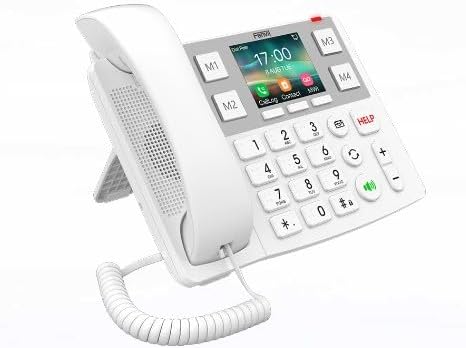
Figure 3.1: Fanvil X305 with desk stand for optimal viewangolu tal-ing. - Qabbad il-Handset: Ipplaggja tarf wieħed tal-korda mkebba tal-handset fil-handset u t-tarf l-ieħor fil-port tal-handset fuq il-bażi tat-telefon.
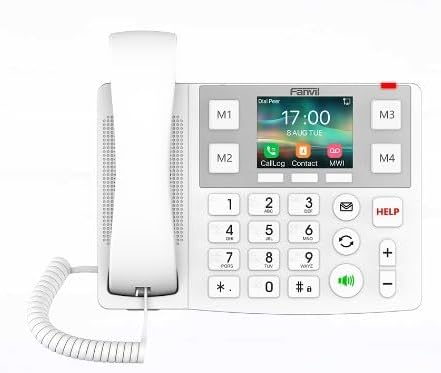
Figura 3.2: Quddiem view of the Fanvil X305, showing the handset connection. - Qabbad man-Netwerk/Enerġija:
- Bl-użu ta' PoE (Enerġija fuq Ethernet): Connect one end of the Ethernet cable to the LAN port on the phone and the other end to a PoE-enabled switch or router. The phone will receive both power and network data through this single cable.
- Using Power Adapter (Optional): If PoE is not available, connect a compatible power adapter (not included) to the power port on the phone and plug it into a power outlet. Then, connect the Ethernet cable from the LAN port on the phone to your network router or switch.
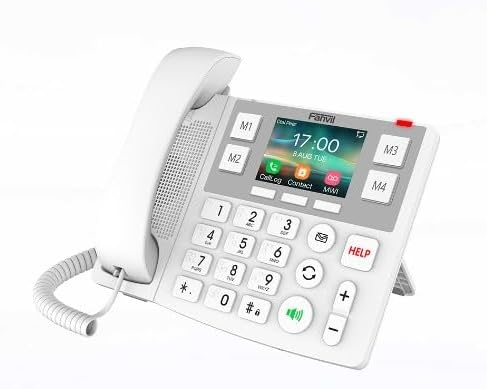
Figura 3.3: Ġenb view of the Fanvil X305, illustrating connectivity ports.
3.2 Network Configuration (Initial Boot)
Upon first boot, the phone will attempt to obtain an IP address via DHCP. If successful, the display will show network information. If manual configuration is required, access the phone's web interface or local menu (refer to advanced configuration guide).
3.3 Wi-Fi and Bluetooth Setup
- Wi-Fi: Navigate to the phone's menu, select "Network" > "Wi-Fi". Scan for available networks, select your desired network, and enter the password if prompted.
- Bluetooth: Navigate to the phone's menu, select "Bluetooth". Enable Bluetooth and pair with compatible devices such as headsets or emergency buttons.
4. Istruzzjonijiet Operattivi
4.1 Tagħmel Sejħa
- Pick up the handset or press the Speakerphone button (speaker icon).
- Ċempel in-numru tat-telefon mixtieq billi tuża t-tastiera numerika l-kbira.
- Press the Dial/Send button (green phone icon) biex tibda s-sejħa.
4.2 Tweġiba għal Sejħa
- When the phone rings, pick up the handset or press the Speakerphone button (speaker icon).
4.3 Using Speed Dial Buttons (M1-M4)
The Fanvil X305 features four customizable speed dial buttons (M1, M2, M3, M4) located around the display. These can be programmed for quick access to frequently called contacts.
- Biex Programm: Access the phone's menu or web interface to assign contacts to M1-M4. You can also assign images to these buttons for visual recognition.
- Biex Uża: Simply press the desired M1-M4 button to dial the pre-programmed contact.
4.4 Emergency Button Support (HELP)
The phone supports 433MHz wireless emergency buttons (e.g., Fanvil KT series). When a paired emergency button is activated, the phone can be configured to automatically dial a pre-set emergency number.
- Biex Programm: Configure the emergency number and response settings via the phone's menu or web interface.
- Biex Uża: Press the dedicated "HELP" button on the phone or activate your paired wireless emergency button.
4.5 Aġġustament tal-Volum
Uża l- + u - buttons on the right side of the keypad to adjust the call volume during a conversation or the ringer volume when idle.
4.6 Redial and Mute
- Ċempil mill-ġdid: Press the Redial button (circular arrow icon) to redial the last number called.
- Siekta: Agħfas il-buttuna Mute (microphone with slash icon) during a call to mute your microphone. Press again to unmute.
5. Manutenzjoni u Kura
To ensure the longevity and optimal performance of your Fanvil X305 IP Phone, please follow these maintenance guidelines:
- Tindif: Use a soft, dry, lint-free cloth to clean the phone's surface and screen. For stubborn marks, slightly dampen the cloth with water. Avoid using harsh chemicals, abrasive cleaners, or solvents, as these can damage the phone's finish.
- Ambjent: Keep the phone in a dry environment, away from direct sunlight, excessive heat, and moisture. Do not expose it to extreme temperatures.
- Immaniġġjar: Immaniġġja t-telefon b'attenzjoni. Evita li twaqqgħu jew li tissottomettih għal impatti qawwija.
- Kurduni: Ensure all cords (handset, Ethernet) are not kinked or pinched, which can lead to damage.
6 Issolvi l-problemi
This section addresses common issues you might encounter with your Fanvil X305 IP Phone. If the problem persists, please contact technical support.
| Problema | Kawża Possibbli | Soluzzjoni |
|---|---|---|
| It-telefon ma jixgħelx. | L-ebda konnessjoni tal-enerġija jew kejbil/adapter difettuż. |
|
| L-ebda ton tad-dial / Ma nistax nagħmel telefonati. | Network issue, SIP registration failure, or incorrect configuration. |
|
| Kwalità awdjo fqira (eku, statiku). | Network congestion, faulty handset/speaker, or environmental interference. |
|
| Il-Wi-Fi jew il-Bluetooth mhux qed jikkonnettja. | Incorrect password, out of range, or device not discoverable. |
|
7. Speċifikazzjonijiet
| Karatteristika | Deskrizzjoni |
|---|---|
| Mudell | X305 |
| Dimensjonijiet tal-Prodott (L x W x H) | 10 x 2 x 2.7 pulzieri |
| Piż tal-oġġett | 2 liri |
| Wiri | Skrin tal-Kulur ta '3.5 pulzieri |
| Linji SIP | 2 |
| Konnettività | Dual Gigabit Ethernet ports, PoE, Dual-Band Wi-Fi (2.4GHz/5GHz), Bluetooth 4.2 |
| Emergency Button Support | 433MHz Wireless Emergency Buttons (e.g., Fanvil KT series) |
| Codecs Awdjo | G.722, Opus (HD Audio) |
| Karatteristiċi Speċjali | Large Buttons, Braille Dots on 10-digit keys, 4 Customizable Speed Dial Buttons, HAC (Hearing Aid Compatible) |
| Installazzjoni | Desktop / Imwaħħal mal-ħajt |
| Materjal | Plastik |
8. Garanzija u Appoġġ
The Fanvil X305 IP Phone comes with a standard manufacturer's warranty. For specific warranty terms and conditions, please refer to the documentation provided with your purchase or visit the official Fanvil websit.
Appoġġ Tekniku:
If you encounter issues that cannot be resolved using the troubleshooting guide, or require further assistance, please contact Fanvil technical support or your product vendor.
- Riżorsi onlajn: Visit the Fanvil official website for FAQs, firmware updates, and detailed product documentation.
- Informazzjoni ta' Kuntatt: Refer to your product packaging or the Fanvil websit għad-dettalji ta' kuntatt tas-servizz tal-konsumatur.
Extended protection plans may be available for purchase from your retailer:
- Pjan ta' Protezzjoni ta' Sentejn
- Pjan ta' Protezzjoni ta' Sentejn
- Complete Protect (abbonament ta' kull xahar)
Note: Protection plans are typically offered by third-party providers and their terms may vary.
9. Vidjows Uffiċjali tal-Prodott
There are no official product videos from the seller available for embedding at this time.


