1. Introduzzjoni
This user manual provides detailed instructions for the assembly, operation, and maintenance of your FLEXISPOT Lite Electric Standing Desk. Please read this manual thoroughly before installation and use to ensure proper function and safety. Keep this manual for future reference.
2. Informazzjoni Importanti dwar is-Sigurtà
Jekk ma ssegwix dawn l-istruzzjonijiet ta' sigurtà, jista' jkun hemm korriment jew ħsara lill-prodott.
- The desk has a maximum load capacity of 70 kg (154 lbs)Teċċedix dan il-limitu ta' piż.
- L-assemblaġġ għandu jsir minn adult.
- Kun żgur li l-viti u l-boltijiet kollha jkunu ssikkati sew qabel l-użu.
- Keep children and pets away from the desk during operation to prevent injury from moving parts.
- Do not place hands or other objects near the lifting mechanism while the desk is in motion.
- Skonnettja l-enerġija qabel ma tnaddaf jew tagħmel xi manutenzjoni.
- Uża biss l-adapter tal-enerġija li jiġi mal-iskrivanija.
- Avoid spilling liquids on the control panel or motor components.
3. Prodott Aktarview u Karatteristiċi
The FLEXISPOT Lite Electric Standing Desk is designed to promote a healthy work environment by allowing seamless transitions between sitting and standing positions. It features a robust motor, memory presets, and an anti-collision system.

Figure 3.1: FLEXISPOT Lite Electric Standing Desk setup with accessories.
Karatteristiċi ewlenin:
- Disinn Ergonomiku: Facilitates alternating between sitting and standing to reduce physical strain.
- Quiet and Durable Motor: Operates at less than 50 dB, ensuring a quiet workspace.
- Electric Height Adjustment with Memory: Easily adjust height with a control panel and save up to four preferred height settings.
- Kostruzzjoni robusta: Steel frame with a T-foot design provides stability and supports up to 70 kg.
- Desktop Spazjuż: 140x60 cm maple tabletop with rounded corners and integrated wire holes.
- Anti-Collision Rebound Function: Automatically stops and reverses if an obstruction is detected during movement.
- Aċċessorji Integrati: Includes two hooks and a cup holder for convenience.
4. Setup u Assemblea
This section outlines the general steps for assembling your FLEXISPOT Lite Electric Standing Desk. Refer to the separate assembly guide included in your package for detailed, step-by-step instructions and diagrams.
4.1 Disimballaġġ
- Iftaħ l-imballaġġ bir-reqqa u neħħi l-komponenti kollha.
- Place all parts on a clean, flat, and soft surface (e.g., a carpet) to prevent scratches.
- Verify that all parts listed in the assembly guide are present.
4.2 Identifikazzjoni tal-Komponent
Iffamiljarizza ruħek mal-komponenti ewlenin:
- Desktop sections
- Leg columns (lifting columns)
- Appoġġ tas-saqajn
- Kaxxa tal-kontroll
- Panel tal-kontroll
- Adapter tal-enerġija u kejbil
- Hardware (screws, bolts, tools)
- Accessories (hooks, cup holder)
4.3 Passi tal-Assemblaġġ (Ġenerali)
- Attach the lifting columns to the desktop frame.
- Secure the foot supports to the bottom of the lifting columns.
- Mount the control box and control panel to the underside of the desktop.
- Connect all cables from the motors to the control box, and then connect the power adapter.
- Attach the desktop sections together (if applicable) and secure them to the frame.
- Install the cup holder and hooks as desired.
Note: Refer to the detailed assembly manual for specific screw types, torque requirements, and visual aids for each step.
5. Operating Your Desk
This section explains how to use the control panel to adjust your desk height and utilize its features.

Figure 5.1: Smart Control Panel.
5.1 Funzjonijiet tal-Panew tal-Kontroll
- Wiri LED: Shows the current desk height in centimeters.
- Buttuni 'l fuq/'l isfel (▲ / ▼): Agħfas u żomm biex taġġusta kontinwament l-għoli tal-iskrivanija 'l fuq jew 'l isfel. Itlaq il-buttuna biex twaqqaf fl-għoli mixtieq.
- Sit/Stand Button (i): This button may function as a quick switch between a default sitting and standing height, or as a general indicator. Refer to your specific control panel model for exact functionality.
- Memory Preset Buttons (1, 2, 3, 4): Dawn il-buttuni jippermettulek issalva u terġa' tissejjaħ sa erba' settings tal-għoli preferuti.
5.2 Issettjar ta' Presets tal-Memorja
- Aġġusta l-iskrivanija għall-għoli mixtieq tiegħek billi tuża l-buttuni 'l fuq/'l isfel.
- Press the 'M' or 'Set' button (if available, otherwise proceed to step 3). The display may flash.
- Immediately press one of the number buttons (1, 2, 3, or 4) to save the current height to that preset. The display will show 'S-' followed by the number, confirming the setting.
5.3 Recalling Memory Presets
Sempliċement agħfas il-buttuna tan-numru mixtieqa (1, 2, 3, jew 4). L-iskrivanija tiċċaqlaq awtomatikament għall-għoli ssejvjat.
5.4 Anti-Collision Rebound Function
The desk is equipped with an anti-collision system. If the desk encounters an obstruction while moving up or down, it will automatically stop and reverse slightly to prevent damage or injury.
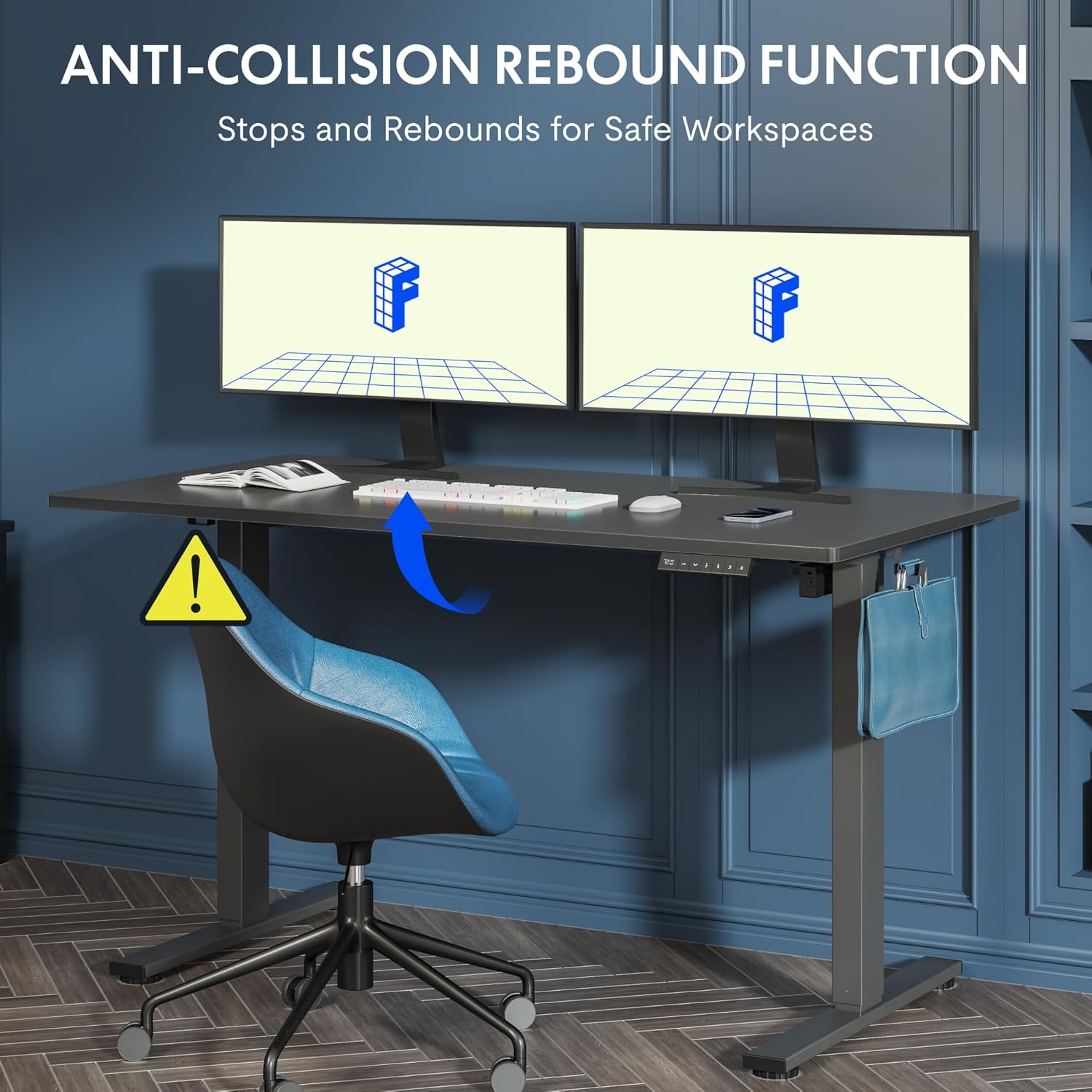
Figure 5.2: Anti-Collision Rebound Function in action.
6. Manutenzjoni u Kura
Manutenzjoni regolari tiżgura l-lonġevità u l-prestazzjoni ottimali tal-iskrivanija wieqfa tiegħek.
- Tindif: Imsaħ id-desktop u l-qafas b'ċarruta ratba u damp drapp. Evita prodotti tat-tindif li joborxu jew kimiċi ħarxa.
- Spezzjoni: Iċċekkja l-viti u l-boltijiet kollha perjodikament biex tiżgura li huma ssikkati. Erġa' ssikkahom jekk meħtieġ.
- Ġestjoni tal-Kejbil: Ensure all cables are neatly routed and not pinched or tangled, which could affect operation.
- Kapaċità tat-Tagħbija: Do not overload the desk beyond its 70 kg capacity.
7. Gwida għas-soluzzjoni tal-problemi
Jekk tiltaqa' ma' problemi bl-iskrivanija tiegħek, irreferi għall-problemi u s-soluzzjonijiet komuni li ġejjin:
| Problema | Kawża Possibbli | Soluzzjoni |
|---|---|---|
| L-iskrivanija ma tiċċaqlaqx jew ma tirrispondix għall-kontrolli. | Power cable disconnected; control box cable loose; motor cable loose. | Check all cable connections. Ensure the power cable is securely plugged into the wall outlet and the control box. |
| L-iskrivanija tiċċaqlaq b'mod irregolari jew tagħmel ħsejjes mhux tas-soltu. | Overload; loose screws; obstruction. | Reduce weight on the desk. Check and tighten all assembly screws. Ensure no obstructions are in the path of the lifting columns. |
| Desk stops moving unexpectedly. | Anti-collision system activated; motor overheating. | Check for obstructions and remove them. If no obstruction, allow the motor to cool down for 20 minutes before attempting operation again. |
| Error code displayed on control panel. | Ħsara speċifika tas-sistema. | Refer to the detailed assembly manual for specific error code meanings and troubleshooting steps. If the issue persists, contact customer support. |
8. Speċifikazzjonijiet Tekniċi

Figure 8.1: Desk Dimensions and Performance Metrics.
| Speċifikazzjoni | Dettall |
|---|---|
| Brand | FLEXISPOT |
| Numru tal-Mudell | QS1M-1460-IE |
| Kulur | White Frame + Maple Top |
| Desktop Dimensions (L x W) | 140 ċm x 60 ċm |
| Medda ta 'Aġġustament Għoli | 73.5-il ċm - 118 ċm |
| Materjal | Wood (Maple Top), Metal (Alloy Steel Frame) |
| Kapaċità massima tat-Tagħbija | 70 kg |
| Piż tal-oġġett | 26.9 kg |
| Livell ta' Storbju | < 50 dB |
| Veloċità ta 'Aġġustament | 20 mm/s |
| Karatteristiċi Speċjali | Ergonomic, Adjustable, Anti-Collision, Memory Presets |
9. Garanzija u Appoġġ għall-Klijent
For warranty information, specific troubleshooting not covered in this manual, or to purchase replacement parts, please contact FLEXISPOT customer support directly. Refer to the product packaging or the official FLEXISPOT websit għad-dettalji tal-kuntatt.


