KULUR W60

COLBOR Wonder W60 LED Video Light User Manual

Mudell: W60 | Marka: COLBOR

Compact and powerful LED video light with wide color temperature range and APP control.

1. Introduzzjoni

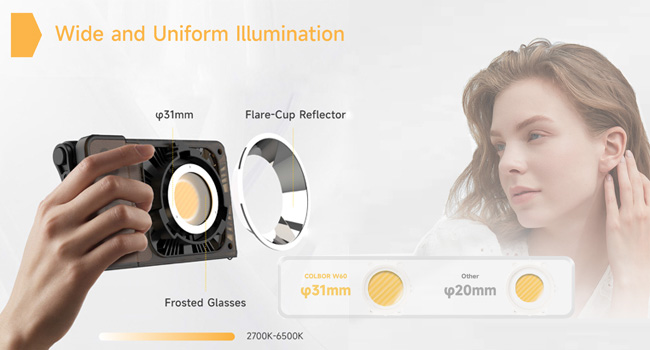
The COLBOR Wonder W60 is a compact and powerful LED video light designed for various photography and videography needs, including YouTube content creation and live streaming. It offers a wide color temperature range from 2700K to 6500K and boasts a high CRI of 97+ for accurate color rendition. Its lightweight and slim design make it highly portable, while multiple power options and APP control enhance its versatility and ease of use.

2. X'hemm fil-Kaxxa

COLBOR Wonder W60 LED Video Light and included accessories

Image: The COLBOR Wonder W60 LED Video Light shown with its complete set of accessories.

  • COLBOR Wonder W60 Video Light x1
  • Cable x1
  • Adapter tal-Enerġija x1
  • Qoxra COB x1
  • Dome x1
  • Riflettur x1

3. Prodott Aktarview u Setup

Familiarize yourself with the components and initial setup of your COLBOR Wonder W60 LED Video Light.

3.1 Komponenti tal-Prodott

Ġenb view of COLBOR Wonder W60 showing controls and ports

Immaġni: Ġenb view of the COLBOR Wonder W60, highlighting the control buttons and ports.

  • Buttuna tal-Qawwa: Used for turning the device on and off.
  • Wireless Control Setting Button: For switching between 2.4GHz remote and APP control modes, and initiating pairing.
  • Brightness Control Wheel: Adjusts the light's brightness.
  • Color Temperature Control Knob: Adjusts the color temperature.
  • NFC Detection Area: For quick pairing with compatible devices.
  • COLBOR Mount Lock & Mount: Securely attach accessories.
  • Port DC: Għall-konnessjoni tal-adapter tal-enerġija.
  • Port tat-Tip-C: For PD Type-C fast charging.
  • 1/4" Hole Screw: For mounting the light onto stands or grips.

3.2 Installazzjoni tad-Dawl

Follow these steps to prepare your light for use:

  1. Removal of COB protection cover: Hold the COB cover with the COLBOR Mount tenon and rotate it to remove it.
    Removing the COB protection cover from the COLBOR W60

    Image: Demonstrating the removal of the protective COB cover by rotating it from the mount.

  2. Installazzjoni u tneħħija tar-riflettur: Allinja r-riflettur mal-kanal madwar il-lamp head and clip it in, then rotate it to fix it. Follow the instructions for "Removal of COB protection cover" to remove the reflector.
    Attaching a reflector to the COLBOR W60

    Image: A reflector being attached to the front of the COLBOR W60 light.

  3. Installation of stand: Align the 1/4" screw hole on the light's bottom or side with the 1/4" screw on the stand, and rotate it to fix it.
    COLBOR W60 mounted on a stand and with a power grip

    Image: The COLBOR W60 shown mounted on a light stand and also attached to a power grip, demonstrating versatile mounting options.

3.3 It-Tħaddim tal-Apparat

The COLBOR Wonder W60 offers flexible powering options:

  • Power with power adapter: Qabbad l-adapter tal-enerġija, allinja l-jack tal-enerġija DC tal-lamp body, and then power on through the cable after stable connection.

    *Do not suspend the power adapter in the air. Use wire rings to hang it on the lamp stand.

    Connecting COLBOR W60 to power adapter

    Image: The COLBOR W60 being powered via its included power adapter.

  • Power with COLBOR Power Grip: Align the 1/4" screw hole on the light's bottom or side with the 1/4" screw on the stand. Rotate it to fix it. Connect the light to the Power Grip via the D-Tap to DC cable for powering.

    *Please do not use the Type-C to Type-C cable to power the light.

    Connecting COLBOR W60 to COLBOR Power Grip

    Image: The COLBOR W60 connected to a COLBOR Power Grip for portable power.

4. Istruzzjonijiet Operattivi

Learn how to operate your COLBOR Wonder W60 LED Video Light.

Video: Official instruction video for the COLBOR Wonder W60/W100 LED Video Light, covering setup, powering, and operation.

4.1 Power On/Off

  • Qawwa Mixgħul: Qabbad mas-sors tal-enerġija imbagħad agħfas fit-tul il-buttuna tal-enerġija.
  • Itfi: Long-press the power button to turn it off.

4.2 Aġġustament tat-Temperatura tal-Kulur

  • Rotate the color temperature control knob for continuous color temperature adjustment.
  • Short press the knob to select the preset color temperature: (2700K, 3200K, 4300K, 5600K, 6500K).

4.3 Aġġustament tal-luminożità

  • Roll the brightness adjustment wheel for continuous brightness adjustment.
  • Short press the wheel side to select preset brightness: (0%, 25%, 50%, 75%, 100%).

4.4 Wireless Connection (APP Control)

The COLBOR Wonder W60 supports APP control for seamless and efficient lighting adjustments.

  • Agħfas qasir il-buttuna tal-kontroll mill-bogħod biex taqleb bejn il-modi ta 'kontroll ta' 2.4GHz (CTRL1 remot) u APP (COLBOR Studio APP).
  • Long-press the button to start pairing with the APP.
  • Qabbad mal-APP għall-issettjar tal-Fan u l-issettjar tal-EFF.
COLBOR W60 controlled via smartphone app

Image: The COLBOR W60 being controlled remotely via the COLBOR Studio APP on a smartphone.

5. Manutenzjoni

To ensure the longevity and optimal performance of your COLBOR Wonder W60 LED Video Light, follow these maintenance guidelines:

Diagram of COLBOR W60's smart cooling system

Immaġni: Interna view highlighting the intelligent air duct and heat pipe cooling system of the COLBOR W60.

6 Issolvi l-problemi

If you encounter issues with your COLBOR Wonder W60, refer to the following common problems and solutions:

ProblemaKawża PossibbliSoluzzjoni
Id-dawl ma jixgħelx.No power, loose connection, or power button not pressed correctly.Ensure power adapter is securely connected and plugged into a working outlet. If using a power grip, ensure it is charged and properly attached. Long-press the power button for 2-3 seconds.
Il-luminożità jew it-temperatura tal-kulur ma jistgħux jiġu aġġustati.Control knob/wheel malfunction or in locked mode.Check the display for any lock indicators. Try restarting the device. If using APP control, ensure the light is properly paired and the APP is functioning correctly.
Il-kontroll tal-APP mhux qed jaħdem.Bluetooth/2.4GHz connection issue, APP not updated, or incorrect mode.Ensure the light is in APP control mode (short press wireless control button). Long-press the button to re-initiate pairing. Check your smartphone's Bluetooth settings. Update the COLBOR Studio APP to the latest version.
Id-dawl iżżejjed.Obstructed ventilation or prolonged high-power use in hot environment.Ensure ventilation grilles are clear of obstructions. Reduce brightness or allow the light to cool down. Operate in a well-ventilated area.

If the problem persists after trying these solutions, please contact COLBOR customer support for further assistance.

7. Speċifikazzjonijiet

KaratteristikaDettall
BrandCOLBOR
MudellW60
Dimensjonijiet tal-Prodott6.18 x 1.69 x 3.66 pulzieri
Piż tal-oġġett2.14 pounds (approx. 345g as per feature bullet)
Illuminazzjoni2890Lux@1m (5600K)
Temperatura tal-Kulur (CCT)2700K sa 6500K
CRI97+
Teknoloġija tal-KonnettivitàBluetooth (għall-kontroll tal-APP)
Għażliet tal-EnerġijaCOLBOR Battery Grip, DC adapter, PD Type-C fast charging
Sistema tat-tkessiħIntelligent Air Duct and Heat Pipe Cooling System
Livell ta 'Reżistenza għall-IlmaMhux Reżistenti għall-Ilma
Pajjiż ta' OriġiniIċ-Ċina

8. Garanzija u Appoġġ

COLBOR products are manufactured to the highest quality standards. For warranty information and technical support, please refer to the warranty card included with your product or visit the official COLBOR websit. Żomm l-irċevuta tax-xiri tiegħek bħala prova tax-xiri għal talbiet ta' garanzija.

For further assistance, you may contact COLBOR customer service through their official channels. Please provide your product model (W60) and any relevant details when seeking support.

Dokumenti Relatati - W60

Preview COLBOR PB74 Manwal għall-Utent tal-Bażi tal-Enerġija
Manwal tal-utent għall-Bażi tal-Enerġija COLBOR PB74, li jiddeskrivi l-karatteristiċi, l-operat, l-iċċarġjar, l-installazzjoni, l-ispeċifikazzjonijiet u l-informazzjoni dwar il-garanzija tagħha għall-iċċarġjar tad-dwal tas-serje COLBOR W60 u W100.
Preview Manwal tal-Utent tal-Colbor CL60R RGB COB LED Monolight
Manwal komprensiv għall-utent għall-Colbor CL60R RGB COB LED Monolight, li jagħti dettalji dwar l-istruzzjonijiet tas-sigurtà, il-komponenti tal-prodott, l-installazzjoni, it-tħaddim, u diversi modi ta' dawl inklużi CCT, HSI, u effetti speċjali.
Preview Manwal tal-Utent tad-Dawl tal-Vidjo COLBOR CL220 COB
Manwal komprensiv għall-utent għad-Dawl tal-Vidjo COLBOR CL220 COB, li jagħti dettalji dwar il-karatteristiċi, it-tħaddim, l-installazzjoni, l-ispeċifikazzjonijiet u l-informazzjoni dwar il-garanzija tiegħu. Tgħallem kif tissettja, tikkontrolla u żżomm it-tagħmir tad-dawl tiegħek.
Preview Manwal tal-Utent tad-Dawl tal-Vidjo COLBOR CL220M | Tħaddim, Speċifikazzjonijiet, Garanzija
Manwal komprensiv għall-utent għad-Dawl tal-Vidjo COLBOR CL220M. Tgħallem dwar il-karatteristiċi tal-prodott, l-istruzzjonijiet tat-tħaddim, il-konnessjoni tal-enerġija, is-settings, il-kontroll tal-app, l-ispeċifikazzjonijiet, il-kontenut tal-pakkett, u l-informazzjoni dwar il-garanzija.
Preview Manwal għall-Utent tad-Dawl tal-Vidjo COLBOR CL220R
Gwida komprensiva għad-Dawl tal-Vidjo COLBOR CL220R, li tiddeskrivi l-karatteristiċi, l-operat, il-modi, il-kontroll tal-app, l-ispeċifikazzjonijiet, u informazzjoni dwar il-garanzija tiegħu.
Preview Manwal tal-Utent tal-Magna taċ-Ċpar COLBOR CineFlare CF5
Manwal tal-utent għall-Magna taċ-Ċpar COLBOR CineFlare CF5, li jagħti dettalji dwar l-operat, il-karatteristiċi, l-ispeċifikazzjonijiet u l-informazzjoni dwar il-garanzija tagħha.