1. Introduzzjoni
This manual provides comprehensive instructions for the safe and effective operation of your Hantek DSO8000E Series Handheld Oscilloscope. This device integrates multiple functions including an Oscilloscope, Recorder, Digital Multimeter (DMM), Spectrum Analyzer, Frequency Counter, and Arbitrary Waveform Generator. Please read this manual thoroughly before using the instrument and retain it for future reference.
2. Prodott Aktarview
2.1 Karatteristiċi ewlenin
- Six-in-one Functionality: Oscilloscope, Recorder, DMM, Spectrum Analyzer, Frequency Counter, Arbitrary Waveform Generator.
- Durabilità Ambjentali: IP-51 rated for dust, drip, and shake resistance.
- Sigurtà: Large fuse conforms to European Safety Standards.
- Ġestjoni tal-Enerġija: Battery indicator, easy-change connect points, and selectable 18650 battery box.
- Sigurtà Fiżika: Anti-theft lock hole, tripod fixed hole, hang rope, and built-in flashlight.
- Konnettività: Replaceable BNC safety joints, USB Host/Device 2.0, optional WIFI/LAN.
- Oscilloscope Specifications: 70MHz-200MHz bandwidth, 1GSa/s sample rate, 2M memory depth.
- Ġeneratur tal-Forma tal-Mewġa Arbitrarja: 25MHz, 200MSa/s DDS, 12-bit vertical resolution.
- Multimetru diġitali: 6000 counts, AC/DC voltage, AC/DC current, resistance, continuity, capacitance, diode function.
- Analysis Capabilities: FFT spectral analysis, waveform math (add, subtract, multiply, divide), X-Y mode, over 20 automatic measurements.
- Wiri: Large 5.6-inch TFT Color LCD (640x480 resolution).
- Output tad-Data: Waveform data can be exported in WORD, EXCEL, BMP, JPG formats.
2.2 Layout tal-Apparat
Familiarize yourself with the physical components and controls of the Hantek DSO8072E.

Figura 2.2.1: Angolat view of the Hantek DSO8072E Handheld Oscilloscope. This image shows the device from a side angle, highlighting its robust casing, integrated kickstand, and the main display screen with various control buttons.

Figura 2.2.2: Quddiem view of the Hantek DSO8072E Handheld Oscilloscope. The screen displays a sine wave and a square wave, illustrating its multi-channel measurement capability. Various function buttons and input ports are visible below the screen.
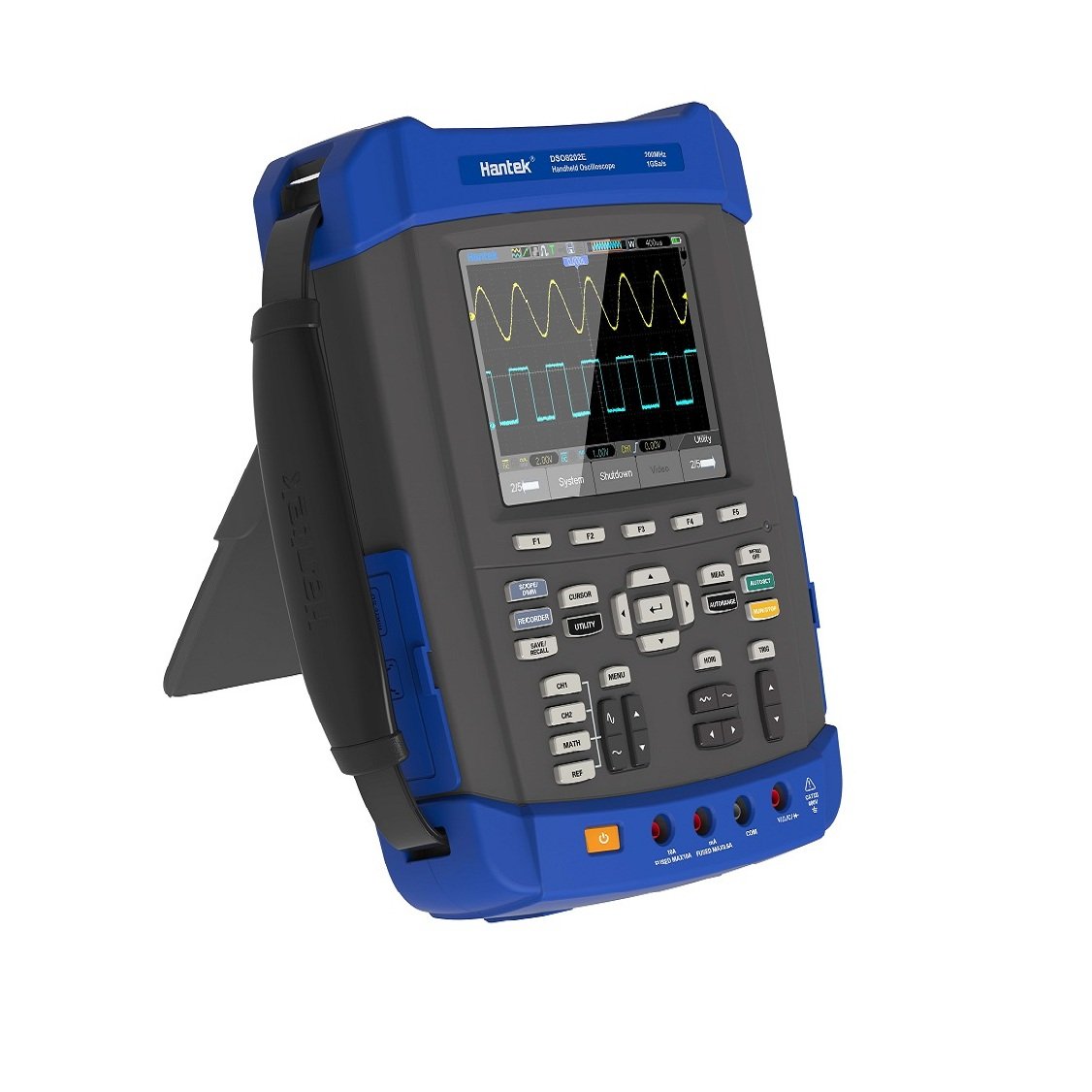
Figura 2.2.3: Ġenb view of the Hantek DSO8072E Handheld Oscilloscope with its kickstand extended, allowing for desktop use. This view emphasizes the ergonomic design and portability of the device.
2.3 Aċċessorji Inklużi
Verify that all the following accessories are included in your package:
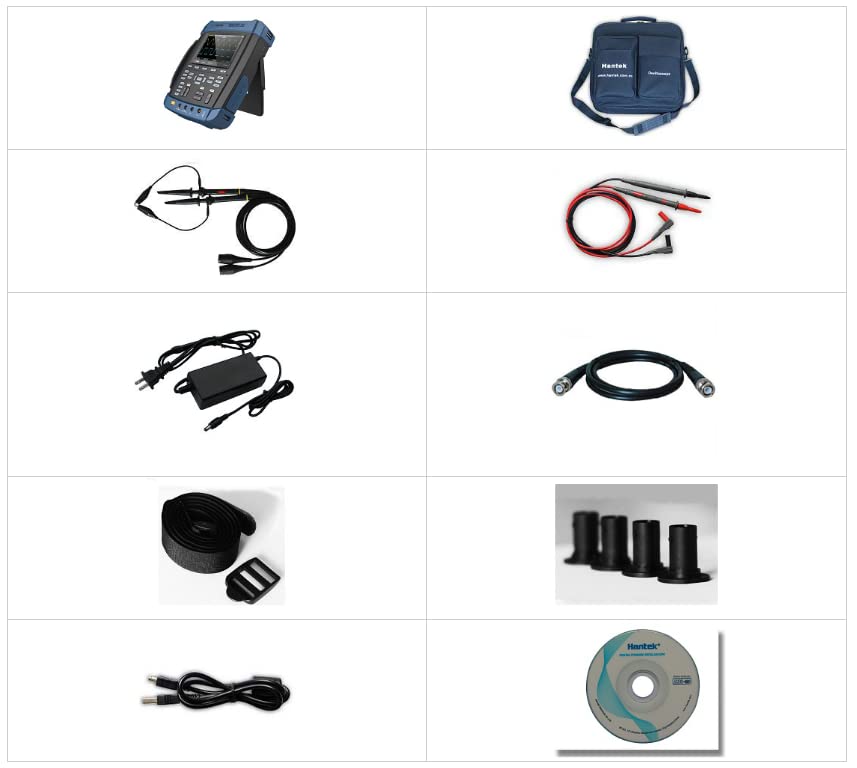
Figura 2.3.1: A grid displaying the various accessories included with the Hantek DSO8072E. These typically include oscilloscope probes, DMM test leads, a power adapter, a USB cable, a carrying bag, and a software CD.
- Sondi tal-Oxxilloskopju (2)
- DMM Test Leads
- Adapter tal-Enerġija
- Cable USB
- Borża tal-Ġarr
- Software CD
- Manwal għall-Utent (dan id-dokument)
3. Setup
3.1 Tixgħel/Jitfi
- Iċċarġjar tal-batterija: Connect the power adapter to the device and a power outlet. The battery indicator will show charging status. Ensure the battery is sufficiently charged before portable use.
- Qawwa Mixgħul: Agħfas u żomm il- QAWWA button located on the side or front panel until the screen illuminates.
- Itfi: Agħfas u żomm il- QAWWA button until the shutdown prompt appears, then confirm.
3.2 Konfigurazzjoni Inizjali
Upon first power-on or after a factory reset, you may need to configure basic settings such as language, date, and time. Navigate through the menus using the directional buttons and confirm selections with the DĦUL buttuna.
4. Istruzzjonijiet Operattivi
The Hantek DSO8072E offers multiple operational modes. Use the dedicated function buttons (e.g., SCOPE/RECORDER, DMM, SPECTRUM) to switch between modes.
4.1 Modalità tal-Oxxilloskopju
This mode is used for observing and analyzing electrical signals. Connect probes to the BNC inputs (CH1, CH2).
- Agħfas il- SCOPE/RECORDER button to enter Oscilloscope mode.
- Adjust vertical sensitivity (Volts/Div) using the CH1/CH2 knobs or corresponding menu options.
- Adjust horizontal time base (Sec/Div) using the HORI pum.
- Configure trigger settings (Type, Source, Level) using the TRIG button and menu.
- Użu AUTORANGE for automatic scaling or ĠIR / STOP to pause/resume waveform acquisition.
- Access measurement functions (e.g., Vpp, Freq, RMS) via the MEAS buttuna.
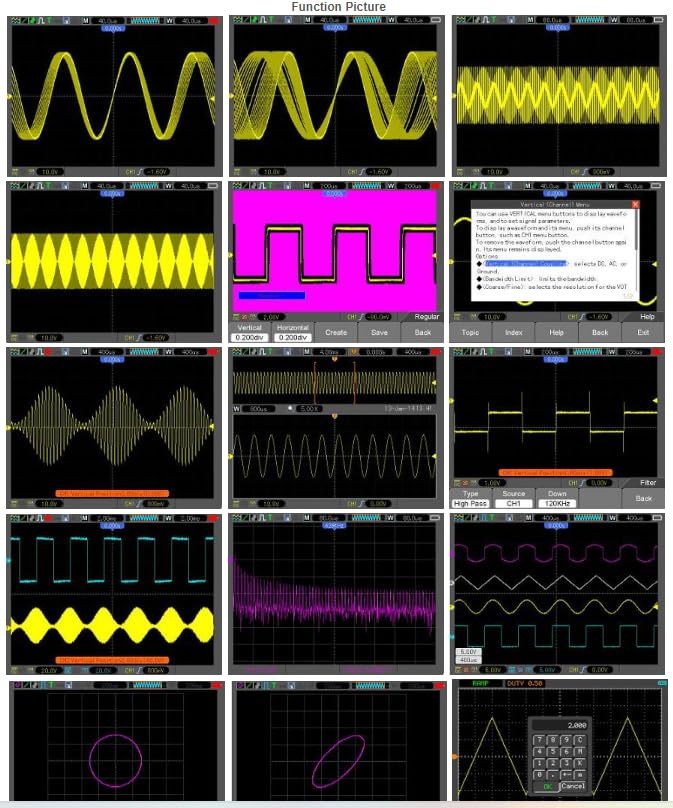
Figura 4.1.1: A collage of various waveform displays on the Hantek DSO8072E screen, demonstrating its capability to visualize different signal types, including sine waves, square waves, modulated signals, and FFT analysis results.
4.2 Recorder Mode
Record long-term signal changes. Press SCOPE/RECORDER and select Recorder from the menu.
4.3 Modalità tal-Multimetru Diġitali (DMM)
Għall-kejl tal-voltage, current, resistance, capacitance, and performing diode/continuity tests. Connect test leads to the DMM input jacks (VΩmA, COM).
- Agħfas il- DMM buttuna.
- Select the desired measurement function (e.g., DCV, ACV, Resistance) using the menu buttons.
- Qabbad il-wajers tat-test maċ-ċirkwit taħt test.
4.4 Modalità tal-Analizzatur tal-Ispettru
Analyze the frequency components of a signal. Press the SPETTRU buttuna.
4.5 Frequency Counter Mode
Measure the frequency of input signals. This function is often integrated within the oscilloscope or DMM modes, or accessible via a dedicated menu option.
4.6 Arbitrary Waveform Generator (AWG) Mode
Generate various standard and custom waveforms. Connect the AWG output to the circuit requiring a signal input.
- Agħfas il- AWG button (if available) or navigate through the Utility menu.
- Select waveform type (Sine, Square, Triangle, etc.) and adjust parameters (Frequency, Amplitude, Offset).
- Enable output.
5. Manutenzjoni
5.1 Tindif
Imsaħ l-apparat b'artab, damp cloth. Do not use abrasive cleaners or solvents. Ensure the device is powered off and disconnected from all power sources before cleaning.
5.2 Kura tal-Batterija
To prolong battery life, avoid fully discharging the battery frequently. Store the device in a cool, dry place when not in use for extended periods. If using 18650 batteries, ensure they are of good quality and correctly inserted.
5.3 Aġġornamenti tal-Firmware
Periodically check the Hantek official website for firmware updates to ensure optimal performance and access to new features. Follow the instructions provided with the firmware update package carefully.
6 Issolvi l-problemi
| Problema | Kawża Possibbli | Soluzzjoni |
|---|---|---|
| L-apparat ma jixgħelx. | Low or depleted battery; power adapter not connected; faulty power button. | Charge the battery; ensure power adapter is securely connected; contact support if power button is unresponsive. |
| No waveform displayed in Oscilloscope mode. | Probe not connected; incorrect vertical/horizontal settings; trigger not set correctly; no input signal. | Connect probe securely; adjust Volts/Div and Sec/Div; check trigger level and source; verify signal source. |
| DMM readings are inaccurate. | Incorrect function selected; faulty test leads; device calibration required. | Select the correct measurement function; check test leads for damage; refer to calibration procedures or contact support. |
| L-apparat jiffriża jew ma jibqax jirrispondi. | Software error; excessive load; low battery. | Perform a soft reset (refer to manual for specific key combination); ensure battery is charged; update firmware. |
7. Speċifikazzjonijiet
| Karatteristika | Speċifikazzjoni |
|---|---|
| Numru tal-Mudell | YQH-DSO8072E (DSO8072E, DSO8102E, DSO8152E, DSO8202E series) |
| Dimensjonijiet (L x W x H) | 8.27 x 4.33 x 6.3 pulzieri |
| Piż | 3.31 Liri |
| Batteriji | 1 batterija tal-Lithium Metal (inkluża) |
| Faxxa tal-Oxxilloskopju | 70MHz (DSO8072E) - 200MHz (DSO8202E) |
| Sample Rata | 1GSa/s |
| Profond tal-Memorja | 2M |
| DMM Counts | 6000 |
| AWG Frequency | 25MHz |
| Wiri | 5.6 inch TFT Color LCD (640x480) |
| Konnettività | USB Host/Device 2.0, WIFI/LAN (Optional) |
| Klassifikazzjoni tal-IP | IP-51 |
8. Garanzija u Appoġġ
Hantek products are designed for reliability and performance. For warranty information, please refer to the warranty card included with your product or visit the official Hantek website. For technical support, troubleshooting assistance, or service inquiries, please contact Hantek customer service through their official channels.
Manifattur: Hantek Qingdao
Websit: Visit the Hantek Store on Amazon


