1. Introduzzjoni
Welcome to the user manual for your Natec FURY SHOBO SH4F RGB MIDI TOWER PC Case. This guide provides essential information for the proper assembly, installation, operation, and maintenance of your new computer chassis. Please read this manual thoroughly before beginning installation to ensure optimal performance and longevity of your components.
2. Linji Gwida dwar is-Sigurtà
- Always disconnect the power supply from the wall outlet before installing or removing any components inside the PC case.
- Immaniġġja l-komponenti b'attenzjoni biex tevita ħsara minn skariku elettrostatiku (ESD). Ikkunsidra li tuża ċinga tal-polz antistatika.
- Żomm partijiet żgħar, bħal viti, 'il bogħod mit-tfal.
- Kun żgur li jkun hemm ventilazzjoni xierqa madwar il-kaxxa tal-PC biex tevita li tissaħħan iżżejjed.
- Do not expose the case to extreme temperatures, humidity, or direct sunlight.
- Evita li tpoġġi oġġetti tqal fuq il-kaxxa.
3. Kontenut tal-Pakkett
Jekk jogħġbok ivverifika li l-oġġetti kollha huma preżenti fil-pakkett tiegħek:
- Natec FURY SHOBO SH4F RGB MIDI TOWER PC Case
- Kaxxa tal-aċċessorji (li fiha viti, rabtiet tal-kejbil, u partijiet żgħar oħra)
- Manwal għall-Utent (dan id-dokument)
4. Prodott Aktarview
The Natec FURY SHOBO SH4F is a MIDI TOWER PC case designed for gaming and general-purpose computing, offering ample space for components and efficient cooling. It features a modern design with RGB lighting.
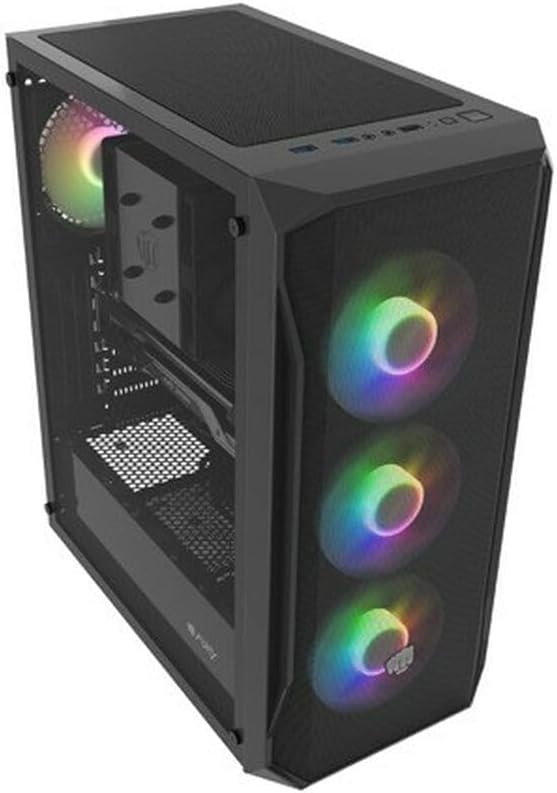
Figura 4.1: Angolat view of the Natec FURY SHOBO SH4F RGB MIDI TOWER PC Case, showcasing its black metal and tempered glass construction. The front panel features a mesh design with three illuminated RGB fans, and a single RGB fan is visible at the rear exhaust. The top panel includes I/O ports and a mesh filter.
4.1 Pannell tal-I/O ta' Quddiem
- Buttuna tal-Qawwa
- Irrisettja Buttuna
- Port USB 2.0 (x1)
- Audio Jacks (Headphone/Microphone)
- RGB Control Button (if applicable)
4.2 Tqassim Intern
The case supports Micro ATX and Mini ATX motherboards and features a bottom-mounted power supply bay. It includes dedicated areas for storage drives and efficient cable management.
5. Konfigurazzjoni u Installazzjoni tal-Komponenti
Follow these steps to install your PC components into the FURY SHOBO SH4F case.
5.1 Tħejjija tal-Każ
- Poġġi l-kaxxa fuq wiċċ ċatt u stabbli.
- Remove the side panels. Typically, the tempered glass side panel is secured with thumbscrews.
5.2 Installazzjoni tal-Motherboard
- Installa l-I/O shield (jekk mhux installat minn qabel fuq il-motherboard tiegħek) fil-ftuħ ta' wara tal-kaxxa.
- Ensure the motherboard standoffs are correctly aligned for your Micro ATX or Mini ATX motherboard. Adjust or install additional standoffs if necessary.
- Poġġi l-motherboard bir-reqqa fuq l-istandoffs, billi tallinja t-toqob tal-viti.
- Waħħal il-motherboard bil-viti pprovduti. Tissikkax iżżejjed.
5.3 Installazzjoni tal-Provvista tal-Enerġija
- Locate the power supply bay at the bottom rear of the case.
- Slide your power supply unit (PSU) into the bay from the rear of the case, ensuring the fan faces downwards (if the case has a bottom vent) or upwards.
- Waħħal il-PSU bil-viti minn wara tal-kaxxa.
5.4 Installazzjoni tad-Drive tal-Ħażna
Refer to your case's specific drive bay design for 2.5" SSDs and 3.5" HDDs. Typically, these involve trays or direct screw mounting.
5.5 Expansion Card Installation (e.g., Graphics Card)
- Neħħi l-għata meħtieġa tas-slott PCI-E minn wara tal-kaxxa.
- Daħħal il-kard tal-espansjoni tiegħek fl-islott PCI-E korrispondenti fuq il-motherboard.
- Waħħal il-kard b'kamin jew bil-mekkaniżmu ta' żamma tal-kaxxa.
5.6 Ġestjoni tal-Cable
Uża l-qtugħ u l-punti ta' rbit wara t-trej tal-motherboard biex tgħaddi u twaħħal il-kejbils. Dan itejjeb il-fluss tal-arja u l-estetika.
5.7 Connecting RGB Fans
The pre-installed RGB fans typically connect to a central RGB controller or directly to your motherboard's RGB headers. Consult your motherboard manual for specific RGB header locations and software control. Ensure all fan power cables are connected to appropriate fan headers on the motherboard or a fan hub.
6. Kif Tħaddem il-Kaxxa tal-PC Tiegħek
6.1 Tixgħel/Jitfi
After all components are installed and cables connected, plug your power supply into a wall outlet. Press the power button on the front I/O panel to turn on your system. To turn off, use the operating system's shutdown function or press and hold the power button for several seconds.
6.2 Kontroll tad-Dawl RGB
If your case features an RGB control button on the front I/O panel, press it to cycle through various lighting modes and colors. For advanced customization, use your motherboard's RGB software (e.g., ASUS Aura Sync, MSI Mystic Light, Gigabyte RGB Fusion) if the fans are connected to compatible headers.
7. Manutenzjoni
Manutenzjoni regolari tgħin biex tiżgura prestazzjoni ottimali u testendi l-ħajja tal-komponenti tal-PC tiegħek.
7.1 Tindif tal-Filtru tat-Trab
The FURY SHOBO SH4F case includes dust filters (e.g., on the top and bottom). Periodically remove and clean these filters by rinsing them with water and allowing them to dry completely before re-installing. This prevents dust buildup and maintains airflow.
7.2 Tindif ta' barra
Imsaħ il-barra tal-kaxxa b'ċarruta ratba u damp drapp. Evita prodotti tat-tindif jew solventi li joborxu li jistgħu jagħmlu ħsara lill-finitura jew lill-ħġieġ ittemprat.
8 Issolvi l-problemi
Jekk tiltaqa' ma' problemi, irreferi għall-passi komuni li ġejjin għas-soluzzjoni tal-problemi:
- Ebda Qawwa: Ensure the power supply is properly connected to the wall outlet and the motherboard. Check all internal power cables (24-pin ATX, 8-pin CPU, GPU power). Verify the power button cable is correctly connected to the motherboard's front panel header.
- Fannijiet Mhux Iduru: Check if fan power cables are securely connected to the motherboard or fan hub. Ensure the power supply is functioning.
- Dawl RGB Mhux Taħdim: Verify RGB cables are correctly connected to the RGB controller or motherboard header. If using a button, try cycling through modes. If using software, ensure it's installed and configured correctly.
- Is-sħana żejda: Ensure all fans are spinning correctly and oriented for proper airflow (intake/exhaust). Clean dust filters and internal components. Verify CPU cooler and GPU cooler are properly installed.
9. Speċifikazzjonijiet
| Brand | Natec |
| Serje | SH4F |
| Numru tal-Mudell | NFO-2154 |
| Tip ta' Każ | Torri tal-Midi |
| Kompatibbiltà tal-motherboard | Micro ATX, Mini ATX |
| Kulur | Iswed |
| Materjal | Metall |
| Dimensjonijiet tal-Prodott (LxWxH) | 19.69 x 16.93 x 9.84 pulzieri (50 x 43 x 25 ċm) |
| Piż tal-oġġett | 9.46 libbra (4.3 Kilogrammi) |
| Tip ta' Immuntar tal-Provvista tal-Enerġija | Mount tal-qiegħ |
| Metodu tat-tkessiħ | Arja |
| Numru ta 'USB 2.0 Ports | 1 |
10. Garanzija u Appoġġ
Natec products are manufactured to high-quality standards. For information regarding warranty terms and conditions, please refer to the warranty card included with your product or visit the official Natec website. If you encounter any issues not covered in this manual or require further assistance, please contact Natec customer support through their official channels.
Manifattur: Natec


