1. Introduzzjoni
This manual provides essential information for the setup, operation, maintenance, and troubleshooting of your Intel NUC 12 Extreme Kit Desktop PC. Please read this manual thoroughly before using the product to ensure proper functionality and safety.
2. Informazzjoni dwar is-Sigurtà
Osserva l-linji gwida tas-sigurtà li ġejjin biex tevita ħsara lill-apparat jew korriment lilek innifsek:
- Tiżgura l-provvista tal-enerġija voltage jaqbel mar-rekwiżiti speċifikati fuq l-apparat.
- Do not open the chassis unless instructed by qualified personnel.
- Żomm l-apparat 'il bogħod mill-ilma, umdità, u temperaturi estremi.
- Poġġi l-apparat fuq wiċċ stabbli u ċatt b'ventilazzjoni adegwata.
- Skonnettja l-enerġija qabel ma tnaddaf jew tagħmel xi manutenzjoni.
3. Kontenut tal-Pakkett
Ivverifika li l-oġġetti kollha huma preżenti fil-pakkett:
- Intel NUC 12 Extreme Kit Desktop PC (Model RNUC12D)
- Kejbil tal-Enerġija
- Tastiera
- Dokumentazzjoni (dan il-manwal)
4. Prodott Aktarview
The Intel NUC 12 Extreme Kit is a high-performance desktop PC designed for demanding tasks, including gaming and content creation. It features an Intel Core i7-12700 processor, NVIDIA GeForce RTX 3060 Ti graphics, 16GB DDR4 RAM, and a 2TB M.2 SSD.
4.1 Panel ta 'Quddiem
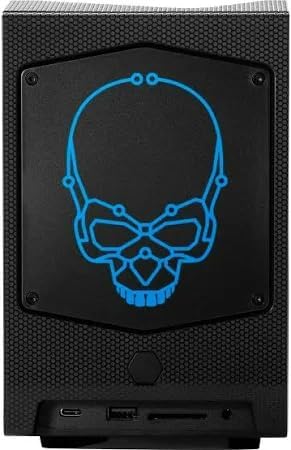
Figura 4.1: Quddiem view of the Intel NUC 12 Extreme Kit, showcasing the illuminated blue skull logo and front I/O ports.

Figura 4.2: Quddiem view of the Intel NUC 12 Extreme Kit, illustrating the customizable RGB skull logo.
4.2 Top and Angled View

Figure 4.3: Angled perspective of the Intel NUC 12 Extreme Kit, highlighting the top ventilation grille and the RGB skull logo.
4.3 Il-Pannell ta' Wara u l-Portijiet
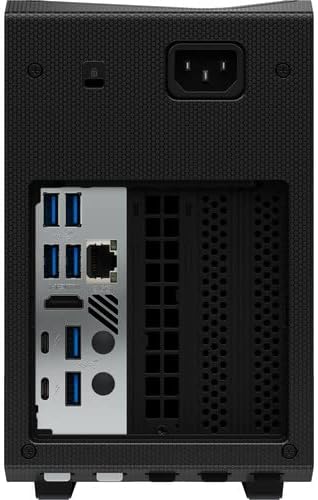
Figure 4.4: Rear panel of the Intel NUC 12 Extreme Kit, detailing the arrangement of USB, HDMI, DisplayPort, Ethernet, and power input ports.
4.4 Komponenti Interni

Figure 4.5: Internal layout of the Intel NUC 12 Extreme Kit, revealing the graphics card, CPU module, and cooling fans.
5. Setup Inizjali
5.1 Konnessjoni tal-Periferali
- Qabbad il-Monitor: Use an HDMI or DisplayPort cable to connect your monitor to the graphics card ports on the rear of the NUC.
- Qabbad it-Tastiera u l-Maws: Plug your USB keyboard and mouse into any available USB ports.
- Qabbad in-Netwerk (Mhux obbligatorju): For a wired internet connection, connect an Ethernet cable to the RJ-45 port. For wireless, ensure Wi-Fi antennas are properly connected (if external).
5.2 Konnessjoni tal-Enerġija
- Connect the power cable to the power input on the rear of the NUC.
- Ipplaggja t-tarf l-ieħor tal-kejbil tal-enerġija f'sokit elettriku ertjat.
5.3 L-Ewwel Boot
- Agħfas il-buttuna tal-qawwa li tinsab fuq il-pannell ta' quddiem tal-NUC.
- Follow the on-screen instructions to complete the Windows 11 Pro setup.
6. Istruzzjonijiet Operattivi
6.1 Power On/Off
- Qawwa Mixgħul: Agħfas il-buttuna tal-qawwa.
- Itfi: Click the Start button in Windows, then select Power > Shut down. Alternatively, press and hold the power button for 4 seconds to force a shutdown (use only when necessary).
6.2 Windows 11 Pro
Your Intel NUC 12 Extreme Kit comes pre-installed with Windows 11 Pro. Familiarize yourself with the operating system's interface and features. Regular updates are recommended for security and performance.
6.3 Konnettività
- Wi-Fi 6E: Connect to wireless networks via the built-in Intel Wi-Fi 6E AX211.
- Bluetooth 5.3: Pair with Bluetooth devices such as headphones, speakers, or input devices.
- Portijiet USB: Utilize the various USB ports (Thunderbolt 4, USB 3.2 Gen 2) for connecting external devices and storage.
7. Manutenzjoni
7.1 Tindif
- Barra: Uża drapp artab u niexef biex timsaħ l-uċuħ ta’ barra. Evita prodotti tat-tindif jew solventi li joborxu.
- Ventilazzjoni: Periodically check and clean the ventilation grilles to ensure unobstructed airflow. Use compressed air to remove dust from vents.
7.2 Aġġornamenti tas-Software
Regularly update your operating system, drivers, and applications to maintain optimal performance and security. Windows Update will handle OS updates, and Intel provides driver updates for NUC systems.
8 Issolvi l-problemi
Jekk tiltaqa' ma' problemi, irreferi għas-soluzzjonijiet komuni li ġejjin:
8.1 Ebda Qawwa
- Ensure the power cable is securely connected to both the NUC and the electrical outlet.
- Ivverifika li s-sokit elettriku jaħdem billi tqabbad apparat ieħor.
8.2 Ebda Display
- Iċċekkja li l-monitor huwa mixgħul u li s-sors tad-dħul korrett huwa magħżul.
- Ensure the video cable (HDMI/DisplayPort) is securely connected to both the NUC and the monitor.
- Ipprova kejbil tal-vidjo jew monitor differenti jekk disponibbli.
8.3 Kwistjonijiet ta' Konnettività tan-Netwerk
- Wajer: Iċċekkja l-konnessjoni tal-kejbil Ethernet u l-istatus tar-router.
- Wireless: Verify Wi-Fi is enabled in Windows settings and that you are connected to the correct network. Restart your router/modem.
9. Speċifikazzjonijiet
| Karatteristika | Speċifikazzjoni |
|---|---|
| Isem tal-Mudell | NUC 12 Extreme Kit |
| Numru tal-Mudell tal-Oġġett | RNUC12D |
| Proċessur | Intel Core i7-12700 (12-Core, up to 4.9 GHz) |
| RAM | 16 GB DDR4 (3200 MHz) |
| Ħażna | 2 TB SSD |
| Koproċessur tal-Grafika | NVIDIA RTX 3060 Ti 8GB GDDR6 |
| Sistema Operattiva | Windows 11 Pro |
| Konnettività bla fili | Intel Wi-Fi 6E AX211 (2x2), Bluetooth 5.3 |
| LAN | 10/100/1000Mbps RJ-45 |
| Portijiet USB | 2x USB-C Thunderbolt 4, 1x USB-C 3.2 Gen 2, 7x USB 3.2 Gen 2 |
| Output tal-vidjo | 1x HDMI v2.0, 3x DisplayPort (from GPU) |
| Awdjo | 1x Jack tal-Headphone/Mikrofonu Combo |
| Dimensjonijiet | 4.1 x 14.1 x 7.4 pulzieri |
| Piż | 17.64 liri |
| Kulur | Iswed |
10. Informazzjoni dwar Garanzija
This Intel NUC 12 Extreme Kit Desktop PC is covered by a limited warranty. Please refer to the warranty card included with your product or visit the official Intel support websit għal termini u kundizzjonijiet dettaljati. Żomm il-prova tax-xiri tiegħek għal talbiet ta' garanzija.
11. Appoġġ għall-Klijent
For technical assistance, driver downloads, or further information, please visit the official Intel support website. You may also contact Intel customer service through the channels provided on their websit.
Appoġġ Intel Websit: https://www.intel.com/content/www/us/en/support/products/125499/mini-pcs/intel-nuc-kits.html


