1. Prodott Aktarview
The LIORQUE Digital Kitchen Timer Model YGH5249 is a multi-functional device designed to assist with various timing needs. It features a large LCD display, adjustable alarm volume, and multiple placement options. This timer can function as a countdown timer, a count-up stopwatch, and a digital clock.

Stampa 1.1: Quddiem view of the LIORQUE Digital Kitchen Timer, highlighting its large LCD screen and control buttons.
Karatteristiċi ewlenin:
- Funzjonalità 3-in-1: Timer, Stopwatch, and Clock modes.
- Display LCD kbir: Ensures clear readability of time.
- Volum ta' Allarm Aġġustabbli: Three levels (Mute, Low, High) to suit different environments.
- Modalità Custom: Save frequently used countdown times for quick access.
- Poġġiment versatili: Magnetic back, foldable stand, and lanyard hole for flexible use.
- Delay Reminder: Automatically starts counting up after countdown finishes.
- Auto-Restore: Remembers the last set countdown time.

Image 1.2: Visual representation of the timer's main features and functions.
2. Konfigurazzjoni u Installazzjoni tal-Batterija
The timer requires 2 AAA batteries (included) for operation. Follow these steps to install them:
- Locate the battery compartment cover on the back of the timer.
- Żerżaq l-għatu miftuħ.
- Daħħal żewġ batteriji AAA, waqt li tiżgura l-polarità korretta (+ u -) kif indikat ġewwa l-kompartiment.
- Agħlaq l-għatu tal-kompartiment tal-batterija sew.
It-tajmer jixgħel awtomatikament ladarba l-batteriji jkunu installati.
3. Istruzzjonijiet Operattivi
3.1 Switching Modes (Timer/Stopwatch/Clock)
The LIORQUE timer offers three modes: Timer (countdown), Stopwatch (count-up), and Clock. To switch between Timer mode and Clock mode, press and hold the ST/SP button for 2 seconds. The timer will display the current time in Clock mode or the timer interface in Timer mode.

Image 3.1: Switching between Counting Mode and Clock Mode.
3.2 Setting Countdown Timer
- Ensure the timer is in Timer mode (displaying H:M:S).
- Uża l- 1H, 5M, 1M, u 5S buttons to set the desired countdown time. Each press adds the corresponding time increment.
- Agħfas il- ST/SP buttuna biex tibda l-countdown.
- Biex twaqqaf il-countdown, agħfas ST/SP għal darb'oħra. Agħfasha darba oħra biex tkompli.
- To reset the timer to zero, press the RESET buttuna.
- When the countdown reaches zero, the alarm will sound for 1 minute.
3.3 Using Stopwatch (Count-Up)
- Ensure the timer is in Timer mode and reset to 00:00:00.
- Agħfas il- ST/SP button to start counting up.
- Biex twaqqaf il-kronometru, agħfas ST/SP għal darb'oħra. Agħfasha darba oħra biex tkompli.
- Biex tirrisettja l-istopwatch għal żero, agħfas il-buttuna RESET buttuna.

Image 3.2: Illustration of Count-up and Countdown modes.
3.4 Shortcut Setting
The timer allows for quick setting of common intervals:
- Agħfas 1H għal siegħa.
- Agħfas 5M għal 5 minuta.
- Agħfas 1M għal minuta.
- Agħfas 5S għal 5 sekondi.

Immaġni 3.3: Eż.amples of using shortcut buttons for quick time setting.
3.5 Modalità Custom
The Custom Mode allows you to save a frequently used countdown time for instant recall.
- In Timer mode, set your desired countdown time using the 1H, 5M, 1M, u 5S buttuni.
- Agħfas u żomm il- DOGANALI button for 2 seconds. The timer will remember this setting.
- Each subsequent short press of the DOGANALI button will automatically load the saved time.

Image 3.4: Setting and recalling a custom timer value.
3.6 Aġġustament tal-Volum tal-Allarm
The timer features a 3-level alarm volume adjustment (Mute, Low, High). A switch on the side of the timer allows you to select the desired volume level.

Image 3.5: Volume adjustment switch and its three settings.
3.7 Għażliet ta' Tqegħid
The LIORQUE timer offers flexible placement options:
- Manjetiku: Attach the timer to metal surfaces like refrigerators using its strong magnetic back.
- Stand: Use the integrated foldable stand to place the timer on any flat surface, such as a countertop or desk.
- Toqba tal-lanyard: Hang the timer using a rope through the designated lanyard hole.
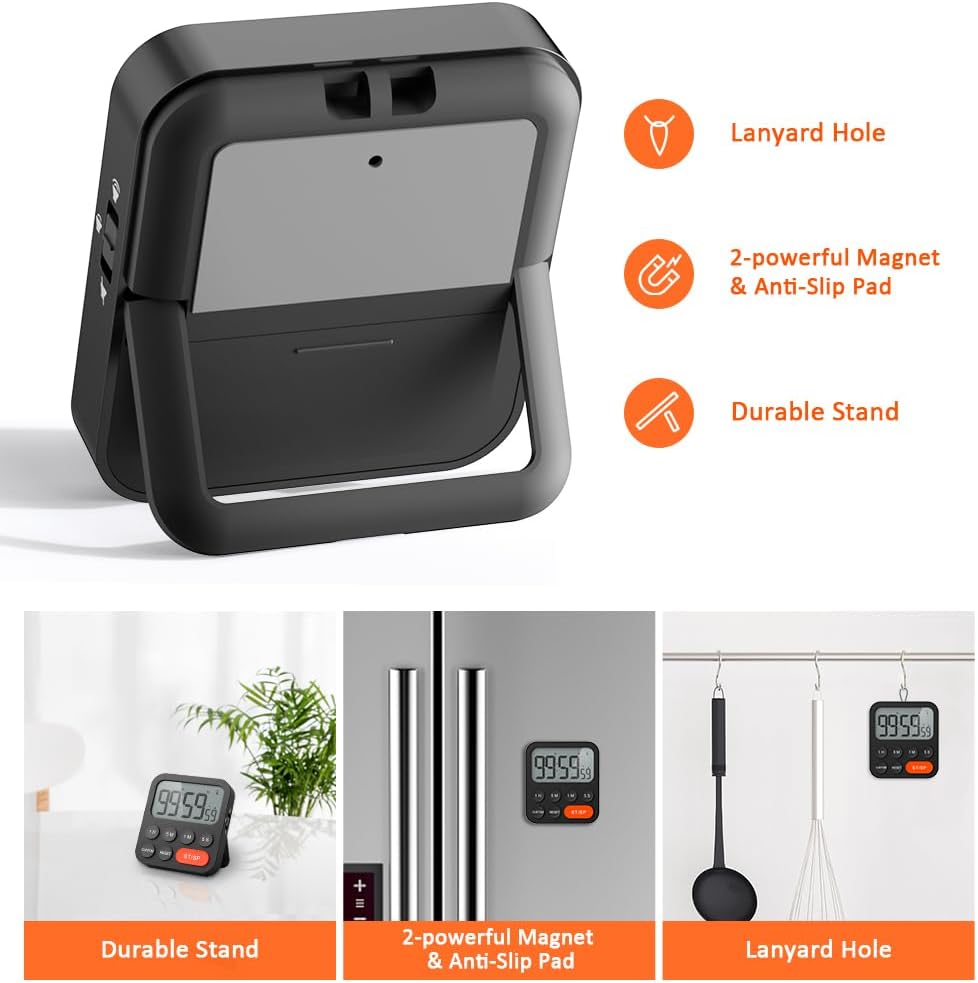
Image 3.6: Various ways to place and use the timer.
3.8 Funzjonijiet Addizzjonali
- Delay Reminder: After a countdown finishes, the timer will automatically start counting up, indicating the elapsed time since the alarm.
- Auto-Restore: Once a countdown is complete and the alarm has sounded, pressing the ST/SP button will restore the timer to the last set countdown time, making it convenient for repetitive tasks.

Image 3.7: Explanation of Delay Reminder and Auto-restore features.
4. Manutenzjoni
- Clean the timer with a soft, dry cloth. Do not use abrasive cleaners or immerse in water.
- Replace batteries when the display becomes dim or the timer functions erratically.
- Aħżen it-tajmer f'post frisk u niexef meta ma jkunx qed jintuża għal perjodi twal.
5 Issolvi l-problemi
- Timer not responding: Iċċekkja jekk il-batteriji humiex installati sew u għandhomx biżżejjed ċarġ. Ibdelhom jekk meħtieġ.
- Alarm too quiet/loud: Adjust the volume switch on the side of the timer to your preferred level.
- Il-wiri huwa vojt: Ensure batteries are installed and functional. If the issue persists, contact customer support.
6. Speċifikazzjonijiet
| Karatteristika | Dettall |
|---|---|
| Brand | LIORQUE |
| Numru tal-Mudell | YGH5249 |
| Kulur | Iswed |
| Dimensjonijiet tal-Prodott | 0.94"D x 0.94"H |
| Piż tal-oġġett | 4.2 uqija |
| Sors tal-Enerġija | 2 batteriji AAA (inklużi) |
| Numru ta' Settings | 3 (Volum) |
| Daqs tal-Iskrin | 1E+1 Ċentimetri |
7. Garanzija u Appoġġ
For warranty information or technical support, please refer to the product packaging or contact LIORQUE customer service through their official webis-sit jew il-bejjiegħ bl-imnut minn fejn inxtara l-prodott. Żomm l-irċevuta tax-xiri tiegħek għal talbiet ta’ garanzija.


