1. Introduzzjoni
This manual provides essential information for the safe and effective use of your KFD 12V AC DC Adapter. This power supply is specifically designed to be compatible with Wahoo KICKR Core Smart Trainers, including models WF123, WFBKTR4, and SUN-1200500. It delivers a stable 12V output at 5A, ensuring reliable power for your indoor cycling training equipment.
The KFD adapter is certified for safety and quality, featuring multiple protection mechanisms to safeguard your device and the power supply itself.
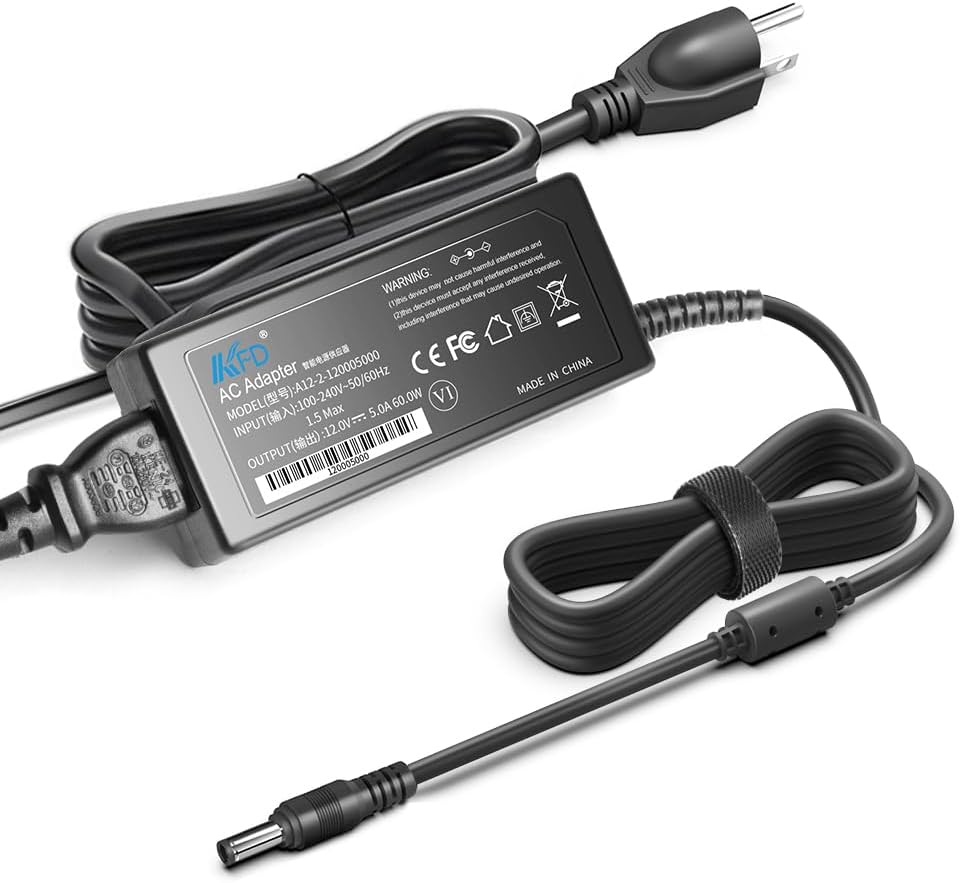
Image 1.1: The KFD 12V AC DC Adapter, showing the main unit and connected power cords.
Important Note: This adapter provides a 12V output. It is NOT compatible with 24V or 48V versions of Wahoo KICKR trainers. Please verify your trainer's voltage rekwiżiti qabel l-użu.
2. Istruzzjonijiet ta' Setup
Follow these steps to properly connect your KFD 12V AC DC Adapter to your Wahoo KICKR Core Smart Trainer:
- Ħoll l-Adapter: Carefully remove the KFD 12V AC DC Adapter and its power cords from the packaging.
- Qabbad il-Kejbil tad-Dħul tal-AC: Plug the detachable AC input cable into the adapter's AC input port. Ensure it is firmly seated.
- Qabbad mal-Power Outlet: Insert the AC plug into a standard wall power outlet (100-240V, 50-60Hz).
- Connect to Wahoo KICKR Core: Locate the power input port on your Wahoo KICKR Core Smart Trainer. Insert the DC output barrel connector from the KFD adapter into this port. Ensure a snug fit.
- Ivverifika l-Konnessjoni: Once all connections are secure, your Wahoo KICKR Core Smart Trainer should receive power. Refer to your trainer's manual for specific power indicator lights.

Image 2.1: The KFD adapter properly connected to a Wahoo KICKR Core Smart Trainer, ready for use.

Image 2.2: Visual confirmation of compatibility with Wahoo WF123, WFBKTR4, and SUN-1200500 models, emphasizing the 12V output requirement.
3. Istruzzjonijiet Operattivi
The KFD 12V AC DC Adapter functions as a dedicated power supply for your compatible Wahoo KICKR Core Smart Trainer. Once correctly connected as described in the Setup section, the adapter continuously supplies the necessary power to operate your trainer.
- Operazzjoni Awtomatika: The adapter begins supplying power as soon as it is plugged into a live electrical outlet and connected to the trainer.
- Qawwa Kontinwa: It provides a consistent 12V DC output, allowing for uninterrupted training sessions.
- Indikatur tal-Enerġija: Some adapters may feature a small LED indicator light to confirm power is being supplied.
No further operational steps are required for the adapter itself beyond ensuring proper connection and power supply.
4. Manutenzjoni u Sigurtà
To ensure the longevity and safe operation of your KFD 12V AC DC Adapter, please observe the following maintenance and safety guidelines:
- Żomm Niexef: Do not expose the adapter to water, moisture, or high humidity. Use indoors only.
- Kontroll tat-temperatura: Avoid operating the adapter in extremely hot or cold environments. Ensure adequate ventilation around the adapter to prevent overheating.
- Spezzjoni Fiżika: Regularly inspect the adapter and its cables for any signs of damage, such as cuts, frayed wires, or bent pins. Discontinue use if damage is found.
- Tindif: Disconnect the adapter from the power outlet and the device before cleaning. Use a dry, soft cloth to wipe the surface. Do not use liquid cleaners or solvents.
- Ħażna: When not in use for extended periods, unplug the adapter from both the wall outlet and the device. Store it in a cool, dry place.
- Ebda Żarmar: Tippruvax tiftaħ jew issewwi l-adapter. Dan jannulla l-garanzija u jista' joħloq riskju għas-sigurtà.
- Immaniġġjar kif suppost: Always grasp the plug when disconnecting from an outlet; do not pull on the cord.

Immaġni 4.1: Intern view of the adapter showcasing its robust components designed for safety and stability.
5 Issolvi l-problemi
If you encounter issues with your KFD 12V AC DC Adapter, refer to the following troubleshooting guide:
| Problema | Kawża Possibbli | Soluzzjoni |
|---|---|---|
| No power to Wahoo KICKR Core |
|
|
| L-adapter iħoss sħun |
|
|
| Qawwa intermittenti |
|
|
If the problem persists after attempting these solutions, please contact KFD customer support for further assistance.
6. Speċifikazzjonijiet
Detailed technical specifications for the KFD 12V AC DC Adapter:
- Numru tal-Mudell: A12-2-120005000
- Input: 100-240V AC, 50-60Hz
- Output: 12V DC, 5A (60W)
- Tip ta' Konnettur: Konnettur tal-Barmil
- Ċertifikazzjonijiet: UL, CE, FCC, RoHS
- Karatteristiċi ta' Protezzjoni:
- OVP (Over Voltage Output Protection)
- OCP (Over Current Output Protection)
- SCP (Short Circuit Output Protection)
- Prevenzjoni ta' ħlas żejjed
- Over-Discharge Prevention
- Prevenzjoni tas-sħana żejda
- Over-Output Protection
- Apparati Kompatibbli: Wahoo Model WF123, WFBKTR4 Fitness KICKR Core Smart Trainer, Wahoo Model SUN-1200500 SUN1200500.
- Dimensjonijiet (Pakkett): 7.6 x 5.04 x 1.81 pulzieri
- Piż tal-oġġett: 13.2 uqija
- Kulur: Iswed

Immaġni 6.1: Fuqview of the multiple protection features integrated into the KFD adapter for charging safety.

Image 6.2: Detail of the high-quality thinned copper wire used in the power cord, ensuring safe and reliable power transmission, along with UL certification.
7. Garanzija u Appoġġ
KFD stands behind the quality of its products. Your KFD 12V AC DC Adapter comes with the following warranty and support:
- Perjodu ta' Garanzija: 30 Days Free Exchange / 36 Months (3 Years) Warranty.
- Manifattur: Shenzhen Huikeyuan Electronic Technology Co.,Ltd (KFD).
- Appoġġ għall-Klijent: For any questions, technical assistance, or warranty claims, please contact KFD customer support through the retailer where the product was purchased or visit the official KFD websit għal informazzjoni ta' kuntatt.

Image 7.1: Visual representation of the 3-year warranty and an invitation to contact customer support.


