1. Introduzzjoni
The DIGITUS DS-55324 Wireless Video Extender Kit provides a solution for wirelessly transmitting Ultra-HD 4K/30Hz audio and video signals. This kit operates on a point-to-point connection, featuring a USB-C transmitter and an HDMI receiver, allowing for easy plug-and-play setup without the need for drivers or software. It supports a transmission range of up to 30 meters with a clear line of sight and ensures secure data transmission through 128-bit AES encoding and WPA2 protocol. This device is compatible with HDMI 2.0, DP 1.2, and HDCP 2.2/1.4 standards.

Figure 1: DIGITUS DS-55324 Wireless Video Extender Kit components.
2. Kontenut tal-Pakkett
Jekk jogħġbok ivverifika li l-oġġetti kollha huma preżenti u f'kundizzjoni tajba malli tiftaħ il-pakkett:
- 1 x Sender Unit (Transmitter with USB-C connector)
- 1 x Receiver Unit (Receiver with HDMI connector)
- 2 x Kejbil USB-A għal USB-C (100 ċm)
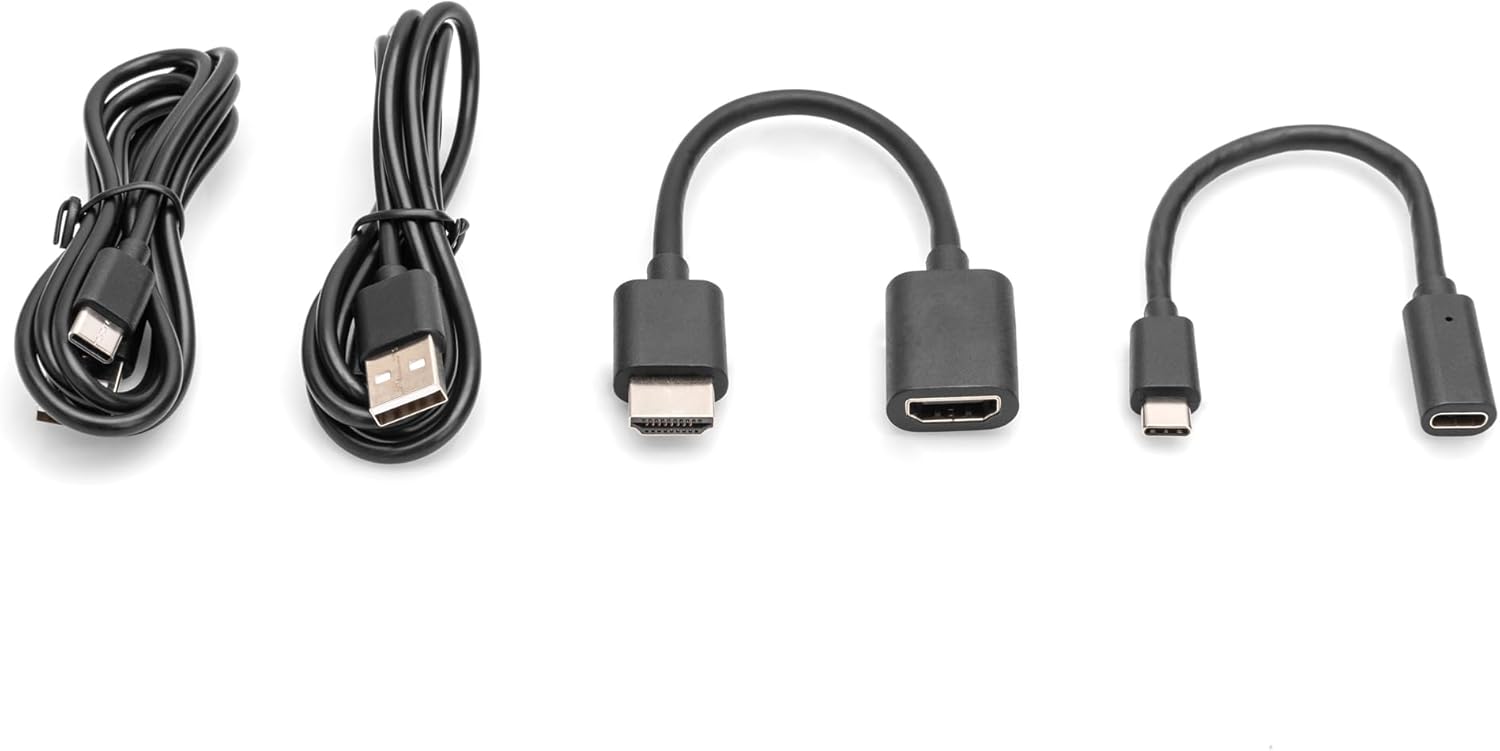
Figure 2: Included cables for power and connection.
3. Karatteristiċi tal-Prodott u Aktarview
The DS-55324 kit offers the following key features:
- Wireless transmission of HDMI signals up to 30 meters (with free view).
- Point-to-point connection: 1 sender (source) to 1 receiver (output device).
- Supports resolutions up to 4K UHD (2160p/30Hz).
- HDMI 2.0, DP 1.2, and HDCP 2.2/1.3 compatibility.
- Power supplied via USB-C connection.
- Enhanced security with 128-bit AES Encoding and WPA2 Protocol.

Figure 3: Key features and button location on the extender units.
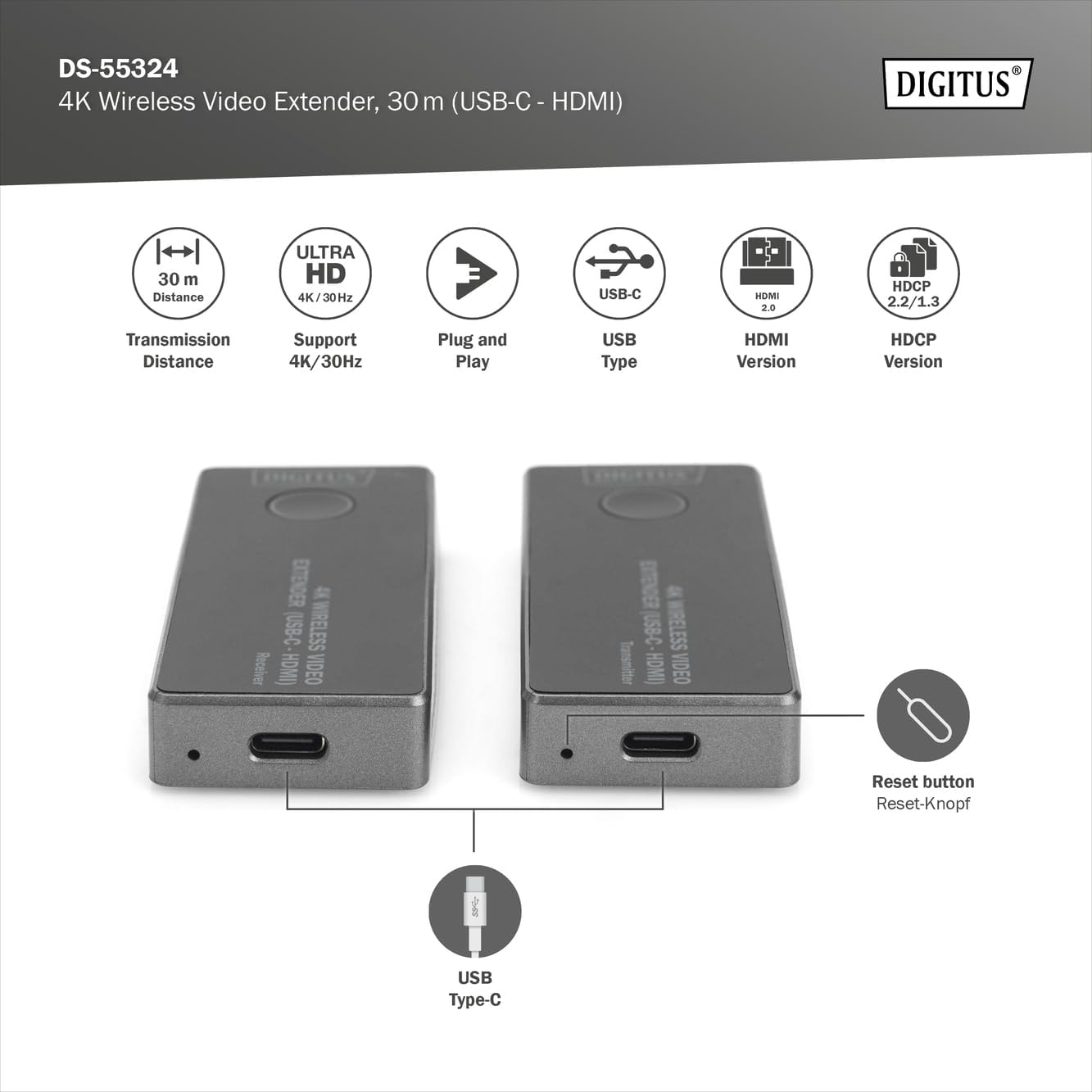
Figure 4: Location of the reset button and USB Type-C power input.
4. Istruzzjonijiet ta' Setup
Follow these steps to set up your DIGITUS Wireless Video Extender Kit:
- Qabbad it-Trasmettitur: Plug the USB-C connector of the Sender Unit (Transmitter) into the USB-C port of your source device (e.g., laptop, PC, smartphone with USB-C video output).
- Qabbad ir-Riċevitur: Plug the HDMI connector of the Receiver Unit into an available HDMI input port on your display device (e.g., monitor, projector, TV).
- Qawwa l-Unitajiet: Use the provided USB-A to USB-C cables to connect both the Sender Unit and Receiver Unit to a power source. This can be a USB port on your source/display device or a separate USB power adapter (5V/1A minimum, not included). Ensure both units receive stable power.
- Stabbilixxi Konnessjoni: Once both units are powered and connected, they will automatically attempt to pair. The LED indicators on the units will show their status. A stable connection is indicated when the video signal appears on your display.
- Troubleshooting (if no signal): If no signal is displayed, ensure both units are powered, correctly connected, and within the 30-meter range with minimal obstructions. You may also press the button on each unit to initiate pairing manually if needed.

Figure 5: Connection diagram for the wireless video extender.

Figure 6: Wireless signal transmission from source to display.

Figura 7: Dettaljat view of the USB-C (transmitter) and HDMI (receiver) ports.
5. Istruzzjonijiet Operattivi
Once the setup is complete and the units are paired, the extender operates automatically:
- Trażmissjoni Awtomatika tas-Sinjali: The video and audio signal from your source device will be wirelessly transmitted to your display.
- Riżoluzzjoni: The system will automatically negotiate the best possible resolution up to 4K/30Hz, depending on the capabilities of your source and display devices.
- Funzjoni tal-buttuna: The button on each unit can be used to initiate or re-establish pairing if the connection is lost or not automatically established. A short press typically triggers a re-scan for the partner unit.
6. Manutenzjoni
To ensure the longevity and optimal performance of your DIGITUS Wireless Video Extender Kit, follow these maintenance guidelines:
- Tindif: Use a soft, dry cloth to clean the units. Do not use liquid cleaners or aerosols, as they may damage the components.
- Ħażna: Store the units in a cool, dry place away from direct sunlight and extreme temperatures when not in use.
- Immaniġġjar: Avoid dropping the units or subjecting them to strong impacts. Do not attempt to disassemble the units, as this will void any warranty and may cause damage.
- Ventilazzjoni: Kun żgur li l-islots tal-ventilazzjoni fuq l-unitajiet mhumiex imblukkati biex tevita li jisħnu żżejjed.
7 Issolvi l-problemi
If you encounter issues with your wireless video extender, refer to the following common problems and solutions:
| Problema | Kawża Possibbli | Soluzzjoni |
|---|---|---|
| No video signal on display | Units not powered Konnessjonijiet mhux korretti Out of range or obstructions Ħruġ ta 'tqabbil | Ensure both units are powered via USB-C. Verify USB-C transmitter is in source, HDMI receiver in display. Reduce distance between units, remove obstructions. Press the button on both units to re-initiate pairing. |
| Kwalità tal-vidjo fqira jew teptip | Interferenza Sinjal dgħajjef Source/display incompatibility | Move units away from other wireless devices. Ensure clear line of sight and reduce distance. Check if source/display supports 4K/30Hz. Try a lower resolution if possible. |
| L-ebda awdjo | Audio settings on source/display HDMI cable issue (if applicable) | Iċċekkja s-settings tal-output tal-awdjo fuq l-apparat tas-sors tiegħek u s-settings tad-dħul fuq id-displej tiegħek. Ensure the HDMI connection to the receiver is secure. |
| Units feel warm | Operazzjoni normali Ventilazzjoni fqira | Some warmth is normal during operation. Ensure ventilation slots are not blocked. If excessively hot, disconnect and contact support. |
8. Speċifikazzjonijiet
| Karatteristika | Speċifikazzjoni |
|---|---|
| Numru tal-Mudell | DS-55324 |
| Manifattur | DIĠITU |
| Distanza tat-Trażmissjoni | Sa 30 metru (linja tal-vista) |
| Riżoluzzjoni Appoġġjata | Up to 4K UHD (2160p/30Hz) |
| Verżjoni HDMI | HDMI 2.0 |
| Verżjoni DisplayPort | DP 1.2 |
| Appoġġ HDCP | HDCP 2.2 / 1.3 |
| Transmitter Connector | USB-C |
| Konnettur tar-riċevitur | HDMI |
| Provvista tal-Enerġija | Via USB-C (5V/1A recommended) |
| Protokolli tas-Sigurtà | 128-bit AES Encoding, WPA2 Protocol |
| Dimensjonijiet tal-Prodott | 3.19 x 1.34 x 0.51 inches (each unit) |
| Piż tal-oġġett | 1.13 ounces (each unit) |
9. Garanzija u Appoġġ
For warranty information and technical support, please refer to the documentation provided with your purchase or visit the official DIGITUS websit. Żomm il-prova tax-xiri tiegħek għal talbiet ta' garanzija.


