Introduzzjoni
Grazzi tax-xiriasing the SHARP XL-B530 Micro Component System. This system is designed to provide high-quality audio playback from various sources, including Bluetooth wireless streaming, CD, USB, AM/FM radio, and auxiliary input. This manual provides detailed instructions for setting up, operating, and maintaining your new audio system to ensure optimal performance and longevity.
Informazzjoni Importanti dwar is-Sigurtà
- Aqra l-istruzzjonijiet kollha bir-reqqa qabel l-użu.
- Żomm dan il-manwal għal referenza futura.
- Tesponix l-unità għax-xita jew l-umdità.
- Aċċerta ruħek li jkun hemm ventilazzjoni xierqa madwar l-unità. Timblokkax il-fetħiet tal-ventilazzjoni.
- Tpoġġix l-unità ħdejn sorsi tas-sħana bħal radjaturi, reġistri tas-sħana, stufi, jew apparat ieħor (inkluż amplifiers) li jipproduċu sħana.
- Ipproteġi l-korda tad-dawl milli jimxi fuqu jew maqrusa.
- Uża biss aċċessorji/aċċessorji speċifikati mill-manifattur.
- Aqla’ dan l-apparat waqt maltempati tas-sajjetti jew meta ma jintużax għal perjodi twal ta’ żmien.
- Irreferi l-manutenzjoni kollha lil persunal tas-servizz kwalifikat.
Kontenut tal-Pakkett
Jekk jogħġbok iċċekkja li l-oġġetti kollha li ġejjin huma inklużi fil-pakkett tiegħek:
- Main Unit (Micro Component System)
- Unitajiet tal-Ispeaker (x2)
- Kontroll mill-bogħod
- Korda tal-Enerġija
- Antenna FM
- AM Loop Antenna
- Manwal għall-Utent (dan id-dokument)
Prodott Overview
Familiarize yourself with the components and controls of your SHARP XL-B530 system.
Main Unit and Speakers

B'mod ġenerali view of the SHARP XL-B530 Micro Component System, including the main unit, two speakers, and the remote control.
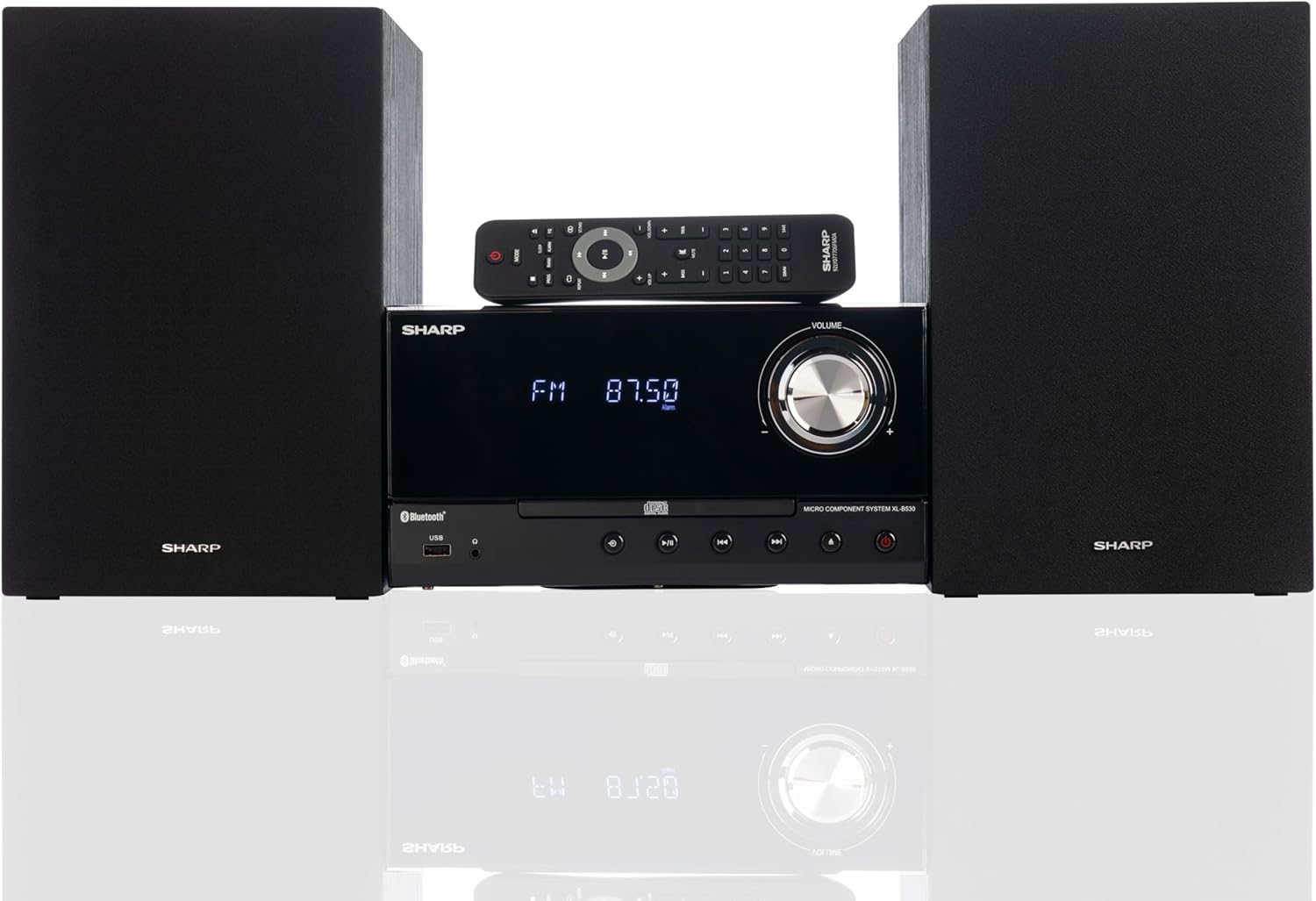
Front panel of the main unit, showing the LCD display, volume knob, CD tray, and control buttons.
Konnessjonijiet tal-Panew ta' wara

The rear panel of the main unit, featuring speaker terminals, FM antenna input, AM antenna input, and auxiliary input ports.
Kontroll mill-bogħod
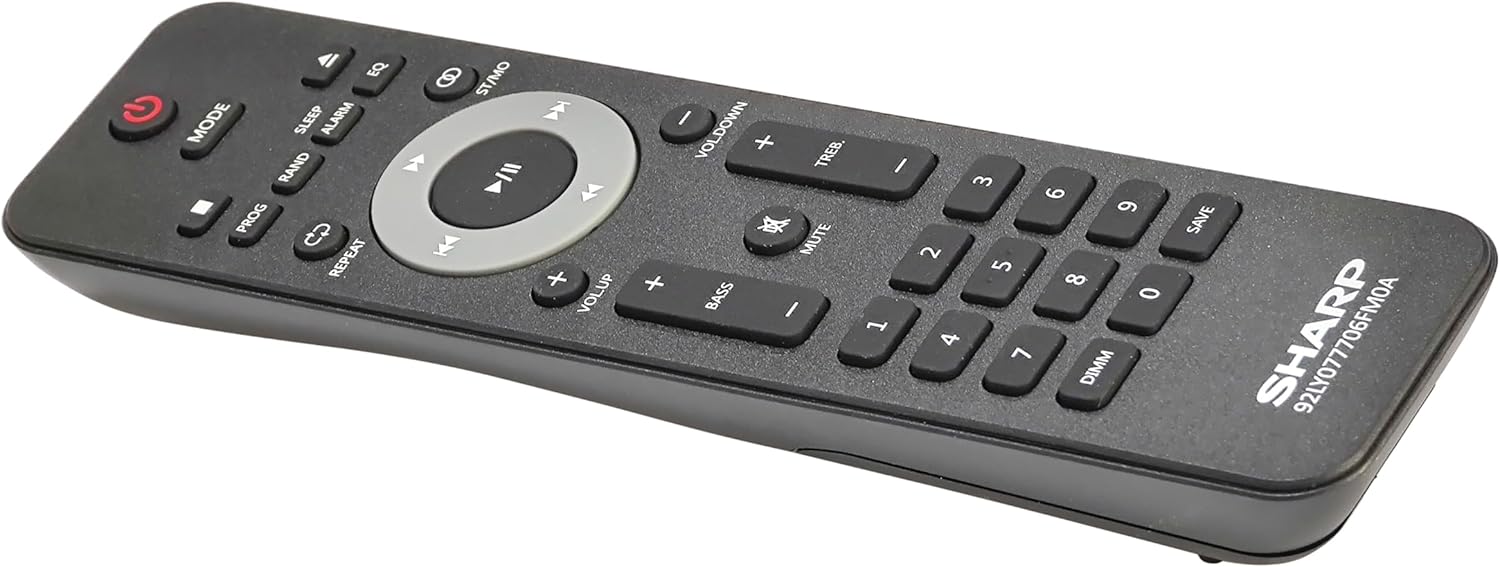
Dettaljati view of the remote control, showing various function buttons for power, mode, playback, volume, and sound adjustments.
Setup
Follow these steps to set up your micro component system.
1. Konnessjoni tal-Ispeaker
- Identify the left and right speaker cables.
- Connect the red (+) wire from each speaker to the red (+) terminal on the main unit's rear panel.
- Connect the black (-) wire from each speaker to the black (-) terminal on the main unit's rear panel.
- Ensure a secure connection for both speakers.
2. Konnessjoni tal-antenna
- Antenna FM: Connect the supplied FM wire antenna to the FM antenna jack on the rear panel. Extend the wire fully for best reception.
- Antenna AM: Assemble the AM loop antenna and connect its wires to the AM antenna terminals on the rear panel. Rotate the antenna for optimal AM reception.
3. Konnessjoni tal-Enerġija
- Ensure all other connections are made.
- Ipplaggja l-korda tal-enerġija fil-jack AC IN fuq wara tal-unità prinċipali.
- Daħħal it-tarf l-ieħor tal-korda tal-enerġija f’sokit tal-ħajt.
Istruzzjonijiet Operattivi
This section details how to use the various functions of your SHARP XL-B530 system.
Qawwa mixgħul/mitfi
- Agħfas il- QAWWA buttuna fuq l-unità prinċipali jew fuq il-kontroll remot biex tixgħel jew titfi s-sistema.
Għażla tas-Sors
- Agħfas il- MODALITÀ button on the main unit or remote control repeatedly to cycle through available sources: CD, Bluetooth, USB, FM, AM, AUX.
Daqq ta' CD
- Agħfas il- MODALITÀ button to select 'CD' mode.
- Agħfas il- FTUĦ/MAGĦLUQ buttuna biex tiftaħ it-trej tas-CD.
- Place a CD (CD/MP3/WMA/CD-R/CD-RW) with the label side up into the tray.
- Agħfas il- FTUĦ/MAGĦLUQ Agħfas il-buttuna mill-ġdid biex tagħlaq it-trej. Id-daqq jibda awtomatikament.
- Użu DĦABBA/PAWŻA, STOP, SKIP (forward/backward), and FITTEX buttuni għall-kontroll.
Tqabbil tal-Bluetooth
- Agħfas il- MODALITÀ button to select 'Bluetooth' mode. The display will show 'BT' and flash, indicating it's ready for pairing.
- Fuq l-apparat Bluetooth tiegħek (smartphone, tablet, eċċ.), attiva l-Bluetooth u fittex apparati disponibbli.
- Select 'SHARP XL-B530' from the list.
- Once paired, the display will stop flashing and show 'BT CONNECTED'. You can now stream audio from your device.
Daqq USB
- Daħħal flash drive USB fil-port USB fuq il-pannell ta' quddiem.
- Agħfas il- MODALITÀ button to select 'USB' mode.
- The system will automatically detect and begin playing compatible audio files (MP3/WMA).
- Use playback controls similar to CD mode.
Radju AM/FM

The SHARP XL-B530 system displaying an FM radio frequency, highlighting its digital tuner capabilities.
- Agħfas il- MODALITÀ button to select 'FM' or 'AM' mode.
- Skanjar Awtomatiku: Agħfas u żomm il- DĦABBA/PAWŻA buttuna biex tiskennja u ssalva awtomatikament l-istazzjonijiet disponibbli.
- Irfinar Manwali: Uża l- SKIP buttons to manually tune to desired frequencies.
- Stazzjonijiet issettjati minn qabel: Use the number buttons on the remote to directly select saved preset stations.
Volume and Sound Adjustment

A close-up of one of the SHARP XL-B530 speakers, illustrating the adjustable bass and treble sound output.
- Volum: Dawwar il- VOLUM il-pum fuq l-unità prinċipali jew uża l- VOL + / VOL- buttuni fuq il-kontroll remot.
- Bass/Treble: Uża l- BASS+ / BASS- u TREB+ / TREB- buttons on the remote control to adjust sound characteristics.
- Loudin: Agħfas il- ĦOSS button on the remote to enhance bass and treble at low volumes.
- EQ: Agħfas il- EQ button on the remote to cycle through preset equalizer modes.
Manutenzjoni
Kura xierqa tiżgura l-lonġevità tas-sistema tiegħek.
- Tindif: Use a soft, dry cloth to clean the exterior of the unit. For stubborn stains, dampen the cloth lightly with water. Do not use abrasive cleaners or solvents.
- CD Care: Immaniġġja s-CDs mit-truf tagħhom. Naddaf is-CDs maħmuġin b'ċarruta ratba u mingħajr suf, billi timsaħ miċ-ċentru 'l barra.
- Ventilazzjoni: Ensure the ventilation openings are not blocked by dust or debris.
- Ħażna: Jekk taħżen l-unità għal perjodu estiż, aqlagħha mill-plagg tal-elettriku u aħżenha f'post frisk u niexef.
Issolvi l-problemi
If you encounter issues with your system, refer to the following common problems and solutions.
| Problema | Kawża Possibbli | Soluzzjoni |
|---|---|---|
| Ebda qawwa | Il-korda tal-enerġija mhux imqabbda; Is-sokit tal-enerġija mhux attiv | Kun żgur li l-korda tal-enerġija hija mdaħħla sew; Ipprova sokit differenti |
| L-ebda ħoss | Volum baxx wisq; L-ispikers mhux konnessi; Sors mhux korrett magħżul | Żid il-volum; Iċċekkja l-konnessjonijiet tal-ispiker; Agħżel is-sors tad-dħul korrett |
| Is-CD mhux qed idoqq | CD inserted incorrectly; CD is dirty or scratched; Incorrect mode | Insert CD correctly (label side up); Clean or replace CD; Select CD mode |
| Bluetooth mhux pairing | Bluetooth mode not selected; Device too far; Device already paired to another unit | Select Bluetooth mode; Move device closer; Disconnect from other devices and try again |
| Riċeviment ħażin tar-radju | Antenna not connected or positioned poorly; Interference | Connect and adjust antenna position; Move unit away from other electronic devices |
| Il-kontroll mill-bogħod ma jaħdimx | Il-batteriji huma mejta jew imdaħħla ħażin; Ostruzzjoni bejn ir-remote u l-unità | Replace batteries, check polarity; Remove any obstructions; Ensure remote is pointed at the unit's sensor |
Speċifikazzjonijiet
| Karatteristika | Speċifikazzjoni |
|---|---|
| Numru tal-Mudell | XL-B530(BK) |
| Qawwa tal-Ħruġ | 200W Max (100W RMS) |
| Konnettività | Bluetooth, USB, Aux Input |
| Kompatibilità tad-Diska | CD, CD-R/RW, MP3, WMA |
| Tuner | AM/FM Stereo Digital Tuner (50 station presets) |
| Tip ta' Kelliem | Stereo |
| Dimensjonijiet tal-Prodott (L x W x H) | 25 x 11 x 9.6 pulzieri |
| Piż tal-oġġett | 18 liri |
| Kulur | Ballut iswed |
Garanzija u Appoġġ
For warranty information and technical support, please refer to the warranty card included with your product or visit the official SHARP websit. Żomm l-irċevuta tax-xiri tiegħek bħala prova tax-xiri għal kwalunkwe talba ta' garanzija.
For further assistance, you may contact SHARP customer service through their official channels.


