1. Introduzzjoni
Thank you for choosing the WalkerFit Smart Watch for Men. This 1.84-inch big screen fitness watch is designed to enhance your daily life with features like heart rate monitoring, sleep tracking, stress management, and a wide array of sports modes. It offers seamless connectivity with Android phones and iPhones, ensuring you stay connected and informed. This manual provides detailed instructions to help you get the most out of your new smartwatch.

Image: The WalkerFit Smart Watch displaying its main interface and call functions.
2. Kontenut tal-Pakkett
Jekk jogħġbok immarka l-kaxxa biex tiżgura li l-oġġetti kollha huma preżenti:
- Arloġġ intelliġenti x 1
- Manwal għall-utent x 1
- Kejbil tal-iċċarġjar x 1
3. Nibdew
3.1 Iċċarġjar tal-Apparat
Qabel l-ewwel użu, iċċarġja l-ismartwatch tiegħek kompletament. Qabbad il-kejbil tal-iċċarġjar manjetiku mal-punti tal-iċċarġjar fuq wara tal-arloġġ u daħħal it-tarf tal-USB f'adapter tal-enerġija (mhux inkluż) jew fil-port USB tal-kompjuter.
- Ħin tal-Iċċarġjar: Madwar sagħtejn
- Active Usage: Up to 7 days
- Ħin ta' Standby: Sa 25 ijiem

Image: The WalkerFit Smart Watch being charged, highlighting its fast charging and extended battery life.
3.2 Installazzjoni u Tqabbil tal-App
- Scan the QR code in the manual or search for the companion app (e.g., 'FitCloudPro' or similar, check manual for exact name) on your smartphone's app store (Google Play Store for Android, Apple App Store for iOS).
- Installa l-app u oħloq kont jekk tintalab.
- Ippermetti Bluetooth fuq l-ismartphone tiegħek.
- Open the app, navigate to 'Device' or 'My Device', and select 'Add Device'.
- Select 'SW205-A1PRO' or the corresponding device name from the list to pair. Follow the on-screen prompts to complete the pairing process.
3.3 Liebes l-Għassa
Wear the watch comfortably on your wrist, about one finger's width from your wrist bone. Ensure the sensor on the back of the watch is in contact with your skin for accurate health monitoring.
4. Operazzjoni Bażika
4.1 Navigazzjoni tal-Interfaċċja
The WalkerFit Smart Watch features a vibrant 1.84-inch touchscreen. Swipe left, right, up, or down to access different functions and menus. The side button typically serves as a power button or a return-to-home button.
4.2 Tagħmel u Riċeviment Sejħiet
The watch is equipped with a built-in speaker and microphone, allowing you to handle calls directly from your wrist via Bluetooth 5.3 connection to your smartphone.
- Tagħmel Sejħiet: Access the phone function on the watch to view recent calls, use a dial pad, or access contacts (synced from your phone).
- Jirċievu Sejħiet: When a call comes in, the watch will display the caller ID. You can answer, reject, or mute the call directly from the watch screen.

Image: Bluetooth 5.3 connectivity features, including call handling and notifications.
4.3 Notifiki
Stay synchronized with your iPhone or Android phone for real-time notifications from social media, texts, and apps like Facebook, WhatsApp, and Twitter. Ensure notification permissions are enabled in the companion app and your phone settings.
4.4 Il-Personalizzazzjoni tal-Uċuħ tal-Arloġġ
Personalize your watch by changing the watch face. Long press on the current watch face to access available options. You can also customize styles through the smartphone app, with numerous digital and analog options available.
5. Karatteristiċi ta' Monitoraġġ tas-Saħħa
The WalkerFit Smart Watch provides continuous 24/7 health monitoring to help you track your well-being.

Image: The watch's health sensors and examples of health data graphs.
5.1 Heart Rate Tracking
Monitor your heart rate throughout the day. The watch provides real-time heart rate data, which can be viewed on the watch or in the app for historical trends.
5.2 Monitoraġġ tal-Irqad
L-arloġġ awtomatikament isegwi x-xejriet tal-irqad tiegħek, inkluż irqad fil-fond, irqad ħafif, u ħinijiet ta' qawmien.view your sleep quality and duration in the app to improve your rest.
5.3 Stress Tracking
The watch can help monitor your stress levels, providing insights into your mental well-being. Refer to the app for detailed stress data and trends.
5.4 Pedometru u Traċċar tal-Attività
The built-in pedometer accurately tracks your daily walking steps and miles. It also monitors calories burned and active time, serving as an indispensable health companion.
5.5 Traċċar tas-Saħħa tan-Nisa
The watch supports period tracking, allowing users to log and predict menstrual cycles through the companion app.
6. Modi Sportivi
Pursue your fitness goals with over 120 sports modes available on this activity tracker. The watch can track various metrics depending on the sport, including calories, steps, time, and distances.
- Setting Workout Targets: Set specific goals for your workouts within the watch or app.
- Disinn li ma jgħaddix ilma minnu: The watch's waterproof design makes it suitable for various exercise routines, including those involving sweat or light water exposure.

Image: The watch's sports tracking interface and various sport mode icons.
7. Funzjonijiet Intelliġenti Addizzjonali
The WalkerFit Smart Watch offers several convenient functions to enhance your daily experience.
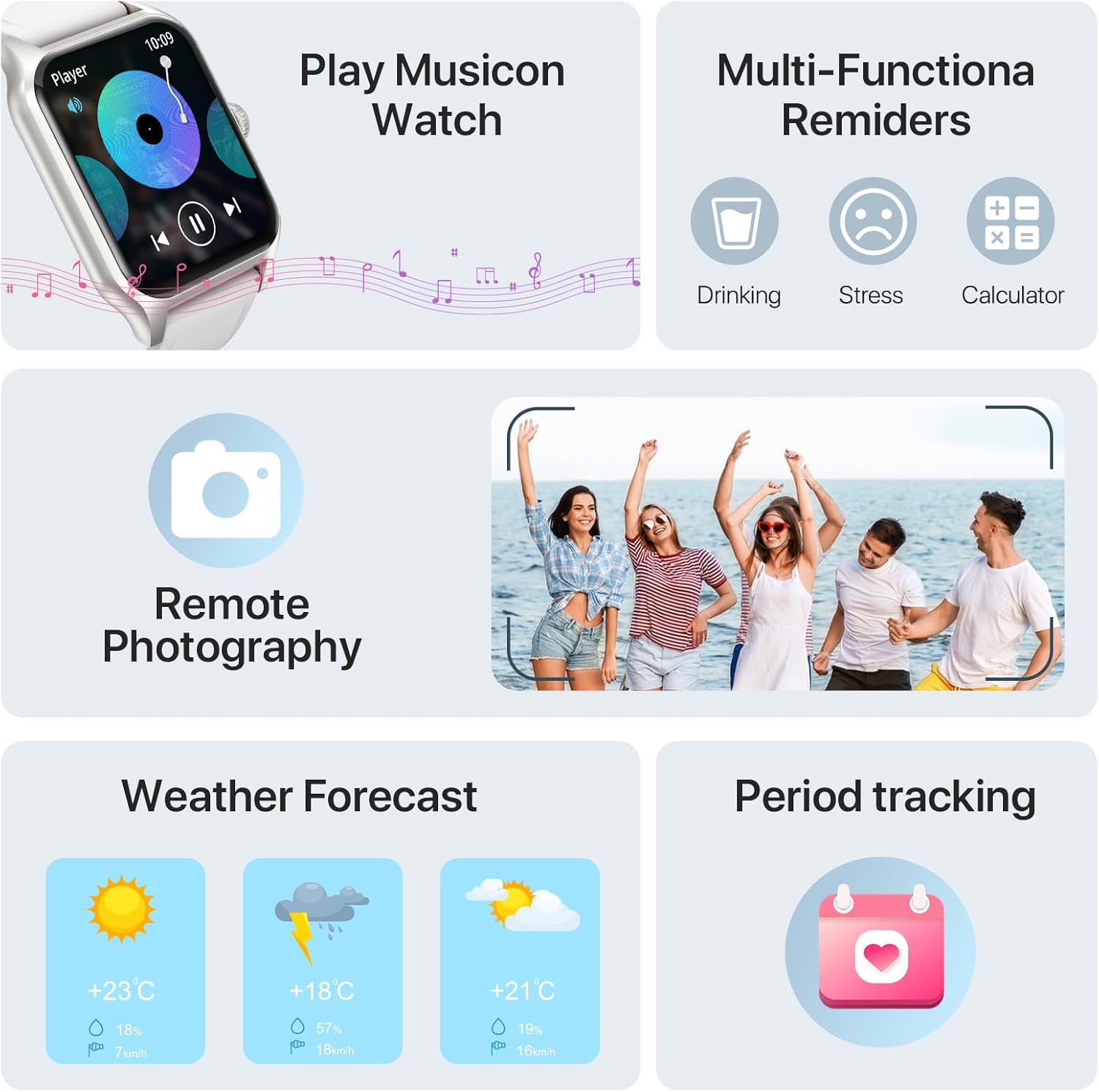
Image: Various smart functions including music control, reminders, remote camera, weather, and period tracking.
7.1 Kontroll tal-Mużika
Control music playback on your smartphone directly from your watch. Play, pause, skip tracks, and adjust volume without needing to take out your phone.
7.2 Kamera mill-bogħod
Use your watch as a remote shutter for your smartphone's camera. Open the remote camera function on the watch and shake your wrist to take a photo.
7.3 Tbassir tat-Temp
Check the current weather conditions and forecast directly on your smartwatch by raising your wrist.
7.4 Alarms and Reminders
Set alarms on your watch to wake up or for important reminders. The watch also supports multi-functional reminders such as drinking water reminders and stress reminders.
7.5 AI Voice Recognition
Utilize AI voice recognition for quick commands and information, such as asking about the weather or initiating calls.
8. Speċifikazzjonijiet
| Karatteristika | Dettall |
|---|---|
| Numru tal-Mudell | SW205-A1PRO |
| Daqs tal-Iskrin | 1.83 Inches (visible screen diagonal: 2" / 5 cm) |
| Teknoloġija tal-Konnettività | Bluetooth 5.3 |
| Kapaċità tal-batterija | Polimer tal-Litju 260mAh |
| Ħin tal-Iċċarġjar | Appross. 2.5 sigħat |
| Ħin ta' Użu Attiv | Sa 7 jum |
| Ħin ta' Standby | Sa 25 jum |
| Sistema Operattiva | Android compatible |
| Karatteristiċi Speċjali | Cycle Tracking, Multisport Tracker, Activity Tracker, Notifications, Music Player, Heart Rate Monitor, Sleep Monitor, Stress Monitor, Pedometer |
| Piż tal-oġġett | 160 Gram (5.6 uqija) |
| Dimensjonijiet (Wiċċ tal-Arloġġ) | 37mm (1.45in) width, 52mm (2.04in) height, 10mm (0.39in) thickness |
| Total Length (Watch + Strap) | 250mm (9.8in) |

Image: Detailed product dimensions of the WalkerFit Smart Watch.
9 Issolvi l-problemi
9.1 L-arloġġ mhux qed jixgħel
- Kun żgur li l-arloġġ ikun iċċarġjat kompletament. Qabbad mal-kejbil tal-iċċarġjar u ma' sors tal-enerġija għal mill-inqas 30 minuti.
- Press and hold the side button for several seconds to power on.
9.2 Unable to Pair with Smartphone
- Kun żgur li l-Bluetooth huwa attivat fuq l-ismartphone tiegħek.
- Kun żgur li l-arloġġ jinsab fil-firxa tal-Bluetooth tat-telefon tiegħek.
- Erġa' ibda kemm l-arloġġ kif ukoll l-ismartphone tiegħek.
- Check if the companion app has necessary permissions (location, Bluetooth, notifications).
- If previously paired, try unpairing the device from your phone's Bluetooth settings and re-pairing through the app.
9.3 Dejta tas-Saħħa Mhux Preċiża
- Ensure the watch is worn snugly on your wrist, with the sensors in proper contact with your skin.
- Naddaf iż-żona tas-sensur fuq wara tal-arloġġ regolarment.
- Evita moviment eċċessiv waqt il-kejl.
9.4 Notifiki li Ma Jidhrux
- Verify that notifications are enabled in the companion app.
- Check your smartphone's notification settings to ensure the app is allowed to send notifications.
- Kun żgur li l-arloġġ huwa konness permezz tal-Bluetooth.
10. Garanzija u Appoġġ
At WalkerFit, we are committed to providing high-quality products and excellent customer service. Your WalkerFit Smart Watch undergoes rigorous quality checks before leaving the factory.
- Garanzija: All WalkerFit smartwatches carry a two-year warranty from the date of purchase.
- Appoġġ ta' wara l-bejgħ: If you encounter any issues upon receiving or using your smartwatch, please contact our 24/7 after-sales team immediately. We are committed to swift issue resolution.
Thank you for choosing WalkerFit.


