Introduzzjoni
This manual provides essential instructions for the proper setup, operation, and maintenance of your 3nStar PTA0157-432 All-in-One POS System. Please read this manual thoroughly before using the device to ensure optimal performance and longevity.
Informazzjoni dwar is-Sigurtà
Observe the following safety precautions to prevent damage to the device or injury to yourself and others:
- Tesponix l-apparat għall-ilma jew għal umdità eċċessiva.
- Evita li tpoġġi l-apparat ħdejn sorsi tas-sħana jew fid-dawl tax-xemx dirett.
- Uża biss l-adapter tal-AC provdut.
- Tippruvax tiftaħ jew issewwi l-apparat int stess. Irreferi għal kull manutenzjoni f'idejn persunal kwalifikat.
- Kun żgur li jkun hemm ventilazzjoni xierqa madwar l-apparat waqt it-tħaddim.
Kontenut tal-Pakkett
Ivverifika li l-oġġetti kollha huma preżenti fil-pakkett:
- 3nStar PTA0157-432 All-in-One POS System
- Adapter AC
- Manwal għall-Utent (dan id-dokument)
Prodott Overview
The 3nStar PTA0157-432 is a 15.6-inch All-in-One Point of Sale system designed for various business environments. It features a 10-point capacitive touchscreen, runs on Android 11, and is powered by a Quad-Core processor with 4GB RAM and 32GB storage. Integrated Wi-Fi and Bluetooth connectivity are also included.

Figura 1: Quddiem view of the 3nStar PTA0157-432 All-in-One POS System, showcasing the 15.6-inch display and integrated stand.

Figure 2: A user interacting with the 10-point capacitive touchscreen of the POS system, demonstrating its touch responsiveness.

Figura 3: Wara view of the 3nStar POS System, showing the ventilation slots and the sturdy integrated stand.
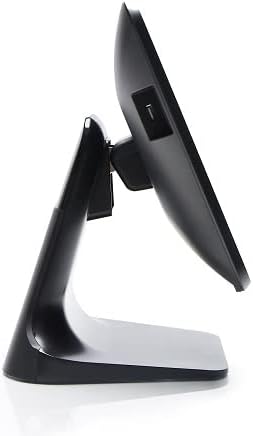
Figura 4: Proġett tal-ġenbfile of the 3nStar POS System, highlighting its slim design and adjustable screen angle.
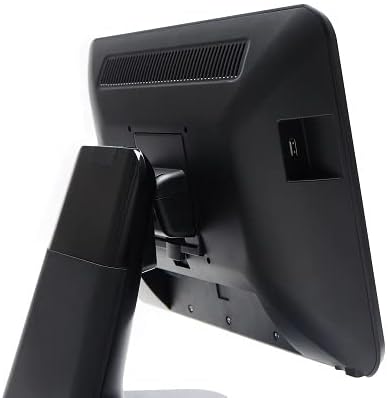
Figura 5: In-naħa ta' wara view of the 3nStar POS System, illustrating the location of various connectivity ports for peripherals.
Setup
- Iftaħ is-Sistema: Carefully remove the POS system and all accessories from the packaging.
- Pożizzjona s-Sistema: Place the POS system on a stable, flat surface, ensuring adequate ventilation around the device.
- Qabbad l-Enerġija: Connect the AC adapter to the power input port on the back of the POS system, then plug the adapter into a standard electrical outlet.
- Qawwa Inizjali Mixgħula: Press the power button, usually located on the side or back of the display. The system will boot up to the Android 11 operating system.
- Konfigurazzjoni Inizjali: Follow the on-screen prompts to complete the initial Android setup, including language selection, Wi-Fi connection, and Google account setup (optional).
- Ikkonnettja l-Periferali: Connect any necessary peripherals such as barcode scanners, receipt printers, or cash drawers to the available USB or other designated ports. Refer to the peripheral's manual for specific connection instructions.
Istruzzjonijiet Operattivi
The 3nStar PTA0157-432 operates on Android 11, providing a familiar and intuitive user experience.
Navigazzjoni Bażika
- Touchscreen: Use your fingers to tap, swipe, pinch, and zoom on the 15.6-inch capacitive display.
- Skrin tad-dar: Access your installed applications and widgets from the main home screen.
- App Drawer: Swipe up from the bottom of the screen or tap the app drawer icon to view l-applikazzjonijiet kollha installati.
- Notifiki: Skrolla 'l isfel minn fuq nett tal-iskrin biex taċċessa n-notifiki u s-settings rapidi.
Konnessjoni mal-Wi-Fi
- Mur fuq Settings > Netwerk u internet > Wi-Fi.
- Ixgħel il-Wi-Fi On.
- Agħżel in-netwerk mixtieq tiegħek mil-lista u daħħal il-password jekk tintalab.
Konnessjoni ta 'Tagħmir Bluetooth
- Mur fuq Settings > Apparati konnessi > Preferenzi ta' konnessjoni > Bluetooth.
- Toggle Bluetooth On.
- Kun żgur li l-apparat Bluetooth tiegħek jinsab fil-modalità ta' tqabbil.
- Select the device from the list to pair.
Using POS Software
The system is designed to run various Android-compatible Point of Sale applications. Install your preferred POS software from the Google Play Store or other trusted sources. Refer to your specific POS software's documentation for detailed usage instructions.
Manutenzjoni
Tindif tal-Apparat
- Skrin: Uża drapp ratba u mingħajr ħelu ftit dampened with water or a screen cleaner specifically designed for electronic displays. Do not spray cleaner directly onto the screen.
- Korp: Imsaħ l-uċuħ ta’ barra b’ċarruta ratba u niexfa. Evita prodotti tat-tindif jew solventi li joborxu.
- Ventilazzjoni: Ensure ventilation slots are free from dust and debris to prevent overheating. Use compressed air if necessary.
Aġġornamenti tas-Software
Regularly check for and install system updates for Android 11 to ensure optimal performance, security, and compatibility. Go to Settings > Sistema > Aġġornament tas-sistema.
Ġestjoni tal-Ħażna
Monitor the 32GB internal storage to ensure sufficient space for applications and data. Delete unnecessary files or uninstall unused applications to free up space. Go to Settings > Ħażna.
Issolvi l-problemi
| Problema | Kawża Possibbli | Soluzzjoni |
|---|---|---|
| L-apparat ma jixgħelx. | Power cable not connected properly; AC adapter malfunction. | Ensure the AC adapter is securely connected to the device and a working power outlet. Test the outlet with another device. |
| It-touchscreen ma jirrispondix. | Software glitch; screen dirty; physical damage. | Restart the device. Clean the screen with a soft cloth. If the issue persists, contact support. |
| Problemi bil-konnessjoni tal-Wi-Fi. | Password mhux korretta; barra mill-firxa; problema bir-router. | Verify Wi-Fi password. Ensure the device is within range of the router. Restart the router and the POS system. |
| Periferali (eż., printer) mhux skopert. | Incorrect connection; driver issue; peripheral not powered on. | Check physical connections. Ensure the peripheral is powered on. Install necessary drivers or apps for the peripheral. Restart the POS system. |
Speċifikazzjonijiet
| Karatteristika | Dettall |
|---|---|
| Numru tal-Mudell | PTA0157-432 |
| Sistema Operattiva | Android 11 |
| Daqs tal-Iskrin | 15.6 Pulzier |
| Riżoluzzjoni tal-Iskrin | 1920 x 1080 Pixels |
| Touchscreen | 10-point Capacitive |
| Proċessur | Quad-Core (Rockchip 3568, 2 GHz) |
| RAM | 4GB LPDDR4 |
| Ħażna | 32GB SSD (Flash Memory) |
| Grafika | Grafika Integrata |
| Konnettività | Wi-Fi, Bluetooth |
| Dimensjonijiet tal-Prodott (LxWxH) | 10 x 13 x 16 pulzieri |
| Piż tal-oġġett | 11 liri |
| Kulur | Iswed |
Garanzija u Appoġġ
For warranty information, technical support, or service inquiries, please refer to the official 3nStar webis-sit jew ikkuntattja lir-rivenditur awtorizzat tiegħek. Żomm l-irċevuta tax-xiri tiegħek bħala prova tax-xiri għal talbiet ta' garanzija.
Online resources and frequently asked questions may be available on the manufacturer's support page: Appoġġ 3nStar


