Fachixy FC300 Wireless Gaming Headset User Manual
Mudell: FC-300
Introduzzjoni
Thank you for choosing the Fachixy FC300 Wireless Gaming Headset. This manual provides detailed instructions for setting up, operating, and maintaining your headset to ensure optimal performance and longevity. The FC300 offers a seamless gaming experience with its 2.4GHz lossless wireless and Bluetooth connectivity, long-lasting battery, and immersive audio.
Informazzjoni dwar is-Sigurtà
- Tesponix il-headset għal temperaturi, umdità, jew likwidi estremi.
- Evita li twaqqa’ l-headset jew li tissottomettih għal impatti qawwija.
- Tippruvax tiżżarma jew timmodifika l-headset. Dan jannulla l-garanzija.
- Isma' b'volum moderat biex tevita ħsara fis-smigħ.
- Żomm fejn ma jintlaħaqx mit-tfal.
Kontenut tal-Pakkett
Jekk jogħġbok iċċekkja l-pakkett għall-oġġetti li ġejjin:
- Fachixy FC300 Wireless Gaming Headset
- 2.4GHz USB Dongle
- Cable tal-Iċċarġjar tal-USB-C
- Manwal għall-Utent (dan id-dokument)

Image: The Fachixy FC300 Wireless Gaming Headset in white and purple, shown with its accompanying USB dongle.
Prodott Overview
Familiarize yourself with the various components and controls of your FC300 headset.

Image: A detailed diagram highlighting the control buttons on the left earcup of the Fachixy FC300 headset, including power, volume, mic, and RGB controls.
- Buttuna tal-Enerġija/Multi-Funzjoni: Turn on/off, play/pause, answer/reject calls.
- Volume Down / Track Preċedenti: Decrease volume, skip to previous track.
- Volum Up / Track Li jmiss: Żid il-volum, aqbeż għat-trakka li jmiss.
- Microphone Mute/Bluetooth Pairing: Mute/unmute microphone, initiate Bluetooth pairing.
- Kontroll tad-Dawl RGB: Ixgħel/itfi d-dwal RGB.
Setup
1. Iċċarġjar tal-Headset
Before first use, fully charge the headset. Connect the USB-C charging cable to the headset's charging port and the other end to a USB power source (e.g., computer USB port, wall adapter). The LED indicator will show charging status.
- Kapaċità tal-batterija: 1200mAh
- Ħin ta' Ċarġ Sħiħ: Madwar 2.5 sigħat
- Playtime: Up to 50 hours (without RGB), 40 hours (with RGB)

Image: Visual representation of the headset's 1200mAh battery capacity and up to 50 hours of playtime on a 2.5-hour charge.
2. Connecting via 2.4GHz Wireless (for PC, PS5, PS4, Switch, Mac, Laptops)
- Daħħal id-dongle USB ta' 2.4GHz f'port USB disponibbli fuq l-apparat tiegħek.
- Power on the headset by long-pressing the Power button (1) for 3 seconds.
- The headset will automatically connect to the dongle. A stable connection is indicated by the LED light on the headset.
- Kun żgur li l-headset huwa magħżul bħala l-apparat tal-output/input tal-awdjo fis-settings tas-sistema tiegħek.

Image: A user wearing the headset connected wirelessly to a gaming PC via the 2.4GHz USB dongle, illustrating low-latency connectivity.
3. Connecting via Bluetooth (for Mobile Phones, Tablets, iPad)
Note: Bluetooth mode is not compatible with PS4 or PS5.
- Żgura li l-headset tkun mixgħula.
- Long-press the Microphone Mute/Bluetooth Pairing button (4) for 3 seconds to enter Bluetooth pairing mode. The LED indicator will flash rapidly.
- On your device, enable Bluetooth and search for "Fachixy FC300" in the list of available devices.
- Select "Fachixy FC300" to connect. The LED indicator will become solid once connected.
Istruzzjonijiet Operattivi
Qawwa mixgħul/mitfi
- Qawwa Mixgħul: Long-press the Power button (1) for 3 seconds.
- Itfi: Long-press the Power button (1) for 3 seconds.
Kontroll tal-Volum
- Volum 'il fuq: Single click the Volume Up button (3).
- Volum 'l isfel: Single click the Volume Down button (2).
Kontroll tal-Mikrofonu
- Ixekkel/Istinka l-Mic: Single click the Microphone Mute button (4).
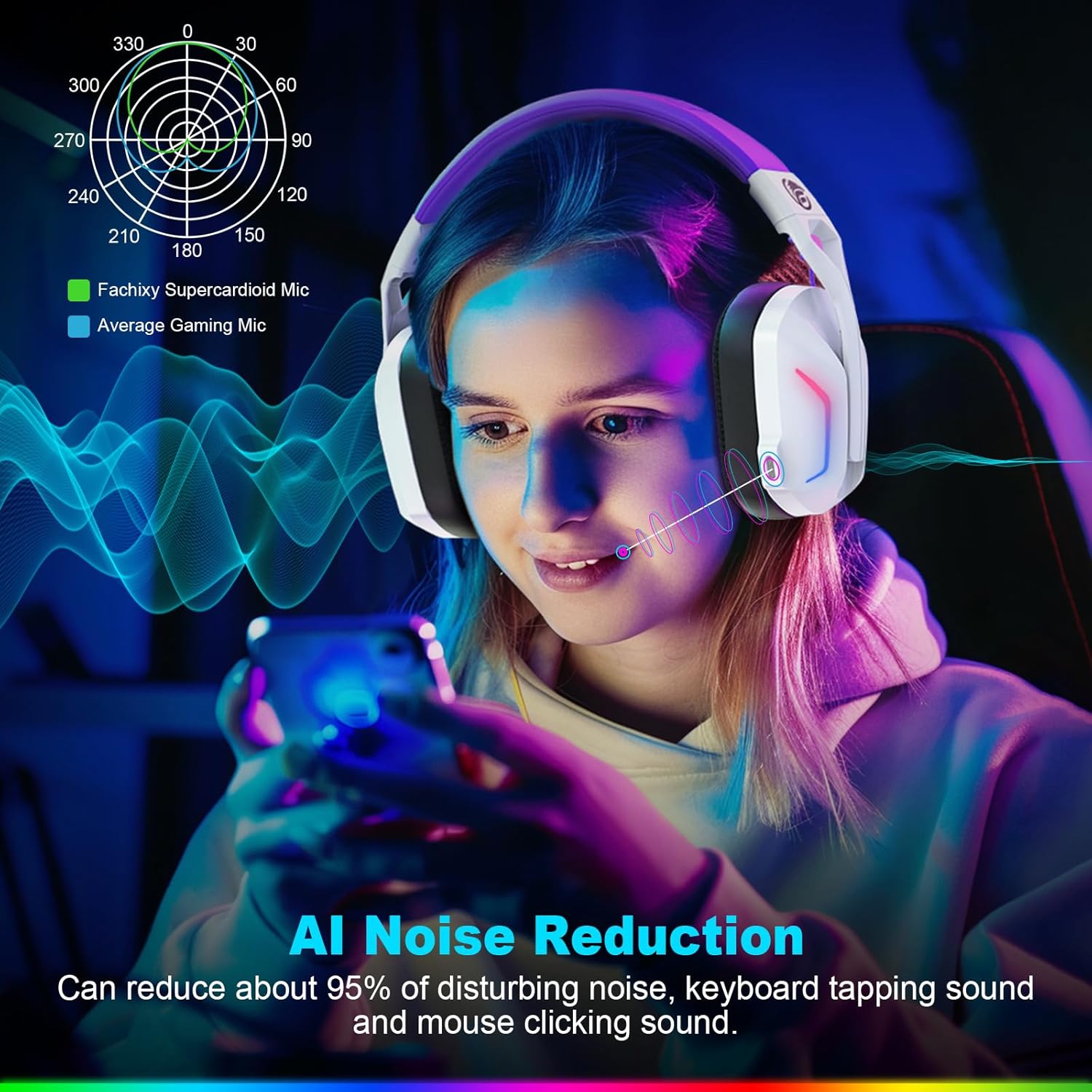
Image: A graphic illustrating the AI Noise Reduction capability of the Fachixy Supercardioid Mic, showing reduction of background noise like keyboard tapping and mouse clicking.
Kontroll tad-Dawl RGB
- Turn RGB On/Off: Single click the RGB Light Control button (5).

Image: A person wearing the Fachixy FC300 headset, showcasing its vibrant RGB lighting effects on the earcups.
Call Management (in Bluetooth mode)
- Wieġeb/Hang up Call: Single click the Power button (1).
- Irrifjuta Sejħa: Long-press the Power button (1) for 2 seconds.
Music Playback Control (in Bluetooth mode)
- Play/Pawsa: Single click the Power button (1).
- Track li jmiss: Long-press the Volume Up button (3) for 2 seconds.
- Track preċedenti: Long-press the Volume Down button (2) for 2 seconds.
- Traceback (Redial last number): Double click the Power button (1).

Immaġni: Sploda view diagram illustrating the 50mm Neodymium magnet driver and Titanium Coat Diaphragm responsible for the headset's immersive 3D surround sound quality.
Manutenzjoni
- Tindif: Uża drapp artab u niexef biex tnaddaf il-headset. Tużax prodotti tat-tindif jew solventi li joborxu.
- Ħażna: Aħżen il-headset f'post frisk u niexef 'il bogħod mix-xemx diretta u minn temperaturi estremi.
- Kura tal-batterija: Biex ittawwal il-ħajja tal-batterija, evita li tiċċarġja kompletament il-batterija ta' spiss. Iċċarġjaha regolarment, anke jekk ma tkunx qed tużaha għal perjodi twal.

Image: A close-up of the headset's earcup and headband, highlighting features like soft protein earmuffs, memory foam, foldable structure, and adjustable slider for all-day comfort.
Issolvi l-problemi
| Problema | Kawża Possibbli | Soluzzjoni |
|---|---|---|
| Il-headset ma jixgħelx. | Batterija baxxa. | Iċċarġja l-headset kompletament. |
| L-ebda ħoss jew kwalità tal-ħoss fqira. | Incorrect audio output selected; headset not connected; volume too low. | Check system audio settings; ensure headset is properly connected (2.4GHz dongle or Bluetooth); increase volume. |
| Il-mikrofonu mhux qed jaħdem. | Mikrofonu siekta; apparat tad-dħul mhux korrett magħżul. | Unmute microphone (single click button 4); check system audio input settings. |
| Ma nistax nikkonnettja permezz ta' konnessjoni mingħajr fili ta' 2.4GHz. | Dongle not properly inserted; interference. | Ensure dongle is fully inserted; try a different USB port; move closer to the dongle. |
| Ma nistax nikkonnettja permezz tal-Bluetooth. | Headset not in pairing mode; device Bluetooth off; incompatible device. | Long-press button 4 to enter pairing mode; enable Bluetooth on your device; note that Bluetooth is not compatible with PS4/PS5. |
| Id-dwal RGB mhux qed jaħdmu. | RGB lights turned off. | Single click button 5 to turn RGB lights on. |
Clear All Devices (Reset Pairing): Press Volume Up (3) and Volume Down (2) buttons together for 6 seconds while in Bluetooth mode. The headset will auto turn off after this operation.
Speċifikazzjonijiet
| Karatteristika | Dettall |
|---|---|
| Brand | Fachixy |
| Numru tal-Mudell | FC-300 |
| Kulur | Abjad / Vjola |
| Tip ta 'widna | Fuq il-widna |
| Konnettività | 2.4GHz Wireless, Bluetooth |
| Karatteristiċi Speċjali | Fast Charge, RGB Lighting, AI Noise Reduction Mic |
| Kompożizzjoni tal-batterija | Lithium-ion |
| Kapaċità tal-batterija | 1200 mAh |
| Ħin tal-Iċċarġjar | Appross. 2.5 sigħat |
| Playtime (without RGB) | Sa 50 sigħat |
| Playtime (with RGB) | Sa 40 sigħat |
| Piż | Appross. 360g |
| Daqs tas-Sewwieq | 50mm Neodimju |
| Kompatibilità | 2.4GHz: PS5, PC, PS4, Switch, Mac, Laptops. Bluetooth: Mobile phones, tablets, iPad. |
Garanzija u Appoġġ
Fachixy products are designed and manufactured to the highest quality standards. For warranty information or technical support, please refer to the contact details provided on the product packaging or the official Fachixy websit. Jekk jogħġbok żomm il-prova tax-xiri tiegħek għal talbiet ta' garanzija.


