1. Introduzzjoni
This manual provides essential information for the safe and efficient operation of your Metz MUD8500Z 43-inch 4K UHD Google Smart TV. Please read these instructions thoroughly before using the television and retain them for future reference. This television features a 43-inch Direct LED display with UHD 4K HDR resolution, integrated Google TV operating system, and a built-in soundbar with Wonder Audio technology.
2. X'hemm fil-Kaxxa
Oħroġ it-televiżjoni tiegħek mill-pakkett bir-reqqa u ċċekkja li l-oġġetti kollha li ġejjin huma inklużi:
- Metz MUD8500Z 43-inch Smart TV
- Adapter tal-Enerġija
- Kontroll mill-bogħod
- Manwal għall-Utent (dan id-dokument)
- Komponenti tal-Stand tat-TV (jekk applikabbli)
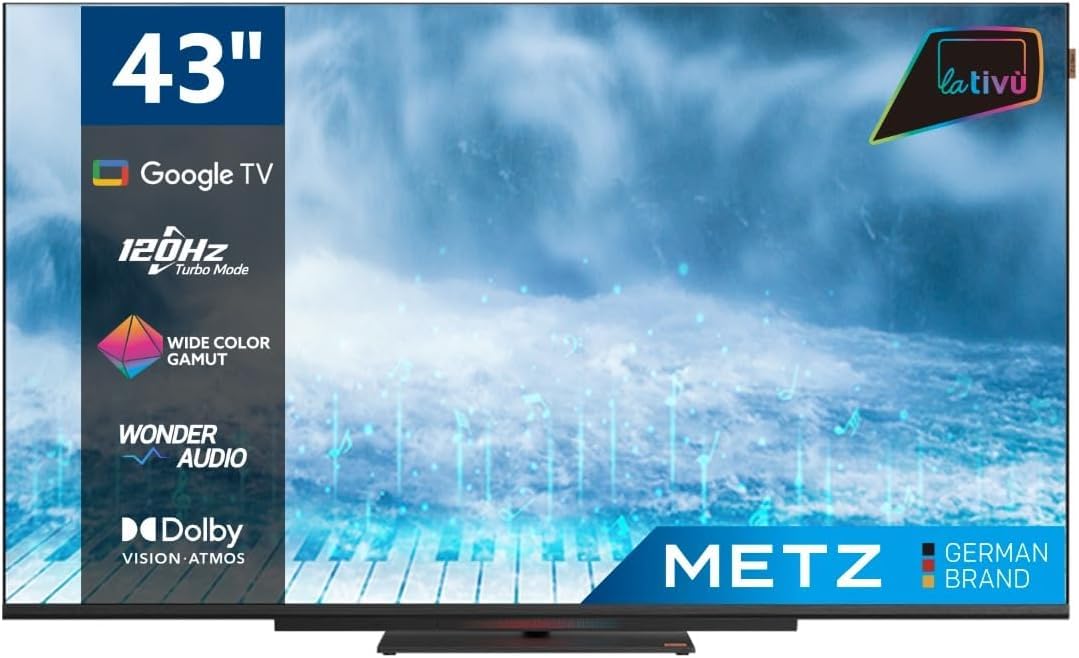
Immaġni: Quddiem view of the Metz MUD8500Z 43-inch Smart TV.
3. Setup
3.1. Żpakkjar u Tqegħid
Neħħi t-TV mill-imballaġġ tiegħu. Poġġi t-TV fuq wiċċ stabbli u ċatt jew waħħalha mal-ħajt billi tuża muntatura VESA kompatibbli (mibiegħa separatament). Kun żgur li jkun hemm ventilazzjoni adegwata madwar it-TV.

Image: Diagram showing the dimensions of the Metz MUD8500Z TV (96.6cm width, 57cm height, 11cm depth).
3.2. Qawwa tal-Konnessjoni
Connect the power adapter to the TV's power input, then plug the adapter into a wall outlet. The TV will enter standby mode.
3.3. Initial Setup (Google TV)
Malli tixgħelha għall-ewwel darba, it-TV jiggwidak fil-proċess inizjali tas-setup. Dan jinkludi:
- Għażla tal-Lingwa: Agħżel il-lingwa ppreferuta tiegħek.
- Konnessjoni tan-Netwerk: Connect the TV to your home Wi-Fi network or via an Ethernet cable.
- Idħol fil-Kont tal-Google: Idħol bil-kont Google tiegħek biex taċċessa l-karatteristiċi, l-apps u r-rakkomandazzjonijiet personalizzati ta' Google TV.
- Scan tal-Kanal: Scan for available TV channels (Antenna/Cable).
4. Istruzzjonijiet Operattivi
4.1. Funzjonijiet Bażiċi tat-TV
- Power On/Off: Agħfas il-buttuna tal-qawwa fuq il-kontroll remot jew it-TV.
- Kontroll tal-Volum: Uża l-buttuni Volume Up/Down fuq ir-remote.
- Għażla tal-Kanal: Uża l-buttuni Channel 'il fuq/'l isfel jew it-tastiera tan-numri.
- Sors tad-dħul: Press the 'Input' button to select HDMI, AV, or other connected devices.
4.2. Google TV Navigation
The Google TV interface provides access to streaming services, apps, and live TV. Use the directional pad and 'OK' button on your remote to navigate menus and select items.

Image: Remote control for the Metz Smart TV, highlighting dedicated buttons for popular streaming services and Google Assistant.
4.3. Google Assistent
Your TV has an integrated Google Assistant. Press the Google Assistant button on your remote or use the built-in microphone for voice commands to search for content, control smart home devices, and more.
4.4. App Access
Access a wide range of applications from the Google Play Store directly on your TV. Navigate to the 'Apps' section on the Google TV home screen to browse, download, and manage your applications.

Image: Screenshot of the Google TV interface displaying various streaming applications.
5. Karatteristiċi
5.1. UHD 4K Resolution and HDR
Experience stunning visuals with a resolution of 3840x2160 pixels, providing exceptional clarity and detail. The 4K HDR (High Dynamic Range) support enhances contrast and color accuracy for a more lifelike picture.
5.2. Wide Color Gamut
The Wide Color Gamut technology allows the TV to display a broader spectrum of colors, resulting in more vibrant and realistic images.

Image: A visual comparison demonstrating the enhanced color range with Wide Color Gamut versus normal display.
5.3. Wonder Audio Soundbar
The integrated soundbar with Wonder Audio technology delivers an immersive and clear audio experience. This advanced sound processing algorithm improves treble and bass, offering a more realistic virtual surround sound.

Image: Diagram illustrating the internal structure of the Surging Soundbar, showing increased diaphragm area and net sound cavity volume.
5.4. Google TV Operating System
Powered by Google TV, this television provides a personalized experience with easy access to your favorite movies, shows, live TV, and apps from across your subscriptions. It also offers smart recommendations based on your viewdrawwiet.
5.5. 120Hz Turbo Mode
The 120Hz Turbo Mode enhances motion clarity, making fast-paced scenes and gaming content appear smoother and more fluid.

Image: Visual representation of the 120Hz Turbo Mode, illustrating enhanced smoothness for dynamic content.
5.6. Dolby Vision and Dolby Atmos
Enjoy cinematic picture quality with Dolby Vision, offering incredible brightness, contrast, and color. Dolby Atmos provides immersive, multi-dimensional audio that flows around you.
6. Konnessjonijiet
Your Metz MUD8500Z TV offers various ports for connecting external devices:
- HDMI (x3): Qabbad plejers tal-Blu-ray, consoles tal-logħob, set-top boxes, eċċ.
- USB 2.0 (x2): Qabbad apparati tal-ħażna USB għad-daqq tal-midja.
- LAN (Ethernet): Għal konnessjoni tal-internet bil-fili.
- AV IN: Connect older devices with composite video and stereo audio outputs.
- RF Input (Antenna/Satellite): Connect your terrestrial or satellite antenna.
- Barra ottika: For digital audio output to a sound system or soundbar.
- Slott CI: Għal moduli tal-Interfaċċa Komuni (eż., għal servizzi ta' televiżjoni bi ħlas).

Immaġni: Dettaljata view of the rear panel connections, including CI, AV IN, RF Input, USB 2.0, HDMI, Optical Out, and LAN ports.
7. Speċifikazzjonijiet
| Parametru | Valur |
|---|---|
| Numru tal-Mudell | MUD8500Z (S9147779) |
| Daqs tal-Iskrin | 43 Pulzier (108 ċm) |
| Teknoloġija tal-Wiri | LED |
| Riżoluzzjoni | 4K UHD (3840x2160) |
| Riffriskar Rata | 60 Hz (with 120Hz Turbo Mode) |
| Proporzjon ta' l-aspett | 16:9 |
| Konnettività | Ethernet, HDMI (x3), USB (x2), Wi-Fi |
| Karatteristiċi Speċjali | Flat Screen, Google TV, Google Assistant, Wonder Audio Soundbar, HDR, Wide Color Gamut |
| Dimensjonijiet tal-Prodott (WxDxH) | 96.6 x 10.9 x 56.9 ċm |
| Piż | 8.2 kg |
| Klassi tal-Effiċjenza tal-Enerġija (SDR) | F |
| Konsum tal-Enerġija (SDR) | 50.0 W |
| Klassi tal-Effiċjenza tal-Enerġija (HDR) | G |
| Konsum tal-Enerġija (HDR) | 90.0 W |
| Enerġija Stand-by | 0.4 W |
For detailed energy information, please refer to the official EU energy label: https://eprel.ec.europa.eu/qr/1530402
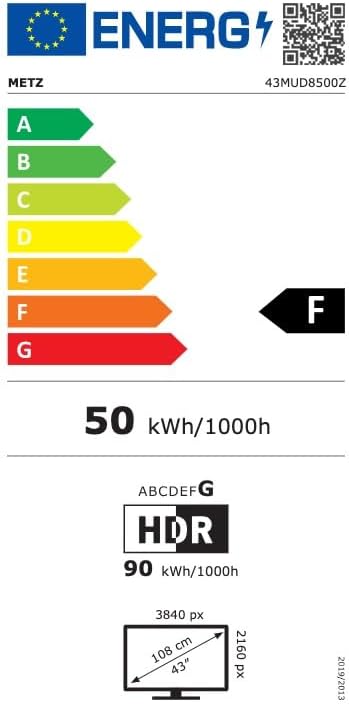
Image: EU Energy Label for the Metz MUD8500Z television, showing energy efficiency class F.
8 Issolvi l-problemi
If you encounter issues with your TV, consult the following common problems and solutions:
- Ebda Qawwa:
- Ensure the power cable is securely connected to both the TV and the wall outlet.
- Check if the wall outlet is functioning by plugging in another device.
- Press the power button on the remote or TV. - Ebda Stampa/Ħoss:
- Verify the correct input source is selected (e.g., HDMI 1, AV).
- Check all cable connections between the TV and external devices.
- For no sound, ensure volume is not muted or too low. - Il-Kontroll mill-bogħod Mhux Jaħdem:
- Replace the batteries in the remote control.
- Ensure there are no obstructions between the remote and the TV's IR sensor.
- Point the remote directly at the TV. - Kwistjonijiet ta' Konnessjoni man-Netwerk:
- Restart your Wi-Fi router.
- Check Wi-Fi password and ensure it is entered correctly.
- Try connecting via an Ethernet cable if Wi-Fi issues persist. - Picture Quality Issues (e.g., blurry, distorted):
- Check the resolution settings of the input source.
- Ensure the signal source (antenna, cable box, streaming) is stable.
- Adjust picture settings in the TV menu (brightness, contrast, sharpness).
Jekk il-problema tippersisti wara li tipprova dawn is-soluzzjonijiet, jekk jogħġbok ikkuntattja l-appoġġ għall-klijenti.
9. Manutenzjoni
9.1. Tindif tal-Iskrin
Imsaħ l-iskrin bil-mod b'ċarruta ratba u mingħajr suf. Għal marki persistenti, nixxef bil-modampLaħlaħ id-drapp bl-ilma jew b'prodott speċjalizzat għat-tindif tal-iskrin. Tużax kimiċi ħarxa jew materjali li joborxu.
9.2. Tindif tal-Kabinett
Wipe the TV cabinet with a soft, dry cloth. Avoid using liquid cleaners directly on the TV.
9.3. Ventilazzjoni
Ensure that the ventilation openings on the back of the TV are not blocked. Proper airflow prevents overheating and prolongs the life of the TV.
10. Garanzija u Appoġġ
The Metz MUD8500Z television comes with a standard manufacturer's warranty. According to specifications, the minimum general warranty duration provided by the supplier is 2 years.
For warranty claims, technical assistance, or further support, please refer to the contact information provided with your purchase documentation or visit the official METZ CONNECT websit.