1. Introduzzjoni
Thank you for choosing the VIMTAG Light Bulb Security Camera Model 847. This device is designed to provide reliable surveillance for your home, offering 2.5K/4MP high-definition video, pan/tilt functionality, night vision, two-way audio, and smart detection features. This manual will guide you through the setup, operation, and maintenance of your camera to ensure optimal performance.
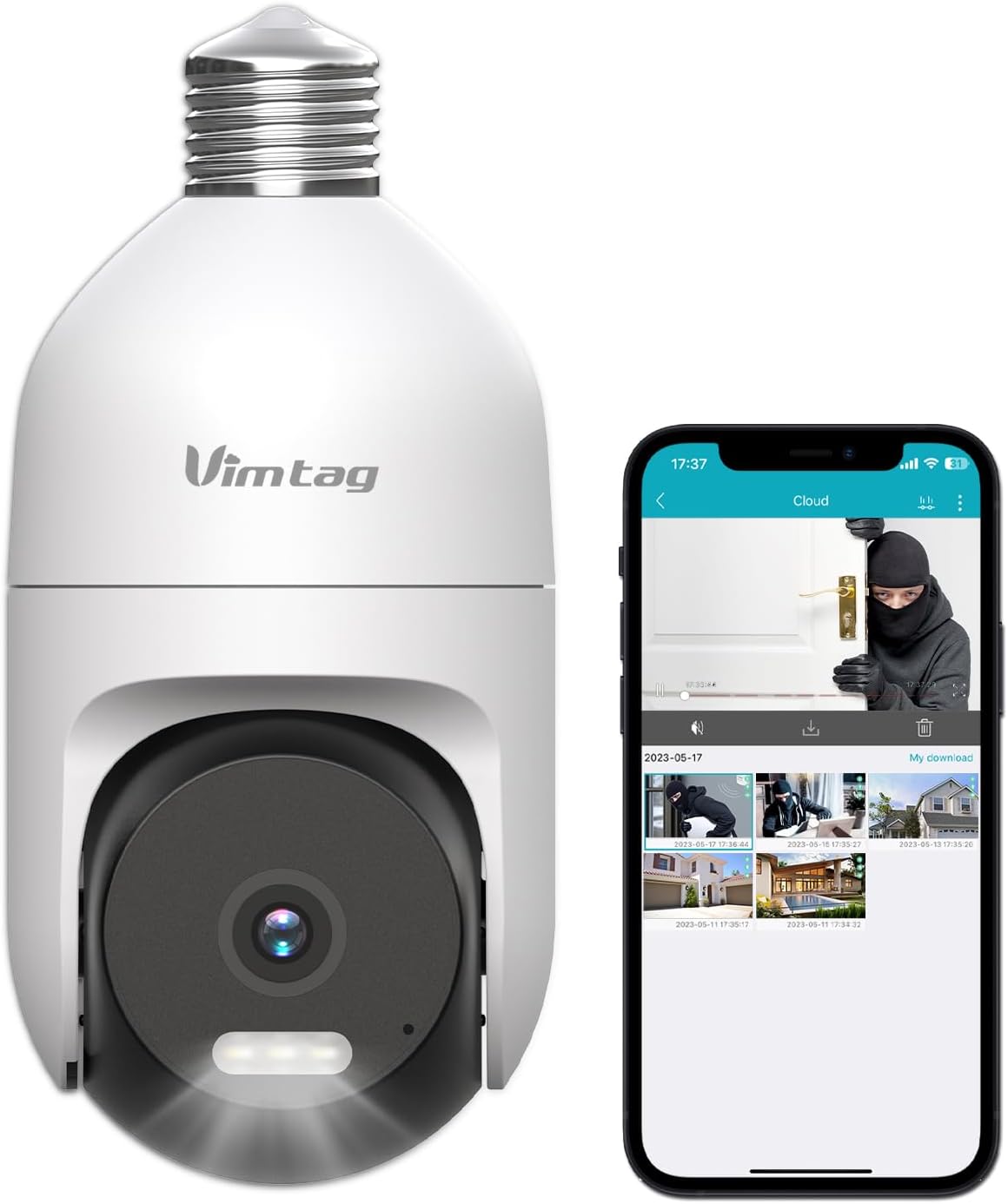
Image: The VIMTAG Light Bulb Security Camera Model 847, shown alongside a smartphone displaying its live feed.
2. Informazzjoni dwar is-Sigurtà
- Ensure the power is off before installing or removing the camera from a light socket.
- Install the camera in a standard E27/E26 light bulb socket.
- Do not expose the camera to extreme temperatures or humidity beyond its operating range.
- Żomm il-kamera 'l bogħod minn kampi manjetiċi qawwija.
- Tippruvax tiżżarma jew issewwi l-kamera int stess. Ikkuntattja l-appoġġ għall-klijenti għall-għajnuna.
- This camera is rated IP66 for weather resistance, suitable for outdoor use, but avoid submerging it in water.
3. Kontenut tal-Pakkett
The VIMTAG Light Bulb Security Camera package includes:
- VIMTAG Light Bulb Security Camera (Model 847)
- Manwal ta 'Istruzzjoni (dan id-dokument)
Nota: Karta SD għall-ħażna lokali mhijiex inkluża u trid tinxtara separatament jekk mixtieq.
4. Prodott Aktarview
The VIMTAG Light Bulb Security Camera features a compact design that fits into a standard light bulb socket. Key components include:
- Lenti tal-Kamera: Captures 2.5K/4MP video.
- LEDs infra-aħmar (IR): Għal viżjoni bil-lejl bl-abjad u bl-iswed.
- Spotlight: Provides color night vision and acts as a deterrent.
- Mikrofonu: For audio input during two-way talk and sound detection.
- Kelliem: For audio output during two-way talk and siren alarms.
- Slott tal-Karta Mikro SD: Għal ħażna lokali tal-vidjow (jappoġġja sa 512GB).
- Buttuna Irrisettja: Used for factory reset (usually a small pinhole).
- E27/E26 Base: Standard light bulb screw-in base for power and mounting.
5. Setup
5.1 Installazzjoni Fiżika
- Itfi: Ensure the power to the light socket is turned off at the circuit breaker before installation.
- Invita: Carefully screw the VIMTAG Light Bulb Camera into a standard E27/E26 light bulb socket. Ensure it is securely fastened.
- Qawwa Mixgħul: Irrestawra l-enerġija fis-sokit tad-dawl. Il-kamera tixgħel u tibda s-sekwenza tal-istartjar tagħha.

Image: Illustration of screwing the camera into a light bulb socket.
5.2 Tniżżil tal-App u Ħolqien ta' Kont
- Niżżel l-App: Fittex għal "Vimtag" in your smartphone's app store (iOS App Store or Google Play Store) and download the official VIMTAG app.
- Irreġistra Kont: Open the app and follow the on-screen instructions to register a new account using your email address or phone number.

Image: A smartphone screen showing the VIMTAG app icon, indicating the app download step.
5.3 It-tqabbil tal-kamera u l-konnessjoni Wi-Fi
- Żid Apparat: In the VIMTAG app, tap the "+" icon (usually in the top right or center) to add a new device.
- Select Camera Type: Choose "Light Bulb Camera" from the list of device types.
- Segwi l-Prompts fl-App: The app will guide you through connecting the camera to your 2.4GHz Wi-Fi network. This typically involves scanning a QR code generated by the app with the camera lens or listening for an audio prompt.
- Konferma tal-Konnessjoni: Once connected, the camera will indicate successful pairing (e.g., a voice prompt or LED indicator change), and its live feed will appear in the app.

Image: A smartphone screen showing the process of adding a new device, specifically selecting the light bulb camera.

Image: A smartphone displaying the live video feed from the VIMTAG camera after successful setup.
6. It-tħaddim tal-Kamera
6.1 Ħaj View u Kontroll Pan/Tilt
Once connected, open the VIMTAG app u agħżel il-kamera tiegħek biex view the live feed. Use the on-screen controls to pan (horizontal 355°) and tilt (vertical 100°) the camera lens to adjust the viewing angle. The camera offers 8x digital zoom for closer inspection.

Image: Multiple devices (phone, tablet, laptop, desktop) displaying the live feed from the VIMTAG camera, illustrating multi-terminal viewing.
6.2 Awdjo b'żewġ direzzjonijiet
The camera features a built-in microphone and speaker. Tap the microphone icon in the app to speak through the camera, and listen to audio from the camera's location. This allows for real-time communication with visitors or to deter intruders.

Image: A person speaking into a phone to communicate with a delivery person at the door via the VIMTAG camera's two-way audio.
6.3 Modi ta' Viżjoni bil-Lejl
The camera supports two night vision modes:
- Viżjoni Lejl IR: Defaults to black and white infrared vision in low light conditions.
- Color Night Vision with Spotlight: When the spotlight mode is activated (manually or via motion detection settings), the camera will switch to full-color night vision.
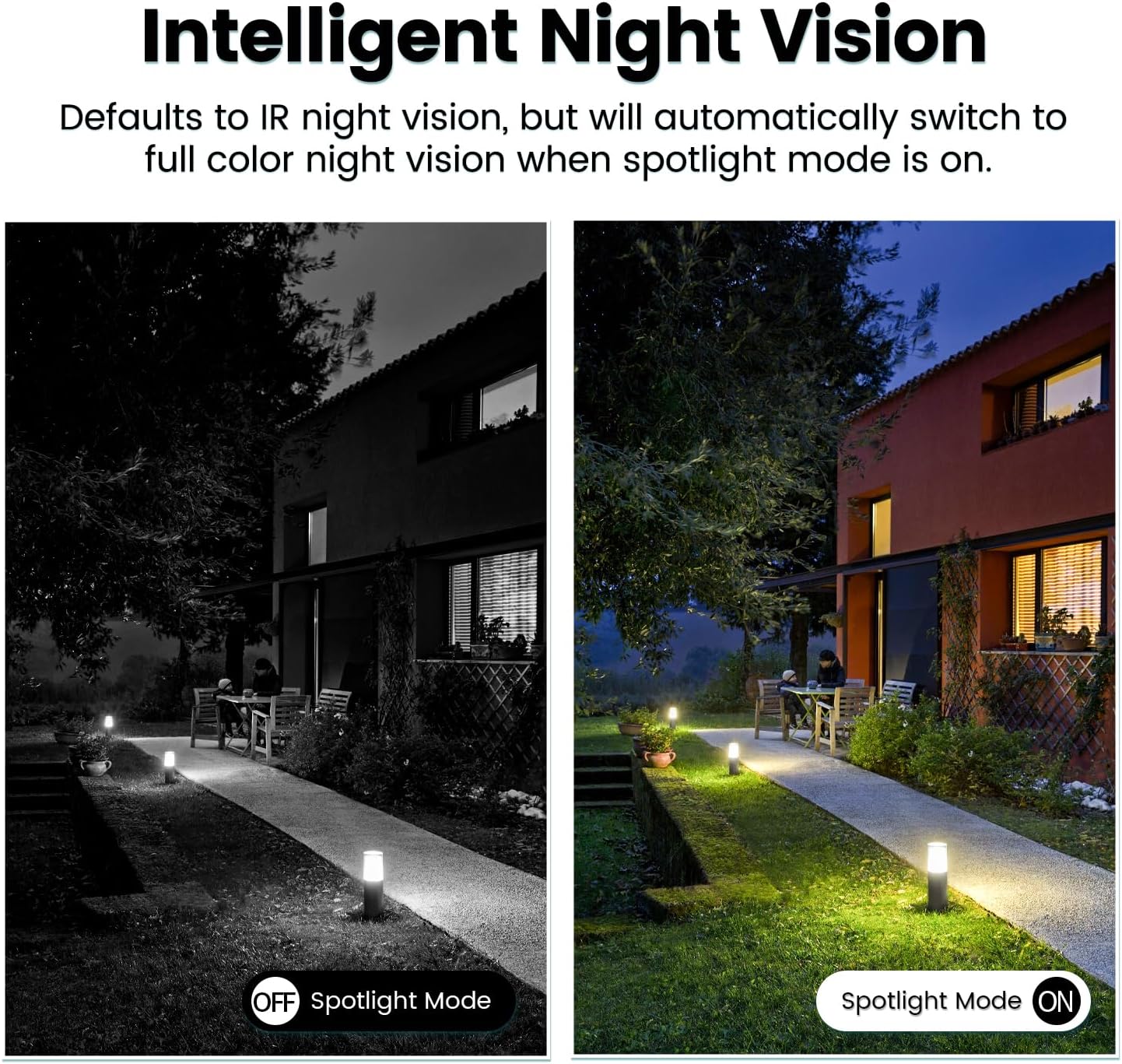
Image: Comparison of IR night vision (black and white, spotlight off) and color night vision (full color, spotlight on) from the VIMTAG kamera.
6.4 AI Human/Motion/Sound Detection and Alarms
Configure detection settings in the VIMTAG app. The camera can detect human shapes, general motion, and sounds. Upon detection, you will receive notifications on your phone, and the camera can trigger a siren alarm or activate its spotlight to deter unwanted activity.

Image: An illustration of the VIMTAG camera detecting an intruder, triggering a spotlight and sending an alert to a smartphone.

Image: A smartphone displaying a "Motion Detection Alert" notification from the VIMTAG app.
6.5 Reġistrazzjoni u Ħażna tal-Vidjo
Il-kamera tappoġġja żewġ għażliet ta' ħażna:
- Ħażna Lokali: Insert a Micro SD card (up to 512GB, not included) into the camera's SD card slot for continuous 24/7 recording. Recorded footage can be accessed and managed through the VIMTAG app.
- Ħażna Cloud: An optional cloud storage service is available through the VIMTAG app for secure, encrypted video storage. Subscription details can be found within the app.
6.6 Integrazzjoni ta' Alexa
The VIMTAG camera is compatible with Amazon Alexa. To integrate:
- Enable the VIMTAG ħila fl-app Alexa.
- Link your VIMTAG kont.
- Skopri apparati.
You can then use voice commands such as, "Alexa, show me the [camera name]" to view the live feed on compatible Alexa-enabled devices with screens (e.g., Echo Show).

Image: A person interacting with an Amazon Echo Show to view the VIMTAG camera feed using voice commands.
7. Manutenzjoni
- Tindif: Imsaħ il-lenti u l-qafas tal-kamera bil-mod b'ċarruta ratba u niexfa. Tużax kimiċi ħarxa jew prodotti tat-tindif li joborxu.
- Aġġornamenti tal-Firmware: Regularly check the VIMTAG app for available firmware updates. Keeping your camera's firmware updated ensures optimal performance, security, and access to new features.
- Ġestjoni tal-Karta SD: Jekk qed tuża SD card, erġa' agħmel dan perjodikament.view u agħmel backup tal-ikel importantitage. Format the SD card through the app if you experience recording issues or to clear old data.
8 Issolvi l-problemi
| Problema | Kawża Possibbli | Soluzzjoni |
|---|---|---|
| Camera fails to power on. | No power to the light socket; camera not screwed in properly. | Check the light socket's power supply; ensure the camera is securely screwed in. |
| Ma tistax tikkonnettja mal-Wi-Fi. | Incorrect Wi-Fi password; camera too far from router; 5GHz Wi-Fi network used. | Verify Wi-Fi password; move camera closer to router; ensure you are connecting to a 2.4GHz Wi-Fi network. |
| Kwalità fqira tal-vidjo. | Sinjal dgħajjef tal-Wi-Fi; lenti maħmuġa. | Improve Wi-Fi signal strength; clean the camera lens. |
| Is-sejbien tal-moviment mhux qed jaħdem. | Detection settings disabled or sensitivity too low; camera positioned incorrectly. | Check and adjust motion detection settings in the app; ensure camera has a clear view taż-żona. |
| Il-karta SD mhux qed tirrekordja. | SD card full or corrupted; incorrect recording settings. | Format the SD card via the app; check recording schedule and settings. Replace SD card if necessary. |
9. Speċifikazzjonijiet
| Karatteristika | Dettall |
|---|---|
| Isem tal-Mudell | 847 |
| Riżoluzzjoni tal-vidjo | 2.5K / 4MP (1440p) |
| Medda Pan/Tilt | 355° Orizzontali, 100° Vertikali |
| Zoom Diġitali | 8x |
| Viżjoni bil-lejl | IR Night Vision & Color Night Vision with LED Spotlight |
| Awdjo Two-Way | Yes (Built-in Microphone & Speaker) |
| Sejbien | AI Human, Motion, Sound Detection |
| Konnettività | Wi-Fi ta' 2.4GHz (IEEE 802.11b/g/n) |
| Għażliet ta' Ħażna | Micro SD Card (up to 512GB), Cloud Storage (optional subscription) |
| Sors tal-Enerġija | Corded Electric (E27/E26 Light Bulb Socket) |
| Użu fuq ġewwa/barra | Yes (IP66 Weatherproof) |
| Apparati Kompatibbli | iOS, Android, Mac, iPad, Windows, Amazon Alexa |
| Dimensjonijiet (L x W x H) | 3.07 x 3.07 x 5.31 pulzieri |
| Piż tal-oġġett | 9.1 uqija |
| Frame Rata | 25 frejm kull sekonda |
| Kodifikazzjoni tal-vidjo | H.264/H.265 |
10. Garanzija u Appoġġ
VIMTAG products come with a standard manufacturer's warranty. For specific warranty terms and conditions, please refer to the warranty card included with your product or visit the official VIMTAG website. For technical support, troubleshooting assistance, or any product-related inquiries, please contact VIMTAG customer service through the VIMTAG app or their official websit.
Riżorsi onlajn:
- VIMTAG Uffiċjali Websit: Visit the VIMTAG Aħżen fuq Amazon
- In-App Support: Access support features directly within the VIMTAG applikazzjoni mobbli.