1. Prodott Aktarview
The Taffio Android Head Unit is designed to upgrade your Porsche Macan (2017 onwards) with PCM 4.0 and Bose sound system. This unit integrates advanced navigation, communication, and multimedia features into your vehicle's dashboard, maintaining compatibility with original car functions.
Karatteristiċi ewlenin:
- 12.3-inch Full HD (1920x720) Capacitive Touchscreen Display
- Intuitive 3D User Interface
- FM/AM Radio Tuner with RDS
- Electronic and Mechanical Anti-Shock/Vibration System
- USB Ports for Music, Images, and Videos
- Bluetooth A2DP for Music Streaming
- Integrated Wireless CarPlay and Android Auto
- Built-in Wi-Fi for Hotspot Connectivity
- 4G LTE SIM Card Slot for Mobile Internet
- Rear Camera Input with Automatic Switching
- Customizable Equalizer Settings (Pop, Classic, Rock, Jazz, Bass/Treble/Balance Control)
- Day and Night Display Function with Automatic Brightness Adjustment
- Subwoofer Output, 4 Audio Outputs, 2 Video Outputs, 1 Auxiliary Video Input
- Button Illumination compatible with original car lighting
2. Kompatibilità
This head unit is compatible with Porsche Macan models from 2017 onwards, equipped with PCM 4.0 and a Bose sound system. It supports all original car radio functions, including the original reverse camera, PDC (Park Distance Control), and car settings.
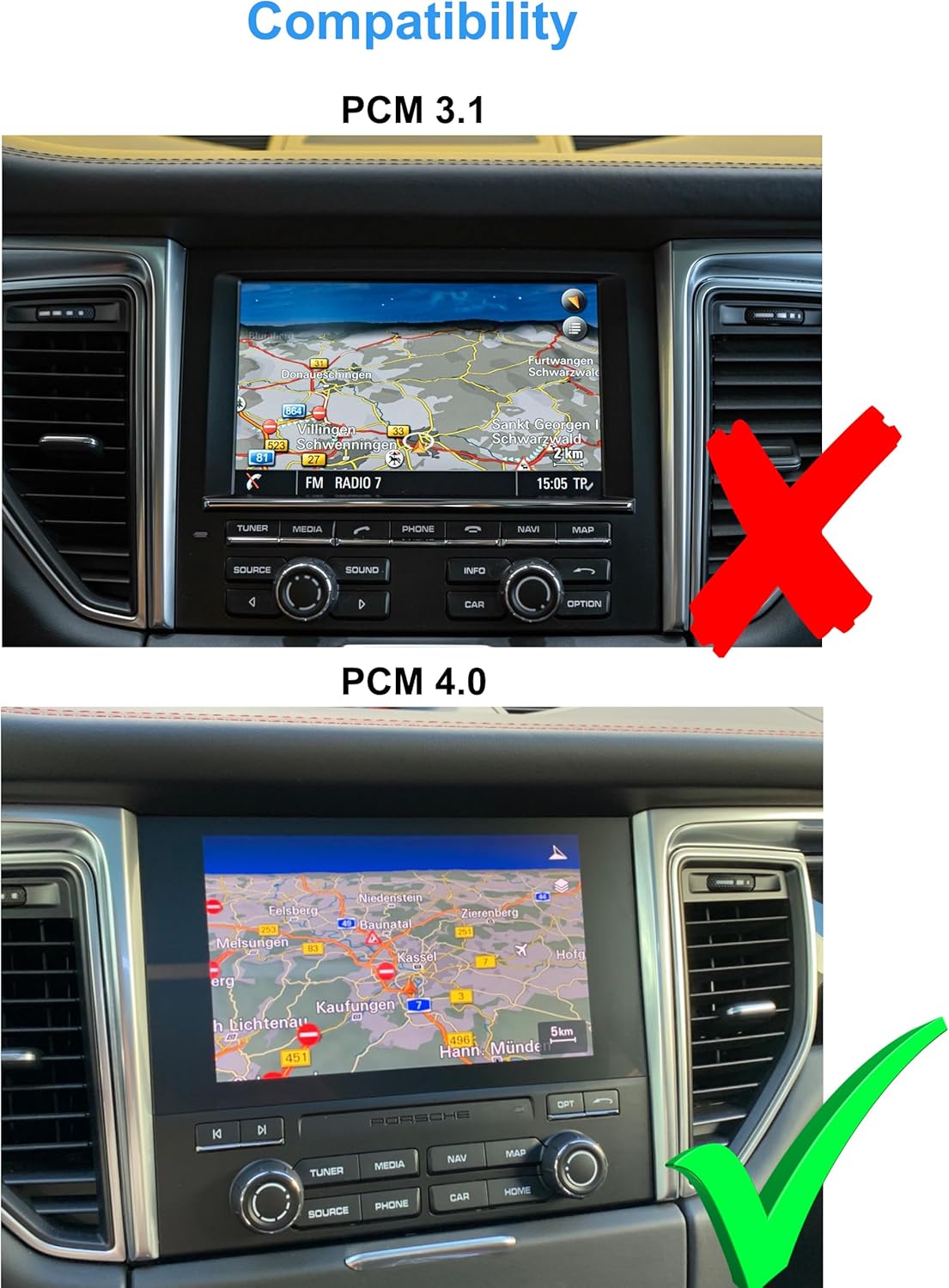
Image: Compatibility check. The top image shows a PCM 3.1 system, which is not compatible (marked with a red X). The bottom image shows a PCM 4.0 system, which is compatible (marked with a green checkmark). Ensure your vehicle has the PCM 4.0 system as shown.
3. Kontenut tal-Pakkett
Ivverifika li l-komponenti kollha huma preżenti fil-pakkett qabel ma tipproċedi bl-installazzjoni.

Immaġni: Fuqview of included components. This includes the Android Multimedia System, Power Cable + CAN-BUS + Most Adapter, 360 Cam IN cable, Radio Antenna Adapter, RCA Plugs & Sim Slot, Rear Cam IN cable, 2x USB cables, Original USB Adapter, GPS Antenna, 4G Antenna, and Mounting plates and frames.
- 1x Multimedia Display Unit
- 1x GPS Antenna
- 2x 4G Antennas
- 1x Radio Antenna Adapter
- 1x Power Cable with Canbus Decoder
- 1x Box for Bose Audio System
- 2x Kejbils USB
- Mounting Panels and Accessories
- 1x Audio/Video Cable Set
- 1x PDF Manual (downloadable)
4. Setup u Installazzjoni
Installation of this unit is designed to be Plug & Play, requiring no additional adapters or mounting frames. However, professional installation is recommended to ensure proper functionality and avoid damage to your vehicle's electrical system.
4.1 Kontroll ta' Qabel l-Installazzjoni
- Ensure the vehicle's ignition is off and the battery is disconnected before starting.
- Confirm your Porsche Macan has the PCM 4.0 system. Refer to the compatibility section.
- Iftaħ il-komponenti kollha mill-pakkett u vverifika mal-lista tal-kontenut tal-pakkett.
4.2 Dijagramma tal-Wiring
Refer to the following diagram for proper connection of all cables and components.

Image: Detailed wiring diagram. This diagram illustrates how to connect the main unit (A) to the CAN-BUS Decoder (B), MOST Box for Bose Sound System (C), and various cables (D, E) to the original radio plug. It also shows connections for GPS antenna, 4G antennas, rear camera, RCA plugs, SIM slot, USB, and fiber optic cable.
- Connect to TAFFIO Radio (A)
- GPS Antenna (2)
- 2x 4G Antennas (3)
- Rear Camera Plug (4)
- USB (5, 6)
- Can Cable (7)
- 360 Cam Plugs (8)
- RCA Plugs & Sim Slot (9)
- Rear Cam (Original) (10)
- Connect RCA Plugs (11)
- Connect Fibre Optic cable (12)
- CAN-BUS Decoder (B)
- MOST Box (Only for Bose Sound System) (C)
- Connect with Original Radio Plug (D)
- Radio Antenna Connect with Original Plug (E)
4.3 Dehra wara l-Installazzjoni

Image: Before and After Installation. The top image shows the original dashboard display before installation. The bottom image shows the dashboard with the Taffio Android Head Unit installed, displaying the Android interface.
5. Istruzzjonijiet Operattivi
5.1 Operazzjoni Bażika
The unit operates via its 12.3-inch capacitive touchscreen. Navigate through menus by tapping and swiping. Physical buttons on the unit and steering wheel controls (if supported) can also be used.
5.2 Funzjoni tar-Radju
Access the FM/AM radio tuner from the main menu. The RDS (Radio Data System) feature displays station names and other information where available. Use the on-screen controls or physical knobs to tune frequencies and save presets.

Image: Radio Interface. This image displays the unit's radio interface, showing FM/AM selection, frequency display (e.g., 107.1 MHz), and favorite station presets.
5.3 Daqq tal-Multimedia
Connect USB devices to play music, view images, or watch videos. The unit supports various media formats. Bluetooth A2DP allows wireless audio streaming from compatible smartphones.
5.4 Navigazzjoni u Konnettività
The unit comes with current GPS navigation software and free lifetime updates. Integrated Wi-Fi allows connection to mobile hotspots or your smartphone for internet access. For mobile internet without Wi-Fi, insert a 4G LTE SIM card into the designated slot.
5.5 CarPlay u Android Auto
The unit features integrated Wireless CarPlay and Android Auto. Connect your compatible smartphone wirelessly to access navigation, music, messages, and other apps directly on the head unit's display.
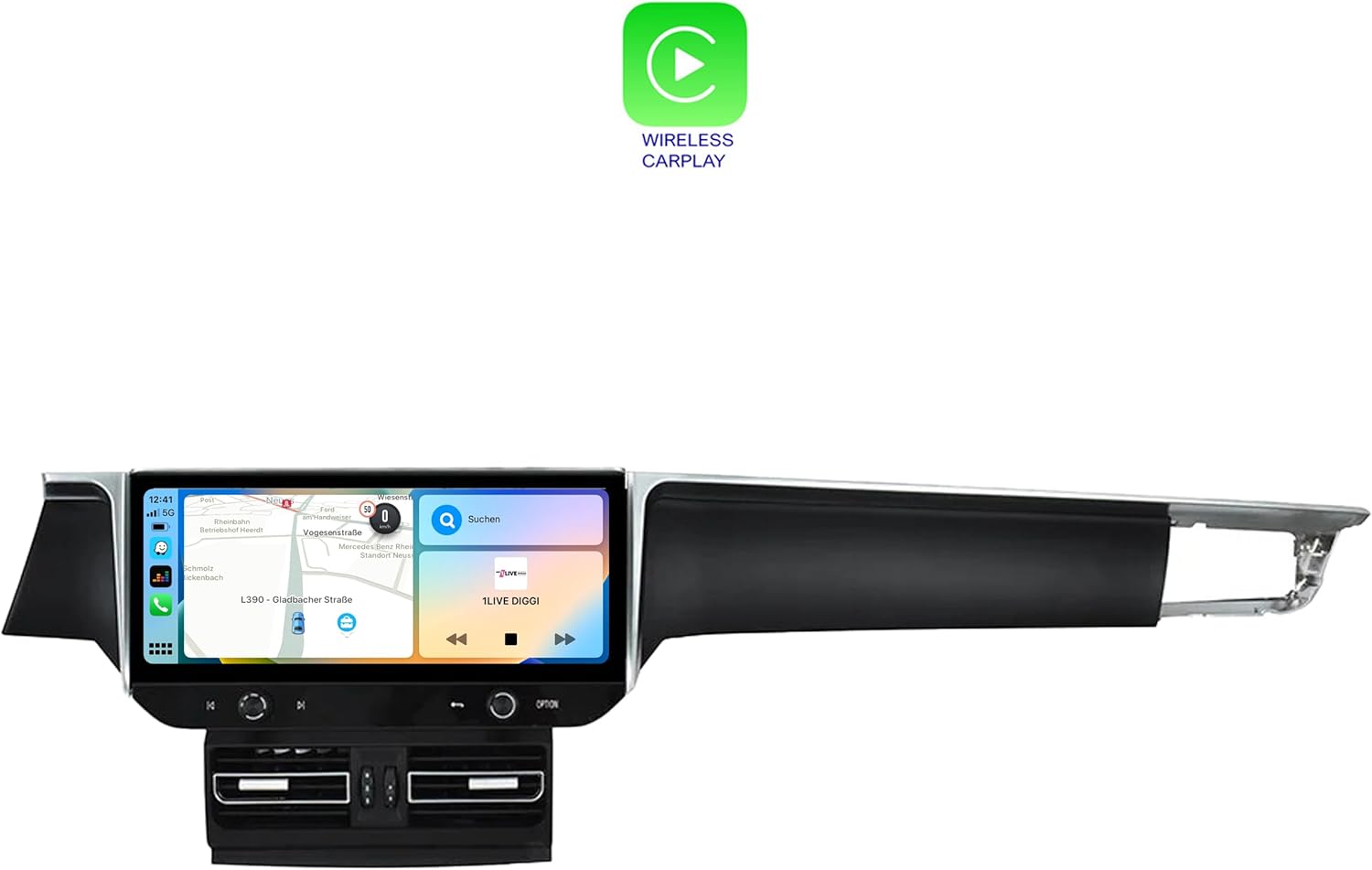
Image: Wireless CarPlay. This image shows the CarPlay interface on the unit, displaying various iOS apps like Maps, Music, and Messages.

Image: Android Auto. This image shows the Android Auto interface on the unit, displaying apps like Google Maps and Messages.
5.6 Issettjar tas-Sistema
Access the system settings to customize various parameters, including display brightness (day/night mode), audio equalizer settings, and other system preferences. The unit features automatic memory for all settings.

Image: Main Application Menu. This image displays the unit's main app screen, featuring icons for Chrome, Android Settings, Phone Link, File Manager, MyGoDVR, Sound, ArMap Auto, AUX IN, Auto-SETUP, Manual, and Screen Saver Settings.
6. Manutenzjoni
To ensure the longevity and optimal performance of your Taffio Android Head Unit, follow these maintenance guidelines:
- Tindif tal-Iskrin: Uża drapp ratba u mingħajr ħelu ftit dampened with water or a screen cleaner specifically designed for electronic displays. Avoid abrasive materials or harsh chemicals.
- Aġġornamenti tas-Software: Periodically check for software updates to ensure you have the latest features and performance improvements. Updates are typically available via Wi-Fi or USB.
- Kundizzjonijiet Ambjentali: Evita li tesponi l-unità għal temperaturi estremi, dawl tax-xemx dirett għal perjodi twal, jew umdità eċċessiva.
- Konnessjonijiet tal-kejbil: Kun żgur li l-kejbils kollha huma konnessi sew. Konnessjonijiet laxki jistgħu jwasslu għal funzjonalità intermittenti.
7 Issolvi l-problemi
If you encounter issues with your head unit, refer to the following common problems and solutions:
| Problema | Kawża Possibbli | Soluzzjoni |
|---|---|---|
| L-unità ma tixgħelx. | Konnessjoni tal-enerġija maħlula, fjus maħruq, problema bil-batterija tal-vettura. | Iċċekkja l-konnessjonijiet kollha tal-kejbil tal-enerġija. Spezzjona l-fjusis tal-vettura. Kun żgur li l-batterija tal-vettura hija ċċarġjata. |
| L-ebda ħoss mill-kelliema. | Volume too low, incorrect audio source, loose speaker wires, Bose adapter issue. | Increase volume. Select correct audio source. Check speaker wire connections. Verify Bose adapter is correctly installed and functioning. |
| GPS signal is weak or absent. | L-antenna tal-GPS mhix installata sew jew hija mblukkata. | Kun żgur li l-antenna tal-GPS tkun immuntata f'post ċar b'wisa' mingħajr ostakli. view tas-sema. Iċċekkja l-konnessjoni tal-antenna. |
| CarPlay/Android Auto mhux qed jikkonnettja. | Bluetooth/Wi-Fi off on phone, incompatible phone, software glitch. | Ensure Bluetooth and Wi-Fi are enabled on your smartphone. Restart both the phone and the head unit. Check for software updates. |
| Original car functions (e.g., reverse camera, PDC) not working. | CAN-BUS decoder or wiring issue. | Verify all CAN-BUS and original wiring connections are secure and correct according to the wiring diagram. |
Jekk il-problema tippersisti wara li tipprova dawn is-soluzzjonijiet, jekk jogħġbok ikkuntattja l-appoġġ għall-klijenti.
8. Speċifikazzjonijiet
| Karatteristika | Dettall |
|---|---|
| Brand | Taffio |
| Numru tal-Mudell | TXH6701-4-BO |
| Daqs tal-Wiri | 12.3 pulzieri |
| Tip ta 'Wiri | Touchscreen capacitive |
| Riżoluzzjoni tal-Wiri | 1920 x 720 Full HD |
| Sistema Operattiva | Android 13 |
| Proċessur | Snapdragon Qualcomm 668s 8x 2.0 GHz |
| RAM | 8 GB |
| Ħażna Interna | 128 GB |
| Konnettività | Bluetooth, USB, Wi-Fi, 4G LTE |
| Karatteristiċi Speċjali | Integrated Wireless CarPlay, Android Auto, GPS Navigation, RDS Radio, Rear Camera Input, Customizable EQ |
| Modalità tal-Ħruġ tal-Awdjo | AUX |
| Tip ta 'Servizz tal-Vettura | Car (Porsche Macan PCM 4.0 Bose) |
9. Garanzija u Appoġġ
This product comes with a 2-year warranty. For technical support, troubleshooting assistance, or warranty claims, please contact the seller, REALMEDIASHOP, directly. Ensure you have your purchase invoice available.
Bejjiegħ: REALMEDIASHOP
Perjodu ta' Garanzija: 2 Snin
Aġġornamenti tal-Mappa tal-GPS: Free lifetime updates provided by the seller.


