1. Introduzzjoni
The Phomemo D520BT Thermal Label Printer is designed for efficient and high-quality label printing, suitable for small businesses and home offices. It supports a wide range of label sizes and offers versatile connectivity options including USB and Bluetooth.

Image: The Phomemo D520BT printer in black, actively printing a shipping label. A smartphone nearby shows a digital label, indicating Bluetooth connectivity. This illustrates the printer's primary function for shipping and package labeling.
2. X'hemm fil-Kaxxa
Malli tiftaħ il-pakkett, jekk jogħġbok ivverifika li l-komponenti kollha li ġejjin huma inklużi:
- Phomemo D520BT Thermal Label Printer
- 30 sheets of 4x6 inch thermal label paper
- Adapter tal-Enerġija u Kurdun
- Type C Adapter and USB Cable
- Gwida għall-Utent

Image: A flat lay of all items included in the Phomemo D520BT printer package, clearly showing the printer, a roll of labels, the user guide, power accessories, and connectivity cables.
3. Prodott Aktarview
Familiarize yourself with the key components of your Phomemo D520BT printer:
- Cover Button: Used to open the printer cover for loading labels.
- Buttuna ta' l-Għalf: Advances the label paper.
- Slott tal-Ħruġ tal-Karta: Fejn joħorġu tikketti stampati.
- Large Paper Bin: Internal compartment for holding label rolls or fan-fold labels.
- Printer Bracket: Supports the label roll within the paper bin.
- Gwida tal-Karta: Ensures labels are fed straight.
- Port USB: For wired connection to computers.
- Port tal-Enerġija: Tqabbad mal-adapter tal-enerġija.
- Swiċċ tal-Enerġija: Ixgħel jew jitfi l-istampatur.
Video: This video provides a visual guide to the physical components of the Phomemo D520BT printer, including the cover button, ports, and internal paper handling mechanisms, and demonstrates initial setup steps like connecting power and loading paper.
4. Setup
4.1 Initial Setup (Power & Paper Loading)
- Waħħal il-korda tal-enerġija mal-adapter tal-enerġija.
- Qabbad l-adapter tal-enerġija mal-port tal-enerġija tal-istampatur.
- Turn the printer ON using the power switch.
- Open the printer cover by pressing the cover button.
- Assemble the label roll onto the printer bracket.
- Adjust the paper guide to fit the label width, insert the label, and ensure it is straight and smooth.
- Agħlaq il-qoxra tal-printer.
- Press the feed button to print a test page and confirm proper paper loading.

Image: A visual demonstration of how to load two types of shipping labels into the Phomemo D520BT printer: fan-fold paper and roll paper, highlighting the internal paper holder design.
4.2 Installazzjoni tas-Sewwieq (Windows)
Before installation, ensure your printer is connected via USB and turned on.
- Download the latest driver from the official Phomemo websit.
- Follow the on-screen installation steps until finished.
- Go to Control Panel > Devices and Printers.
- Right-click on your D520BT Printer and select "Printer properties".
- Click "Print Test Page" to verify the installation.
- For paper setup, right-click on your printer again and select "Printing preferences".
- Go to the "Page Setup" tab. Select the paper size in "Paper Name". If your size is not listed, click "New" to create a custom label size by inputting width and height, then click "OK" to save.
- To change print speed, density, or size units, go to the "Option" tab. Adjust "Print Speed" and "Print Density" as needed.
- Click "Adjust the sensor" to calibrate your printer sensor, then click "Study gap label" to allow the printer to learn the gap label.
- Click "Apply" and "OK" to save changes.
For detailed video tutorials on driver installation and setup for various operating systems, please refer to the official Phomemo YouTube channel.
4.3 Għażliet ta' Konnettività
The Phomemo D520BT offers flexible connectivity:
- Bluetooth: Compatible with Android and iOS devices via the "Labelife" app.
- USB: Supports connections to Windows, Mac, Chrome OS, and Linux systems.
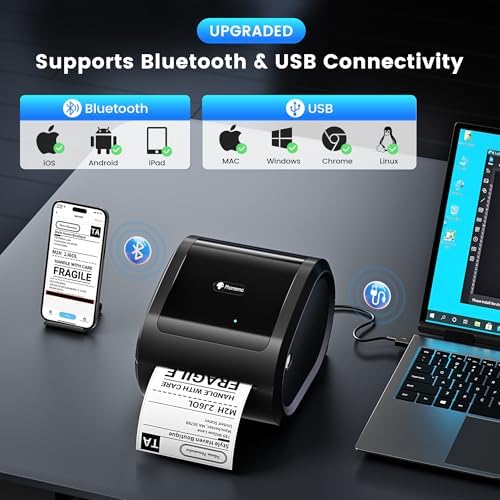
Image: The Phomemo D520BT printer connected to both a smartphone via Bluetooth and a laptop via USB, illustrating its broad compatibility across various operating systems and devices.
5. Joperaw
5.1 Stampar ta' Tikketti
Once the printer is set up and connected, you can print labels from various platforms and applications. For PDF files, tiftaħ il- file, click the print icon, select your D520BT printer, and ensure the preview and print size are correct before printing.

Image: A graphic illustrating the Phomemo D520BT printer's compatibility with a wide array of shipping and sales platforms, such as Amazon, Etsy, eBay, UPS, PayPal, and Shopify.

Immaġni: Wirja ta' kollaġġasing diverse applications of the Phomemo D520BT printer, from standard shipping labels to specialized uses like barcode labels, thank you stickers, jar labels, QR codes, and document labels.
6. Manutenzjoni
To ensure optimal performance and longevity of your Phomemo D520BT printer, regular maintenance is recommended:
- Tindif tar-ras tal-istampar: Uża drapp mingħajr suf biex tnaddaf ħafifampened with isopropyl alcohol to gently wipe the print head. Ensure the printer is off and cooled down before cleaning.
- Tindif tar-Roller tal-Platen: Dawwar ir-romblu tal-platen u imsaħ b'adamp drapp biex tneħħi kwalunkwe residwu ta’ kolla jew trab.
- Tneħħija tat-Trab: Regularly clean the exterior of the printer with a soft, dry cloth to prevent dust accumulation.
- Ħażna: Aħżen il-printer f'post frisk u niexef 'il bogħod mix-xemx diretta u minn temperaturi estremi.
7 Issolvi l-problemi
If you encounter issues with your Phomemo D520BT printer, please refer to the following common solutions:
| Problema | Kawża Possibbli | Soluzzjoni |
|---|---|---|
| Il-printer mhux qed jirrispondi | Power issue, loose cable, driver not installed. | Check power connection, ensure USB/Bluetooth is properly connected, reinstall printer drivers. |
| Kwalità tal-istampar fqira (sfumata, imċajpra) | Print head dirty, incorrect print density setting, low-quality labels. | Clean the print head, adjust print density in printer preferences, use high-quality thermal labels. |
| It-tikketti mhux qed jitimgħu sew | Paper jammed, paper guide not adjusted, incorrect label type. | Clear any paper jams, adjust paper guides to fit label width, ensure you are using thermal labels. |
| Kwistjonijiet ta 'konnessjoni Bluetooth | Bluetooth not enabled, incorrect pairing, app issues. | Ensure Bluetooth is enabled on both devices, unpair and re-pair the printer, restart the "Labelife" app. |
If the issue persists, please contact Phomemo customer support for further assistance.
8. Speċifikazzjonijiet
| Karatteristika | Dettall |
|---|---|
| Isem tal-Mudell | D520BT-BK |
| Teknoloġija tal-Istampar | Termali |
| Veloċità Massima tal-Istampar (Monokromu) | 72 ppm (labels per minute) / 150mm/s |
| Daqs Massimu tal-Midja | 4 x 6 pulzier |
| Midja Stampata | Tikketti |
| Teknoloġija tal-Konnettività | Bluetooth, USB |
| Apparati Kompatibbli | Laptops, PC, Smartphones, Tablets (Android, iOS, Windows, Mac, Chrome OS, Linux) |
| Dimensjonijiet tal-Prodott | 9.06 x 7.28 x 6.85 pulzieri |
| Piż tal-oġġett | 2.43 liri |
9. Garanzija u Appoġġ
Phomemo provides comprehensive customer support for the D520BT Thermal Label Printer. For any inquiries or technical assistance, please utilize the following resources:
- Appoġġ għall-Klijent: Available via phone, email, or remote support. Contact details are typically found in the included User Guide or on the official Phomemo websit.
- Tutorials tal-vidjo: Detailed video tutorials for setup and troubleshooting are available on the official Phomemo YouTube channel.
- Informazzjoni dwar il-garanzija: Please refer to the warranty card included with your product or the official Phomemo websit għal termini u kundizzjonijiet speċifiċi tal-garanzija.


