1. Introduzzjoni
The Mastfuyi FY12DMM is a versatile 2-in-1 device combining a high-resolution thermal imager with a comprehensive digital multimeter. This instrument is designed for professionals and enthusiasts requiring precise measurements and visual thermal analysis in various fields, including electrical, mechanical, construction, and automotive diagnostics. This manual provides essential information for safe and effective operation.
2. Informazzjoni dwar is-Sigurtà
Always adhere to the following safety precautions to prevent personal injury or damage to the device.
- Aqra u tifhem l-istruzzjonijiet kollha qabel l-użu.
- Tħaddimx l-apparat jekk jidher li hu bil-ħsara jew mhux qed jaħdem sew.
- Ensure proper test lead connection before taking any measurements.
- Teċċedix il-klassifikazzjonijiet massimi tad-dħul għal kwalunkwe funzjoni.
- Oqgħod attent meta taħdem ma' ċirkwiti elettriċi ħajjin.
- Żomm l-apparat niexef u nadif.
- Only use accessories and replacement parts specified by the manufacturer.
3. Kontenut tal-Pakkett
Ivverifika li l-oġġetti kollha huma preżenti fil-pakkett:
- 1 x Mastfuyi FY12DMM Thermal Imager Multimeter
- 1 x Charging Cable (USB Type-C)
- 1 x Każ tal-Ġarr
- 1 x Manwal tal-Utent (dan id-dokument)
- Wavel tat-Test (Aħmar u Iswed)
Nota: The flexible AC current clamp is not included in the standard package.

4. Device Overview
The Mastfuyi FY12DMM integrates thermal imaging and digital multimeter functionalities into a single, portable unit. Its design focuses on ease of use and comprehensive diagnostic capabilities.

Il-komponenti ewlenin jinkludu:
- 3.98-inch TFT LCD Touch Screen: A full-view display for clear visualization of thermal images, multimeter readings, and intuitive menu navigation.
- Thermal Imager Lens: The optical component responsible for capturing infrared radiation.
- Ġakki tad-Dħul tal-Multimetru: Standard ports for connecting test leads for electrical measurements.
- Buttuna tal-Qawwa: Controls the device's power state.
- Navigation Wheel/Buttons: Provides alternative control for menu selection and parameter adjustments.
- Port USB tat-Tip Ċ: Used for charging the internal battery and transferring data to a computer.

5. Setup
5.1 Iċċarġjar inizjali
Qabel l-ewwel użu, iċċarġja l-apparat kompletament.
- Connect the supplied USB Type-C charging cable to the device's charging port.
- Qabbad it-tarf l-ieħor tal-kejbil ma' adapter tal-enerġija USB standard (mhux inkluż) jew port USB tal-kompjuter.
- L-indikatur tal-iċċarġjar se jixgħel. Ħalli l-apparat jiċċarġja sakemm l-indikatur juri ċarġ sħiħ.

5.2 Power On/Off
- Biex tixgħel: Agħfas u żomm il-buttuna tal-qawwa sakemm l-iskrin jixgħel.
- To power off: Press and hold the power button until the shutdown prompt appears, then confirm.
6. Operating the Thermal Imager
6.1 Immaġini Termali Bażiċi
Upon powering on, the device typically defaults to thermal imaging mode, displaying a real-time thermal image with temperature readings.
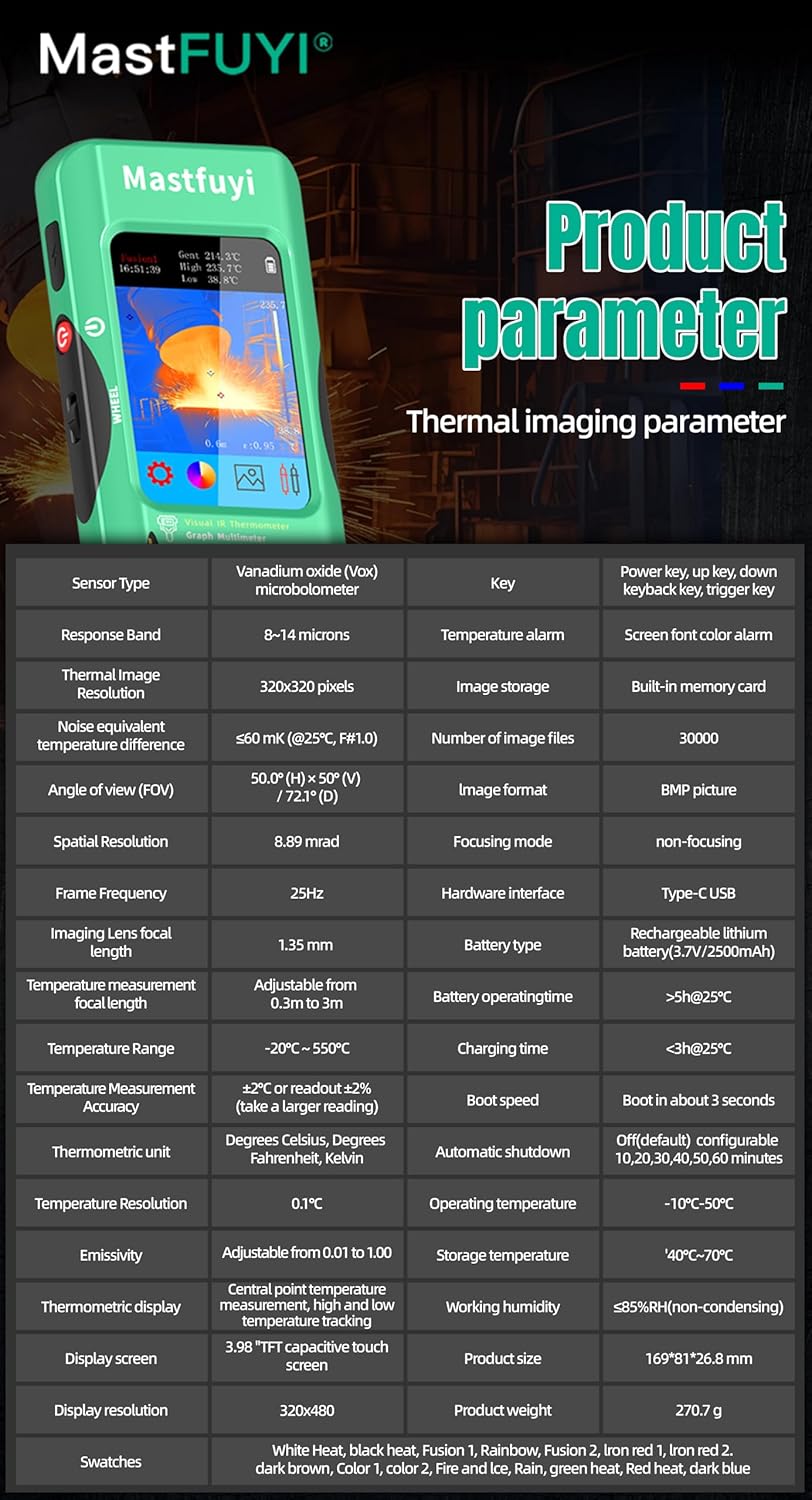
- Firxa tat-Temperatura: Measures temperatures from -20℃ to 550℃ (-4℉ to 1022℉).
- Riżoluzzjoni IR: Features a 320 x 320 pixel infrared resolution for clear and detailed thermal images.
- Rata ta' Aġġornar: Operates at 25Hz, providing a smooth, real-time thermal video feed.
- Sensittività Termali (NETD): With a sensitivity of less than 60mk, the device can detect subtle temperature differences.
The device can perform microscopic detection at a component level, though a macro lens is not included as a standard accessory. If detailed close-up thermal imaging is required, a corresponding macro lens package would need to be acquired separately.

6.2 Thermal Palettes
The device offers 15 distinct thermal palettes to enhance the visualization of temperature differences. Selecting the appropriate palette can significantly improve the clarity of thermal patterns for specific applications.
- Access palette options via the touchscreen menu or navigation controls.
- Experiment with palettes like Iron Red, Rainbow, White Hot, and Black Hot to find the most suitable display for your inspection.
6.3 Aġġustament tal-Emissività
Accurate temperature measurements depend on correct emissivity settings. The emissivity value (adjustable from 0.01 to 1.0) should match the material surface being measured.
- Locate the emissivity setting in the thermal imaging menu.
- Consult standard emissivity tables for common materials or adjust the value to achieve the most accurate readings for your specific target.
6.4 High and Low Temperature Alarm
The intelligent alarm function allows you to set custom temperature thresholds. The device will trigger immediate audible and visual alerts if temperatures exceed or fall below these predefined safety ranges.
- Access the alarm settings through the thermal imaging interface.
- Configure the upper and lower temperature limits to suit your monitoring requirements.
7. Operating the Multimeter
The FY12DMM includes a 20,000-count digital multimeter for precise electrical measurements.
7.1 Konnessjoni tal-wajers tat-test
- Daħħal il-wajer tat-test aħmar fil-jack tad-dħul "VΩmA".
- Daħħal il-wajer tat-test iswed fil-jack tad-dħul "COM" (komuni).
- For AC current measurements with an optional clamp, refer to the clamp's instructions.
7.2 Funzjonijiet tal-Kejl
Use the touchscreen or navigation to select the desired measurement function. The device supports auto-ranging for most functions.
- DC Voltage: Sa 1000V.
- AC Voltage: Sa 750V.
- Reżistenza: Sa 200MΩ.
- Kapaċità: Sa 99.999mF.
- Test tad-Diode: Checks diode functionality.
- Test ta' Kontinwità: Audible indication for continuity.
- Flexible AC Current: Up to 2000A (requires optional clamp).
- Temperatura: -20℃ to 1300℃ (-4℉ to 2372℉) using a K-type thermocouple (not included).
L-apparat għandu Żomm function to freeze the current reading and Firxa measurement modes for manual range selection if desired.
8. Ġestjoni tad-Data
8.1 Ħażna tal-Immaġni
The FY12DMM has a built-in memory card capable of storing up to 30,000 images in BMP format.
- To save a thermal image, press the designated capture button on the screen.
- Images are automatically saved to the internal memory.

8.2 Exporting Data
Stored images and recorded waveform data can be exported to a computer for further analysis.
- Connect the device to a computer using the USB Type-C cable.
- The device should appear as a removable storage device.
- Copy the desired BMP image files or data logs to your computer.
9. Manutenzjoni
9.1 Tindif
- Imsaħ il-barra tal-apparat b'ċarruta ratba u damp drapp. Tużax tindif jew solventi li joborxu.
- Gently clean the thermal imager lens with a lens cleaning cloth.
- Kun żgur li l-apparat ikun mitfi u skonnettjat minn kwalunkwe sors ta' enerġija qabel ma tnaddaf.
9.2 Kura tal-Batterija
- Erġa' ċċarġja l-batterija regolarment, anke jekk l-apparat ma jkunx qed jintuża ta' spiss, biex iżżomm il-batterija f'kundizzjoni tajba.
- Avoid storing the device in extreme temperatures.
10 Issolvi l-problemi
| Problema | Kawża Possibbli | Soluzzjoni |
|---|---|---|
| L-apparat ma jixgħelx. | Batterija baxxa jew eżawrita. | Charge the device fully using the supplied USB Type-C cable. |
| Qari mhux preċiż tat-temperatura. | Incorrect emissivity setting; dirty lens. | Adjust emissivity for the target material; clean the thermal imager lens. |
| Multimeter readings are unstable or incorrect. | Poor test lead connection; incorrect function selected. | Ensure test leads are securely connected; verify the correct measurement function is selected. |
| Cannot transfer data to computer. | Faulty USB cable; incorrect connection mode. | Try a different USB Type-C cable; ensure the device is properly connected and recognized by the computer. |
11. Speċifikazzjonijiet
11.1 Infrared Camera Specifications
| Karatteristika | Speċifikazzjoni |
|---|---|
| Daqs tal-Wiri | 3.98 Pulzier TFT LCD |
| Riżoluzzjoni IR | 320 x 320 pixel |
| Riżoluzzjoni tal-Iskrin | 320 x 480 pixel |
| Angolu ta ' View (FOV) | 50.0°(H) x 50.0°(V) / 72.1°(D) |
| Riżoluzzjoni Spazjali (IFOV) | 8.89mrad |
| Firxa tat-Temperatura | -20 ℃ sa 550 ℃ (-4 ℉ sa 1022 ℉) |
| Sensittività Termali/NETD | Less than 60mk |
| Riffriskar Rata | 25Hz |
| Settings tad-Distanza | 0.3 - 3 metru |
| Emissività | 0.01 - 1.0 (aġġustabbli) |
| Thermal Palettes | 15 |
| Number of Storage Images | 19,000 (internal memory) |
11.2 Digital Multimeter Specifications
| Karatteristika | Firxa | Riżoluzzjoni | Eżattezza |
|---|---|---|---|
| Display MAX | 20000 għadd | ||
| DC Voltage | 20mV/200mV/2V/20V/200V/1000V | 0.001mV sa 0.1V | ±(0.05%+3) to ±(0.5%+3) |
| AC Voltage | 20mV/200mV/2V/20V/200V/750V | 0.001mV sa 0.1V | ±(0.1%+3) to ±(0.5%+3) |
| Flexible AC Current | 200A/2000A | 0.1A/1A | ±(1.0%+5) |
| Reżistenza | 200Ω sa 200MΩ | 0.01Ω sa 0.01MΩ | ±(0.2%+3) to ±(5%+5) |
| Kapaċità | 999.99nF to 99.999mF | 0.01nF to 0.001mF | ±(2%+5) to ±(5%+20) |
| Temperatura | -20℃~1300℃/-4℉-2372℉ | 1 ℃ / 1 ℉ | ±(2%+5) |
| Dajowd | Iva | ||
| Kontinwità | Iva | ||

11.3 Speċifikazzjonijiet Ġenerali
- Qawwa: 2500mAh rechargeable battery (built-in)
- Daqs: 169 x 81 x 26.8 mm
- Piż: 270g
- Operating System Languages: English, Spanish, German, French, Italian, Japanese, Chinese (selectable)

12. Garanzija u Appoġġ
For warranty information and technical support, please refer to the warranty card included with your product or visit the official Mastfuyi websit.
Visit the Mastfuyi Store on Amazon għal aktar prodotti u riżorsi ta' appoġġ.


