Introduzzjoni
This manual provides detailed instructions for the safe and efficient use of your OttLite Wellness Series Wireless Charging LED Table Lamp. Dan lamp features OttLite's exclusive ClearSun LED technology, designed to reduce eyestrain, along with convenient wireless charging and a USB charging port. Please read this manual thoroughly before operating the lamp u żommha għal referenza futura.
Istruzzjonijiet Importanti dwar is-Sigurtà
Biex tnaqqas ir-riskju ta’ nar, xokk elettriku, jew korriment lil persuni, jekk jogħġbok osserva dan li ġej:
- Tużax b'korda jew plagg bil-ħsara.
- Tħaddimx lamp if it has been dropped or damaged.
- Tippruvax timmodifika l-lamp.
- Uża biss l-adapter tal-enerġija pprovdut.
- Żomm il-lamp bogħod mill-ilma jew likwidi oħra.
- Dan lamp huwa għal użu fuq ġewwa biss.
- Is-sors tad-dawl LED ma jistax jinbidel.
Kontenut tal-Pakkett
- OttLite Wellness Series Wireless Charging LED Table Lamp
- Adapter tal-Enerġija
Setup
- Spakkja l-Lamp: Neħħi bir-reqqa l-komponenti kollha mill-imballaġġ.
- Qabbad l-Enerġija: Insert the power adapter plug into the power input port located on the back of the lamp base. Plug the other end of the adapter into a standard 110V AC wall outlet.
- Poġġi l-Lamp: Poġġi l-lamp fuq wiċċ stabbli u ċatt. Kun żgur li l-korda tal-enerġija ma tkunx maqbuda jew imfixkla.
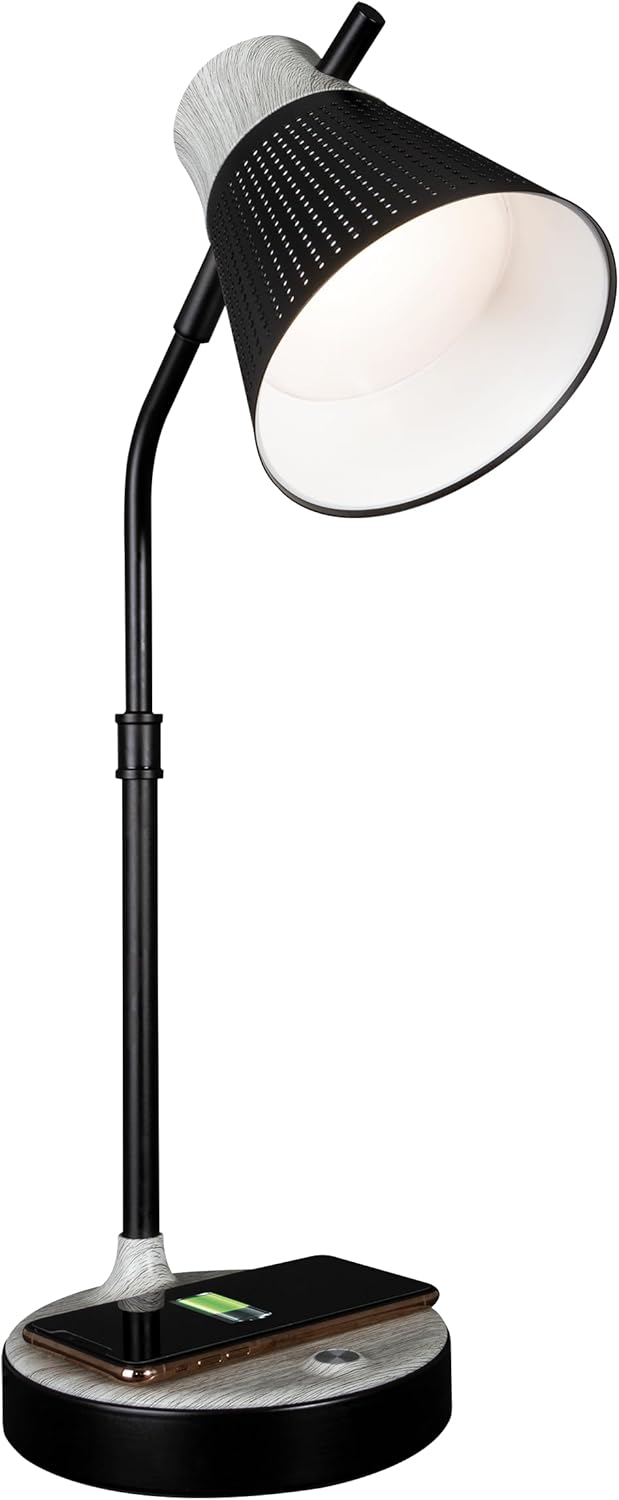
Il-lamp issa hija lesta għat-tħaddim.
Istruzzjonijiet Operattivi
1. Power On/Off and Brightness Control
Il-lamp features touch-sensitive controls located on the base.
- Biex Tixgħel/Tfi: Lightly touch the power icon on the lamp bażi.
- Biex taġġusta l-Luminożità: Mal-lamp on, repeatedly touch the power icon to cycle through three brightness levels.

2. Color Temperature Settings
Il-lamp offers three distinct color temperature modes:
- ClearSun Natural Daylight: Provides a balanced spectrum for reduced eyestrain.
- Abjad sħun: A softer, warmer light ideal for relaxation.
- Abjad jgħajjat: A crisp, clear light suitable for tasks requiring focus.
To switch between color temperatures, touch the mode icon on the lamp base. Cycle through the available options to select your preferred light.

3. L-aġġustament tal-Lamp
Il-lamp features a flexible neck and an adjustable shade for precise light placement.
- Għonq Flessibbli: Gently bend the lamp neck to direct light where needed.
- Dell Aġġustabbli: The shade can be moved up, down, and side-to-side to optimize illumination.

4. Iċċarġjar bla fili
Il-lamp base includes a Qi-compatible wireless charging pad.
- Place your Qi-compatible device (e.g., smartphone) directly onto the charging pad on the lamp bażi.
- Ensure the device is centered on the charging pad for optimal connection.
- A charging indicator on your device will confirm that charging has begun.

5. Port tal-Iċċarġjar tal-USB
A 5V, 2.1A USB charging port is integrated into the lamp base for charging additional devices.
- Connect your device's USB charging cable to the USB port on the back of the lamp bażi.
- Connect the other end of the cable to your device (e.g., headphones, smartwatch, tablet).

Manutenzjoni
- Tindif: Skonnettja l-provvista tal-enerġija qabel it-tindif. Uża drapp artab u niexef biex timsaħ l-lamp. Tużax tindif jew solventi li joborxu.
- Kura tal-LED: The LED light source is designed for long-term use and does not require replacement. Avoid direct contact with the LED panel.
Issolvi l-problemi
| Problema | Kawża Possibbli | Soluzzjoni |
|---|---|---|
| Lamp ma jixgħelx. | L-adapter tal-enerġija mhux imqabbad jew is-sokit difettuż. | Kun żgur li l-adapter tal-enerġija huwa mdaħħal sew fil-plakka tal-provvista tal-enerġija.amp and a working wall outlet. Test the outlet with another device. |
| L-iċċarġjar mingħajr fili mhux qed jaħdem. | L-apparat mhux kompatibbli mal-Qi jew mhux allinjat sew. | Verify your device supports Qi wireless charging. Reposition the device on the charging pad, ensuring it is centered. Remove any thick phone cases. |
| L-iċċarġjar tal-USB mhux qed jaħdem. | USB cable faulty or device not compatible. | Try a different USB cable. Ensure the device is compatible with 5V, 2.1A charging. |
| Id-dawl jitteptep jew mhux konsistenti. | Loose power connection or electrical interference. | Check all power connections. Move the lamp away from other electronic devices that might cause interference. |
Speċifikazzjonijiet
- Numru tal-Mudell: CSAQABG9-SHPR
- Ditta: OttLite
- Dimensjonijiet tal-Prodott: 6.88"D x 6.88"W x 25"H (għoli aġġustabbli)
- Piż tal-oġġett: 4.99 liri
- Sors tal-Enerġija: Corded Electric (110 Volts AC)
- Tip ta' Sors tad-Dawl: LED (Teknoloġija ClearSun)
- Wattage: 10 watt
- Metodu ta' Kontroll: Mess
- Karatteristiċi Speċjali: Wireless Charging, USB Charging Port, Flexible Neck, Adjustable Shade, 3 Brightness Settings, 3 Color Temperatures
- Materjal: Metall, Injam
- Tip ta 'Finish: Miżbugħa
- Użu fuq ġewwa/barra: Ġewwa biss

Informazzjoni dwar Garanzija
OttLite products are manufactured to high-quality standards. For specific warranty details, including coverage period and terms, please refer to the warranty card included with your purchase or visit the official OttLite websit. Żomm il-prova tax-xiri tiegħek għal talbiet ta' garanzija.
Appoġġ għall-Klijent
If you have any questions, require assistance, or need to report an issue with your OttLite Wellness Series Wireless Charging LED Table Lamp, please contact OttLite customer support through their official webis-sit jew l-informazzjoni ta' kuntatt ipprovduta fl-imballaġġ tal-prodott tiegħek.
Għal aktar informazzjoni, żur il- OttLite Store.


