1. Introduzzjoni
This manual provides essential information for the safe and efficient operation of your TELLUR Obia PRO 60W Bluetooth Speaker. Please read this manual thoroughly before using the product and retain it for future reference.
2. Informazzjoni dwar is-Sigurtà
- Tesponix l-ispiker għal temperaturi estremi jew dawl tax-xemx dirett għal perjodi twal.
- Evita li twaqqa’ jew tissuġġetta lill-kelliem għal impatti qawwija.
- Tippruvax tiżżarma jew timmodifika l-ispiker. Dan jannulla l-garanzija.
- Żomm l-ispiker 'il bogħod minn apparati mediċi.
- Ensure the charging port cover is securely closed when near water to maintain IPX6 water resistance.
- Uża biss il-kejbil tal-iċċarġjar u l-adapter tal-enerġija speċifikati.
3. Kontenut tal-Pakkett
Ivverifika li l-oġġetti kollha huma preżenti fil-pakkett:
- TELLUR Obia PRO 60W Bluetooth Speaker
- Cable tal-Iċċarġjar tal-USB
- 3.5mm AUX Cable Awdjo
- Manwal għall-Utent (dan id-dokument)
4. Prodott Aktarview u Kontrolli
Familiarize yourself with the speaker's components and control buttons.

Figura 4.1: Quddiem view of the TELLUR Obia PRO speaker, showcasing the main grille, control panel, and integrated LED lights on the handle and side woofers.
4.1 Panel tal-Kontroll

Figura 4.2: Dettaljati view of the control buttons located on the top panel of the speaker.
- Volume Down (-) / Previous Track: Agħfas fil-qosor biex tnaqqas il-volum. Agħfas u żomm biex tmur għat-trakka ta' qabel.
- Volume Up (+) / Next Track: Press briefly to increase volume. Press and hold to go to the next track.
- LED Light Mode Button: Agħfas biex tiċċikla bejn il-modi differenti tad-dawl LED.
- Buttuna tal-Qawwa: Press and hold to power on/off. Briefly press to play/pause music.
- TWS (True Wireless Stereo) Button: Press to activate TWS pairing mode.
- Buttuna tal-Modalità (M): Press to switch between Bluetooth, USB, and AUX input modes.
4.2 Portijiet ta 'Input/Output
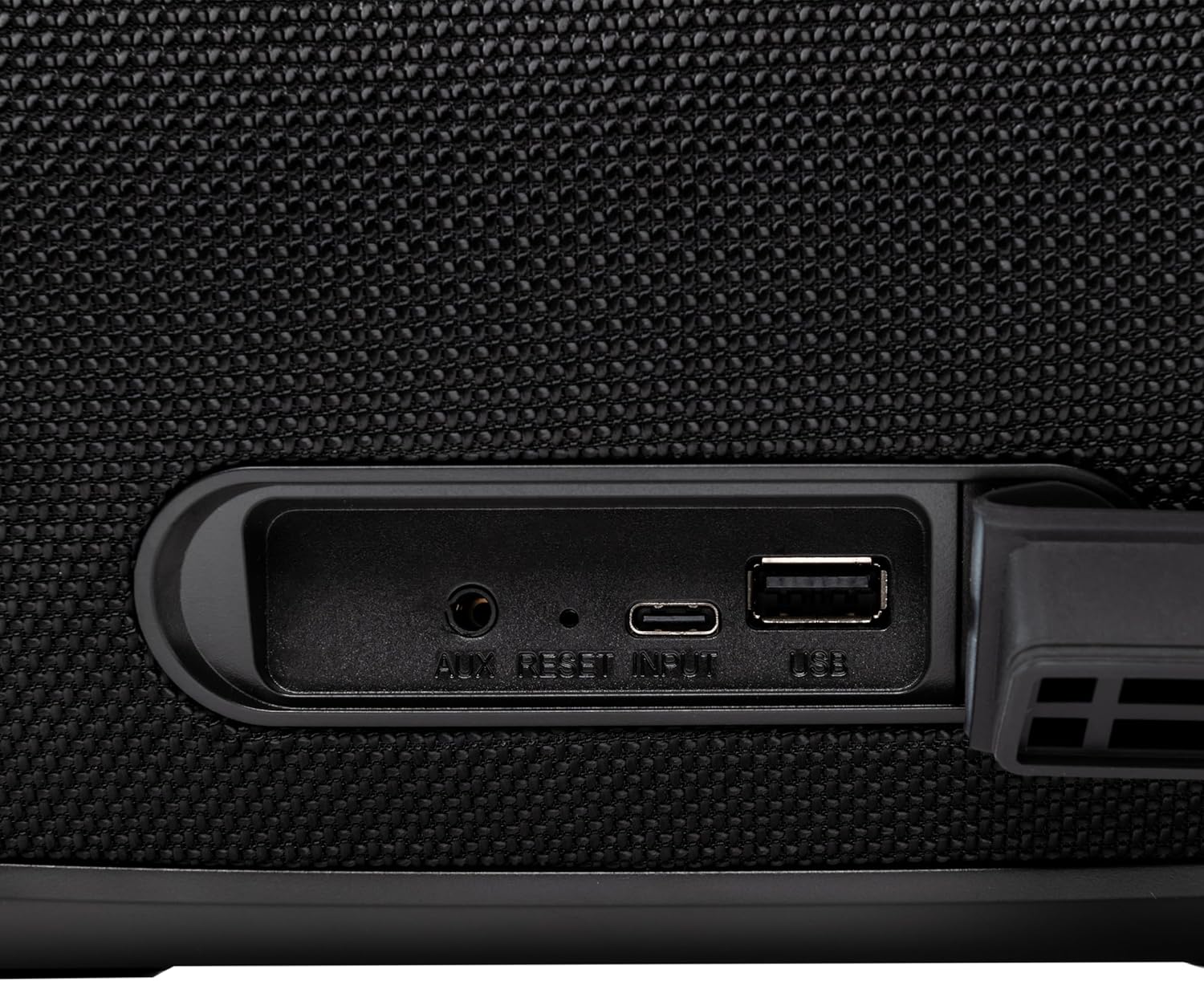
Figura 4.3: Close-up of the protected input/output ports on the rear of the speaker.
- Port AUX-IN: Għall-konnessjoni ta' apparati awdjo esterni permezz ta' kejbil awdjo ta' 3.5mm.
- Buttuna Irrisettja: Use a thin object to press and reset the speaker if necessary.
- Input USB-C: Għall-iċċarġjar tal-ispiker.
- Port USB-A: For playing MP3 audio files from a USB drive or for power bank functionality.
5. Setup
5.1 Iċċarġjar tal-Ispeaker
Before initial use, fully charge the speaker. The speaker also functions as a power bank to charge other devices via its USB-A port.
- Connect the USB charging cable to the USB-C input port on the speaker.
- Qabbad it-tarf l-ieħor tal-kejbil ma' adapter tal-enerġija USB kompatibbli (mhux inkluż).
- The charging indicator light will illuminate. It will turn off once charging is complete.
- The battery level can be displayed on your connected phone when paired via Bluetooth.
5.2 Tixgħel/Jitfi
- Biex Tixgħel: Agħfas u żomm il- Buttuna tal-Qawwa for approximately 3 seconds until you hear an audible prompt and the LED lights activate.
- Biex Tifi: Agħfas u żomm il- Buttuna tal-Qawwa for approximately 3 seconds until you hear an audible prompt and the LED lights turn off.
6. Istruzzjonijiet Operattivi
6.1 Tqabbil tal-Bluetooth
The speaker uses Bluetooth v5.3 for stable wireless connection up to 10 meters.
- Ensure the speaker is powered on and in Bluetooth mode (indicated by a flashing blue LED). If not, press the Buttuna tal-Modalità (M) biex taqleb għall-modalità Bluetooth.
- Ippermetti l-Bluetooth fuq l-apparat mobbli tiegħek (smartphone, tablet, eċċ.).
- Fittex għal available Bluetooth devices and select "TELLUR Obia PRO" mil-lista.
- Once paired, the speaker will emit an audible confirmation, and the blue LED will stop flashing.
- L-ispiker jerġa' jikkonnettja awtomatikament mal-aħħar apparat imqabbad meta jixgħel, jekk disponibbli.

Figura 6.1: The TELLUR Obia PRO speaker wirelessly connected to a smartphone, ready for audio playback.
6.2 Funzjoni Stereo Veru Mingħajr Fili (TWS)
TWS allows you to pair two Obia PRO speakers for a stereo sound experience.
- Ensure both Obia PRO speakers are powered on and in Bluetooth mode, but not yet paired with any device.
- Fuq kelliem wieħed (dan se jkun il-kelliem primarju), agħfas il-buttuna Buttuna TWS. The speaker will enter TWS pairing mode, indicated by a flashing light.
- The two speakers will automatically connect to each other. Once connected, you will hear an audible confirmation, and the TWS indicator light on both speakers will become solid.
- Now, connect your mobile device to the primary speaker via Bluetooth as described in Section 6.1. The audio will play in stereo across both speakers.
6.3 Multiple Link Technology
This technology allows connecting an unlimited number of Obia PRO speakers wirelessly for a synchronized audio experience. Refer to the manufacturer's website or specific instructions for detailed setup of Multiple Link.
6.4 USB Playback (MP3)
Play MP3 awdjo files directly from a USB flash drive (up to 128GB).
- Daħħal USB flash drive li jkun fih MP3 files fil-port USB-A.
- Agħfas il- Buttuna tal-Modalità (M) to switch to USB mode. The speaker will automatically begin playing music from the USB drive.
- Uża l- Volum 'il fuq/'l isfel u Buttuna tal-Qawwa (for play/pause) to control playback.
6.5 Konnessjoni AUX-IN
Connect non-Bluetooth devices using the 3.5mm AUX audio cable.
- Connect one end of the 3.5mm AUX audio cable to the AUX-IN port on the speaker.
- Connect the other end to the audio output jack of your external device (e.g., MP3 player, laptop).
- Agħfas il- Buttuna tal-Modalità (M) biex taqleb għall-modalità AUX.
- Ikkontrolla d-daqq u l-volum mit-tagħmir estern tiegħek.
6.6 Sejħa mingħajr idejn
When connected to a smartphone via Bluetooth, the speaker's built-in microphone allows for hands-free calls.
- Tweġiba/Tmiem Sejħa: Agħfas fil-qosor il- Buttuna tal-Qawwa.
- Irrifjuta Sejħa: Agħfas u żomm il- Buttuna tal-Qawwa għal 2 sekondi.
6.7 Modalità tad-Dawl LED
The speaker features integrated LED lights with multiple display modes.
- Agħfas il- Buttuna tal-Modalità tad-Dawl LED to cycle through available light patterns and colors.
- Agħfas u żomm il- Buttuna tal-Modalità tad-Dawl LED to turn the lights off or on.

Figura 6.2: A user interacting with the LED light mode button to change the speaker's lighting effects.
6.8 Equalizer Settings (Indoor/Outdoor)
The speaker allows for equalizer customization for different environments. Specific controls for this are not detailed in the provided data, but typically involve a dedicated button or a combination of existing buttons. Refer to the product's quick start guide or manufacturer's website for precise instructions on adjusting the equalizer.
7. Manutenzjoni
7.1 Tindif
- Imsaħ l-ispiker b'ċarruta ratba u niexfa.
- Tużax prodotti tat-tindif li joborxu, alkoħol, jew solventi kimiċi.
7.2 Reżistenza għall-Ilma (IPX6)
The Obia PRO speaker is rated IPX6, meaning it is protected against high-pressure water jets from any direction. This makes it suitable for outdoor use and environments where it might be exposed to splashes or rain.
- Ensure the rubber cover for the charging and AUX ports is securely closed before exposing the speaker to water.
- Tgħaddasx il-kelliem fl-ilma.
- Wara li jkun espost għall-ilma, imsaħ l-ispiker niexef qabel ma tiċċarġjah.
7.3 Kura tal-Batterija
- Biex ittawwal il-ħajja tal-batterija, evita li tiċċarġja kompletament il-batterija ta' spiss.
- Iċċarġja l-ispiker regolarment, anke jekk ma jkunx qed jintuża, biex iżżomm il-batterija f'saħħitha.
- Aħżen l-ispiker f'post frisk u niexef meta ma jkunx qed jintuża għal perjodi twal.
8 Issolvi l-problemi
| Problema | Kawża Possibbli | Soluzzjoni |
|---|---|---|
| L-ispiker ma jixgħelx. | Batterija baxxa. | Iċċarġja l-ispiker kompletament. |
| Ma tistax tqabbad permezz tal-Bluetooth. | L-ispiker mhux fil-modalità ta' tqabbil; il-Bluetooth tal-apparat mitfi; wisq 'il bogħod mill-ispiker. | Ensure speaker is in Bluetooth mode (flashing LED). Turn on Bluetooth on your device. Move device closer to speaker (within 10m). |
| L-ebda ħoss. | Volume too low; incorrect mode selected; device not playing. | Increase speaker and device volume. Press Buttuna tal-Modalità (M) to select correct input. Ensure audio is playing on the connected device. |
| It-tqabbil tat-TWS ifalli. | Speakers already paired to a device; not both Obia PRO models. | Disconnect both speakers from any Bluetooth devices. Ensure both speakers are Obia PRO models. Try TWS pairing again. |
| Il-plejbek tal-USB mhux qed jaħdem. | Id-drajv tal-USB mhux ifformattjat sew; mhux appoġġjat file type; drive capacity too large. | Ensure USB drive is formatted to FAT32. Only MP3 files are supported. Max capacity 128GB. |
9. Speċifikazzjonijiet
| Isem tal-Mudell | Obia PRO |
| Brand | TELLUR |
| Qawwa tal-Ħruġ | 60W (2x 20W RMS subwoofers, 2x 10W RMS tweeters) |
| Verżjoni Bluetooth | v5.3 |
| Firxa Wireless | Sa 10 metri |
| Rispons ta' Frekwenza | 80 MHz (Note: This value is unusual for speaker frequency response and may be a typo in source data. Typically measured in Hz-kHz.) |
| Impedenza | 4 ohms |
| Modi Awdjo | Bluetooth, USB (MP3), AUX-IN |
| Appoġġ USB | USB 2.0/3.0, up to 128GB (MP3 format) |
| Reżistenza għall-Ilma | IPX6 |
| Kapaċità tal-batterija | 5400 mAh |
| Ħin tal-daqq | Sa 12-il siegħa (b'volum moderat) |
| Funzjoni tal-Bank tal-Enerġija | Yes, via USB-A port |
| Dimensjonijiet (L x W x H) | 37.7 x 17 x 18 ċm |
| Piż | 3.48 kg |
| Materjal | Plastik |
| Kulur | Iswed |
Nota: L-ispeċifikazzjonijiet huma soġġetti għal tibdil mingħajr avviż minn qabel.
10. Garanzija u Appoġġ
TELLUR products are manufactured to the highest quality standards. For information regarding warranty terms, technical support, or service, please refer to the warranty card included with your product or visit the official TELLUR websit.
Informazzjoni ta' Kuntatt: Jekk jogħġbok żur www.tellur.com għall-aħħar informazzjoni ta' appoġġ.


