1. Introduzzjoni
Thank you for choosing the VOCOO Digital Kitchen Timer Model 5285W. This versatile timer is designed for various applications, including cooking, classroom management, home gym workouts, and more. Featuring an extra-large LED display, multiple alarm options, adjustable brightness, and convenient placement methods, it aims to simplify your timing needs.
2. Karatteristiċi ewlenin
- Extra Large 7.8-inch LED Display: Clear, easy-to-read numbers visible from a distance.
- 3 Livelli ta 'luminożità: Adjustable display brightness (Dim/Medium/Bright) to suit any environment.
- 4 Alarm Options with 3 Volume Levels: Choose from different melodies and adjust volume (Loud, Medium, Soft).
- Modi ta' Ħin Versatili: Countdown from 99 hours 59 minutes or count up (stopwatch) from 0 to 99 hours 59 minutes 59 seconds.
- Batterija rikarikabbli: Powered by an included C battery, with a low power indicator.
- Għażliet Multipli ta' Tqegħid: Strong silicone-covered magnets for metal surfaces, a fold-out stand for desktops, and a hanging hole.
- Kontrolli Intuwittivi: Dedicated buttons for setting time, reset, and start/pause for ease of use.
3. Kontenut tal-Pakkett
- VOCOO Digital Timer (Model 5285W)
- Ipplaggja USB-C
- Cable tal-Iċċarġjar tal-USB-C
- Manwal għall-Utent
4. Prodott Aktarview
Familiarize yourself with the timer's display and control buttons.
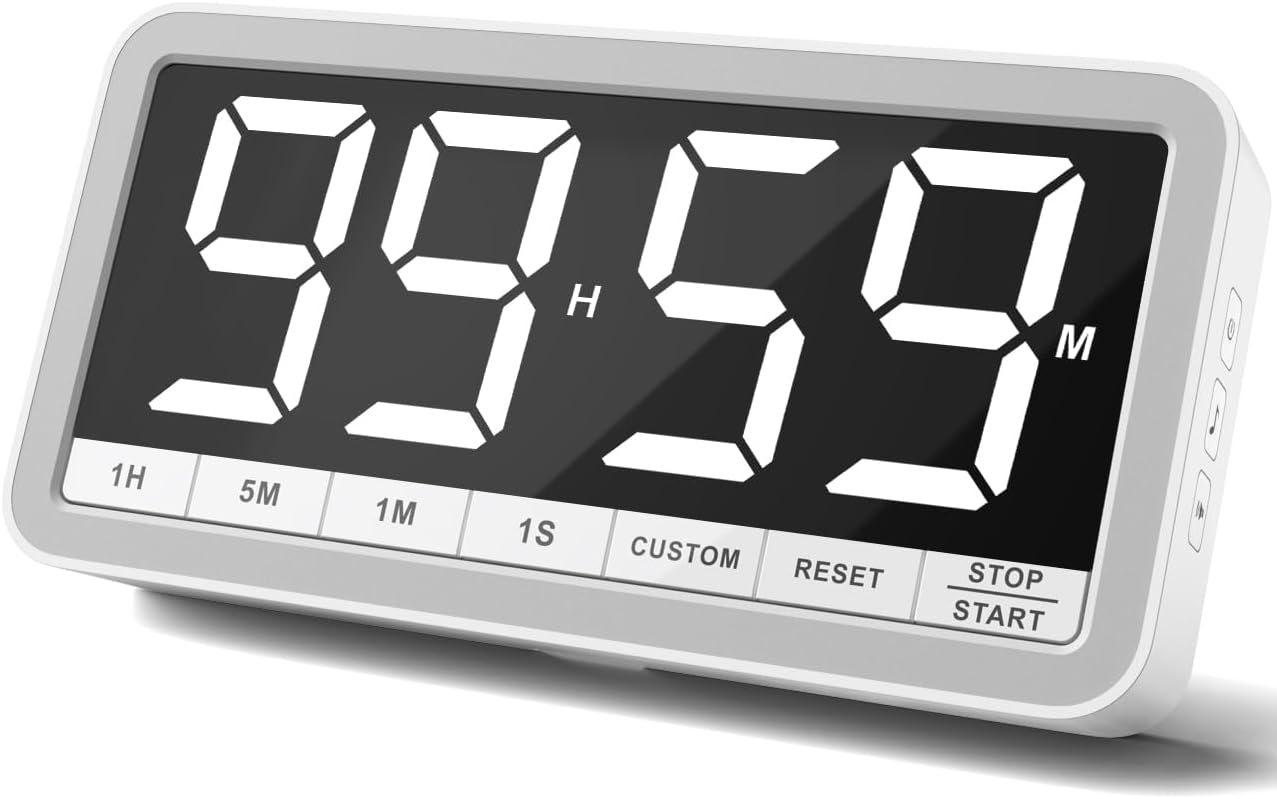
Buttuni tal-Panew ta 'Quddiem:
- 1H: Add 1 hour
- 5M: Żid żewġ minuti
- 1M: Żid minuta
- 1S: Add 1 second
- DOGANALI: Set/Recall custom time
- RESET: Clear current time setting
- Waqqaf/Ibda: Begin or pause timing
Buttuni tal-Panel tal-Ġenb:
- Buttuna tal-Qawwa: Turn the timer On/Off. Also cycles through brightness levels (Dim/Medium/Bright) when pressed briefly while on.
- Buttuna tan-Nota Mużikali: Cycle through 4 different alarm sounds.
- Speaker Icon Button: Cycle through 3 volume levels (Loud/Medium/Soft).
5. Setup
- Ħlas Inizjali: Before first use, fully charge the timer using the provided USB-C cable and plug. A low power icon will indicate when charging is needed.
- Qawwa Mixgħul: Press and hold the Power Button on the side for a few seconds to turn the timer on.
6. Istruzzjonijiet Operattivi
6.1. Modalità tat-Tajmer tal-Countdown
- Issettja Ħin: Uża l- 1H, 5M, 1M, u 1S buttons to set your desired countdown time. The maximum time is 99 hours 59 minutes.
- Ibda l-Countdown: Agħfas il- Waqqaf/Ibda buttuna biex tibda l-countdown.
- Pause / Resume: Agħfas Waqqaf/Ibda għal darb'oħra biex twaqqaf jew tkompli l-countdown.
- Irrisettja: Agħfas il- RESET button to clear the current time and return to 00:00.
- 1-Minute Reminder: When the countdown reaches 1 minute, the display digits will turn red to provide a visual alert.
- Allarm: Once the timer reaches 00:00, the selected alarm will sound.

6.2. Count-Up Timer (Stopwatch) Mode
- Start Count-Up: Ensure the timer is at 00:00. Press the Waqqaf/Ibda buttuna biex tibda tgħodd 'il fuq.
- Pause / Resume: Agħfas Waqqaf/Ibda again to pause or resume the count-up.
- Irrisettja: Agħfas il- RESET button to clear the count-up time and return to 00:00.
6.3. Custom Time Setting
Il- DOGANALI button allows you to save and quickly recall a frequently used time setting. To set a custom time, first set the desired time using the 1H, 5M, 1M, 1S buttons, then press and hold the DOGANALI button until the display flashes, indicating the time is saved. To recall, simply press the DOGANALI buttuna fil-qosor.
6.4. Adjusting Alarm and Volume
Uża l- Music Note Button on the side to cycle through the 4 available alarm sounds. Use the Speaker Icon Button on the side to select one of the 3 volume levels (Loud, Medium, Soft).

6.5. L-aġġustament tal-luminożità
Agħfas fil-qosor il- Buttuna tal-Qawwa on the side while the timer is on to cycle through the 3 brightness levels: Dim, Medium, and Bright.

7. Għażliet ta' Tqegħid
The VOCOO Digital Kitchen Timer offers flexible placement options to suit your needs:
- Twaħħil manjetiku: Two strong magnets covered with silicone on the back allow you to securely attach the timer to any metal surface, such as a refrigerator or whiteboard, without slipping or scratching.
- Stand tad-Desktop: A built-in fold-out stand enables the timer to be placed upright on any flat surface, like a countertop or desk.
- Mdendlin: A hanging hole is provided on the back for wall mounting using a nail or hook.

8. Iċċarġjar
The timer is powered by a rechargeable battery. Use the included USB-C cable and a 5V (output voltage) power plug to charge it. A low power sign will appear on the display to remind you when charging is needed. Using a power plug higher than 5V may damage the battery.
9. Manutenzjoni
To ensure the longevity of your VOCOO Digital Kitchen Timer, follow these simple maintenance guidelines:
- Imsaħ id-displej u l-qafas b'ċarruta ratba u niexfa.
- Evita li tuża tindif jew solventi li joborxu.
- Keep the timer away from extreme temperatures and direct sunlight.
- Tgħaddasx it-tajmer fl-ilma jew tesponih għal umdità eċċessiva.
10 Issolvi l-problemi
If you encounter any issues with your timer, please refer to the following common solutions:
- Id-displej mhux qed jixgħel: Ensure the timer is charged. Connect it to the USB-C charger and allow it to charge for at least 30 minutes before attempting to power it on again.
- L-allarm ma ħossx: Check the volume level using the Speaker Icon Button on the side. Ensure it is not set to 'LO0' (silent).
- Incorrect time setting: Press the RESET button to clear the current setting, then re-enter the desired time using the 1H, 5M, 1M, and 1S buttons.
- Timer not responding: Try turning the timer off and then on again using the Power Button.
11. Speċifikazzjonijiet
| Attribut | Dettall |
|---|---|
| Brand | VOCOO |
| Numru tal-Mudell | 5285W |
| Kulur | Abjad |
| Daqs tal-Iskrin | 7.8 Pulzier |
| Dimensjonijiet tal-Prodott | 1.38"D x 8.27"W x 4.13"H |
| Piż tal-oġġett | 9.5 uqija (270 Grammi) |
| Materjal | Silikonju |
| Batteriji | Meħtieġa batterija C waħda (inkluża) |
12. Vidjo Uffiċjali tal-Prodott
13. Appoġġ
For any questions or support regarding your VOCOO Digital Kitchen Timer, please contact us at: support@vocoo.vip.com


