1. Prodott Aktarview
The MokerLink 16-Port Gigabit Ethernet Switch is an unmanaged network switch designed for expanding network connectivity in home or small office environments. It features 16 Gigabit Ethernet ports, offering high-speed data transfer with plug-and-play simplicity. The fanless metal design ensures quiet and stable operation.

Figura 1: Aktarview of the MokerLink 16-Port Gigabit Ethernet Switch, highlighting its full Gigabit ports, plug and play functionality, power-saving features, wall-mountable design, LED indicators, and fanless operation.
Karatteristiċi ewlenin:
- 16 Portijiet Gigabit Ethernet: Provides 16 10/100/1000Mbps RJ45 ports for high-speed network connections.
- Plug and Play: Requires no configuration, making setup quick and easy.
- Disinn bla fann: Ensures silent operation, suitable for various environments.
- Ċ tal-metall durabbliasing: Offers robust protection and efficient heat dissipation.
- Effiċjenti fl-Enerġija: Features power-saving functionality (IEEE 802.3az EEE support) to reduce energy consumption.
- Pjazzament Flessibbli: Supports desktop or wall-mount installation.
2. Kontenut tal-Pakkett
Ivverifika li l-oġġetti kollha huma preżenti fil-pakkett:
- 1 x MokerLink 16-Port Gigabit Ethernet Switch
- 1 x Power Adapter (DC 12V / 1.0A)
- 1 x Manwal tal-Utent (dan id-dokument)
3. Setup u Installazzjoni
Follow these steps to set up your MokerLink Gigabit Ethernet Switch:
- Agħżel Post: Place the switch on a stable desktop or mount it on a wall. Ensure adequate ventilation around the device.
- Qabbad l-Enerġija: Insert the DC plug of the power adapter into the switch's DC input port. Plug the other end of the power adapter into a standard electrical outlet. The power LED indicator will illuminate.
- Qabbad l-Apparati tan-Netwerk: Connect your network devices (e.g., computers, printers, network-attached storage, routers, IP cameras, wireless access points) to any of the 16 RJ45 ports using standard Ethernet cables. The switch supports auto MDI/MDIX, so crossover cables are not required.
- Ivverifika l-Konnessjoni: Once a device is connected, the corresponding port's LED indicator will light up (green for link, flashing for data transmission).
- Immuntar tal-ħajt (Mhux obbligatorju): If wall mounting, use appropriate screws and anchors (not included) with the mounting holes on the switch.
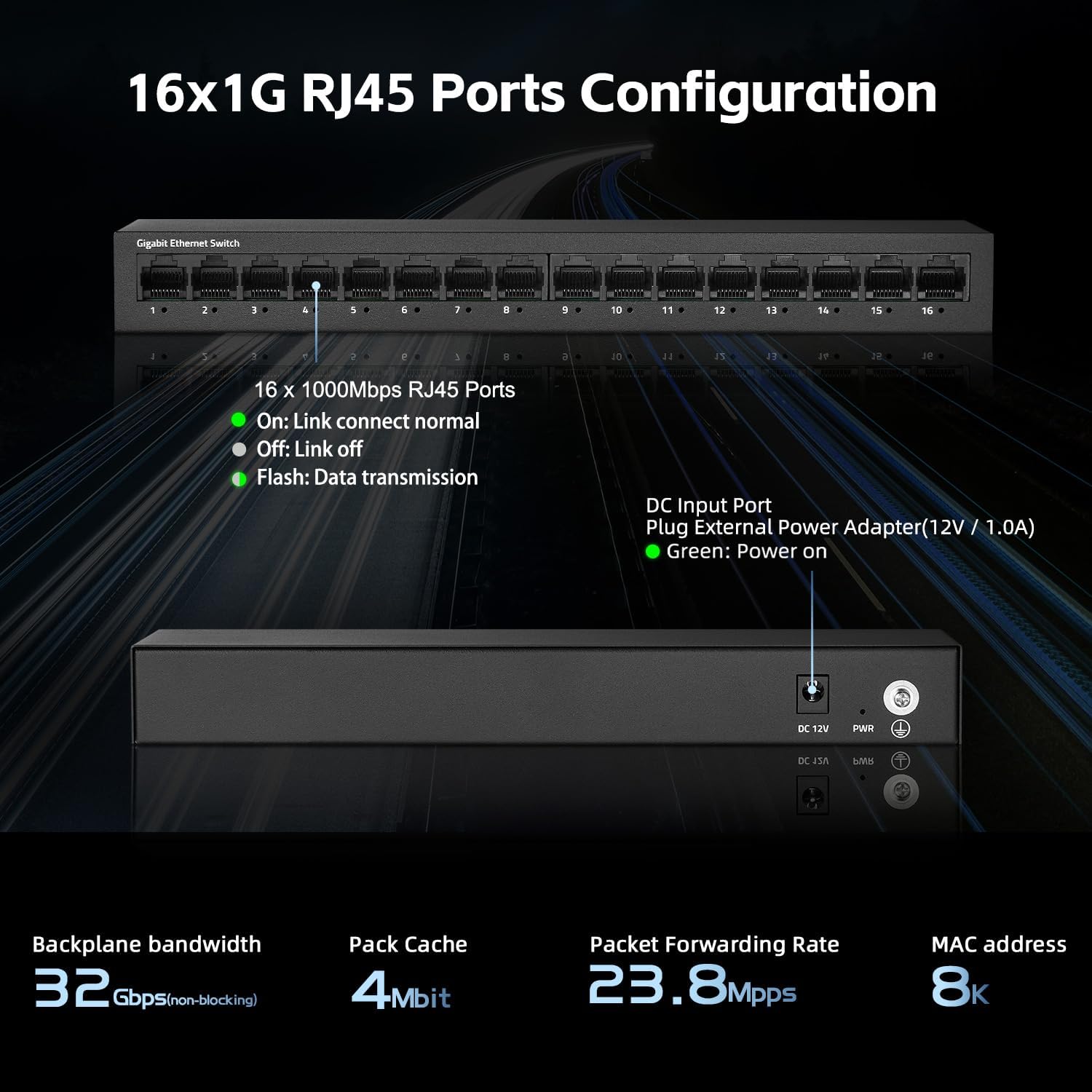
Figura 2: Wara view of the switch showing the DC input port and power LED indicator.

Figure 3: Ethernet cables connected to the switch ports.

Figura 4: Eżample of the switch mounted on a wall, demonstrating its flexible placement options.
4. Istruzzjonijiet Operattivi
The MokerLink 16-Port Gigabit Ethernet Switch is an unmanaged device, meaning it operates automatically without requiring user configuration. Simply connect your devices, and the switch will handle network traffic efficiently.
Indikaturi LED:
| Indikatur | Status | Deskrizzjoni |
|---|---|---|
| Qawwa LED | Aħdar | Is-swiċċ huwa mixgħul. |
| Port Link/Act LEDs (1-16) | Aħdar (Solidu) | A device is connected to the port, and the link is active. |
| Aħdar (Jteptep) | Id-dejta qed tiġi trażmessa jew riċevuta permezz tal-port. | |
| Mitfi | No device is connected, or the connected device is powered off/inactive. |

Figura 5: Close-up view of the port LED indicators, showing a green light for an active link.
Funzjonijiet Awtomatiċi:
- Awto-Negozjar: Each port automatically detects the link speed of the connected network device (10/100/1000Mbps) and adjusts for compatibility and optimal performance.
- MDI/MDIX Awtomatiku: Automatically detects the type of Ethernet cable (straight-through or crossover) and adjusts accordingly, eliminating the need for specific cable types.
- Non-Blocking Wire Speed: All ports can simultaneously transmit and receive data at their full wire speed without congestion.
5. Manutenzjoni u Kura
To ensure the longevity and optimal performance of your MokerLink switch, follow these maintenance guidelines:
- Ambjent: Operate the switch within its specified temperature range (0°C to 45°C). Avoid placing it in direct sunlight, near heat sources, or in areas with high humidity.
- Tindif: Uża drapp artab u niexef biex tnaddaf il-barra tas-swiċċ. Tużax prodotti tat-tindif likwidi jew aerosol.
- Ventilazzjoni: Ensure that the ventilation holes on the sides of the switch are not blocked to allow for proper heat dissipation. The fanless design relies on natural convection.
- Provvista tal-Enerġija: Use only the provided power adapter. If the adapter is damaged, replace it with an equivalent approved adapter.
- Ġestjoni tal-Kejbil: Organize network cables neatly to prevent strain on the ports and accidental disconnections.

Figure 6: The switch features a fanless metal design for efficient heat dissipation and energy saving.
6 Issolvi l-problemi
If you encounter issues with your MokerLink switch, refer to the following common troubleshooting steps:
- Ebda Qawwa:
- Kun żgur li l-adapter tal-enerġija huwa konness sew kemm mas-swiċċ kif ukoll ma' sokit elettriku li jaħdem.
- Iċċekkja jekk is-sokit tal-enerġija hux qed jaħdem billi tqabbad apparat ieħor.
- Verify the power LED on the switch is illuminated.
- Ebda Link/Attività fuq Port:
- Kun żgur li l-kejbil Ethernet huwa konness sew kemm mal-port tas-swiċċ kif ukoll mal-apparat tan-netwerk.
- Check the status of the connected network device (e.g., computer is powered on, network adapter is enabled).
- Ipprova kejbil Ethernet differenti.
- Ipprova qabbad l-apparat ma 'port differenti fuq is-swiċċ.
- Verify the link/activity LED for the port is illuminated (solid green for link, flashing for activity).
- Veloċità baxxa tan-Netwerk:
- Ensure all connected devices and cables support Gigabit Ethernet (1000Mbps). The switch will operate at the lowest common speed.
- Iċċekkja għal traffiku eċċessiv tan-netwerk jew applikazzjonijiet li jużaw ħafna bandwidth u li jaħdmu fuq apparati konnessi.
- Restart the switch by unplugging and replugging the power adapter.
- Konnessjoni intermittenti:
- Inspect Ethernet cables for damage.
- Ensure the switch is placed in a stable environment, free from excessive heat or electromagnetic interference.
- Check for loose power or Ethernet cable connections.
7. Speċifikazzjonijiet
| Karatteristika | Deskrizzjoni |
|---|---|
| Mudell | 16*1G Unmanaged |
| Portijiet | 16-il Port RJ45 ta' 10/100/1000Mbps |
| Kapaċità tal-Qlib | 32 Gbps |
| Rata ta' Tressiq ta' Pakketti | 23.8 Mpps |
| Tabella ta' l-Indirizz MAC | 8K |
| Qafas Jumbo | 9K (Standard for Gigabit Ethernet) |
| Standards | IEEE 802.3, IEEE 802.3u, IEEE 802.3ab, IEEE 802.3x, IEEE 802.3az |
| Tip ta' Interface | RJ45 |
| Metodu ta' Trażmissjoni | Aħżen-u-Forward |
| Provvista tal-Enerġija | External Power Adapter (DC 12V / 1.0A) |
| Konsum tal-Enerġija | Low power consumption (Energy Efficient Ethernet support) |
| Indikaturi LED | Power, Link/Act (per port) |
| Dimensjonijiet (L x W x H) | Madwar 10.16 x 5.04 x 3.23 pulzieri (25.8 x 12.8 x 8.2 cm) |
| Piż tal-oġġett | Madwar 1.65 libbra (0.75 kg) |
| Materjal tal-Każ | Metall |
| Temperatura operattiva | 0°C sa 45°C (32°F sa 113°F) |
| Umdità Operattiva | 10% sa 90% mingħajr kondensazzjoni |
| Installazzjoni | Desktop or Wall-Mount |

Figure 7: Visual representation of the switch's high port speed and switching capacity.
8. Vidjows Uffiċjali tal-Prodott
The following videos provide additional information and visual guidance for the MokerLink 16-Port Gigabit Ethernet Switch:
Vidjo 1: Prodott Fuqview (0:38)
This short video provides a quick overview of the MokerLink 16-Port Gigabit Ethernet Switch, highlighting its main features and design.
Video 2: Detailed Features and Usage (2:11)
A more in-depth video demonstrating the features and typical usage scenarios of the Gigabit Ethernet Switch.
Video 3: Installation and Connectivity (1:38)
This video guides you through the physical installation and connection process for the switch.
Video 4: Key Highlights (0:36)
A concise video highlighting important aspects and benefits of the MokerLink switch.
Video 5: Advanced Overview (1:25)
This video offers a more advanced look at the switch's capabilities and performance.
Video 6: Quick Feature Spotlight (0:20)
A very brief video focusing on a specific feature or benefit of the switch.
Video 7: Comprehensive Demonstration (2:59)
This comprehensive video provides a full demonstration of the MokerLink 16-Port Gigabit Ethernet Switch, from unboxing to operation.
9. Garanzija u Appoġġ
Informazzjoni dwar il-garanzija: For details regarding the product warranty, please refer to the warranty card included with your purchase or contact the seller/manufacturer directly. Warranty terms may vary by region and retailer.
Appoġġ Tekniku: If you require technical assistance or have questions not covered in this manual, please contact MokerLink customer support through their official webis-sit jew il-bejjiegħ bl-imnut li mingħandu xtrajt il-prodott.
Għal aktar informazzjoni, żur il- Ħanut MokerLink fuq Amazon.


