1. Prodott Aktarview
This manual provides essential information for the operation and maintenance of your GHUST MR23GA Replacement Magic Voice Remote Control. This remote is designed as a replacement for various LG Smart TV models, offering convenient control without complex setup.

Image 1.1: The GHUST MR23GA Replacement Magic Voice Remote Control.
Karatteristiċi ewlenin:
- Sostituzzjoni Diretta: Functions as a direct replacement for original LG Magic Remote models.
- Ebda Programmazzjoni Meħtieġa: Ready to use out of the box after battery insertion.
- Kostruzzjoni Durabbli: Made of high-quality ABS material for enhanced durability.
- Disinn kompatt: Small and ergonomic for comfortable grip.
- Voice Search Capability: Supports voice commands for easier navigation (functionality may vary based on TV model and original remote features).
- Dedicated Shortcut Buttons: Quick access to popular streaming services like Netflix and Prime Video.
2. Setup u Installazzjoni
The MR23GA remote control is designed for immediate use with compatible LG Smart TVs. No complex programming or pairing procedures are required.
2.1. Installazzjoni tal-batterija
- Sib l-għatu tal-kompartiment tal-batterija fuq wara tal-kontroll remot.
- Slide the cover downwards or press the latch to open the compartment.
- Insert two (2) AAA batteries (not included) into the compartment, ensuring the positive (+) and negative (-) terminals align correctly with the indicators inside.
- Agħlaq l-għatu tal-kompartiment tal-batterija billi tiżżerżaqha lura f'postu sakemm tikklikkja sew.

Image 2.1: The remote control is designed for ease of use with no setup or programming required after battery installation.
Once batteries are installed, the remote is ready to operate your compatible LG Smart TV.
3. Istruzzjonijiet Operattivi
This section details the basic functions and operation of your MR23GA remote control.
3.1. Funzjonijiet Bażiċi
- Buttuna tal-Qawwa (●): Agħfas biex tixgħel jew tintefa t-TV.
- Buttuni tan-Numri (0-9): Use to directly input channel numbers.
- Volum 'il fuq/Niżżel (+/-): Aġġusta l-livell tal-volum tat-TV.
- Kanal 'il fuq/'l isfel (▲/▼): Ibdel il-kanali tat-TV.
- Buttuna tal-Mute (🔇): Mute or unmute the TV's audio.
- Pad tan-Navigazzjoni ('Il fuq, 'l isfel, Xellug, Lemin, OK): Innaviga fil-menus u agħżel l-għażliet.
- Back Button (↶): Irritorna għall-iskrin jew il-menù ta' qabel.
- Home Button (🏠): Access the TV's Smart Home dashboard.

Image 3.1: The compact size and ergonomic design make the remote easy to hold and operate.
3.2. Kontroll tal-Vuċi
Agħfas u żomm il- Buttuna tal-mikrofonu to activate voice control. Speak clearly into the remote to issue commands or search for content. Release the button when finished speaking. Note that voice control functionality may depend on your specific LG TV model and its original features.
3.3. Dedicated Shortcut Buttons
The remote features dedicated buttons for quick access to popular streaming applications:
- Buttuna Netflix: Directly launch the Netflix application.
- Buttuna Prime Video: Directly launch the Amazon Prime Video application.
- Buttuna Disney+: Directly launch the Disney+ application.
- LG Channels Button: Directly launch the LG Channels application.
- Sling Button: Directly launch the Sling TV application.
- Buttuna Alexa: Activate Alexa voice assistant (functionality depends on TV model).

Image 3.2: Dedicated shortcut buttons provide quick access to your favorite applications.
3.4. Kompatibilità
This replacement remote control is compatible with a wide range of LG Smart TV models, including but not limited to:
- LG OLED Series: OLED42C3AUA, OLED42C3PUA, OLED48C3PUA, OLED55C3PUA, OLED65C3AUA, OLED77C3PUA, OLED83C3PUA, OLED55G3PUA, OLED65G3PUA, OLED77G3PUA, OLED83G3PUA, OLED55B3PUA, OLED65B3PUA, OLED77B3PUA
- LG QNED Series: 43QNED75URA, 50QNED75URA, 55QNED75URA, 65QNED75URA, 75QNED75URA, 50QNED80URA, 55QNED80URA, 65QNED80URA, 75QNED80URA, 86QNED80URA
- LG UR9000 Series: 43UR9000PUA, 50UR9000PUA, 55UR9000PUA, 65UR9000PUA, 75UR9000PUA
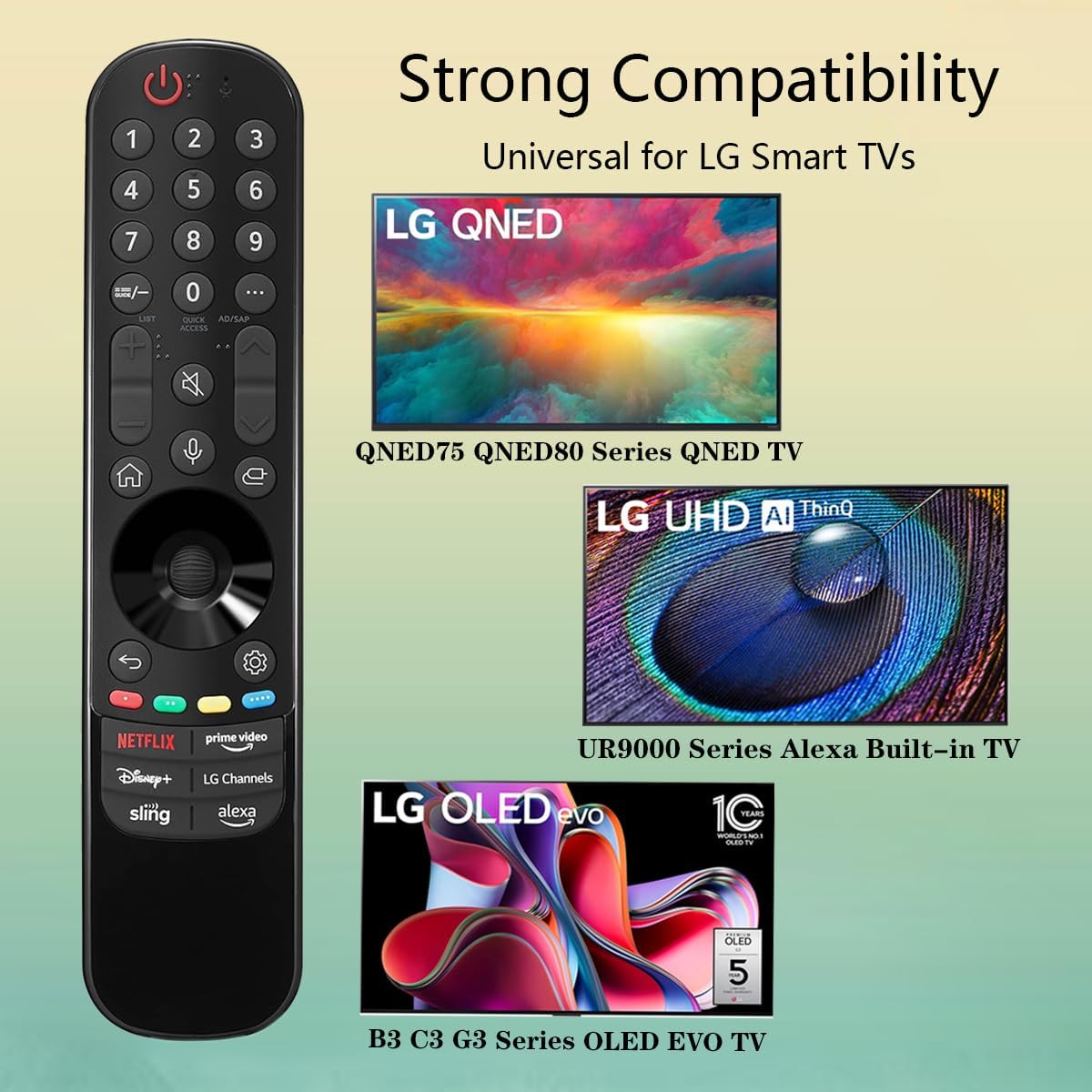
Image 3.3: The remote offers strong compatibility with various LG Smart TV series.
4. Manutenzjoni
Proper care and maintenance will extend the lifespan of your remote control.
4.1. Tindif
- Uża drapp artab u niexef biex timsaħ il-wiċċ tal-kontroll remot.
- Għal ħmieġ iebes, neħħi ftitampLaħlaħ id-drapp bl-ilma jew b'tindif ħafif u mhux abrażiv. Tisprejjax it-tindif direttament fuq ir-remote.
- Avoid using harsh chemicals, solvents, or abrasive cleaning materials, as these can damage the remote's finish or internal components.
4.2. Kura tal-batterija
- Replace batteries when the remote's responsiveness decreases or it stops functioning.
- Dejjem ibdel iż-żewġ batteriji fl-istess ħin b'oħrajn ġodda tal-istess tip (AAA).
- If the remote will not be used for an extended period (e.g., one month or more), remove the batteries to prevent leakage and potential damage to the remote.
- Armi batteriji użati skont ir-regolamenti lokali.
5 Issolvi l-problemi
Jekk tiltaqa' ma' problemi bil-kontroll remot tiegħek, irreferi għall-problemi u s-soluzzjonijiet komuni li ġejjin:
| Problema | Kawża Possibbli | Soluzzjoni |
|---|---|---|
| Ir-remote mhux qed jirrispondi. | Batteriji mejta jew imdaħħla ħażin. | Ibdel il-batteriji b'batteriji AAA ġodda, filwaqt li tiżgura l-polarità korretta (+/-). |
| Ir-remote jaħdem b'mod intermittenti. | Low battery power; obstruction between remote and TV; infrared sensor blocked on TV. | Replace batteries. Ensure a clear line of sight to the TV's infrared sensor. Remove any obstructions. |
| Voice control or pointer not working. | This replacement remote may not support all advanced features of the original LG Magic Remote, or your TV model does not fully support these features with a replacement remote. | Verify your TV model's compatibility with replacement remotes for advanced features. Basic functions should still operate. |
| Dedicated app buttons (e.g., Alexa, LG Channels) not working. | Functionality depends on TV model and specific app integration. | Some app buttons may not be universally compatible or require specific TV software versions. Verify if other buttons work. |
Jekk il-problema tippersisti wara li tipprova dawn is-soluzzjonijiet, jekk jogħġbok ikkuntattja l-appoġġ għall-klijenti.
6. Speċifikazzjonijiet
- Numru tal-Mudell: MR23GA
- Ditta: GĦUST
- Dimensjonijiet tal-Prodott: 7.3 x 1.6 x 1.2 pulzieri
- Piż tal-oġġett: 2.29 uqija
- Sors tal-Enerġija: 2 x batteriji AAA (mhux inklużi)
- Kulur: Iswed
- Materjal: ABS ta' kwalità għolja
- Apparati Kompatibbli: LG Smart Televisions (specific models listed in Section 3.4)
- Karatteristika Speċjali: Voice Search (functionality may vary)
7. Garanzija u Appoġġ
GHUST is committed to providing high-quality products and excellent customer service.
7.1. Servizz ta' wara l-bejgħ
If you have any questions regarding the quality or functionality of your GHUST MR23GA remote control, please do not hesitate to contact our customer support team. We are dedicated to resolving any issues promptly and ensuring your satisfaction.
For support, please refer to the contact information provided with your purchase or on the official GHUST product page.


