Introduzzjoni
Grazzi tax-xiriasing the Parrot Uncle Fireplace TV Stand. This manual provides essential information for the safe assembly, operation, and maintenance of your new TV stand with an integrated electric fireplace. Please read all instructions carefully before assembly and use, and retain this manual for future reference.
This product combines a rustic wooden TV cabinet with an 18-inch electric fireplace, designed to accommodate televisions up to 47 inches. It features storage compartments and an electric fireplace capable of providing supplemental heat and ambient flame effects.
Informazzjoni dwar is-Sigurtà
- Sigurtà Elettrika: Żgura li l-iżbokk tad-dawl jilħaq il-voltage requirements of the electric fireplace. Do not overload circuits. Keep power cords away from heated surfaces and foot traffic.
- Pjazzament: Place the TV stand on a flat, stable, and level surface. Avoid placing it near flammable materials, curtains, or in areas with high humidity.
- Ventilazzjoni: Do not block the air vents of the electric fireplace. Ensure adequate clearance around the unit for proper air circulation.
- Assemblea: Follow all assembly instructions precisely. Do not use power tools for assembly unless specifically instructed, as this may overtighten screws and damage the material.
- Tfal u Pets: Żomm it-tfal u l-annimali domestiċi 'l bogħod mill-unità tan-nar, speċjalment meta tkun qed taħdem u sħuna.
- Protezzjoni mis-sħana żejda: The electric fireplace is equipped with an overheat protection feature that automatically shuts off the unit if it becomes too hot. If this occurs, unplug the unit, allow it to cool, and check for any obstructions to the air vents before restarting.
Kontenut tal-Pakkett
Qabel tibda l-assemblaġġ, ivverifika li l-partijiet kollha elenkati hawn taħt huma preżenti u mhux imħassra. Jekk xi partijiet huma neqsin jew imħassra, tipproċedix bl-assemblaġġ u kkuntattja l-appoġġ għall-klijenti.
- Wooden panels for TV stand frame
- Hardware pack (screws, dowels, cam locks, etc.)
- Glass doors with metal mesh inserts
- Pumi tal-bibien
- Electric fireplace insert (18-inch)
- Kontroll remot għan-nar
- Manwal ta' struzzjonijiet
Istruzzjonijiet ta' Armar
Assembly typically requires two adults. Lay out all components on a soft, clean surface to prevent scratches. Refer to the diagram below for component identification and assembly sequence.
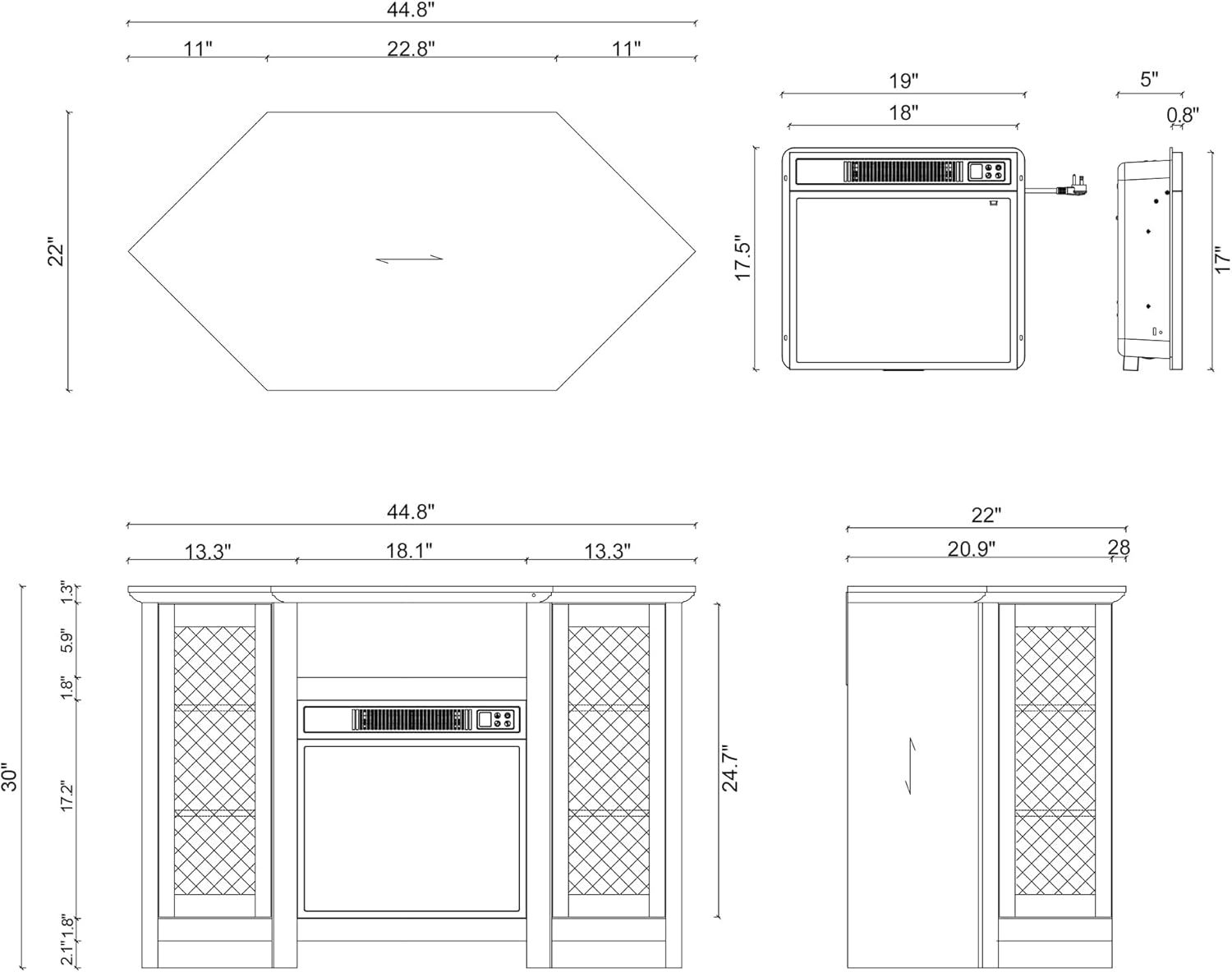
Figure 1: Detailed assembly diagram showing dimensions and component placement.
- Pass 1: Iftaħ il-pakkett u Identifika l-Partijiet. Carefully remove all components from the packaging. Compare each part to the parts list and the assembly diagram (Figure 1) to ensure everything is present and undamaged.
- Pass 2: Arma l-Bażi. Attach the side panels to the bottom panel using the provided hardware (dowels and cam locks). Ensure all connections are secure.
- Pass 3: Installa l-Ixkafef u d-Diviżuri. Insert the fixed shelves and vertical dividers into their designated slots, securing them with the appropriate fasteners.
- Pass 4: Waħħal il-Panel ta' Fuq. Secure the top panel to the assembled frame using screws and cam locks.
- Step 5: Install Electric Fireplace Insert. Carefully slide the 18-inch electric fireplace insert into the central opening of the TV stand. Ensure it fits snugly and is centered. Do not force it.
- Pass 6: Waħħal il-Bibien. Mount the glass doors to the side compartments using the hinges provided. Adjust hinges as necessary for proper alignment.
- Step 7: Install Door Handles. Attach the door handles to the glass doors.
- Pass 8: Verifika Finali. Ensure all screws and fasteners are tightened. Place the TV stand in its desired location, ensuring it is level and stable.

Figure 2: Assembled Parrot Uncle Fireplace TV Stand.
Operating Instructions (Electric Fireplace)
The electric fireplace can be operated using the control panel on the unit or the included remote control.
Funzjonijiet tal-Panel tal-Kontroll / Remot:
- Buttuna tal-Qawwa: Press to turn the fireplace ON or OFF.
- Buttuna tal-Luminożità tal-Fjamma: Cycle through different flame brightness levels (e.g., low, medium, high).
- Buttuna tas-Sħana: Press to activate the heating function. Press again to turn off the heat. The unit can operate with flame effect only, or with both flame and heat.
- Kontroll tat-temperatura: Adjust the desired temperature setting. The fireplace will cycle on and off to maintain the set temperature.
- Buttuna tat-Tajmer: Set the operating timer from 0.5 hours to 6 hours. The fireplace will automatically shut off after the set time.
Noti Importanti:
- Always plug the fireplace directly into a wall outlet. Do not use extension cords or power strips.
- The heating element is designed for supplemental heat for areas up to 300 square feet.
- If the unit experiences overheating, the automatic shut-off feature will activate. Unplug the unit and allow it to cool for at least 10-15 minutes before plugging it back in. Check for any blocked vents.
Kura u Manutenzjoni
Stand tat-TV:
- Tindif: Imsaħ l-uċuħ b'artab, damp drapp. Evita kimiċi ħarxa jew prodotti tat-tindif li joborxu li jistgħu jagħmlu ħsara lill-finitura.
- Tixrid: Imsaħ immedjatament kwalunkwe tixrid biex tevita tbajja’ jew ħsara lill-injam inġinerizzat.
- Bibien tal-ħġieġ: Clean glass with a standard glass cleaner and a soft cloth.
- Ħardwer: Iċċekkja l-viti u l-qafliet kollha perjodikament biex tiżgura li jibqgħu ssikkati. Erġa' ssikka jekk meħtieġ.
Nar Elettriku:
- Tindif: Ensure the unit is unplugged and cool before cleaning. Use a soft, dry cloth to wipe the exterior. Do not use water or liquid cleaners on the electrical components.
- Ventijiet: Keep the air intake and exhaust vents clear of dust and debris. Use a vacuum cleaner with a brush attachment to gently clean the vents.
- Bozoz: The flame effect uses LED technology, which typically does not require bulb replacement. If issues arise, consult customer support.
Issolvi l-problemi
| Problema | Kawża Possibbli | Soluzzjoni |
|---|---|---|
| In-nar ma jixgħelx. | No power, unit unplugged, circuit breaker tripped, overheat protection activated. | Check power cord connection. Ensure outlet is functional. Reset circuit breaker. If overheat protection activated, unplug and allow to cool for 15 minutes. |
| L-ebda sħana, iżda l-effett tal-fjamma jaħdem. | Heat function not activated, temperature setting too low, air vents blocked. | Press the heat button. Increase temperature setting. Clear any obstructions from air vents. |
| Il-kontroll mill-bogħod ma jaħdimx. | Batteriji mejta, remote barra mill-firxa, sensor imblukkat. | Replace batteries. Ensure remote is pointed at the fireplace sensor. Remove any obstructions between remote and sensor. |
| TV stand feels unstable. | Loose fasteners, uneven surface. | Retighten all assembly screws. Move the stand to a level surface or use shims to stabilize. |
Speċifikazzjonijiet tal-Prodott
| Karatteristika | Dettall |
|---|---|
| Brand | Ziju Pappagall |
| Isem tal-Mudell | TV Stand (Model 001) |
| Dimensjonijiet tal-Prodott | 18"D x 44.8"W x 30"H |
| Materjal | Injam Inġinerija |
| Tip Finish | Miżbugħa |
| Kulur | Griż |
| Tip ta' Installazzjoni | Freestanding |
| Sors tal-Enerġija | Elettriku |
| Karatteristika Speċjali | Flame Effect, TV Stand |
| Tip ta 'ventilazzjoni | Vent Ħieles |
| Piż tal-oġġett | 30 Liri |
| Komponenti Inklużi | TV Stand, Electric Fireplace Insert |
Informazzjoni dwar Garanzija
For specific warranty details regarding your Parrot Uncle Fireplace TV Stand, please refer to the warranty card included with your purchase or contact the retailer/manufacturer directly. Warranty terms typically cover manufacturing defects for a specified period from the date of purchase.
Appoġġ għall-Klijent
If you have any questions, require assistance with assembly, or encounter issues not covered in this manual, please contact Parrot Uncle customer support. Contact information can typically be found on the product packaging, the manufacturer's webis-sit, jew permezz tal-bejjiegħ bl-imnut tiegħek.