Introduzzjoni
Grazzi tax-xiriasing the 7artisans AF 50mm F1.8 Full Frame Lens. This manual provides essential information for the safe and effective use of your new lens. Please read it thoroughly before use and keep it for future reference.
This 50mm F1.8 lens is designed for Sony E-Mount full-frame cameras, offering a large aperture, fast autofocus, and support for advanced features like face and eye recognition. Its versatile focal length makes it suitable for a wide range of photographic applications, from portraits to street photography.
Informazzjoni dwar is-Sigurtà
- Do not look at the sun or bright light sources through the lens, as this may cause permanent vision impairment.
- Keep the lens away from direct sunlight when not in use to prevent fire hazards or damage to internal components.
- Avoid exposing the lens to extreme temperatures, high humidity, or dust.
- Do not attempt to disassemble or repair the lens yourself. Contact authorized service personnel for assistance.
- Żomm fejn ma jintlaħaqx mit-tfal.
Kontenut tal-Pakkett
Ivverifika li l-oġġetti kollha huma preżenti fil-pakkett tiegħek:
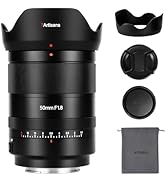
- 7artisans AF 50mm F1.8 Full Frame Lens
- Kap tal-Lenti ta 'Quddiem
- Kap tal-Lenti ta 'wara
- Lens Hood
- Borża tal-Lenti
- Manwal ta 'Istruzzjoni (dan id-dokument)

Image: The 7artisans AF 50mm F1.8 lens shown with its included accessories: front and rear lens caps, lens hood, and a soft pouch.
Prodott Overview
The 7artisans AF 50mm F1.8 lens features a robust metal construction with a sleek black finish. Key components include:
- Ċirku tal-Fokus: For manual focusing.
- Ċirku tal-Apertura: Allows switching between automatic and manual aperture control.
- Swiċċ AF/MF: Jaqleb bejn il-modi ta' fokus awtomatiku u fokus manwali.
- Muntatura tal-lenti: Sony E-Mount compatible.
- Port USB-C: Għal aġġornamenti tal-firmware.
Immaġni: Close-up view of the lens barrel, highlighting the AF/MF switch for mode selection.

Immaġni: Dettaljata view of the lens mount, showing the electronic contacts and the integrated USB-C port for firmware updates.
Setup
- It-twaħħil tal-Lenti:
- Allinja l-punt abjad fuq il-kanna tal-lenti mal-punt abjad fuq il-muntatura tal-lenti tal-kamera tiegħek.
- Daħħal il-lenti bil-mod fil-muntatura tal-kamera.
- Dawwar il-lenti lejn l-arloġġ sakemm tikklikkja f'postha, u b'hekk tindika li hija msakkra sew.
- Tneħħi l-Lenti:
- Agħfas u żomm il-buttuna tar-rilaxx tal-lenti fuq il-korp tal-kamera tiegħek.
- Rotate the lens counter-clockwise until it detaches from the camera mount.
- Waħħal l-għotjien tal-lenti ta’ quddiem u ta’ wara biex tipproteġi l-elementi tal-lenti.
- It-twaħħil tal-Lens Hood:
- Allinja l-għatu tal-lenti man-naħa ta' quddiem tal-lenti.
- Dawwar il-kappa lejn l-arloġġ sakemm tissakkar sew.
- The lens hood helps reduce flare and provides physical protection to the front element.

Image: The 7artisans AF 50mm F1.8 lens securely mounted on a Sony mirrorless camera, viewed mill-ġenb.
Tħaddim tal-Lenti
1. Focus Mode Selection (AF/MF)
Use the AF/MF switch on the lens barrel to select your desired focus mode:
- AF (Awtofokus): The camera will automatically focus on the subject. This lens features a high-speed STM stepping motor for quick and accurate autofocus performance.
- MF (Fokus Manwali): You can manually adjust the focus by rotating the focus ring on the lens.
Immaġni: Dettaljata view of the AF/MF switch, allowing users to toggle between autofocus and manual focus modes.
2. Kontroll tal-Apertura
The lens features an aperture ring that can be switched between automatic and manual control:
- Automatic Aperture: Set the aperture ring to the 'A' position. The camera will control the aperture settings.
- Manual Aperture: Rotate the aperture ring to select your desired F-stop (F1.8 to F16). This provides precise control over depth of field and exposure.
The large F1.8 aperture allows for excellent low-light performance and the creation of beautiful background blur (bokeh).
3. Face/Eye Recognition Support
This lens supports your camera's face and eye recognition functions. When enabled on your camera, the lens will automatically set accurate focusing points and exposure for human faces or eyes, ensuring sharp portraits.

Image: A photograph illustrating the camera's eye recognition feature actively focusing on a subject's eye.
4. Aġġornamenti tal-Firmware
The integrated USB-C port allows for easy firmware updates. Connect the lens to your computer using a USB-C cable and follow the instructions provided on the 7artisans official website to update the firmware. This ensures optimal performance and compatibility with future camera models.
Immaġni: Dettaljata view of the lens mount, showing the electronic contacts and the integrated USB-C port for firmware updates.
Manutenzjoni
- Tindif: Use a soft, lint-free cloth to clean the lens barrel. For lens elements, use a lens brush to remove dust, then gently wipe with a lens cleaning cloth and lens cleaning solution.
- Ħażna: When not in use, store the lens with both caps attached in a cool, dry place away from direct sunlight and moisture. Consider using a desiccant to prevent mold growth.
- Immaniġġjar: Avoid dropping or subjecting the lens to strong impacts, as this can damage internal optical elements.
Issolvi l-problemi
1. Lens not focusing:
- Ensure the AF/MF switch is set to the desired mode (AF for autofocus).
- Check camera settings to ensure autofocus is enabled and the correct focus area is selected.
- Naddaf il-kuntatti tal-lenti kemm fuq il-lenti kif ukoll fuq il-korp tal-kamera.
2. Images are blurry:
- Verify that the lens is properly focused.
- Check shutter speed to avoid camera shake, especially in low light.
- Ensure the lens elements are clean and free from smudges or dust.
3. Lens not recognized by camera:
- Remove and reattach the lens, ensuring it clicks securely into place.
- Clean the electronic contacts on both the lens and camera body with a clean, dry cloth.
- Check for available firmware updates for both the lens and your camera.
Speċifikazzjonijiet
| Karatteristika | Dettall |
|---|---|
| Brand | 7artiġjani |
| Numru tal-Mudell | AF5018EB |
| Tul Fokali | 50mm |
| Apertura massima | F1.8 |
| Apertura Minima | F16 |
| Tip ta' Lenti | Lenti Prim Standard |
| Muntaturi Kompatibbli | Sony E-Mount |
| Struttura ottika | 11 elementi fi 9 gruppi |
| Xfafar tad-dijaframma | 11-il biċċa |
| Angolu ta ' View | D:46.8°, H:39.6°, V:27.0° |
| L-eqreb distanza ta' ffukar | 0.5M - ∞ |
| Daqs tal-Filtru | 58mm |
| Piż tal-oġġett | 1.78 liri (madwar 807g) |
| Dimensjonijiet tal-Prodott | 40.94 x 28.35 x 28.35 pulzieri |
Garanzija u Appoġġ
Għal informazzjoni dwar il-garanzija, appoġġ tekniku, jew mistoqsijiet dwar is-servizz, jekk jogħġbok żur is-sit uffiċjali ta' 7artisans. webis-sit jew ikkuntattja lin-negozjant awtorizzat tiegħek. Żomm il-prova tax-xiri tiegħek għal talbiet ta' garanzija.
For the latest firmware updates and additional resources, please visit: 7artisans Official Store
Vidjows Uffiċjali tal-Prodott
Watch these official videos for more information on the 7artisans AF 50mm F1.8 lens:
7artiġjani AF50mm F1.8
Vidjo: Wirja uffiċjali tal-vidjo tal-prodottasing the features and capabilities of the 7artisans AF 50mm F1.8 lens.
7artisans AutoFocus 50mm F1.8
Video: Another official product video demonstrating the autofocus performance and image quality of the 7artisans 50mm F1.8 lens.

