1. Introduzzjoni
Grazzi tax-xiriasing the Ankilo Projection Alarm Clock. This device is designed to provide convenient timekeeping with a unique projection feature, allowing you to view the time on your ceiling or wall. It also includes an alarm, temperature display, and USB charging capabilities. Please read this manual carefully to ensure proper use and maintenance of your new alarm clock.
2. Informazzjoni dwar is-Sigurtà
- Tesponix l-apparat għal temperaturi estremi, dawl tax-xemx dirett, jew umdità għolja.
- Żomm l-apparat 'il bogħod mill-ilma jew likwidi oħra.
- Tippruvax tiżżarma jew issewwi l-apparat int stess. Irreferi għal kull manutenzjoni f'idejn persunal kwalifikat.
- Uża biss il-kejbil USB provdut għall-enerġija.
- The CR2032 battery is for backup only; the clock requires continuous USB power for full functionality.
3. Kontenut tal-Pakkett

- 1 x Ankilo Projection Alarm Clock
- 1 x USB Power Cable (1.5m)
- 1 x CR2032 Memory Battery (pre-installed for backup)
- 1 x Manwal għall-Utent
The image above shows the complete contents included in your Ankilo Projection Alarm Clock package. Please verify all items are present upon unboxing.
4. Prodott Aktarview

This diagram illustrates the various buttons and ports on your Ankilo Projection Alarm Clock for easy identification and operation.
| Komponent | Deskrizzjoni |
|---|---|
| Buttuna SNOOZE / DAWL | Press to snooze alarm or adjust display brightness. |
| PROJECT Button | Press to adjust projection brightness. |
| Buttuna ta 'ALLARM | Press to set or activate/deactivate alarm. |
| Buttuna SET | Press to enter time/date setting mode. |
| Buttuna UP | Increase values during setting, or switch 12/24H format. |
| Buttuna 'l isfel | Decrease values during setting, or switch temperature unit. |
| Projezzjoni Lamp | Emits time projection onto surface. |
| Port tal-Enerġija | Connect USB power cable here. |
| Kompartiment tal-Batterija CR2032 | Houses the backup battery. |
| Speaker | Outputs alarm sound. |
5. Setup
5.1 It-Tħaddim tal-Apparat
The Ankilo Projection Alarm Clock is primarily powered by a USB cable. Connect the provided USB cable to the power port on the back of the clock and plug the other end into a standard USB power adapter (not included) or a USB port.
Nota Importanti:
- The LED screen will only remain on when the USB power supply is connected.
- The included CR2032 battery serves as a backup to retain time and alarm settings during power outages, but it does not power the display or projection.
5.2 Issettjar Inizjali tal-Ħin u d-Data
- Agħfas u żomm il- SET button for 3 seconds to enter time setting mode. The hour digits will start flashing.
- Uża l- UP or 'L isfel buttuni biex taġġusta s-siegħa.
- Agħfas SET Agħfas mill-ġdid biex tikkonferma s-siegħa u tmur għall-issettjar tal-minuti. Iċ-ċifri tal-minuti se jteptpu.
- Uża l- UP or 'L isfel buttuni biex taġġusta l-minuta.
- Agħfas SET again to confirm the minute and move to year setting.
- Repeat the process using UP/'L isfel u SET biex tissettja s-sena, ix-xahar u l-jum.
- Wara li tissettja l-jum, agħfas SET darba oħra għall-aħħar darba biex toħroġ mill-modalità tas-settings.
6. Istruzzjonijiet Operattivi
6.1 Issettjar tal-Allarm
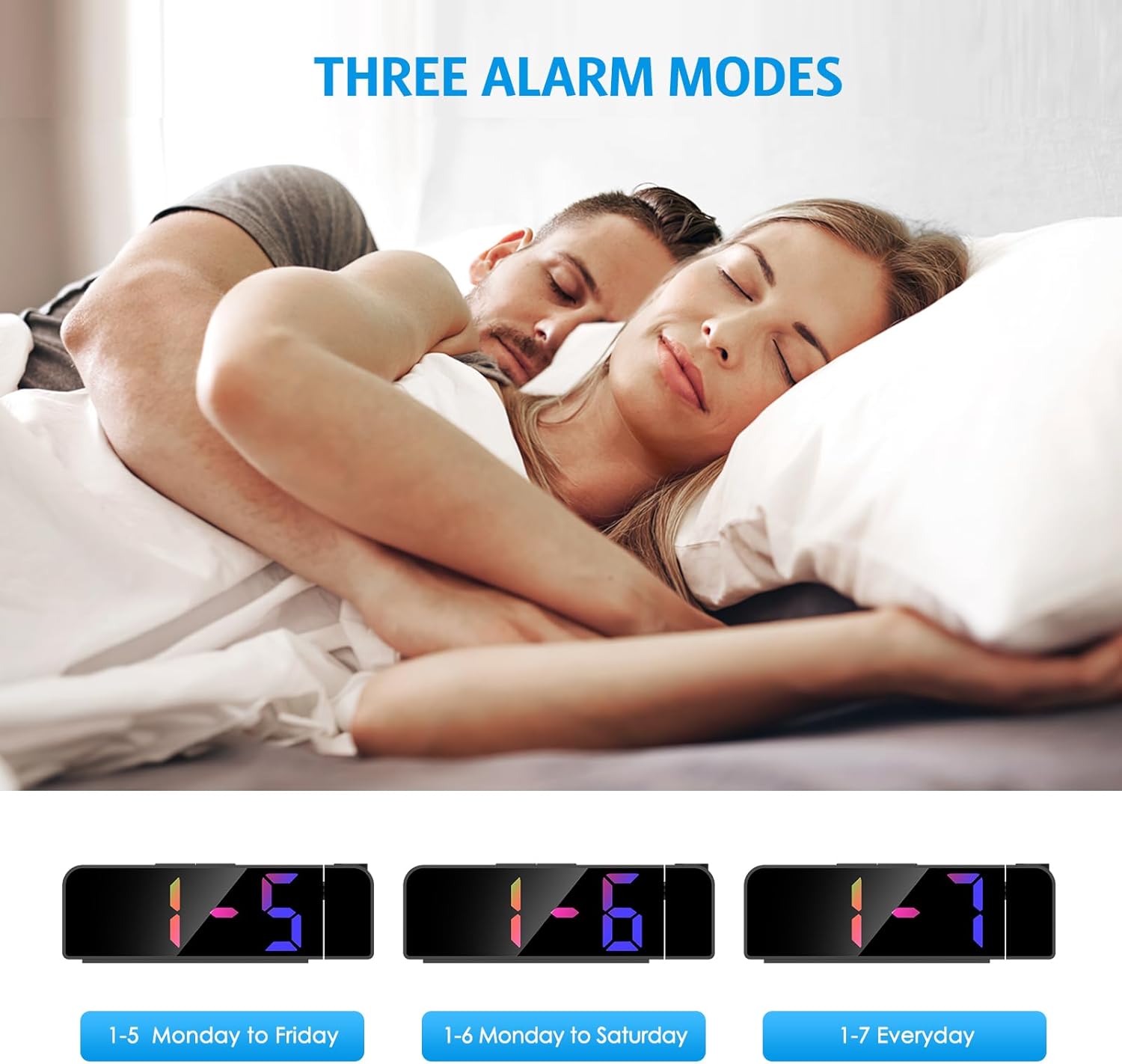
- Agħfas u żomm il- ALLARM Agħfas il-buttuna għal 3 sekondi. Iċ-ċifri tas-siegħa tal-allarm jibdew jteptep.
- Uża l- UP or 'L isfel buttuni biex tissettja s-siegħa tal-allarm mixtieqa.
- Agħfas ALLARM għal darb'oħra biex tikkonferma s-siegħa u tmur għall-issettjar tal-minuti.
- Uża l- UP or 'L isfel buttuni biex tissettja l-minuta tal-allarm mixtieqa.
- Agħfas ALLARM again to select the alarm mode:
- 1-5: L-allarm idoqq mit-Tnejn sal-Ġimgħa.
- 1-6: L-allarm idoqq mit-Tnejn sas-Sibt.
- 1-7: Alarm sounds Everyday.
- Agħfas ALLARM darba oħra biex tikkonferma u toħroġ mill-modalità tas-settings tal-allarm.
The image above illustrates the three available alarm modes: weekdays, weekdays plus Saturday, and every day.
6.2 Funzjoni Snooze

Meta jdoqq l-allarm, agħfas il-buttuna l-kbira SNOOZE / DAWL button on the top of the clock to activate the snooze function. This will provide an additional 5 minutes of sleep before the alarm sounds again. You can repeat this process as needed.
The image highlights the prominent SNOOZE/LIGHT button, easily accessible for quick snooze activation.
6.3 Aġġustament tal-Luminożità tad-Displej

Agħfas il- SNOOZE / DAWL button (short press) to cycle through 4 levels of display brightness: Bright, Medium, Low, and Off. Select the brightness level that best suits your environment.
This image demonstrates the four distinct brightness settings for the main LED display, from bright to completely off.
6.4 Adjusting Projection Brightness and Orientation

Agħfas il- PROĠETT button (short press) to cycle through 3 levels of projection brightness: Off, Dim, and Bright. The projection lamp can be rotated 180 degrees to project the time onto your ceiling or wall.
The image illustrates the projection feature, showing the clock projecting time onto a wall and the three available brightness levels for the projection.

Important Projection Orientation: The projection digits are only displayed correctly when the projection direction is towards the back of the alarm clock (away from the front display). If you project forward, the numbers will appear reversed. Ensure the projection is directed appropriately for correct readability.
This image clearly demonstrates the correct and incorrect projection orientations, emphasizing that projection should be directed backward for proper display.
6.5 Modalità bil-lejl

The alarm clock features an automatic night mode. By default, the display brightness will automatically dim between 18:00 (6 PM) and 5:59 (5:59 AM). This time range can be adjusted to suit your preferences within the settings menu (refer to the full manual for advanced settings).
The image depicts the alarm clock operating in a low-light environment, showcasing the automatic dimming feature of the night mode.
Format 6.6 12/24 Siegħa

To switch between 12-hour and 24-hour time formats, short press the UP button during normal time display. The display will toggle between AM/PM indication (12-hour) and military time (24-hour).
This image visually compares the appearance of the time display in both 12-hour and 24-hour formats.
7. Manutenzjoni
To maintain your Ankilo Projection Alarm Clock, gently wipe the surface with a soft, dry cloth. Avoid using abrasive cleaners or solvents, as these may damage the finish or electronic components. Keep the projection lens clean for clear time display.
8 Issolvi l-problemi
| Problema | Kawża Possibbli | Soluzzjoni |
|---|---|---|
| Id-displej huwa mitfi jew mudlam. | Not connected to USB power, or display brightness set to 'Off'. | Ensure USB cable is securely connected. Press SNOOZE / DAWL biex taġġusta l-luminożità. |
| Projection numbers are reversed. | Projezzjoni lamp is facing forward. | Rotate the projection lamp 180 degrees so it projects towards the back of the clock. |
| L-allarm ma jdoqqx. | L-allarm mhux issettjat jew huwa diżattivat. | Agħfas u żomm ALLARM to set the alarm time and mode. Ensure the alarm icon is visible on the display. |
| Irrisettjar tal-ħin/is-settings wara li tintefa' l-enerġijatage. | Il-batterija tal-backup CR2032 hija mejta jew nieqsa. | Replace the CR2032 battery in the battery compartment. |
| Il-projezzjoni hija mċajpra. | Projection lens is dirty or surface is too far/close. | Clean the projection lens with a soft cloth. Adjust the clock's distance from the projection surface (ideal 1.6ft-16ft). |
9. Speċifikazzjonijiet
| Karatteristika | Dettall |
|---|---|
| Brand | Ankilo |
| Numru tal-Mudell | WA113B&C-MA06US-HY |
| Tip ta 'Wiri | LED diġitali |
| Daqs tal-Wiri | 7.9 pulzieri |
| Dimensjonijiet tal-Prodott | 1.7"W x 3.3"Għ |
| Sors tal-Enerġija | Corded Electric (USB cable) |
| Batterija tal-Backup | 1 x CR2032 (inkluż) |
| Karatteristiċi Speċjali | 180° Projection, Adjustable Brightness (Display & Projection), USB Charging Port, Night Mode, Temperature Display, Snooze Function, Multiple Alarm Modes (1-5, 1-6, 1-7) |
| Materjal | Metall |
| Piż tal-oġġett | 6.7 uqija |
10. Garanzija u Appoġġ

- Politika ta' Ritorn: Enjoy a 6-month return period from the date of purchase.
- Garanzija: Your Ankilo Projection Alarm Clock is covered by a 24-month warranty against manufacturing defects.
- Appoġġ tul il-ħajja: Ankilo is committed to providing lifetime technical support for this product.
The image above summarizes our commitment to customer satisfaction, including return policy, warranty, and ongoing support.
For any questions, troubleshooting assistance, or warranty claims, please contact Ankilo customer support through the platform where you purchased the product or visit our official websit għal informazzjoni ta' kuntatt.


