Introduzzjoni
Thank you for choosing the Bigben 5000mAh MagSafe Compatible Wireless Power Bank. This portable power bank is designed to provide convenient wireless charging for compatible devices, as well as wired charging via its USB-C port. Please read this manual carefully before using the product to ensure safe and optimal performance.
Informazzjoni dwar is-Sigurtà
Biex tevita korriment jew ħsara lill-apparat tiegħek, jekk jogħġbok osserva l-prekawzjonijiet ta' sigurtà li ġejjin:
- Tesponix il-power bank għal temperaturi estremi, dawl tax-xemx dirett, jew nar.
- Tgħaddasx il-power bank fl-ilma jew f'likwidi oħra.
- Evita li twaqqa’, tolqot, jew tiżżarma l-power bank.
- Żomm fejn ma jintlaħaqx mit-tfal.
- Uża biss kejbils u adapters tal-iċċarġjar iċċertifikati.
- Jekk il-power bank jintefaħ, joħroġ riħa qawwija, jew jisħon iżżejjed, waqqaf l-użu immedjatament.
- Armi l-power bank b'mod responsabbli skont ir-regolamenti lokali.
Kontenut tal-Pakkett
Jekk jogħġbok iċċekkja l-pakkett għall-oġġetti li ġejjin:
- Bigben 5000mAh MagSafe Compatible Wireless Power Bank
- USB-C għal USB-C Charging Cable
- Manwal għall-Utent (dan id-dokument)
Prodott Overview
Familiarize yourself with the components of your power bank:

Immaġni: Quddiem view of the Bigben 5000mAh Power Bank, highlighting the LED indicator lights and the USB-C port.
- Dwal Indikaturi LED: Four small lights indicating the remaining battery level.
- Port USB-C: For charging the power bank and for wired device charging.
- Wiċċ tal-Iċċarġjar mingħajr Fili: The flat surface designed for MagSafe compatible wireless charging.
- Buttuna tal-Qawwa: Activates wireless charging and checks battery level.
Setup
Iċċarġjar tal-Power Bank
Qabel l-ewwel użu, iċċarġja l-power bank tiegħek kompletament.
- Qabbad il-kejbil USB-C provdut mal-port USB-C tal-power bank.
- Qabbad it-tarf l-ieħor tal-kejbil USB-C ma' adapter tal-ħajt USB kompatibbli (mhux inkluż).
- The LED indicator lights will illuminate to show the charging status. When all four LEDs are solid, the power bank is fully charged.
Status tal-Indikatur LED:
- 1 LED: 0-25% charged
- 2 LEDs: 25-50% iċċarġjati
- 3 LEDs: 50-75% iċċarġjati
- 4 LEDs: 75-100% iċċarġjati
Operazzjoni
Iċċarġjar mingħajr fili (Kompatibbli ma' MagSafe)
This power bank supports MagSafe compatible wireless charging up to 10W.
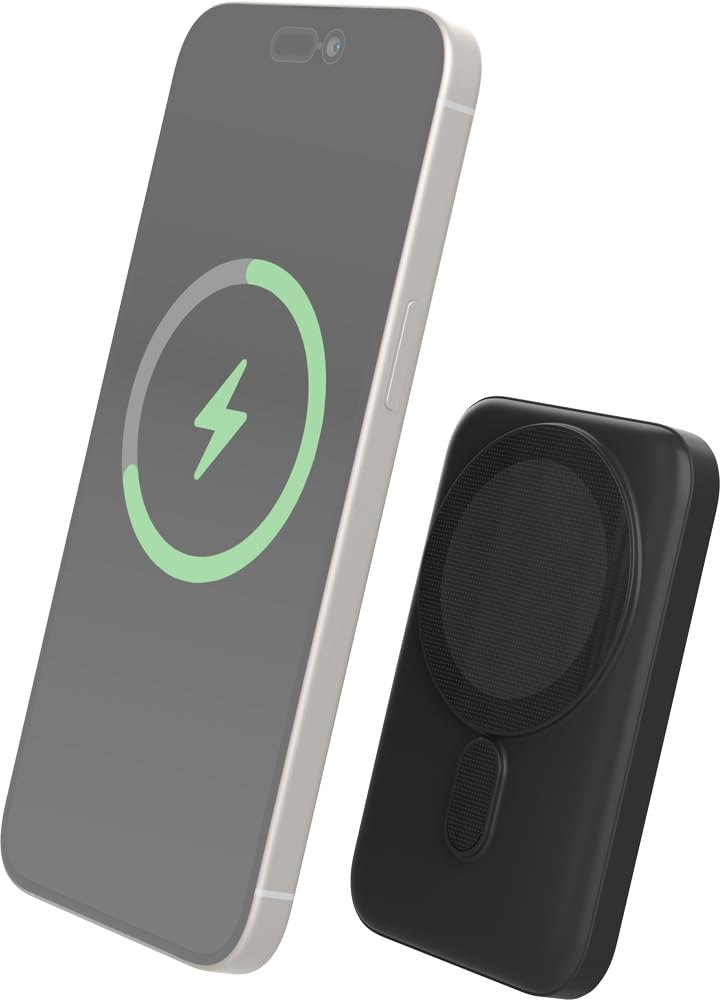
Image: The Bigben power bank magnetically connected to the back of a smartphone, illustrating the wireless charging function.
- Ensure your device is MagSafe compatible or has a MagSafe compatible case.
- Align the power bank with the back of your device. The magnets will snap it into place.
- The power bank will automatically begin charging your device. The LED indicators on the power bank will show its remaining charge.
- To stop charging, simply detach the power bank from your device.
Note: For optimal magnetic attachment and charging efficiency, ensure there are no obstructions between the power bank and your device.
Iċċarġjar bil-fili
You can also charge devices using a USB-C cable.
- Connect one end of a USB-C cable (not included, or use the provided one if suitable) to the power bank's USB-C port.
- Qabbad it-tarf l-ieħor tal-kejbil mal-port tal-iċċarġjar tat-tagħmir tiegħek.
- Il-power bank jibda jiċċarġja t-tagħmir tiegħek awtomatikament.
Manutenzjoni
Tindif
- Disconnect the power bank from all devices and power sources before cleaning.
- Imsaħ il-wiċċ b'ċarruta ratba, niexfa u mingħajr suf.
- Tużax kimiċi ħarxa, solventi tat-tindif, jew deterġenti qawwija.
Ħażna
- Aħżen il-power bank f'post frisk u niexef 'il bogħod mix-xemx diretta u minn temperaturi estremi.
- Jekk taħżnu għal perjodu estiż, iċċarġja l-power bank sa madwar 50% kull tliet xhur biex iżżomm il-batterija f'saħħitha.
Issolvi l-problemi
| Problema | Soluzzjoni Possibbli |
|---|---|
| Il-bank tal-enerġija mhux qed jiċċarġja |
|
| L-apparat mhux qed jiċċarġja mingħajr fili |
|
| L-apparat mhux qed jiċċarġja permezz tal-kejbil |
|
| Indikaturi LED ma jaħdmux |
|
Speċifikazzjonijiet
| Karatteristika | Dettall |
|---|---|
| Numru tal-Mudell | 6128 |
| Kapaċità tal-batterija | 5000mAh |
| Output Wireless | Up to 10W (MagSafe Compatible) |
| Input/Output Port | USB-C |
| Piż | Madwar 300g |
Garanzija u Appoġġ
Bigben products are designed and manufactured to the highest standards. For warranty information or technical support, please refer to the warranty card included with your purchase or visit the official Bigben websit.
For further assistance, please contact Bigben customer service.


