Introduzzjoni
Thank you for choosing the Odoland Portable Camping Fan with Spray. This versatile device is designed to provide cooling, misting, lighting, and emergency power in various outdoor and indoor settings. With its rechargeable battery and compact design, it is an ideal companion for camping, patios, beaches, RVs, and general summer use. Please read this manual thoroughly before use to ensure proper operation and to maximize the product's lifespan.

Image: The Odoland Portable Camping Fan, highlighting its multi-functional design with fan blades, misting outlet, and integrated light, alongside a smartphone connected for charging.
Istruzzjonijiet tas-Sigurtà
- Tgħaddix il-fann fl-ilma jew likwidi oħra.
- Żomm fejn ma jintlaħaqx mit-tfal.
- Uża biss il-kejbil tal-iċċarġjar provdut jew wieħed ekwivalenti ċċertifikat.
- Do not block the fan's air inlet or outlet during operation.
- Avoid disassembling or modifying the device, as this may void the warranty and pose safety risks.
- Ensure the water tank is securely closed when the misting function is not in use to prevent leaks.
- Use only pure water for the misting function to prevent clogging of the spray port.
Kontenut tal-Pakkett
Jekk jogħġbok iċċekkja l-pakkett għall-oġġetti li ġejjin:
- Odoland Portable Misting Fan x 1
- Manwal għall-Utent x 1
- Kejbil tal-Iċċarġjar tat-Tip C x 1

Image: The Odoland Portable Misting Fan, its user manual, and a Type-C charging cable, as included in the product package.
Prodott Overview
Familiarize yourself with the main components of your Odoland Portable CampFann tal-ing:
- Xfafar tal-fann: Located behind the front grille, responsible for air circulation.
- Misting Nozzle: Integrated into the fan grille for spray function.
- Tank tal-Ilma: 250mL capacity, located at the top for misting.
- Panel tal-Kontroll: Buttons for fan speed, misting, light, and timer.
- Indikatur tal-batterija: Displays current battery level and wind speed.
- Port tal-Ħruġ USB-A: For emergency charging of external devices.
- Port tad-Dħul USB-C: For charging the fan's internal battery.
- Manku li jinġarr: Għal ġarr faċli.
- 360° Rotation Hanging Hook: For hanging the fan in tents or other locations.
Setup
1. Iċċarġjar Inizjali
Before first use, fully charge the fan. Connect the provided Type-C charging cable to the fan's USB-C input port and a suitable USB power adapter (not included). The battery indicator lights will show charging progress. A full charge typically takes 5-6 hours.
2. Filling the Water Tank (for Misting Function)
- Locate the rubber stopper on the top of the fan.
- Open the rubber stopper.
- Ferra’ bir-reqqa ilma pur into the 250mL water tank. Using pure water helps prevent clogging of the mist port.
- Tighten the leak-proof cover securely.
- Open the mist cover before activating the misting function.

Image: A visual guide demonstrating the four steps to properly fill the water tank for the misting function, emphasizing the use of clean water.
Istruzzjonijiet Operattivi
1. Tħaddim tal-Fann
Press the fan speed button on the control panel to cycle through the 4 available speeds. Each press will increase the speed. Pressing a fifth time will turn the fan off.
- Veloċità 1: Up to 20 hours of continuous operation.
- Veloċità 2: Up to 14 hours of continuous operation.
- Veloċità 3: Up to 10 hours of continuous operation.
- Veloċità 4: Up to 8 hours of continuous operation.

Image: The Odoland fan illustrating its four fan speed settings and their respective runtimes, along with the battery and wind indicator display.
2. Misting Function
Ensure the water tank is filled with pure water and the mist cover is open.
- Press and hold the spray button until the red light illuminates. This indicates the misting function is ready.
- Press the spray button again to activate the misting.
- The fan offers two spray settings: continuous mode (approx. 40 minutes with full tank) and intermittent mode (approx. 70 minutes with full tank). Press the spray button to switch between modes.
- To turn off the misting function, press and hold the spray button again.
Importanti: If hanging the fan, ensure the water tank is positioned upwards to allow the misting function to work correctly. Cover the spray cap when the misting function is not in use.
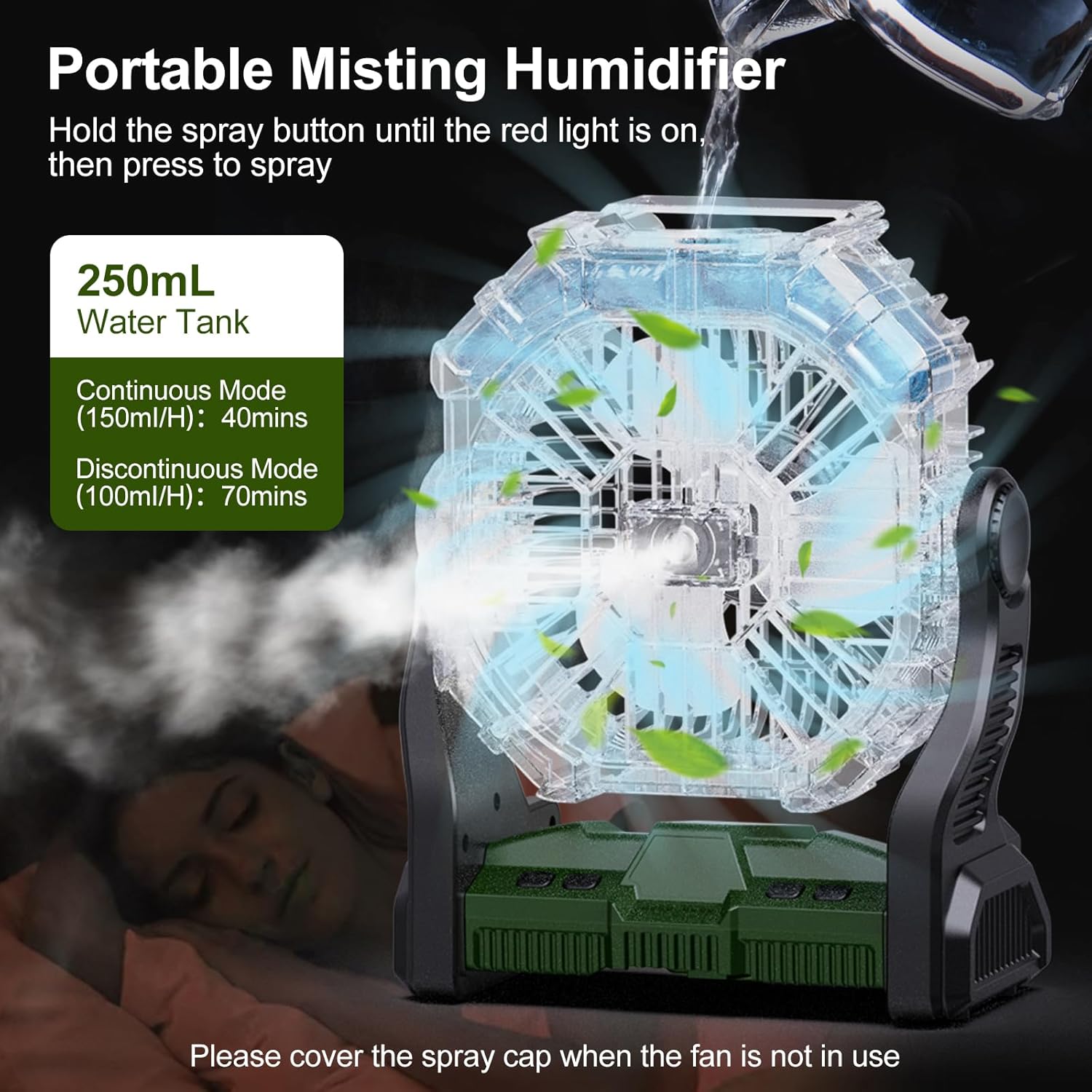
Image: The Odoland fan in misting operation, showing the water vapor being emitted, with details on the 250mL water tank and the duration of continuous and discontinuous misting modes.
3. Light Function
The fan features 7 fixed lighting colors. Press the light button on the control panel to cycle through the different colors. Pressing the button again after the last color will turn the light off.

Image: The Odoland fan with its internal LED lights glowing in multiple colors, illustrating the 7 fixed lighting options available.
4. Emergency Power Bank Function
The fan's built-in 10400mAh battery can serve as an emergency power bank. Connect your phone, GPS, or other USB-powered devices to the fan's USB-A output port using your device's charging cable. This provides convenient charging when away from power outlets.

Image: The Odoland fan charging a smartphone via its USB port, set in a camping environment, demonstrating its emergency power bank capability.
5. Funzjoni Timer
The fan includes a timer function for automatic shut-off. Press the timer button to set the fan to turn off after 2, 4, or 8 hours. The corresponding indicator light will illuminate to confirm the selected timer setting.
Iċċarġjar tal-Fan
To charge the fan, connect the provided Type-C charging cable to the fan's USB-C input port and a compatible USB power source. The fan can operate while charging. A full charge takes approximately 5-6 hours.
Manutenzjoni
Tindif
- Kun żgur li l-fann ikun mitfi u splaggjat qabel it-tindif.
- Wipe the exterior of the fan with a soft, damp drapp. Tużax tindif jew solventi li joborxu.
- For the misting nozzle, if clogging occurs, gently clean with a cotton swab or a soft brush. Only use pure water to prevent mineral buildup.
- Empty and dry the water tank when the misting function is not in use for extended periods to prevent mold or mildew growth.
Issolvi l-problemi
| Problema | Kawża Possibbli | Soluzzjoni |
|---|---|---|
| Il-fann ma jixgħelx. | Batterija baxxa; Il-buttuna tal-qawwa mhux ippressata sew. | Charge the fan; Ensure the power button is pressed firmly. |
| Misting function not working. | Water tank empty; Spray port clogged; Fan hung upside down; Spray button not activated correctly. | Refill water tank with pure water; Clean spray port; Ensure water tank is upwards if hanging; Press and hold spray button until red light comes on, then press again. |
| Il-funzjoni tad-dawl mhux qed taħdem. | Low battery; Light button not pressed. | Charge the fan; Press the light button to cycle through colors. |
| Phone not charging via USB. | Low fan battery; Incorrect cable; Device not compatible. | Charge the fan; Use a functional USB cable; Ensure your device supports USB charging. |
Speċifikazzjonijiet
- Ditta: odoland
- Isem tal-Mudell: OD0634A
- Kulur: Aħdar
- Disinn tal-Fann Elettriku: Fan tal-mejda
- Sors tal-Enerġija: Imħaddem bil-batterija (batterija rikarikabbli ta' 10400mAh)
- Karatteristika Speċjali: Portable, Misting, Light, Emergency Power Bank
- Użi Rakkomandati: Ċirkolazzjoni tal-Arja, Tkessiħ
- Wattage: 14 watt
- Numru ta 'xfafar: 3
- Voltage: 12 Volts (DC)
- Tip ta' swiċċ: Imbotta Buttuna
- Użu fuq ġewwa/barra: Ġewwa, Barra
- Metodu ta' Kontroll: Mess
- Effiċjenza: Effiċjenza Għolja
- Bla fili: Iva
- Numru ta' Livelli ta' Qawwa: 4 (Fan Speeds)
- Dimensjonijiet tal-Prodott: 9.05 x 11.2 x 4.72 pulzieri
- Piż tal-oġġett: 2.68 liri
- Kapaċità tat-Tank tal-Ilma: 250mL
- Modi ta' Misting: Continuous (40 mins), Intermittent (70 mins)
- Dawl: 7 Fixed Colors
- Issettjar tat-Timer: 2H, 4H, 8H
Garanzija u Appoġġ
For warranty information or customer support, please refer to the product packaging or contact Odoland customer service directly. Keep your purchase receipt as proof of purchase.