1. Introduzzjoni
Welcome to the user manual for your MAXCOM FW67 Titan Pro Smartwatch. This device is designed to enhance your daily life by providing convenient access to notifications, health monitoring, and fitness tracking features directly from your wrist. Please read this manual carefully to ensure proper use and to fully understand the capabilities of your new smartwatch.
2. Informazzjoni dwar is-Sigurtà
- Tippruvax tiżżarma, issewwi, jew timmodifika l-apparat. Dan jista' jannulla l-garanzija u jikkawża ħsara.
- Żomm l-apparat 'il bogħod minn temperaturi estremi, dawl tax-xemx dirett, u fjammi miftuħa.
- Evita li tesponi l-apparat għal impatti jew vibrazzjonijiet qawwija.
- This device is water-resistant (IP69K rating), suitable for splashes and swimming. However, avoid hot water, steam, or prolonged submersion in deep water.
- Consult a medical professional before starting any new exercise regimen or if you have any health concerns. The health data provided by the smartwatch is for reference only and should not be used for medical diagnosis or treatment.
- Uża biss il-kejbil tal-iċċarġjar ipprovdut u adapter tal-enerġija kompatibbli.
3. Kontenut tal-Pakkett
Jekk jogħġbok iċċekkja l-pakkett għall-oġġetti li ġejjin:
- MAXCOM FW67 Titan Pro Smartwatch (Orange)
- Iċċarġjar Cable
- Manwal għall-Utent
4. Device Overview
Familiarize yourself with the main components of your smartwatch.

Figura 4.1: Quddiem view of the MAXCOM FW67 Titan Pro Smartwatch, displaying the main watch face with time, date, weather, battery level, and activity metrics like calories burned and step count.

Figura 4.2: Ġenb view of the smartwatch, highlighting the 'POWER' button at the top and the 'BACK' button below it, both located on the right side of the watch casing.
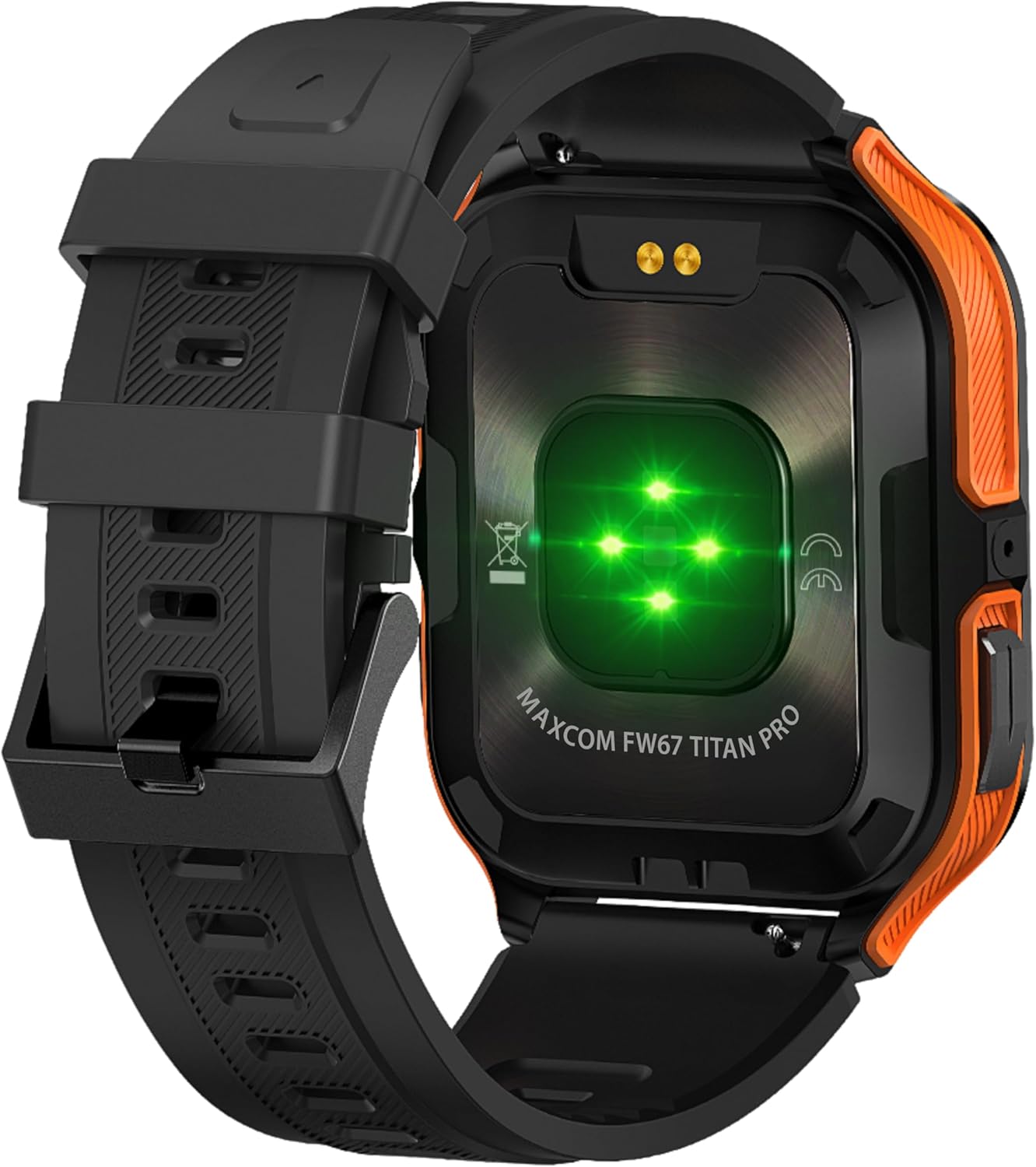
Figura 4.3: Wara view of the smartwatch, showing the optical heart rate sensors (glowing green) and the magnetic charging pins. The model name 'MAXCOM FW67 TITAN PRO' is also visible.
5. Setup
5.1. Iċċarġjar Inizjali
Before first use, fully charge your smartwatch.
- Connect the charging cable to the magnetic charging pins on the back of the smartwatch. Ensure the pins align correctly.
- Plug the USB end of the charging cable into a compatible USB power adapter (e.g., 5V/1A) or a computer's USB port.
- Id-displej tal-arloġġ se jindika l-istatus tal-iċċarġjar. Iċċarġjar sħiħ tipikament jieħu madwar 2-3 sigħat.
5.2. Installazzjoni u Tqabbil tal-App
To unlock the full potential of your smartwatch, you need to pair it with your smartphone via the dedicated companion application.
- Niżżel l-App: Fittex għal the official MAXCOM smartwatch application (e.g., 'GloryFit' or similar, refer to packaging for exact app name) on the Google Play Store (for Android) or Apple App Store (for iOS). Install the app on your smartphone.
- Ippermetti Bluetooth: Kun żgur li l-Bluetooth huwa attivat fuq l-ismartphone tiegħek.
- Iftaħ l-App: Iftaħ l-app installata u segwi l-istruzzjonijiet fuq l-iskrin biex toħloq kont jew tidħol.
- Żid Apparat: Within the app, navigate to the 'Device' or 'Add Device' section. The app will search for available smartwatches.
- Agħżel l-Ismartwatch Tiegħek: Select 'FW67 Titan Pro' from the list of discovered devices.
- Ikkonferma l-Imqabbad: Talba ta' tqabbil tista' tidher kemm fuq it-telefon tiegħek kif ukoll fuq l-ismartwatch. Ikkonferma l-tqabbil fuq iż-żewġ apparati.
- Imla Setup: Follow any remaining prompts in the app to set up your profile, permissions, and preferences.
6. Kif Tħaddem l-Ismartwatch Tiegħek
6.1. Navigazzjoni Bażika
- Buttuna tal-Qawwa: Press and hold to power on/off. Short press to wake the screen or return to the main watch face.
- Buttuna Lura: Short press to go back to the previous screen or exit a function.
- Ġesti tat-Touchscreen:
- Swipe 'l fuq: Access quick settings/control center.
- Swipe' l isfel: View notifiki.
- Swipe Xellug/Lemin: Navigate through widgets (e.g., activity, heart rate, weather).
- Tektek: Agħżel oġġett jew idħol f'menù.
6.2. Karatteristiċi ewlenin

Figura 6.1: Il-wiri tal-ismartwatch juriasing various health metrics including steps taken, calories burned, heart rate, blood oxygen saturation (SpO2), and blood pressure, along with battery status.
- Monitoraġġ tar-Rata tal-Qalb: The watch continuously monitors your heart rate. Access this feature from the main menu or by swiping to the heart rate widget.
- Traċċar tal-Attività: Tracks steps, distance, and calories burned throughout the day. Set daily goals in the companion app.
- Monitoraġġ tal-irqad: Automatically tracks your sleep patterns, including deep sleep, light sleep, and wake times. View analiżi dettaljata fl-app.
- Modi sportivi: Select from various sports modes (e.g., running, walking, cycling) to track specific workout data. Start a workout from the 'Sport' menu.
- Notifiki: Receive call, message, and app notifications directly on your wrist. Ensure notification permissions are granted in the companion app.
- Blood Oxygen (SpO2) & Blood Pressure: The watch can measure SpO2 and blood pressure. These measurements are for reference only and not for medical use.
- Temp: View current weather conditions after syncing with the app and granting location permissions.
- Kontroll tal-Mużika: Ikkontrolla d-daqq tal-mużika fuq l-ismartphone tiegħek direttament mill-arloġġ.
7. Manutenzjoni
- Tindif: Naddaf l-ismartwatch u ċ-ċinga tiegħek regolarment b'ċarruta ratba, niexfa u mingħajr suf. Jekk meħtieġ, uża drapp kemmxejn nadif.amp drapp b'sapun ħafif, imbagħad laħlaħ u nixxef sewwa.
- Evita kimiċi: Tużax kimiċi ħarxa, solventi tat-tindif, jew deterġenti qawwija, għax dawn jistgħu jagħmlu ħsara lill-finitura u s-siġilli tal-arloġġ.
- Port tal-Iċċarġjar: Keep the charging pins clean and dry to ensure proper charging.
- Ħażna: Meta ma tkunx qed tużah għal perjodi twal, aħżen l-ismartwatch f'post frisk u niexef.
- Reżistenza għall-Ilma: While the watch is IP69K water-resistant, it is not recommended for diving or high-pressure water activities. Always dry the watch thoroughly after exposure to water.
8 Issolvi l-problemi
If you encounter issues with your smartwatch, refer to the following common problems and solutions:
| Problema | Soluzzjoni |
|---|---|
| L-ismartwatch mhux se jixgħel | Kun żgur li l-arloġġ ikun iċċarġjat kompletament. Qabbad mal-ċarġer għal mill-inqas 30 minuti. |
| Ma nistax nqabbad ma' smartphone | 1. Ensure Bluetooth is enabled on your phone. 2. Make sure the smartwatch is within range. 3. Restart both the smartwatch and your phone. 4. Clear Bluetooth cache on your phone. 5. Try pairing through the app, not directly via phone's Bluetooth settings. |
| Notifications are not received | 1. Check if the smartwatch is connected to the app. 2. Ensure notification permissions are granted for the app on your phone. 3. Verify that app notifications are enabled within the smartwatch app settings. 4. Disable 'Do Not Disturb' mode on both the watch and phone. |
| Dejta dwar is-saħħa mhux preċiża | 1. Ensure the watch is worn snugly on your wrist, not too loose or too tight. 2. Clean the sensors on the back of the watch. 3. Avoid excessive movement during measurements. 4. Remember that data is for reference and not medical diagnosis. |
| Ħajja qasira tal-batterija | 1. Reduce screen brightness. 2. Limit continuous heart rate monitoring if not needed. 3. Turn off unnecessary notifications. 4. Ensure the watch is fully charged each time. |
9. Speċifikazzjonijiet
Key technical specifications for the MAXCOM FW67 Titan Pro Smartwatch:
| Karatteristika | Speċifikazzjoni |
|---|---|
| Brand | MAXCOM |
| Mudell | FW67 Titan Pro |
| Kulur | Oranġjo |
| Sistema Operattiva | Proprietary OS (compatible with Android/iOS) |
| Daqs tal-Iskrin | 1.85 Pulzier |
| Konnettività | Bluetooth |
| Karatteristiċi Speċjali | Heart Rate Monitor, Notifications, SpO2, Blood Pressure, Activity Tracking |
| Apparati Kompatibbli | Smartphone |
| Kompożizzjoni tal-batterija | Lithium-ion |
| Kapaċità tal-batterija | 380 mAh |
| GPS | GPS permezz ta' smartphone |
| Forma | Rettangolari |
10. Garanzija u Appoġġ
Your MAXCOM FW67 Titan Pro Smartwatch comes with a standard manufacturer's warranty. Please refer to the warranty card included in your package for specific terms and conditions, including warranty duration and coverage details. For technical support, troubleshooting assistance beyond this manual, or warranty claims, please contact MAXCOM customer service through their official webis-sit jew l-informazzjoni ta' kuntatt ipprovduta mad-dokumentazzjoni tal-prodott tiegħek.


