MAXCOM SMARTWATCH FW56 Carbon Pro Gold User Manual
Model: FW56 Carbon Pro Gold
Introduzzjoni
Thank you for choosing the MAXCOM SMARTWATCH FW56 Carbon Pro Gold. This manual provides essential information for setting up, operating, and maintaining your new smartwatch. Please read it carefully to ensure optimal performance and longevity of your device.
Gwida ta' Setup
1. Kontenut tal-Pakkett
Qabel ma tibda, kun żgur li l-oġġetti kollha huma preżenti fil-pakkett:
- MAXCOM SMARTWATCH FW56 Carbon Pro Gold
- Iċċarġjar Cable
- Manwal għall-Utent (dan id-dokument)
2. Iċċarġjar tal-Apparat
For first-time use, fully charge your smartwatch. Connect the charging cable to the charging port on the back of the watch and plug the USB end into a compatible power adapter (not included) or a computer's USB port.
- Ċarġ sħiħ tipikament jieħu madwar 2 sigħat.
- L-ikona tal-batterija fuq l-iskrin tindika l-istatus tal-iċċarġjar.
3. Tqabbil ma' Smartphone
Biex tiftaħ il-potenzjal sħiħ tal-ismartwatch tiegħek, qabbdu mal-ismartphone tiegħek permezz tal-Bluetooth.
- Download the official MAXCOM smartwatch application from your smartphone's app store (e.g., Google Play Store or Apple App Store). Fittex għal "MAXCOM Smartwatch App".
- Kun żgur li l-Bluetooth huwa attivat fuq l-ismartphone tiegħek.
- Open the MAXCOM app and follow the on-screen instructions to add a new device.
- Select "FW56 Carbon Pro Gold" from the list of available devices.
- Ikkonferma t-talba ta' tqabbil kemm fuq l-ismartphone tiegħek kif ukoll fuq l-ismartwatch.
It-Tħaddim tal-Ismartwatch Tiegħek
Navigazzjoni Bażika
The FW56 Carbon Pro Gold features a responsive touchscreen and a side button for navigation.
- Swipe 'l fuq/'l isfel: Skrollja fil-menus u n-notifiki.
- Swipe Xellug/Lemin: Access different widgets and quick functions.
- Tektek: Agħżel oġġett jew ikkonferma azzjoni.
- Agħfas il-Buttuna tal-Ġenb: Erġa' lura għall-iskrin tad-dar jew qajjem/irqad id-displej.
Display u Interface
The smartwatch features a 5.96-inch display, providing clear visuals for all functions.
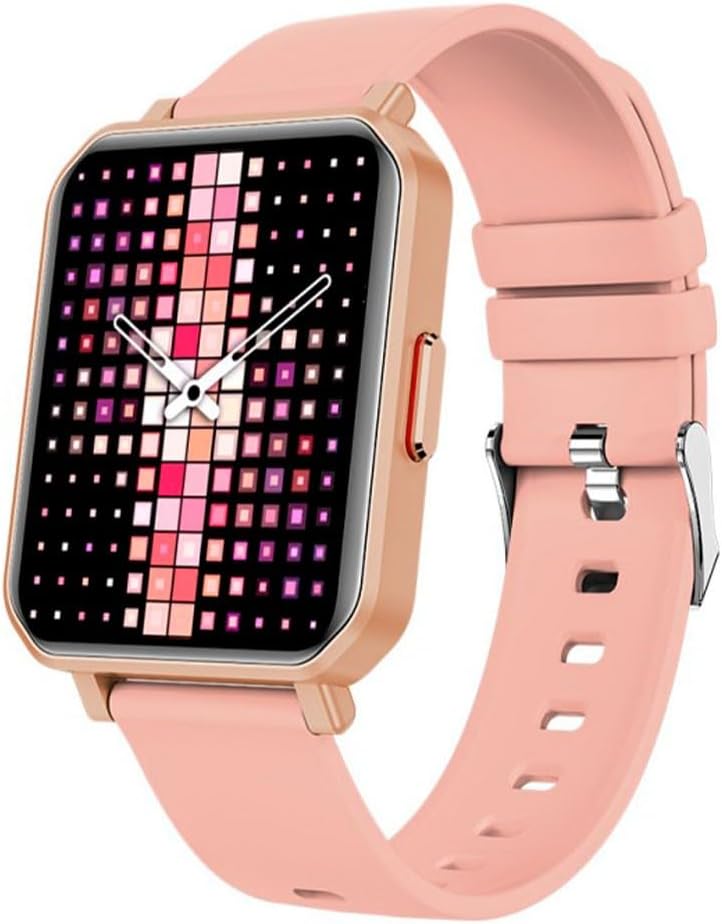
Image: The MAXCOM SMARTWATCH FW56 Carbon Pro Gold, featuring a rectangular gold-colored watch case and a soft pink silicone strap. The display shows a vibrant, pixelated watch face with shades of pink, purple, and white, indicating the time with analog hands.
Funzjonijiet ewlenin
- Notifiki: Irċievi allerti għal telefonati, messaġġi, u notifiki tal-app direttament fuq il-polz tiegħek.
- Traċċar tas-Saħħa: Monitor your steps, distance, calories burned, and heart rate. The integrated GPS allows for accurate tracking of outdoor activities.
- Monitoraġġ tal-irqad: Segwi x-xejriet u l-kwalità tal-irqad tiegħek.
- Kontroll tal-Mużika: Ikkontrolla d-daqq tal-mużika fuq l-ismartphone imqabbad tiegħek.
- Temp: Ikseb aġġornamenti tat-temp f'ħin reali.
Manutenzjoni u Kura
Tindif tal-Ismartwatch Tiegħek
To keep your smartwatch in optimal condition:
- Imsaħ l-iskrin u l-korp b'ċarruta ratba u mingħajr suf.
- Għal marki iebsa, d ftitampLaħlaħ id-drapp bl-ilma. Evita li tuża kimiċi ħarxa jew materjali li joborxu.
- Kun żgur li l-kuntatti tal-iċċarġjar huma nodfa u niexfa qabel ma tiċċarġja.
Kura tal-batterija
- Evita temperaturi estremi, li jistgħu jaffettwaw il-ħajja tal-batterija.
- Tħallix l-arloġġ skarikat kompletament għal perjodi twal.
- Uża biss il-kejbil tal-iċċarġjar ipprovdut.
Issolvi l-problemi
| Problema | Soluzzjoni Possibbli |
|---|---|
| Watch ma tixgħel | Ensure the watch is fully charged. Press and hold the side button for several seconds. |
| Ma nistax nqabbad ma' smartphone | Check if Bluetooth is enabled on both devices. Restart both the watch and the smartphone. Ensure the MAXCOM app is updated. |
| Dejta dwar is-saħħa mhux preċiża | Kun żgur li l-arloġġ jintlibes sew fuq il-polz tiegħek. Naddaf is-sensor fuq wara tal-arloġġ. |
| Ħajja qasira tal-batterija | Reduce screen brightness. Turn off unnecessary notifications. Limit continuous heart rate monitoring. |
Speċifikazzjonijiet tal-Prodott
- Ditta: Maxcom
- Isem tal-Mudell: Smartwatch Fit FW56 Carbon Pro Złoty
- Numru tal-Mudell: MAXCOMFW56CARBONGOLD
- Kulur: Multicolored
- Daqs tal-iskrin: 5.96 Pulzier
- Teknoloġija tal-Konnettività: Bluetooth
- Standard tal-Komunikazzjoni mingħajr Fili: Bluetooth
- Apparati Kompatibbli: Smartphone, Pillola
- GPS: GPS integrat
- Forma: Round
- Udjenza fil-mira: Unisex-Adulti
- Manifattur: Maxcom
- Pajjiż ta' Oriġini: Portugall
Garanzija u Appoġġ
For warranty information and technical support, please refer to the warranty card included with your product or visit the official Maxcom website. You may also contact Maxcom customer service for assistance with product inquiries, troubleshooting, and service requests.
Żomm l-irċevuta tax-xiri tiegħek bħala prova tax-xiri għal talbiet ta' garanzija.


