1. Introduzzjoni
Thank you for choosing the boAt Wave Flex Connect Smart Watch. This manual provides essential information for setting up, operating, and maintaining your device. Please read it carefully to ensure optimal performance and longevity of your smartwatch.
2. X'hemm fil-Kaxxa
- boAt Wave Flex Connect Smart Watch
- Iċċarġjar Cable
- Manwal għall-Utent
- Karta ta' Garanzija
3. Setup
3.1 Iċċarġjar inizjali
Before first use, fully charge your boAt Wave Flex Connect Smart Watch. Connect the charging cable to the watch's charging port and plug the USB end into a compatible power adapter (not included) or a computer's USB port. The watch display will indicate charging status.

Image: The smartwatch screen showing 100% battery, indicating a full charge. This image highlights the impressive battery life of up to 10 days on normal use and 30 days on standby.
3.2 It-tqabbil mal-Ismartphone Tiegħek
- Download the "boAt Crest" app from your smartphone's app store (Google Play Store for Android or Apple App Store for iOS).
- Kun żgur li l-Bluetooth huwa attivat fuq l-ismartphone tiegħek.
- Open the boAt Crest app and follow the on-screen instructions to create an account or log in.
- Select "Add Device" within the app and choose "Wave Flex Connect" from the list of available devices.
- Ikkonferma t-talba ta' tqabbil kemm fuq l-ismartphone tiegħek kif ukoll fuq l-ismartwatch.
4. Kif Tħaddem l-Arloġġ Intelliġenti Tiegħek
4.1 Navigazzjoni Bażika
The boAt Wave Flex Connect features a responsive touch display and a physical button for navigation.
- Swipe 'l fuq/'l isfel: Scroll through notifications, menus, or quick settings.
- Swipe Xellug/Lemin: Access different widgets like activity tracking, heart rate, weather, or music control.
- Tektek: Agħżel oġġett jew iftaħ applikazzjoni.
- Agħfas il-buttuna: Erġa' lura għall-iskrin tad-dar jew qajjem id-displej.
4.2 Sejħa Bluetooth
The Wave Flex Connect supports Bluetooth calling, allowing you to make and receive calls directly from your wrist when connected to your smartphone.

Image: The smartwatch screen showing an incoming call notification, demonstrating the Bluetooth calling feature. Users can accept or decline calls directly from the watch.
4.3 Karatteristiċi tal-Wiri
Experience clear visuals on the 1.83" HD Display with a resolution of 240 x 280. The 2.5D Curve Display and 550 Nits Brightness ensure excellent readability even in bright conditions. The Wake Gesture feature allows you to simply raise your wrist to activate the screen.

Image: A close-up of the smartwatch display, emphasizing its 1.83" HD screen, 240x280 resolution, 2.5D curve, and 550 Nits brightness for clear visibility.
4.4 Health & Wellness Monitoring
The boAt Wave Flex Connect helps you keep track of your health with various monitoring features:
- Monitoraġġ tar-Rata tal-Qalb: Żomm rekord kontinwu tar-rata tal-qalb tiegħek matul il-ġurnata.
- Monitoraġġ tal-Ossiġenu tad-Demm (SpO2): Kejjel il-livelli tal-ossiġnu fid-demm tiegħek.
- Monitoraġġ tal-irqad: Analyze your sleep patterns (deep sleep, light sleep, awake time).
- Twissijiet Sedentarji: Irċievi tfakkiriet biex tiċċaqlaq wara perjodi ta' inattività.
4.5 Utility Features
Your smartwatch comes equipped with several convenient utility functions:
- Allarm: Issettja l-allarmi direttament mill-arloġġ tiegħek.
- Weather Update: Ikseb informazzjoni dwar it-temp f'ħin reali.
- Kontroll tal-Mużika: Ikkontrolla d-daqq tal-mużika fuq l-ismartphone konness tiegħek.
- Kontroll tal-Kamera: Uża l-arloġġ tiegħek bħala shutter remot għall-kamera tat-telefon tiegħek.
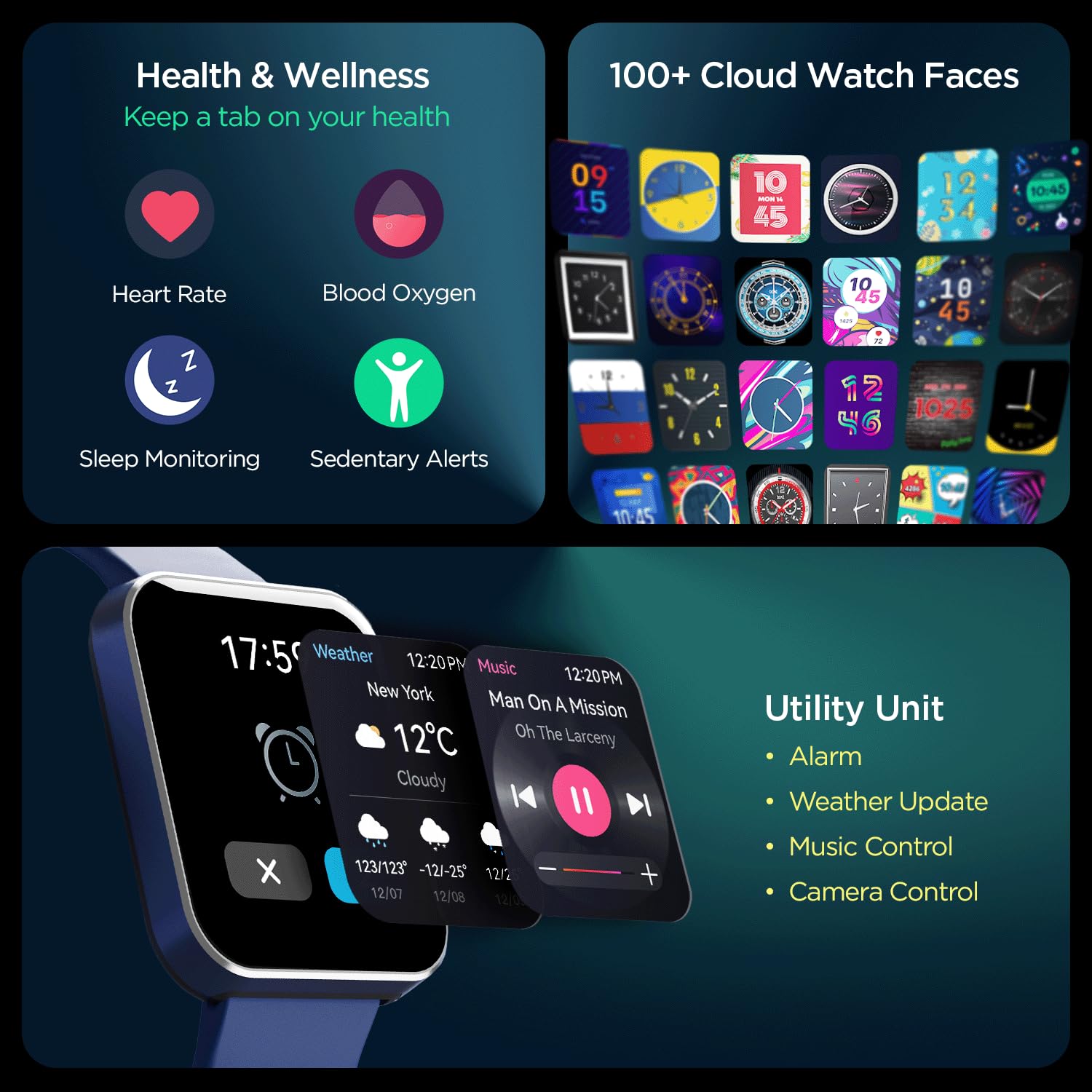
Immaġni: Komprensiva view of the smartwatch's capabilities, including health tracking (heart rate, SpO2, sleep, sedentary alerts), a wide selection of watch faces, and practical utilities like weather, music, and camera control.
4.6 boAt Coins Integration
Earn rewards via boAt Coins on the boAt Crest App by engaging with your smartwatch and the ecosystem.

Image: The smartwatch paired with a smartphone showing the boAt Crest app interface, highlighting the boAt Coins reward system and available vouchers.
5. Manutenzjoni
- Tindif: Imsaħ l-arloġġ u ċ-ċinga regolarment b'ċarruta ratba u niexfa. Għal ħmieġ iebes, uża ċarruta ħafifa.amp drapp u nixxef sewwa.
- Reżistenza għall-Ilma: Refer to the product specifications for water resistance ratings. Avoid exposing the watch to hot water, steam, or high-pressure water jets.
- Iċċarġjar: Uża biss il-kejbil tal-iċċarġjar provdut. Evita li tuża kejbils jew chargers bil-ħsara.
- Ħażna: Aħżen l-arloġġ f'post frisk u niexef 'il bogħod mix-xemx diretta u minn temperaturi estremi.
6 Issolvi l-problemi
6.1 L-arloġġ mhux qed jixgħel
- Kun żgur li l-arloġġ ikun iċċarġjat kompletament. Qabbad mal-ċarġer għal mill-inqas 30 minuti.
- Agħfas u żomm il-buttuna tal-ġenb għal 10-15-il sekonda biex tipprova terġa' tibda bil-forza.
6.2 Kwistjonijiet ta' Tqabbil
- Kun żgur li l-Bluetooth huwa attivat fuq l-ismartphone tiegħek u fuq l-arloġġ.
- Kun żgur li l-arloġġ jinsab fil-medda tal-Bluetooth tat-telefon tiegħek (tipikament 10 metri).
- Erġa' ibda kemm l-ismartphone tiegħek kif ukoll l-ismartwatch.
- Forget the device in your phone's Bluetooth settings and try pairing again through the boAt Crest app.
6.3 Dejta tas-Saħħa Mhux Preċiża
- Kun żgur li l-arloġġ jintlibes sew fuq il-polz tiegħek, madwar wisa' ta' saba' 'l fuq mill-għadma tal-polz.
- Żomm is-sensor nadif u ħieles mill-ħmieġ jew mill-għaraq.
- Note that environmental factors and individual physiology can affect sensor accuracy.
7. Speċifikazzjonijiet
| Karatteristika | Dettall |
|---|---|
| Brand | dgħajsa |
| Isem tal-Mudell | Wave Flex Connect |
| Daqs tal-Wiri | 1.83 pulzieri |
| Riżoluzzjoni | 240 x 240 pixel |
| Tip ta 'Wiri | LCD diġitali |
| Luminożità | Sa 550 Nits |
| Ħajja tal-batterija | Up to 10 days (normal use), 30 days (standby), 3 days (with Bluetooth Calling) |
| Tip ta 'batterija | Polimeru tal-litju |
| Konnettività | Bluetooth |
| Apparati Kompatibbli | Smartphone |
| Sistema Operattiva | Sistema Operattiva tal-Ismartwatch |
| Piż tal-oġġett | 51 g |
| Manifattur | Imagine Marketing Limited. |
8. Garanzija u Appoġġ
8.1 Informazzjoni dwar Garanzija
Your boAt Wave Flex Connect Smart Watch comes with a 1 Snin Garanzija from the date of purchase. Please retain your purchase receipt and the warranty card for any warranty claims. The warranty covers manufacturing defects and does not cover damage caused by misuse, accidents, unauthorized repairs, or normal wear and tear.
8.2 Appoġġ għall-Klijent
For any queries, technical assistance, or warranty claims, please contact boAt customer support. You can find contact details on the official boAt webis-sit jew irreferi għall-karta tal-garanzija inkluża fil-pakkett tal-prodott tiegħek.
Manufacturer: Imagine Marketing Limited., info@imaginemarketingindia.com


