1. Prodott Aktarview
The IFOOTAGE A400 Round Base Monopod is a versatile support system designed for photography and videography. It features a heavy-duty flat base that minimizes footprint compared to traditional tripods, making it suitable for confined spaces. Constructed from aluminum alloy, it offers stability and durability for various equipment setups.

Figure 1: IFOOTAGE A400 Round Base Monopod with light adapter.
2. Kontenut tal-Pakkett
Ivverifika li l-oġġetti kollha huma preżenti fil-pakkett:
- Telescopic tubes (Monopod sections)
- Round base disk
- Light Mount Adapter
- Drapp artab
- Karta tal-garanzija
- Istruzzjonijiet
- Ċertifikat

Figure 2: Included components of the IFOOTAGE A400 Monopod.
3. Setup u Assemblea
- Attach the Monopod to the Base: Securely screw the main monopod pole into the center of the round base. Ensure it is tightened to prevent wobbling.
- Aġġusta l-Għoli: The monopod features quick-twist locks for rapid height adjustment. Rotate the lock rings counter-clockwise to loosen, extend the desired section, and then rotate clockwise to tighten. The monopod can extend from 30.3 inches to 79.4 inches.
- Waħħal Aċċessorji: The monopod comes with a universal 3/8" screw and a light adapter. Attach your desired equipment (camera, light, microphone) to the top mounting point.
- Utilize Accessory Hook: A custom accessory hook is integrated into the monopod shaft. This can be used to hang power supplies or ballasts for improved stability and cable management.

Figure 3: Twist lock mechanism for height adjustment.

Figure 4: Heavy-duty metal round base with anti-slip features.
Video: Replacing Traditional Light Stands
Video 1: Demonstrates the space-saving benefits and stability of the IFOOTAGE A400 compared to traditional light stands.
4. Operating the Monopod
The IFOOTAGE A400 is designed for versatility, supporting a wide range of equipment for various applications.
- Stand tad-Dawl: Use the included light adapter to mount LED panel lights, COB video lights, or other studio lighting equipment. The heavy base provides stability for lights up to 22 lbs (10 kg).
- Appoġġ tal-Kamera: Attach a fluid head or tripod ball head to the 3/8" screw for mounting DSLR cameras, camcorders, or smartphones (with appropriate adapters).
- Stand tal-mikrofonu: Mount microphones directly or via a ball head for audio recording setups.
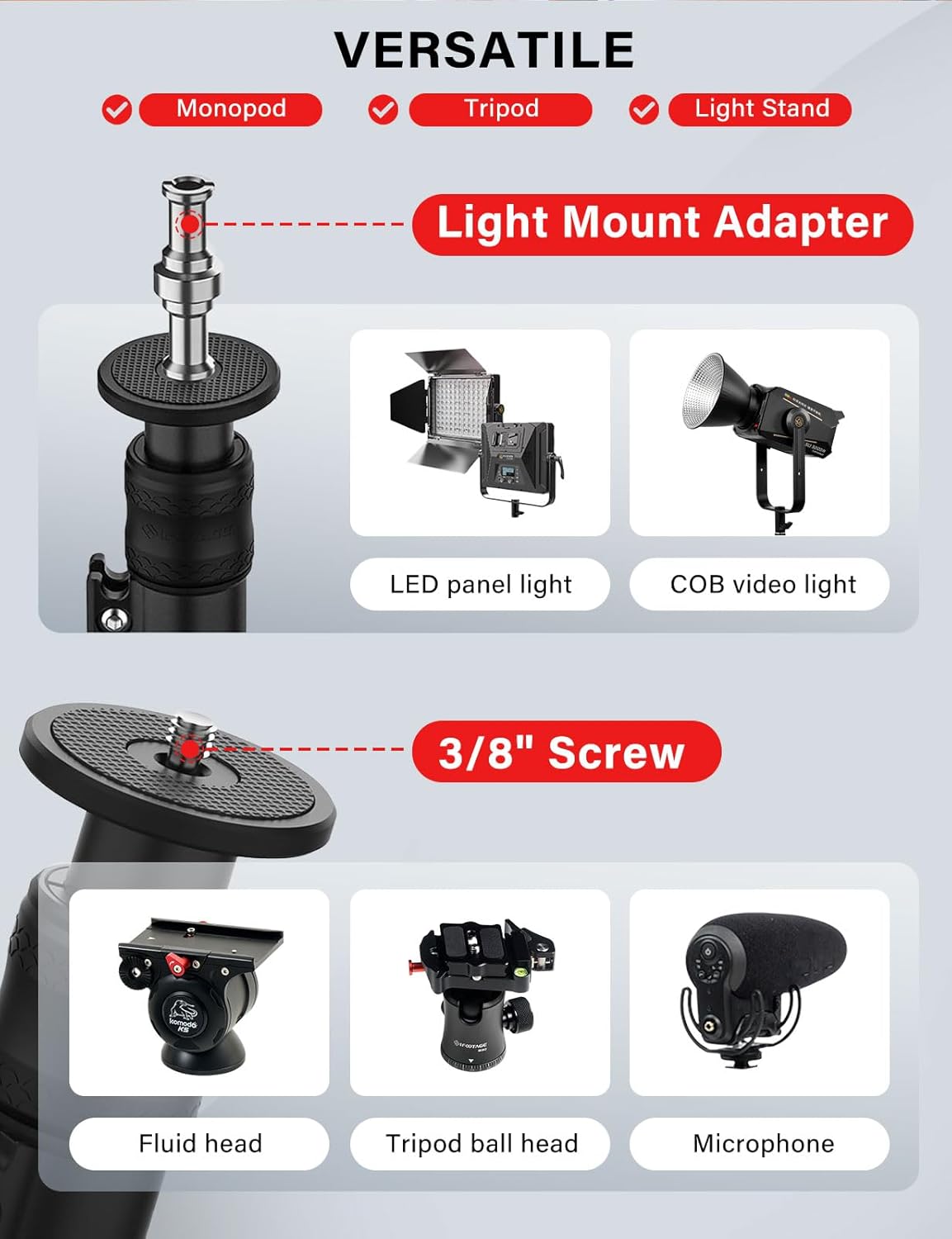
Figure 5: Versatile mounting options for various equipment.

Figure 6: Monopod supporting studio lights with softboxes.
Video: IFOOTAGE RB-A400 VS Traditional Tripods
Video 2: A comparison highlighting the stability and compact design of the RB-A400 against traditional tripods.
5. Manutenzjoni
To ensure the longevity and optimal performance of your IFOOTAGE A400 Monopod, follow these maintenance guidelines:
- Tindif: Wipe down the monopod and base with the provided soft cloth after each use to remove dust, dirt, or moisture. For stubborn grime, use a slightly damp drapp u nixxef sewwa.
- Ħażna: Store the monopod in a dry, clean environment. If disassembling for storage, ensure all components are clean and dry.
- Spezzjoni: Periodically check all screws, locks, and connections for tightness. Do not overtighten.
- Evita kimiċi ħorox: Do not use abrasive cleaners or solvents, as these can damage the aluminum alloy and corrosion-resistant finish.
6 Issolvi l-problemi
If you encounter issues with your IFOOTAGE A400 Monopod, consider the following:
- Tħassib dwar l-Istabbiltà: Ensure the monopod is placed on a flat, stable surface. For heavier loads or uneven surfaces, consider adding counterweights to the accessory hook or placing sandbags on the base.
- Diffikultà fl-Aġġustament tal-Għoli: Check that the twist locks are fully loosened before attempting to extend or retract sections. Ensure no debris is obstructing the telescopic tubes.
- Tħawwad: Verify that all sections are securely tightened using the twist locks and that the monopod is firmly screwed into the base.
7. Speċifikazzjonijiet
| Karatteristika | Speċifikazzjoni |
|---|---|
| Isem tal-Mudell | RB-A400 |
| Materjal | Liga tal-Aluminju |
| Għoli Massimu | 79.4 pulzieri (201.6 ċm) |
| Għoli Minimu | 30.3 pulzieri (77 ċm) |
| Kapaċità tat-Tagħbija | 22 lbs (10 kg) |
| Piż tal-oġġett | 14.08 liri (6.4 kg) |
| Dijametru tal-Bażi | 15.75 pulzieri (40 ċm) |
| Ħxuna tal-Bażi | 5 mm |
| Invita tal-Immuntar | Universal 3/8" |
| Apparati Kompatibbli | Camcorder, Camera, Smartphone, Fluid Heads, Ball Heads, Video Lights, Projectors |
8. Garanzija u Appoġġ
The IFOOTAGE A400 Round Base Monopod comes with a 12-il xahar garanzija against manufacturing defects. For warranty claims, technical support, or any inquiries, please contact IFOOTAGE customer service through their official websit jew il-bejjiegħ bl-imnut minn fejn inxtara l-prodott.
Jekk jogħġbok żomm il-prova tax-xiri tiegħek għall-validazzjoni tal-garanzija.


