1. Introduzzjoni
Thank you for choosing the Charmast C05S 5000mAh Portable Power Bank. This device is designed to provide convenient and fast charging for your mobile devices on the go. Its compact size, built-in cable, and digital display make it an essential accessory for daily use and travel.
2. Kontenut tal-Pakkett
- Charmast C05S 5000mAh Portable Power Bank with built-in Lightning cable (x1)
- USB-C to USB-C charging cable (x1)
- Manwal għall-Utent (x1)

3. Prodott Aktarview
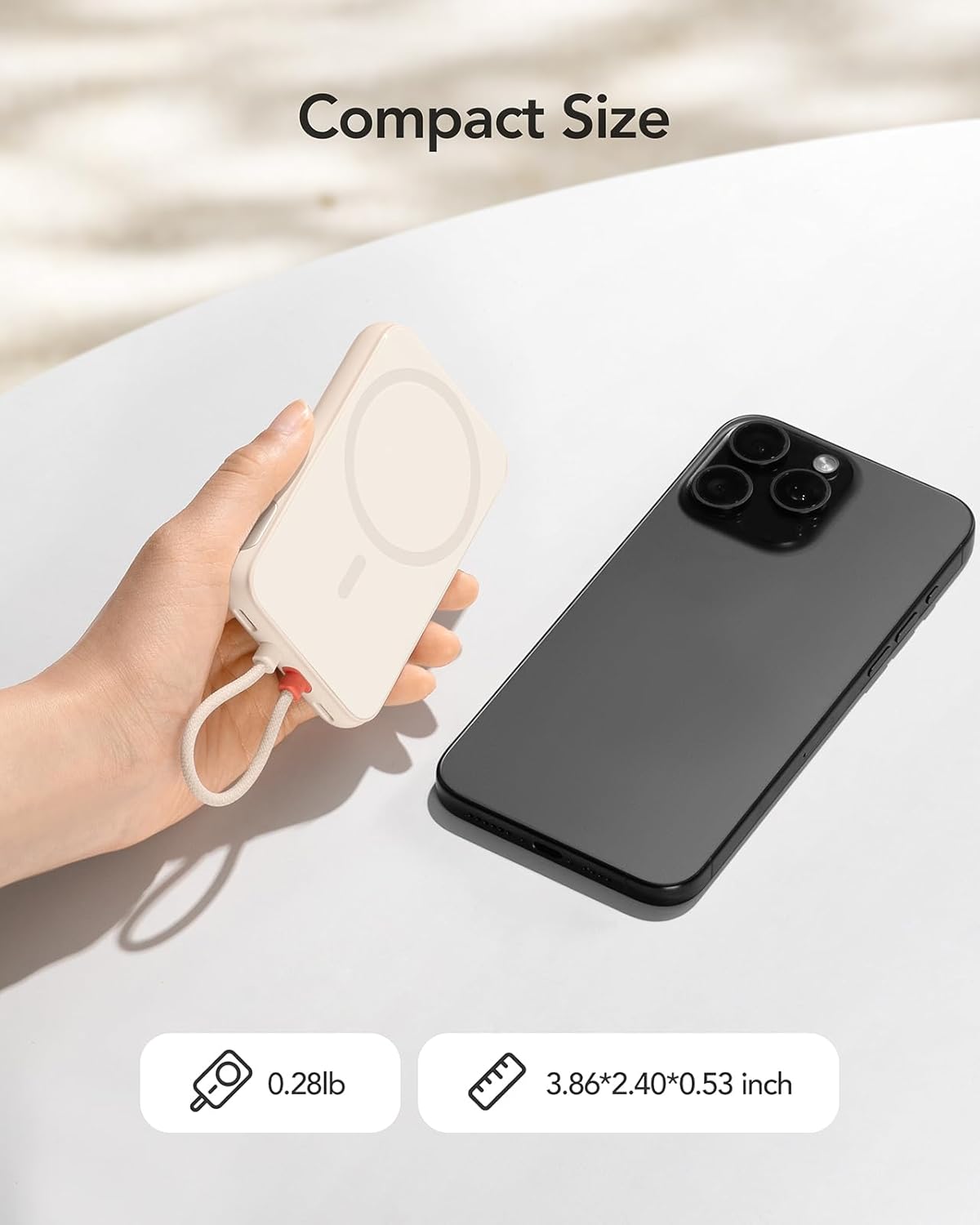
The Charmast C05S is a slim and lightweight power bank designed for portability and efficiency.
- Dimensjonijiet: 3.86 x 2.40 x 0.53 pulzieri
- Piż: Madwar 0.28 liri (5.9 uqija)
- Cable inkorporat: Features an integrated Lightning cable for direct connection to compatible Apple devices.
- Port USB-C: A versatile USB-C port for both input (recharging the power bank) and output (charging other devices).
- Wirja Diġitali: An LED screen on the side indicates the remaining battery percentage.

4. Setup and Recharging the Power Bank
Before first use, fully charge your Charmast C05S Power Bank.
- L-użu tal-Port USB-C: Connect the provided USB-C to USB-C cable to the power bank's USB-C port and to a compatible USB wall adapter (not included). The power bank will fully recharge in approximately 2.0 hours.
- Bl-użu tal-Kejbil tas-Sajjetti Inkorporat: Connect the built-in Lightning cable to a compatible Lightning input port on a wall adapter. The power bank will fully recharge in approximately 3.5 hours.
The digital display will show the charging progress, indicating 100% when fully charged.

5. Istruzzjonijiet Operattivi
Biex tiċċarġja t-tagħmir tiegħek:
- For iPhone (Lightning devices): Pull out the built-in Lightning cable and connect it directly to your iPhone or other compatible Lightning device.
- For USB-C devices: Use the provided USB-C to USB-C cable. Connect one end to the power bank's USB-C port and the other end to your USB-C compatible device.
Il-power bank jibda jiċċarġja t-tagħmir tiegħek awtomatikament. Id-displej diġitali juri l-perċentwal li fadal tal-batterija.tage tal-bank tal-enerġija.


6. Wiri Diġitali
The integrated digital display provides real-time information about the power bank's battery level. It shows the remaining percentage, allowing you to easily monitor when it's time to recharge the power bank.
- To activate the display, press the on/off button located on the side of the power bank.
- The display will automatically turn off after a short period of inactivity to conserve power.
7. Universal Compatibility and Charging Speed
The Charmast C05S Power Bank offers broad compatibility and fast charging capabilities.
- Cable tas-sajjetti inkorporat: Universally compatible with iPhone 14, 13, 12, 11, 8, 7 series, and other Lightning-enabled devices.
- Port USB-C: Compatible with iPhone 15 series, Samsung S24/S23/S22/S21/S20, Google Pixel series, other Android phones, and various low-current devices such as portable fans, neck fans, Bluetooth headphones, and heated vests.
- 20W PD Iċċarġjar Mgħaġġel: Supports Power Delivery (PD) 20W fast charging, significantly reducing charging times for both your devices and the power bank itself.


8. Manutenzjoni u Kura
To ensure the longevity and optimal performance of your power bank:
- Livell tal-batterija: Keep the power bank's battery level above 40% to improve overall battery life and maintain efficient charging speeds.
- Ħażna: Aħżen il-power bank f'post frisk u niexef 'il bogħod mix-xemx diretta u minn temperaturi estremi.
- Tindif: Uża drapp artab u niexef biex tnaddaf il-barra tal-power bank. Evita li tuża kimiċi ħarxa jew materjali li joborxu.
- Evita Qtar: Ipproteġi l-apparat minn waqgħat u impatti, li jistgħu jagħmlu ħsara lill-komponenti interni.
9 Issolvi l-problemi
If you encounter issues with your Charmast C05S Power Bank, please refer to the following common solutions:
- Apparat mhux qed jiċċarġja: Ensure the power bank is sufficiently charged. Check that the charging cable (built-in Lightning or USB-C) is securely connected to both the power bank and your device. Try a different cable or device to isolate the issue.
- Il-power bank mhux qed jiċċarġja: Verify that the charging cable and wall adapter are functioning correctly. Ensure the cable is properly inserted into the power bank's input port.
- Digital display not showing: Press the on/off button on the side of the power bank to reactivate the display. If it remains off, the power bank might be fully depleted and requires recharging.
- Iċċarġjar bil-mod: Ensure you are using a 20W PD compatible wall adapter for optimal fast charging. Charging speed can also be affected by the device being charged and its current battery level.
10. Speċifikazzjonijiet
| Karatteristika | Dettall |
|---|---|
| Numru tal-Mudell | C05S |
| Kapaċità tal-batterija | 5000 Milliamp Sigħat (mAh) |
| Dimensjonijiet tal-Prodott | 3.86 x 2.4 x 0.53 pulzieri |
| Piż tal-oġġett | 5.9 uqija |
| Input (USB-C) | 20W PD (Massimu) |
| Input (Lightning) | 10W (Mass) |
| Output (Built-in Lightning Cable) | 20W PD (Massimu) |
| Ħruġ (Port USB-C) | 20W PD (Massimu) |
| Karatteristiċi Speċjali | Built-in Cable, Digital Display, Fast Charging, Pocket Size, Ultra Slim |
11. Garanzija u Appoġġ
Charmast provides Appoġġ ta' 24-il xahar for this product. If you encounter any problems or have questions, please contact us through Amazon. We are committed to resolving any issues within 24 hours.
12. Informazzjoni dwar is-Sigurtà
Jekk jogħġbok aqra u segwi dawn il-linji gwida tas-sigurtà biex tevita ħsara lill-prodott jew korriment lilek innifsek:
- Tesponix il-power bank għall-ilma, umdità, jew temperaturi estremi.
- Żarmax, timmodifikax jew tipprova ssewwa l-apparat.
- Żomm fejn ma jintlaħaqx mit-tfal.
- Avoid dropping or subjecting the power bank to heavy impacts.
- Armi l-power bank b'mod responsabbli skont ir-regolamenti lokali. Tarmihx fl-iskart domestiku.


