1. Introduzzjoni
1.1 Prodott Fuqview
The Fanvil X4U v2 is an advanced IP phone designed for professional communication environments. It features 12 SIP lines, a 2.8-inch color display, Power over Ethernet (PoE) support, Gigabit Ethernet ports, and Bluetooth connectivity via a USB dongle. This manual provides instructions for setting up, operating, and maintaining your Fanvil X4U v2 IP phone.
1.2 Kontenut tal-Pakkett
Ivverifika li l-oġġetti kollha huma preżenti fil-pakkett:
- Fanvil X4U v2 IP Phone Unit
- Handset
- Korda tal-idejn
- Cable Ethernet
- Stand tat-Telefon
- Gwida ta 'Installazzjoni Mgħaġġla
- (Optional) Power Adapter (if PoE is not used)
2. Setup
2.1 Installazzjoni Fiżika
Follow these steps to physically set up your IP phone:
- Attach the phone stand to the main unit.
- Connect the handset to the handset port using the coiled cord.
- Connect the Ethernet cable from your network switch or router to the LAN port on the phone. If your network switch provides Power over Ethernet (PoE), the phone will power on automatically.
- If not using PoE, connect an optional power adapter (not included) to the power port and a power outlet.
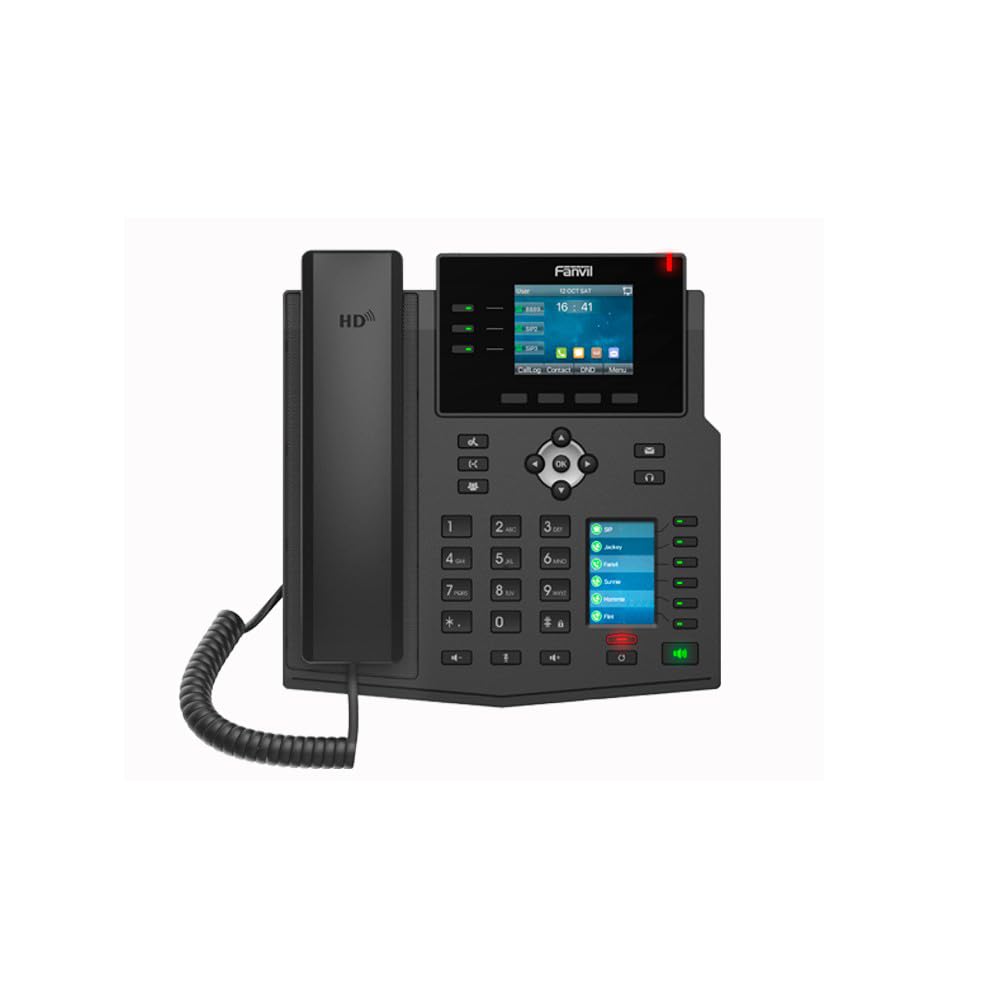
Immaġni: Quddiem view of the Fanvil X4U v2 IP Phone, showing the handset, color display, navigation keys, and numeric keypad.
2.2 Qawwa Inizjali
Once connected to power and network, the phone will initiate its boot sequence. The display will show the Fanvil logo and then proceed to load the operating system.
3. Istruzzjonijiet Operattivi
3.1 Wiri u Navigazzjoni
The 2.8-inch (240x320) color display shows call status, menu options, and other relevant information. Use the navigation keys (up, down, left, right, OK) to browse menus and select options.
3.2 Funzjonijiet Bażiċi tas-Sejħiet
Nagħmlu Sejħa
- Aqbad l-idejn jew agħfas il-buttuna Speaker buttuna.
- Ċempel in-numru tat-telefon mixtieq billi tuża t-tastiera numerika.
- Press the "Dial" soft key or wait for the call to connect automatically.
Tweġiba Sejħa
When an incoming call rings, pick up the handset or press the Speaker button or the "Answer" soft key.
Tmiem Sejħa
Hang up l-idejn jew agħfas il- Speaker buttuna.
3.3 Sejħiet ta' Konferenza
The Fanvil X4U v2 supports 6-way audio conferencing:
- During an active call, press the "Conf" soft key.
- Dial the number of the next participant and press "Dial".
- Once the second participant answers, press the "Conf" soft key again to merge the calls.
- Repeat for additional participants up to a total of six.
3.4 Konnettività Bluetooth
The phone supports Bluetooth connectivity via a USB dongle (sold separately). Insert the Bluetooth USB dongle into the USB port on the phone. Navigate to the Bluetooth settings menu on the phone's display to pair with compatible devices such as headsets.
4. Manutenzjoni
4.1 Tindif
To clean the phone, use a soft, dry cloth. For stubborn marks, a slightly damp cloth with mild, non-abrasive cleaner can be used. Avoid spraying liquids directly onto the phone.
4.2 Ħażna
Aħżen it-telefon f'post frisk u niexef 'il bogħod mix-xemx diretta u minn temperaturi estremi meta ma jkunx qed jintuża għal perjodi twal.
5 Issolvi l-problemi
5.1 Kwistjonijiet Komuni u Soluzzjonijiet
Phone Does Not Power On
- Check if the Ethernet cable is securely connected to the LAN port and the network switch/router. Ensure the network switch provides PoE.
- If not using PoE, verify the power adapter is correctly connected to the phone and a working power outlet.
Ebda Dial Tone
- Ensure the Ethernet cable is properly connected and the phone has network connectivity.
- Verify that your SIP account is registered and active. Check the display for SIP registration status.
Kwalità Awdjo Fqira
- Iċċekkja l-istabbiltà tal-konnessjoni tan-netwerk.
- Kun żgur li l-korda tat-telefon ċellulari hija konnessa sew.
- Adjust volume settings during a call.
6. Speċifikazzjonijiet
6.1 Speċifikazzjonijiet Tekniċi
- Ditta: Fanvil
- Mudell: X4U-V2
- Linji SIP: 12
- Wiri: 2.8-inch (240x320) Color Display
- Portijiet Ethernet: Gigabit Ethernet (2 portijiet)
- Qawwa: Enerġija fuq Ethernet (PoE)
- Bluetooth: Via USB Dongle
- Audio Conference: 6-mod
- Codec awdjo: G.711a/u, G.729A/B, iLBC, G.722, Opus
- Verżjoni tal-Hardware: V2.0
- Dimensjonijiet tal-Prodott: 13 x 9 x 3 pulzieri
- Piż tal-oġġett: 2.62 libbra (1.19 Kilogrammi)
- Kulur: Iswed
- Materjal: Plastik
- Tip tat-Telefon: Corded
- Sors tal-Enerġija: Corded Electric (if not using PoE)
- Tip ta' Dialer: Tastiera Doppju
- Tip ta' Sistema ta' Tweġiba: Diġitali
7. Garanzija u Appoġġ
7.1 Informazzjoni dwar Garanzija
For warranty details and terms, please refer to the documentation provided with your purchase or contact Fanvil customer support.
7.2 Appoġġ għall-Klijent
If you encounter issues not covered in this manual or require further assistance, please contact your vendor or Fanvil's official customer support channels.


