Introduzzjoni
Thank you for choosing the MINIX Portable Monitor. This 16-inch Full HD 1200P IPS touch screen display is designed for enhanced productivity and entertainment on the go. Its ultra-slim design and versatile connectivity make it an ideal companion for laptops, PCs, gaming consoles, and mobile devices. This manual provides essential information for setting up, operating, maintaining, and troubleshooting your new portable monitor.
Informazzjoni dwar is-Sigurtà
- Tesponix il-monitor għax-xita jew għall-umdità biex tevita perikli ta' nar jew xokk elettriku.
- Evita li tpoġġi l-monitor fid-dawl tax-xemx dirett jew ħdejn sorsi tas-sħana.
- Use only the power adapter and cables provided or recommended by MINIX.
- Tippruvax tiżżarma jew issewwi l-monitor int stess. Irreferi għal kull manutenzjoni f'idejn persunal kwalifikat.
- Żomm il-monitor 'il bogħod minn kampi manjetiċi qawwija.
- Clean the screen with a soft, lint-free cloth. Do not use liquid cleaners or aerosol sprays directly on the screen.
X'hemm fil-Kaxxa
Ivverifika li l-oġġetti kollha huma preżenti fil-pakkett tiegħek:
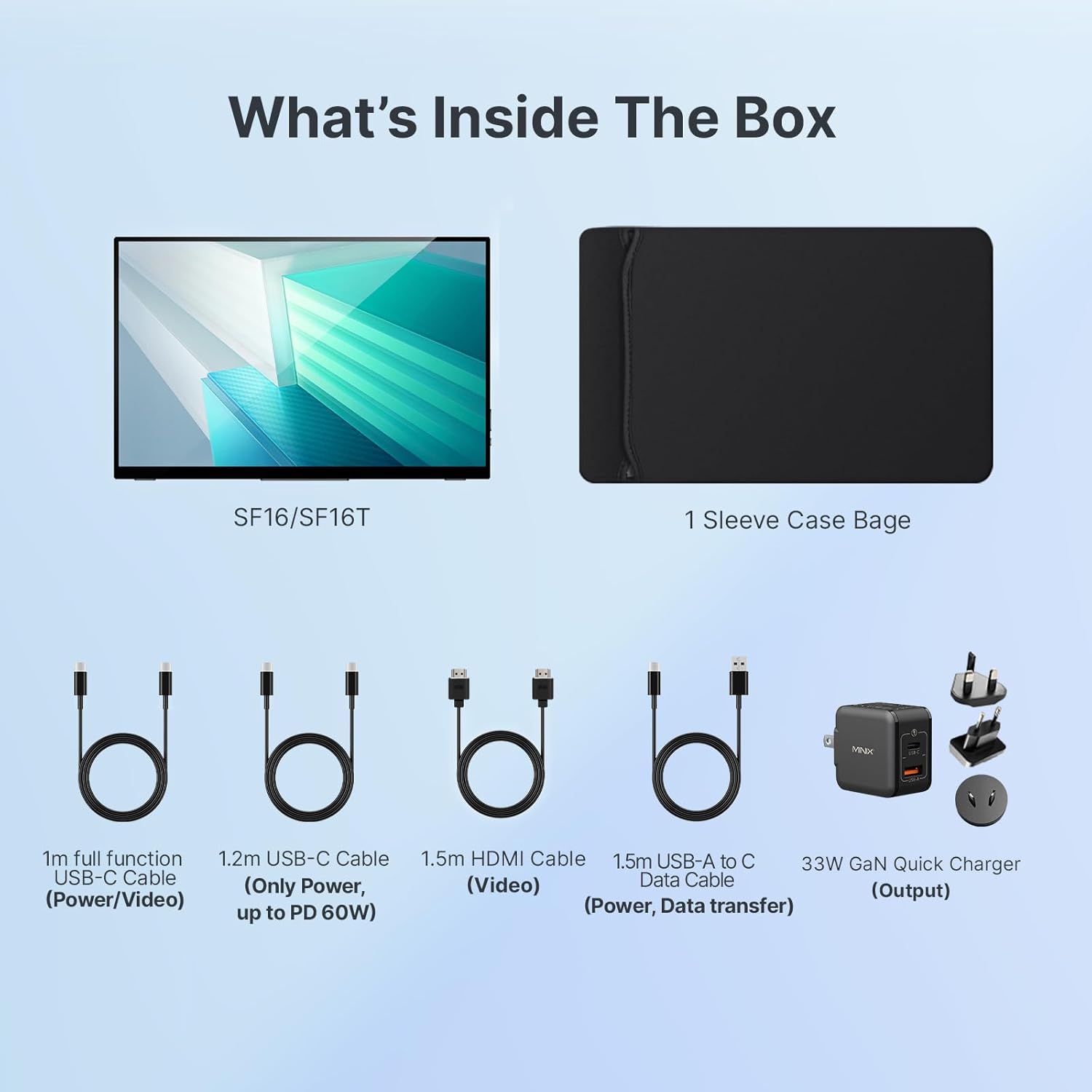
Figura 1: Kontenut tal-Pakkett
- MINIX Portable Monitor (SF16/SF16T)
- Borża tal-Każ tal-kmiem
- 1m Full Function USB-C to USB-C Cable (Power/Video)
- 1.2m USB-C to USB-C Cable (Power, up to PD 60W)
- 1.5m HDMI to HDMI Cable (Video)
- 1.5m USB-A to C Data Cable (Power, Support Touch for SF16T)
- 33W GaN Quick Charger (Output)
Prodott Overview
Familiarize yourself with the ports and controls on your MINIX Portable Monitor.

Figura 2: Portijiet u Kontrolli tal-Monitor
- Port USB 2.0: Connects to a keyboard or mouse.
- Buttuna tal-Qawwa: Ixgħel/itfi l-monitor.
- Brightness/Up Key: Adjusts screen brightness or navigates menu up.
- Volume/Down Key: Adjusts volume or navigates menu down.
- Standard HDMI Port: Connects to devices via HDMI for video input.
- Jack Awdjo 3.5mm: Għall-konnessjoni ta' headphones jew kelliema esterni.
- Type-C (Full Function) Ports: Two full-featured USB-C ports for power, video, and touch data transfer.

Figure 3: Ultra-Slim Design
Setup
Konnessjoni Inizjali
The MINIX Portable Monitor offers flexible connectivity options. Ensure your device supports USB 3.1 Type C DP Alt-Mode for full functionality via a single USB-C cable.
- Provvista tal-Enerġija: Connect the provided 33W GaN Quick Charger to one of the monitor's USB-C ports (or use a power bank with sufficient output).
- Video & Data Connection:
- USB-C (Single Cable Solution): If your laptop or device has a full-featured USB-C port (supporting DisplayPort Alternate Mode and Power Delivery), connect it to one of the monitor's full-function USB-C ports using the 1m full function USB-C cable. This single cable can provide power, video, and touch functionality.
- HDMI + USB-C (for Power/Touch): If your device only has an HDMI output, connect the monitor via the HDMI port using the 1.5m HDMI cable for video. Then, connect a USB-C port on the monitor to a USB-A or USB-C port on your device using the 1.5m USB-A to C data cable for power and touch functionality (if applicable).
- Qawwa Mixgħul: Press the Power Button on the monitor to turn it on.

Figure 4: Connectivity Diagram
Using the Built-in Stand
The monitor features a built-in kickstand for easy adjustment of viewing angles. Simply extend the stand from the back of the monitor and adjust it to your desired angle between -10° and -35°.
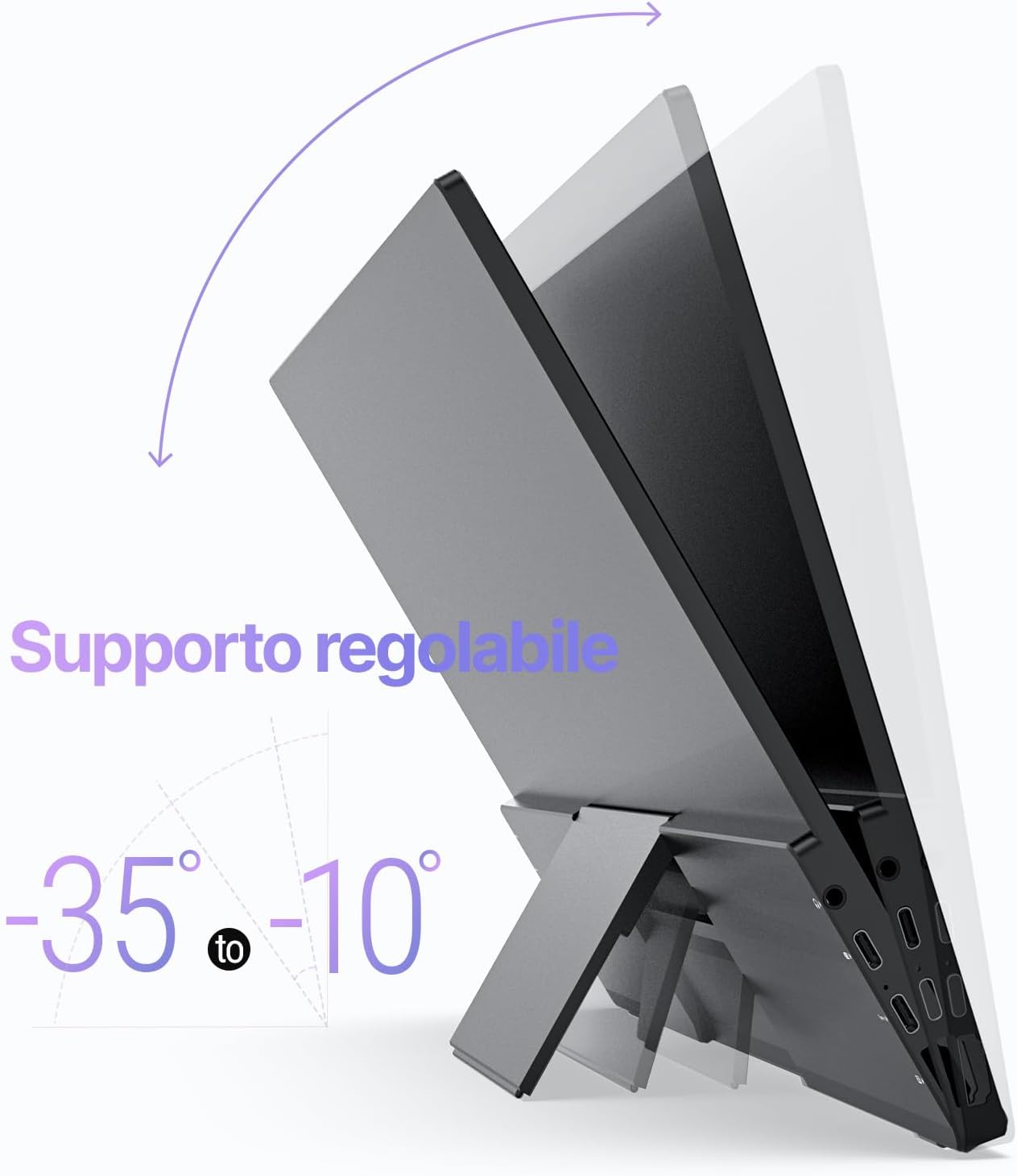
Figure 5: Adjustable Stand
Operazzjoni
Display Settings
Use the Brightness/Up and Volume/Down keys on the side of the monitor to access and navigate the On-Screen Display (OSD) menu. Here you can adjust various settings such as brightness, contrast, color temperature, and input source.
Touch Screen Functionality (SF16T Model)
The SF16T model supports ten-point multi-touch and gesture controls across various operating systems including macOS, Windows 10/11, Android, and Linux. Ensure the USB-C connection is properly established for touch functionality.

Figure 6: Multi-Touch Support
Dimostrazzjoni Video
Watch this official video from MINIX Technology Limited for a visual guide on setting up and using your portable monitor, highlighting its key features like the built-in stand, multi-touch support, and USB-C connectivity.
Video 1: MINIX 16" Portable Touch Monitor Overview
Manutenzjoni
- Tindif tal-Iskrin: Imsaħ l-iskrin bil-mod b'ċarruta ratba, niexfa u mingħajr suf. Għal marki persistenti, nixxef ftit.ampen the cloth with water or a screen-specific cleaning solution (apply to cloth, not directly to screen).
- Tindif tas-Casing: Use a soft, dry cloth to wipe the exterior casing. Evita prodotti tat-tindif jew solventi li joborxu.
- Ħażna: When not in use, store the monitor in its provided sleeve case to protect it from dust and scratches. Keep it in a cool, dry place.
- Immaniġġjar: Dejjem immaniġġja l-monitor mit-truf tiegħu. Evita li tapplika pressjoni fuq l-iskrin.
Issolvi l-problemi
| Problema | Kawża Possibbli | Soluzzjoni |
|---|---|---|
| L-ebda wiri/messaġġ "Ebda Sinjal" | Incorrect input source selected; Loose cable connection; Insufficient power; Device not outputting signal. |
|
| Touch screen not responding (SF16T) | USB-C data cable not connected or not full-featured; Driver issue; OS incompatibility. |
|
| Skrin li jteptep | Cable issue; Interference; Refresh rate mismatch. |
|
| No audio from monitor speakers | Volume too low; Audio output not set to monitor; Cable issue. |
|
Speċifikazzjonijiet
| Karatteristika | Dettall |
|---|---|
| Numru tal-Mudell | SF16 |
| Daqs tal-Iskrin | 16 Pulzier |
| Riżoluzzjoni | 1920 x 1200 Pixels (FHD 1200P) |
| Proporzjon ta' l-aspett | 16:10 |
| Tip ta' Panel | IPS |
| Luminożità | 300 Candela (Nits) |
| Touch Screen | Yes (SF16T model, 10-point touch) |
| Konnettività | 2x Full-featured USB-C, 1x Standard HDMI, 1x USB 2.0, 1x 3.5mm Audio Jack |
| Dimensjonijiet (L x W x H) | 4.84 x 15.59 x 10.79 pulzieri |
| Piż tal-oġġett | 4.16 liri |
| Wiċċ tal-Iskrin | Tleqq |
| Karatteristiċi tal-Kura tal-Għajnejn | Flicker Free, Blue Light Filter |
Garanzija u Appoġġ
MINIX Technology Limited provides a limited warranty for this product. Please refer to the warranty card included in your package for specific terms and conditions. For technical support, troubleshooting assistance, or warranty claims, please contact MINIX customer service through their official webis-sit jew il-bejjiegħ bl-imnut minn fejn xtrajt il-prodott.
You can visit the official MINIX Store on Amazon for more information and support: MINIX Store


