Introduzzjoni
The Optoma ML1080 is an ultra-portable, standard throw RGB laser projector designed for versatile use. It features Time of Flight (ToF) technology for advanced auto-focus and auto keystone correction, ensuring clear images on various surfaces. The RGB Triple Laser delivers 100% REC.709 and 98% DCI-P3 color accuracy for cinematic visuals. Enjoy seamless gaming with an ultra-low 23ms input lag. This projector supports 1080p HD resolution with 4K input, offers multiple connectivity ports, Bluetooth, and a built-in speaker. It can be powered via the included AC cable or a USB-C 60W PD 3.0 portable battery.
X'hemm fil-Kaxxa
- Adapter tal-Enerġija
- Kontroll mill-bogħod
- Batterija
- Borża tal-Ġarr
- Manwal għall-Utent
Karatteristiċi tal-Prodott
- Disinn Ultra-Portabbli: Compact and lightweight for use on any surface with Time of Flight (ToF) technology for advanced auto-focus.
- RGB Triple Laser: Delivers cinematic color with 100% REC.709 and 98% DCI-P3 (WCG) color accuracy.
- Lag tal-Input Ultra-Baxx: 23ms at 1080p60 and 23ms at 4K60 with Enhanced Game Mode and Auto Low Latency Mode (ALLM).
- Lest għall-istriming: Optional EZC-USB Wireless adapter (not included) allows for streaming apps.
- Riżoluzzjoni Għolja: 1080p resolution with 4K input support.
- Portijiet Multipli: HDMI 2.1 input, two USB Type-C display inputs, USB-A input.
- Media Player integrat: Play content directly from storage devices.
- Kelliem inkorporat: Għall-output tal-awdjo.
- Modi tal-Wiri versatili: 9 different display modes.
- Konnettività Bluetooth: For input devices and audio devices.
- Casting & Screen Mirroring: Share content from compatible devices.
- File Maniġer: For easy content access.
- Signage Mode: For commercial applications.
- Premium Carry Case: Included for portability and protection.
Setup
Tqegħid Inizjali
Place the projector on a stable, flat surface. Ensure adequate ventilation around the unit. The compact size allows for flexible placement.

Quddiem view of the Optoma ML1080 projector, highlighting its compact design and lens.
Konnessjoni tal-Enerġija
Connect the included power adapter to the "Power In" port on the projector and then to a power outlet. Alternatively, the projector can be powered by a compatible USB-C 60W PD 3.0 portable battery.
Aġġustament tal-Immaġni
The ML1080 features Time of Flight (ToF) technology for advanced auto-focus and auto keystone correction. Upon powering on or moving the projector, it will automatically adjust the image for optimal clarity and geometry. For best results, ensure the projection surface is flat and free of obstructions.

Diagram illustrating the throw distance for the Optoma ML1080 projector to achieve a 100-inch image.
Operazzjoni
Qawwa mixgħul/mitfi
Press the power button located on the projector or the remote control to turn the unit on or off.
Għażla tas-Sors
Use the remote control or the projector's control panel to select the desired input source (e.g., HDMI, USB-C, USB-A).
Modi tal-Wiri
The projector offers 9 display modes to optimize image quality for different content types (e.g., movie, game, presentation). Refer to the on-screen menu for selection.
Modalità tal-Logħob
For an enhanced gaming experience, activate the Enhanced Game Mode and Auto Low Latency Mode (ALLM) through the projector settings. This reduces input lag to 23ms at 1080p60 and 4K60.
Official video demonstrating the portability, RGB Triple Laser technology, instant setup with Time-of-Flight, built-in speaker, and multiple input options of the Optoma ML1080 projector.
Konnettività
Portijiet Disponibbli
- HDMI 2.1: Connect to Blu-ray players, gaming consoles, or other HDMI-enabled devices.
- USB Type-C (Image Display): Connect compatible devices for video and audio transmission.
- USB Type-C (Power Input): For powering the projector with a compatible portable battery.
- USB-A: For media playback from USB drives or connecting an optional EZC-USB Wireless adapter for streaming.
- 3.5mm Awdjo Out: Qabbad kelliema jew headphones esterni.
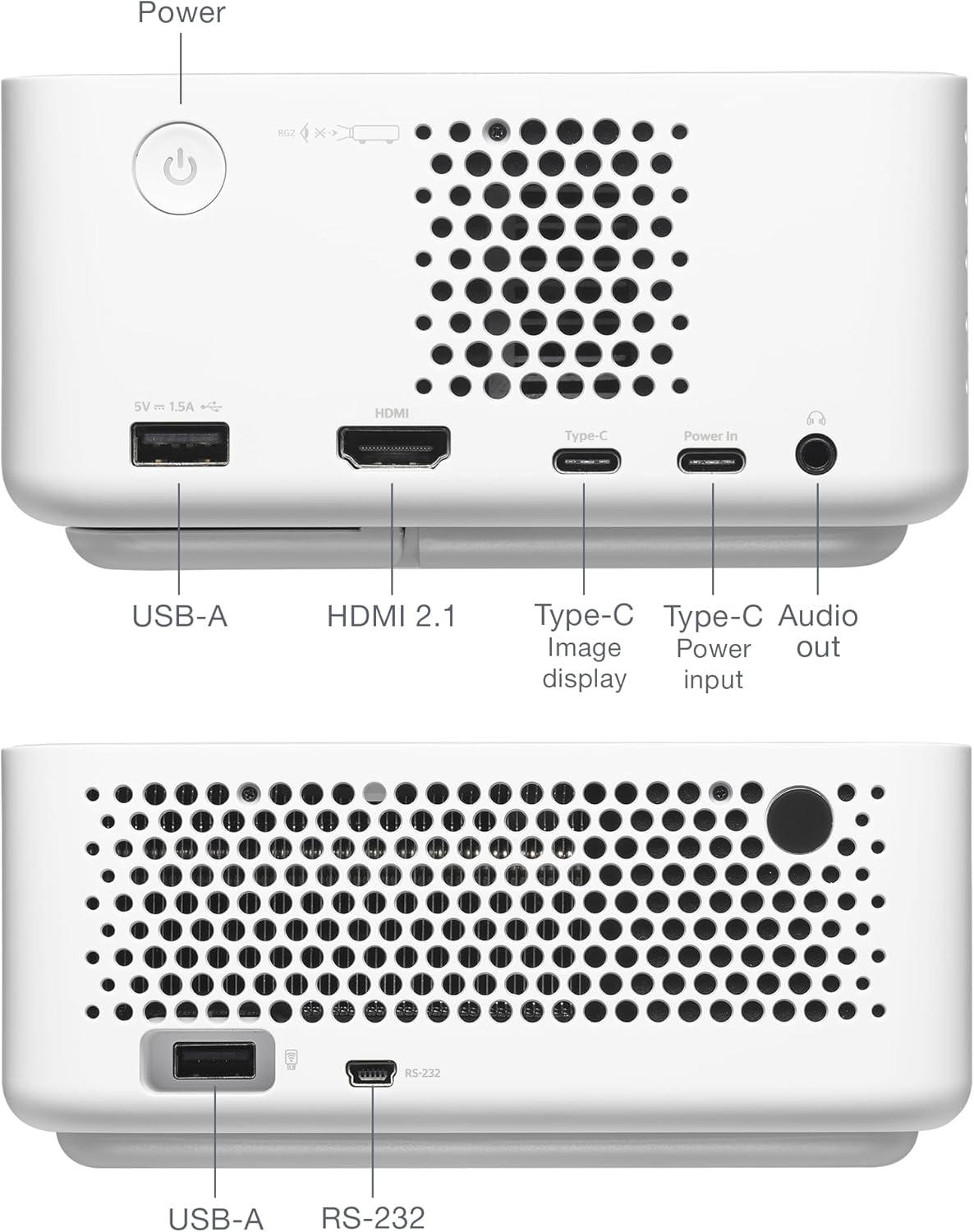
Wara view of the Optoma ML1080 projector, showing the various input and output ports including USB-A, HDMI 2.1, USB-C (Image display), USB-C (Power input), and Audio out.
Manutenzjoni
Tindif tal-Lenti
Use a soft, lint-free cloth specifically designed for optical lenses. Gently wipe the lens to remove dust or smudges. Avoid abrasive materials or harsh chemicals.
Tindif Ġenerali
Imsaħ il-barra tal-proġettazzjoni b'ċarruta ratba u niexfa. Tużax prodotti tat-tindif likwidi direttament fuq l-unità.
Ventilazzjoni
Kun żgur li l-fetħiet tal-ventilazzjoni tal-proġettazzjoni huma ċari u mingħajr ostakli biex tevita li jisħon iżżejjed.
Issolvi l-problemi
Ebda Wiri ta 'Immaġini
- Check power connections and ensure the projector is turned on.
- Iċċekkja li s-sors tad-dħul intgħażel b'mod korrett.
- Kun żgur li l-apparat tas-sors ikun mixgħul u qed joħroġ sinjal.
Immaġni mċajpra
- Allow the projector to complete its automatic focus adjustment.
- Kun żgur li l-wiċċ tal-projezzjoni jkun ċatt u ħieles minn ostakli.
Nru Awdjo
- Iċċekkja l-livell tal-volum fuq il-proġettazzjoni u l-apparat tas-sors.
- If using external speakers, ensure they are properly connected and powered.
Speċifikazzjonijiet
- Dimensjonijiet tal-Prodott: 12.5 x 10 x 4.75 pulzieri
- Piż tal-oġġett: 2.2 liri
- Numru tal-Mudell tal-Oġġett: ML1080
- Batteriji: 1 batterija tal-Lithium Metal meħtieġa (inkluża)
- Manifattur: Optoma Technology Inc
- Użi Rakkomandati: Gaming, Home Cinema, Road Warrior, SMB and Work From Home
- Karatteristiċi Speċjali: 100% REC.709 | 98% DCI-P3, Enhanced Game Mode w/ ALLM, RGB Laser Technology, Time-of-Flight (ToF) Technology, Ultra-Portable
- Teknoloġija tal-Konnettività: Awdjo ta' 3.5mm, HDMI, USB
- Riżoluzzjoni tal-wiri: 1920 x 1080

Diagram illustrating the dimensions and connectivity ports of the Optoma ML1080 projector.
Garanzija u Appoġġ
Għal informazzjoni dwar il-garanzija u appoġġ tekniku, jekk jogħġbok irreferi għall-websajt uffiċjali ta' Optoma. website or contact Optoma customer service. Keep your purchase receipt for warranty claims. Online resources may include FAQs, driver downloads, and service center locations.


