1. Introduzzjoni
Welcome to the FOXBOX Military Smart Watch user manual. This guide provides essential information for setting up, operating, and maintaining your new smartwatch. Designed for durability and comprehensive functionality, your FOXBOX smartwatch is an ideal companion for both daily life and outdoor adventures.
Karatteristiċi ewlenin:
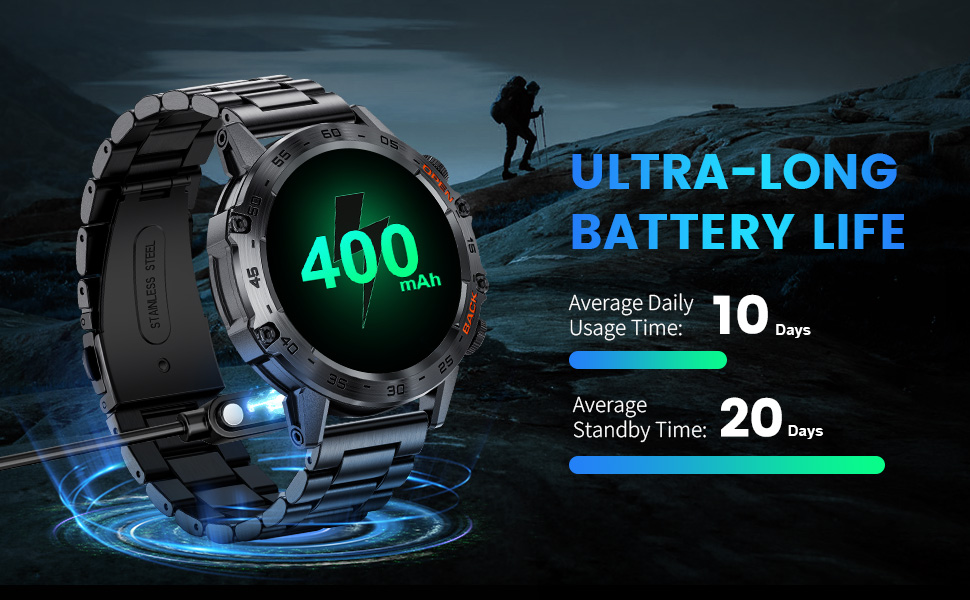
- Powerful Battery Reserve: 400mAh capacity, up to 30 days standby, 7-10 days normal use.
- Advanced Touch and Stunning Visuals: 1.39-inch HD display with 360x360 resolution.
- Multifunctional Communication: Bluetooth 5.0 for calls, messages, music control.
- Leading a Healthy Lifestyle: 100+ sports modes, continuous heart rate, blood pressure, blood oxygen, and sleep monitoring.
- Broad Compatibility and Multifunction: Compatible with Android 4.4+/iOS 8.0+, weather forecasts, alarms, timers, 100+ customizable watch faces.
2. X'hemm fil-Kaxxa
Upon opening your FOXBOX Military Smart Watch package, you should find the following items:
- Smart Watch (1 unit)
- Stainless Steel Strap (1 unit)
- Replacement Silicone Strap (1 unit)
- Charger Cable (1 unit)
- Smartwatch Regulator (1 unit)
- Smart Watch Instruction Manual (1 unit)

Image: Contents of the FOXBOX Smart Watch box, showing the watch, two interchangeable straps, charging cable, and adjustment tools.
3. Setup
3.1 Iċċarġjar inizjali
Before first use, fully charge your smartwatch. Connect the magnetic charger to the charging points on the back of the watch and plug the USB end into a power source. The watch will display a charging indicator.
Immaġni: L-ismartwatch imqabbad mal-kejbil tal-iċċarġjar manjetiku tiegħu.
3.2 Attaching/Changing Straps
The smartwatch comes with two strap options: a stainless steel strap and a silicone strap. To attach or change a strap, locate the quick-release pins on the back of each strap. Slide the pin to align with the lug holes on the watch body and release to secure. Use the provided regulator tool for adjusting the length of the stainless steel strap.
3.3 Installazzjoni u Tqabbil tal-App
To unlock the full potential of your smartwatch, install the 'FitCloudPro' app on your smartphone and pair the devices.
- Ixgħel il-Bluetooth tat-telefon tiegħek.
- Scan the QR code displayed on the watch screen or in the manual, or search for 'FitCloudPro' in your phone's app store (Google Play or Apple App Store).
- Download and open the 'FitCloudPro' app.
- In the app, click the '+ Bind Device' button on the 'Devices' screen.
- Tap 'K-52' (the model name) to pair. Agree to any phone binding requests on the watch.
- To enable Bluetooth voice calls, swipe the watch screen to the right and click the 'Call' icon. Ensure 'Call audio' is turned on.

Image: Smartwatch showing Bluetooth call and message reminder features.

Immaġni: Fuqview of smartwatch features including app interface and connectivity.
Image: QR code to download the FitCloudPro application.
4. Kif Tħaddem l-Arloġġ Intelliġenti Tiegħek
4.1 Navigazzjoni Bażika
The smartwatch features a full touch screen for intuitive navigation. Swipe left, right, up, or down to access different menus and functions. Use the physical buttons on the side for quick access to specific features or to return to the home screen.
4.2 Karatteristiċi ta' Komunikazzjoni
- Sejħiet Bluetooth: Once paired, you can answer or make calls directly from your wrist. The watch has a built-in high-fidelity speaker and noise reduction microphone.
- Notifiki tal-messaġġi: Receive notifications for text messages and social media apps directly on your watch.
- Kontroll tal-Mużika: Control music playback on your phone directly from the smartwatch.

Image: Smartwatch showing an incoming call on its display.
4.3 Monitoraġġ tas-Saħħa
The smartwatch continuously monitors various health metrics:
- Rata tal-qalb: 24-hour heart rate monitoring.
- Pressjoni tad-Demm u Ossiġnu fid-Demm: Real-time data collection.
- Monitor tal-irqad: Tracks sleep patterns to help you understand your sleep quality.

Image: Smartwatch displaying health metrics like heart rate, calorie burn, and exercise distance.
4.4 Modalità Sportiva
With over 100 sports modes, the smartwatch provides detailed tracking for various activities, including distance, steps, heart rate, and calories burned.
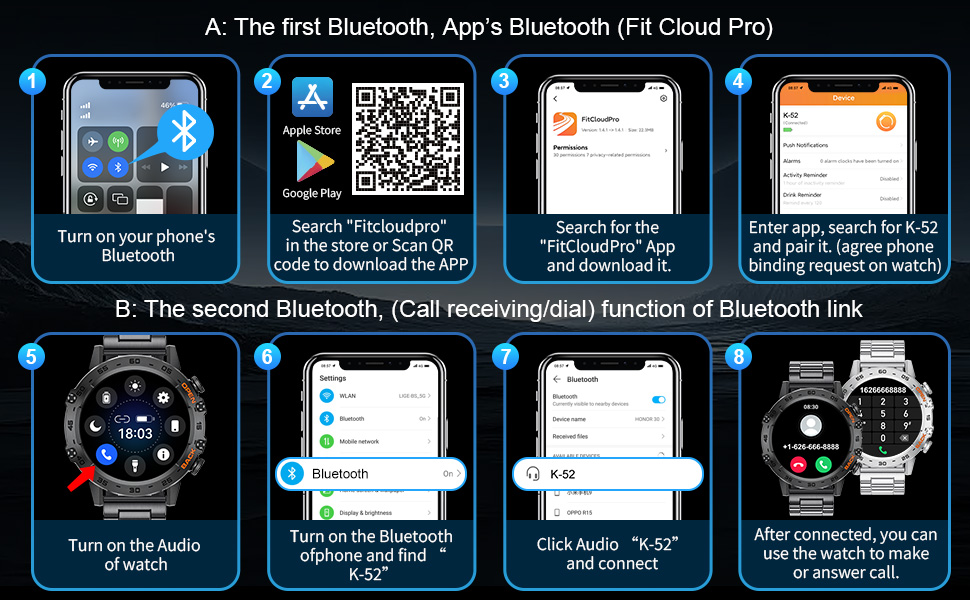
Image: Smartwatch showing various exercise modes and tracking metrics.
4.5 Personalizzazzjoni
Personalize your smartwatch experience:
- Uċuħ tal-Għassa: Choose from over 100 watch faces or upload your own photos.
- Assistent tal-Vuċi AI: Use the integrated AI voice assistant for various commands and reminders.

Image: Smartwatch showing music control, AI voice assistant, and sleep monitoring.
5. Manutenzjoni
5.1 Durability & Water Resistance
The smartwatch's aluminum alloy casing has undergone military-grade tests for extreme temperatures, low pressure, dust resistance, and impact protection. It boasts an IP68 waterproof rating, making it suitable for daily activities like hand washing and rain exposure.
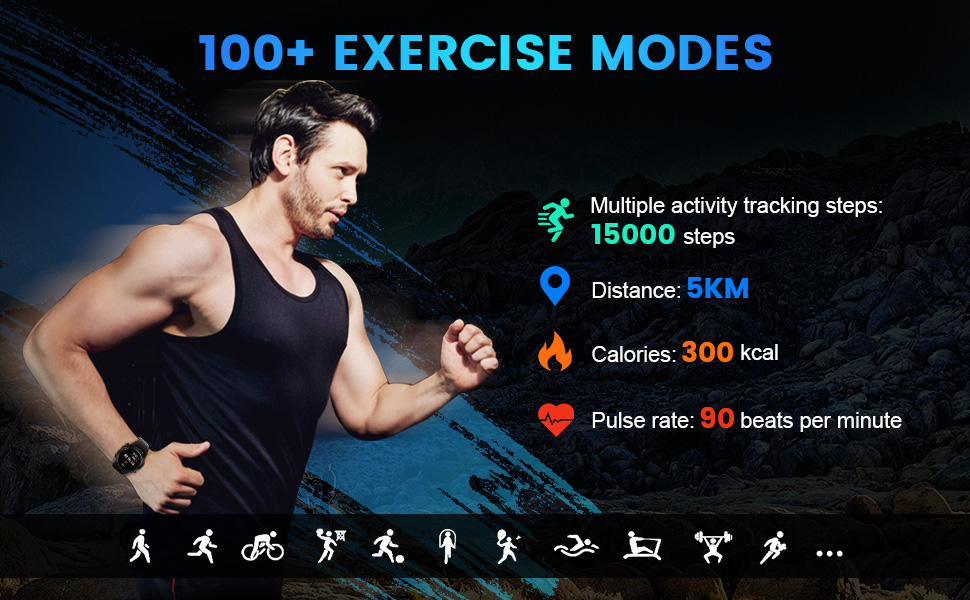
Image: Smartwatch demonstrating military-grade durability against sweat, dust, impact, and harsh conditions.
5.2 Kura tal-Batterija
The 400mAh battery provides excellent life. To maximize battery longevity, avoid extreme temperatures and use only the provided charging cable.
6 Issolvi l-problemi
If you encounter issues with your smartwatch, consider the following:
- Kwistjonijiet ta' Konnettività: Ensure Bluetooth is enabled on your phone and the watch is within range. Restart both devices and attempt to re-pair through the 'FitCloudPro' app.
- Problemi tal-iċċarġjar: Verify the magnetic charger is correctly aligned with the watch's charging points. Ensure the USB cable is securely connected to a working power source.
- Band or Watch Damage: If the band is broken or the watch is not holding a charge, please contact customer support for assistance.
7. Speċifikazzjonijiet
| Karatteristika | Dettall |
|---|---|
| Dimensjonijiet tal-Prodott | 10.24 x 1.69 x 0.39 pulzieri |
| Piż tal-oġġett | 9.1 uqija |
| Numru tal-Mudell tal-Oġġett | BW1846 |
| Batteriji | 1 Batteriji tal-Lithium Polymer meħtieġa (inklużi) |
| Daqs tal-Wiri tal-Iskrin Permanenti | 1.39 Pulzier |
| Kapaċità tal-Ħżin tal-Memorja | 128 MB |
| Sistema Operattiva | Android |
| Kapaċità tal-batterija | 400 Milliamp Sigħat |
| Teknoloġija tal-Konnettività | Bluetooth |
| GPS | L-ebda GPS |
| Forma | Round |
8. Garanzija u Appoġġ
FOXBOX is committed to providing excellent customer service. Your smartwatch comes with:
- 24 H Online Service: For any inquiries or assistance.
- 6 Months Returns Service: Għal ritorni eliġibbli.
- 2 Years Guarantee: Against manufacturing defects.
For further support, please refer to the contact information provided in your product packaging or visit the official FOXBOX store online.


