1. Prodott Aktarview
The LAUNCH Creader Elite V2.0 is a professional automotive diagnostic scan tool designed specifically for Mercedes-Benz, MB Sprinter, and Maybach vehicles. This device provides comprehensive system diagnostics, a wide range of reset services, powerful bi-directional control, and advanced ECU coding capabilities. Equipped with an Android 8.1 OS and a 4-inch touchscreen, it ensures a smooth and efficient diagnostic process.
Key features include OE-level full system diagnosis, all free maintenance services, full OBD2 functions for all car makes, Auto VIN technology, and lifetime free Wi-Fi updates. It is designed to help users quickly identify vehicle faults, perform necessary repairs, and maintain vehicle systems safely and efficiently.

Figure 1.1: LAUNCH Creader Elite V2.0 Diagnostic Scan Tool. The device features a 4-inch touchscreen display showing options for Diagnose, OBDII, Upgrade, Mall, and Settings.
2. Kontenut tal-Pakkett
Qabel tibda, jekk jogħġbok ivverifika li l-oġġetti kollha huma preżenti fil-pakkett:
- 1 x LAUNCH Creader Elite V2.0 PRO Scanner (for Mercedes-Benz/Maybach/Sprinter)
- 1 x Kejbil Dijanjostiku OBD2
- 1 x Gwida Quick Start
- 1 x Manwal għall-Utent

Figure 2.1: LAUNCH Creader Elite V2.0 Packing List. This image displays the main unit, detachable OBD2 cable, user manual, and quick start guide, along with icons indicating lifetime free update, 24/7 post-sale service, 60-day return & replacement, and email support.
3. Twaqqif u Użu Inizjali
- Qawwa Mixgħul: Connect the OBD2 diagnostic cable to the vehicle's OBD2 port (usually located under the dashboard). The device will power on automatically.
- Għażla tal-Lingwa: Upon first boot-up, select your preferred language from the available options. The device supports 11 languages including English, Spanish, French, German, Italian, Portuguese, Korean, Russian, Traditional Chinese, Polish, and Japanese.
- Konnessjoni Wi-Fi: Navigate to "Settings" on the main menu and connect the device to a stable Wi-Fi network. This is crucial for software updates and sharing diagnostic reports via email.
- Aġġornament tas-Software: After connecting to Wi-Fi, go to the "Upgrade" section on the main menu. Perform a one-click update to ensure the device has the latest features and vehicle compatibility.
- Konnessjoni tal-Vettura: Once updated, select "Diagnose" from the main menu. The device supports AutoVIN technology to automatically identify the vehicle's make, model, and year. Alternatively, you can manually select the vehicle information.
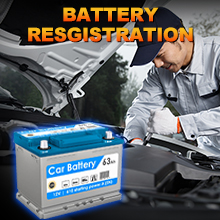
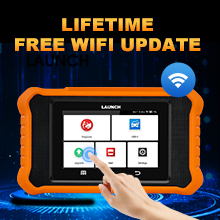
Figure 3.1: Multi-language support and Wi-Fi update functionality.
4. Operating the Device: Key Functions
4.1 OE-Level Full System Diagnostics
The Creader Elite V2.0 provides in-depth diagnostics for all available electronic control modules in Mercedes-Benz, Sprinter, and Maybach vehicles. This includes, but is not limited to, Engine, Transmission, ABS, SRS (Airbag), BMS, EPB, AFS, and Chassis systems. It allows you to read and clear diagnostic trouble codes (DTCs), view live data streams, freeze frame data, and read ECU information.

Figure 4.1: OE-Level Full Systems Diagnostics. The scanner can access and diagnose all available modules in the vehicle, helping to quickly pinpoint issues.
4.2 Kontroll Bidirezzjonali (Test Attiv)
This function allows the scanner to send commands to vehicle systems or components to perform specific tests, verifying their operational integrity. Examples include turning on/off lights, performing wiper tests, door lock tests, injector buzz tests, and operating mirrors. This helps in accurately pinpointing faulty parts for efficient repair.
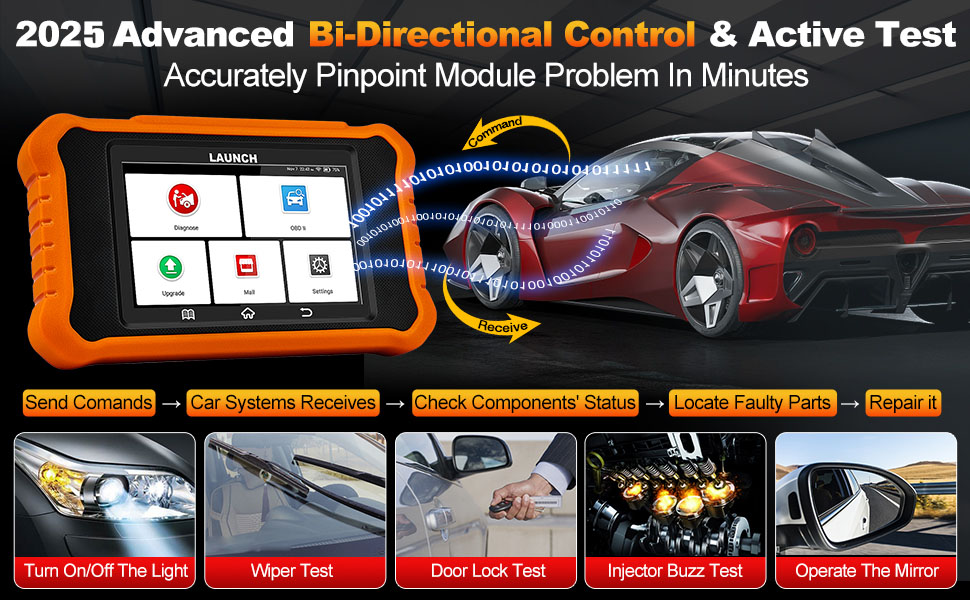
Figure 4.2: Advanced Bi-Directional Control & Active Test. This feature enables the user to command vehicle components for diagnostic purposes.
4.3 Kodifikazzjoni tal-ECU
The ECU Coding function allows for customization of vehicle settings, unlocking hidden features, disabling annoying functions, and performing component matching. It can also recode replacement parts and perform transmission quick relearns, making complex tasks easier.

Figure 4.3: Advanced ECU Coding. This function allows for vehicle customization and component adaptation.
4.4 All Free Maintenance Services
The device includes numerous free maintenance and reset functions. These functions vary by vehicle model and year. Some common services include:
- Fsada mill-ABS
- Irrisettjar tas-SAS (Sensor tal-Angolu tal-Istering)
- Battery Registration/Match
- Irrisettja żejt
- Crankshaft Sensor Relearn
- Irrisettjar tal-EPB (Brejk tal-Ipparkjar Elettroniku)
- Throttle Speed Relearn/Calibration
- Adattament tat-Trażmissjoni
- D-P-F Regeneration Reset (Diesel Particulate Filter)
- Irrisettjar tat-TPMS (Sistema ta' Monitoraġġ tal-Pressjoni tat-Tajers)
- Kodifikazzjoni tal-Injettur
- Irrisettjar tas-Sospensjoni
- Inizjalizzazzjoni tas-sunroof
- A/C Relearn
- Tagħlim tal-Irkaptu
- Reset tal-brejk
- AFS Reset (Adaptive Front-lighting System)
- Kalibrazzjoni tas-Siġġijiet
- Window Calibration

Figure 4.4: All Free Service Functions. A comprehensive suite of maintenance services for various vehicle systems.
4.5 Full OBD2 Functions for All Car Makes
Beyond Mercedes-Benz specific functions, the Creader Elite V2.0 also serves as a universal OBD2 code reader for all vehicles manufactured after 1996 that support the OBD2 protocol. It can diagnose engine problems, read/clear codes, view live data, freeze frame, I/M readiness, O2 Monitor Test, EVAP test (Mode 8), On-board Monitor test (Mode 6), and display vehicle information. This helps in turning off the Malfunction Indicator Light (MIL) and passing smog tests.

Figure 4.5: All-in-One Automotive Scanner. This image highlights the comprehensive diagnostic capabilities, including standard OBD2 functions and advanced features.
5. Manutenzjoni
To ensure the longevity and optimal performance of your LAUNCH Creader Elite V2.0, follow these maintenance guidelines:
- Tindif: Use a soft, dry cloth to clean the device. Avoid using abrasive cleaners or solvents that may damage the screen or casing.
- Ħażna: Store the device in a cool, dry place away from direct sunlight, extreme temperatures, and excessive humidity.
- Aġġornamenti tas-Software: Regularly connect the device to Wi-Fi and perform software updates. These updates provide new features, bug fixes, and expanded vehicle compatibility.
- Kura tal-Cable: Inspect the OBD2 diagnostic cable regularly for any signs of wear or damage. Replace if necessary to ensure reliable connection.
6 Issolvi l-problemi
If you encounter issues with your LAUNCH Creader Elite V2.0, consider the following common troubleshooting steps:
- L-Apparat Mhux Jixgħel: Ensure the OBD2 cable is securely connected to the vehicle's OBD2 port. Verify the vehicle's battery has sufficient charge.
- Update Problems: Kun żgur li għandek konnessjoni Wi-Fi b'saħħitha u stabbli waqt l-aġġornamenti. Jekk aġġornament ifalli, ipprova erġa' ibda l-apparat u erġa' pprova l-aġġornament.
- Funzjoni Mhux Taħdem: Some functions are vehicle-specific. Verify compatibility for your exact vehicle model and year. Refer to the user manual or contact support for specific compatibility inquiries.
- Prestazzjoni bil-mod: Ensure the device has the latest software updates. Clear any unnecessary data or logs if available in the settings.
For persistent issues or advanced troubleshooting, please contact customer support.
7. Speċifikazzjonijiet
| Karatteristika | Dettall |
|---|---|
| Brand | Tnedija |
| Mudell | LAUNCH Creader Elite V2.0 for BENZ |
| Sistema Operattiva | Android 8.1 |
| Wiri | Touchscreen ta' 4 pulzieri |
| Dimensjonijiet tal-Prodott | 7.83"T x 7.6"W x 1.69"Għ |
| Piż tal-oġġett | 1.19 liri |
| Batterija | 1 Batterija meħtieġa (inkluża) |
| Konnettività | Wi-Fi, Type-C USB Port |
| Memorja | 16GB |
| UPC | 884508000041 |
| Numru tal-Mudell | YZB05-A |
8. Garanzija u Appoġġ għall-Klijent
The LAUNCH Creader Elite V2.0 comes with a garanzija ta 'senaBarra minn hekk, a Politika ta' ritorn jew sostituzzjoni ta' 90 jum is provided. The product also benefits from aġġornamenti tas-softwer bla ħlas tul il-ħajja via Wi-Fi, ensuring access to the latest features and vehicle coverage without subscription fees.
For any questions, technical assistance, or support inquiries, please contact the dedicated customer service team:
- Email: ediagtools@hotmail.com
- Telefon: +1 (323) 325-5773
- Disponibbiltà: 24/7/365 after-sales service.

Figure 8.1: Lifetime Technical Support Information.


