1. Introduzzjoni
This manual provides essential information for the safe and efficient use of your GOODTEL G10 10-inch Android 13 Tablet. Please read this manual thoroughly before operating the device and retain it for future reference. The GOODTEL G10 tablet features a 10-inch display, 14GB RAM, 128GB ROM (expandable up to 1TB), Android 13 operating system, dual-band WiFi (2.4G/5G), Bluetooth 5.0, and an 8000 mAh battery.
2. Kontenut tal-Pakkett
Iċċekkja li l-oġġetti kollha elenkati hawn taħt huma preżenti fil-pakkett tal-prodott tiegħek:
- Pillola GOODTEL G10
- Tastiera Bluetooth
- Ġurdien
- Kawża Protettiva
- Charging Device (Adapter and Cable)
- Adapter OTG
- Protettur tal-Iskrin (applikat minn qabel jew separat)
Jekk xi oġġetti huma nieqsa jew bil-ħsara, jekk jogħġbok ikkuntattja l-appoġġ għall-klijenti.
3. Device Overview
Familiarize yourself with the key features and components of your GOODTEL G10 tablet.

Immaġni: Fuqview of the GOODTEL G10 tablet's main features, including processor, screen size, RAM, ROM, battery, connectivity, and cameras.
3.1 Komponenti Ewlenin
- Wiri: 10.1-inch IPS screen with 1280x800 pixel resolution.
- Kameras: 5MP front camera and 8MP rear camera with flash.
- Portijiet: Type-C USB port for charging and data transfer.
- Slot tal-Karta: Supports MicroSD/TF card expansion up to 1TB.
- Buttuni: Power button, Volume up/down buttons.

Immaġni: The 10.1-inch IPS display of the GOODTEL G10 tablet, highlighting its size and visual quality.
3.2 Karatteristiċi tal-Prestazzjoni
- Sistema Operattiva: Android 13, offering enhanced privacy and customization options.
- Proċessur: 2.0GHz Octa-Core Unisoc T310 processor for smooth performance.
- Memorja: 14GB RAM (6GB physical + 8GB virtual expansion) for efficient multitasking.
- Ħażna: 128GB internal storage, expandable with a MicroSD/TF card up to 1TB.
- Batterija: 8000 mAh battery for extended usage.
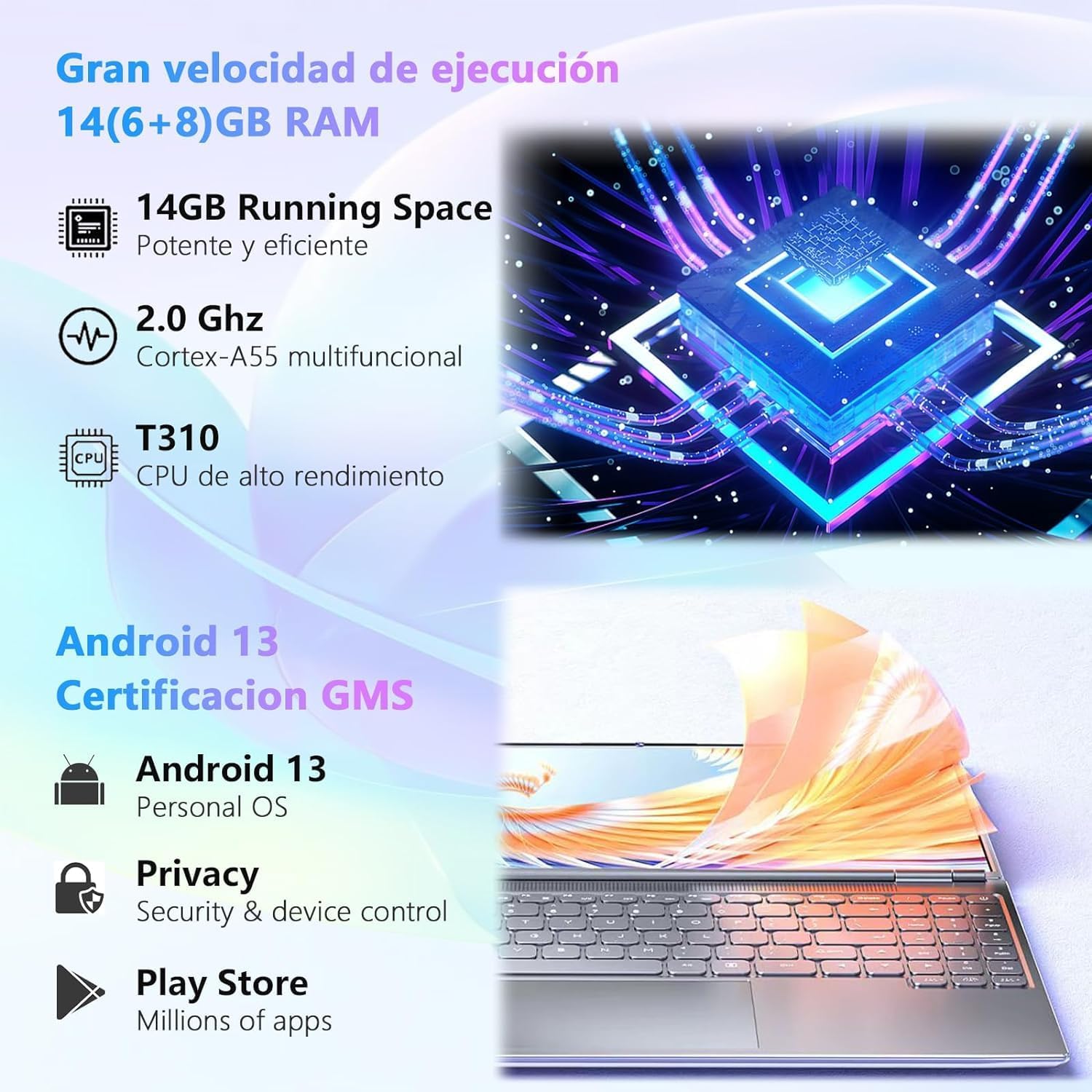
Immaġni: Visual representation of the tablet's powerful processor and the Android 13 operating system with GMS certification.

Immaġni: Illustrates the 128GB ROM and 1TB MicroSD/TF card expansion, showing the tablet's capability for gaming and media storage.

Immaġni: Depiction of the 8000 mAh large capacity, long-lasting battery of the GOODTEL G10 tablet.
3.3 Konnettività
- Wi-Fi: Dual-band 2.4GHz and 5GHz Wi-Fi for stable and fast internet access.
- Bluetooth: Bluetooth 5.0 for connecting wireless accessories like keyboards, mice, and headphones.

Immaġni: Illustration of the tablet's 2.4G/5G dual-band WiFi capability for faster internet access.
4. Setup
4.1 Iċċarġjar inizjali
Before first use, fully charge your tablet using the provided charging device. Connect the Type-C cable to the tablet's charging port and the adapter to a power outlet. The battery indicator on the screen will show charging progress.
4.2 Tixgħel/Jitfi
- Biex Tixgħel: Press and hold the Power button until the GOODTEL logo appears.
- Biex Tifi: Press and hold the Power button until the power options appear on the screen, then select "Power Off".
- Biex terġa' tibda: Agħfas u żomm il-buttuna tal-Enerġija sakemm jidhru l-għażliet tal-enerġija, imbagħad agħżel "Erġa' ibda".
4.3 Wizard tas-Setup Inizjali
Malli tixgħel it-tablet għall-ewwel darba, dan jiggwidak permezz ta' wizard tas-setup inizjali. Segwi l-istruzzjonijiet fuq l-iskrin biex:
- Agħżel il-lingwa tiegħek.
- Qabbad ma 'netwerk Wi-Fi.
- Issettja l-kont Google tiegħek (mhux obbligatorju, iżda rakkomandat għat-tniżżil tal-app).
- Issettja d-data u l-ħin.
- Configure screen lock (PIN, pattern, password).
4.4 Aċċessorji tal-Konnessjoni
Your tablet comes with a Bluetooth keyboard and mouse. To connect them:
- Ensure the keyboard and mouse are charged and in pairing mode (refer to their individual manuals if needed).
- Fuq it-tablet tiegħek, mur fuq Settings > Apparati konnessi > Bluetooth.
- Ixgħel il-Bluetooth.
- Skennja għal apparati disponibbli.
- Select the keyboard and mouse from the list to pair them. Follow any on-screen prompts for confirmation.
The OTG adapter allows you to connect USB devices like flash drives to your tablet.
5. Istruzzjonijiet Operattivi
5.1 Navigazzjoni f'Android 13
- Skrin tad-dar: Skrolla lejn ix-xellug jew lejn il-lemin biex taċċessa skrins tad-dar differenti. Tektek u żomm spazju vojt biex tippersonalizza l-widgets, il-wallpaper, u s-settings.
- Notifiki u Settings Mgħaġġla: Swipe 'l isfel minn fuq tal-iskrin għal view notifiki u aċċess għal settings veloċi bħal Wi-Fi, Bluetooth, u luminożità.
- App Drawer: Skrolla 'l fuq mill-qiegħ tal-iskrin biex taċċessa l-applikazzjonijiet installati kollha.
- Multitasking: Skrolla 'l fuq minn isfel u żomm biex view recent apps. Tap an app icon to access options like split-screen or app info.
5.2 Installazzjoni ta' Applikazzjonijiet
The Google Play Store is pre-installed on your tablet. To download and install apps:
- Ensure you are connected to a Wi-Fi network.
- Iftaħ il- Play Store app.
- Fittex għal the desired app.
- Tektek Installa u segwi l-istruzzjonijiet fuq l-iskrin.
5.3 Użu tal-Kameras
It-tablet għandu kamera ta' quddiem ta' 5MP u kamera ta' wara ta' 8MP. Iftaħ il- Kamera app to take photos or record videos. Tap the screen to focus, and use the on-screen buttons to switch between front/rear cameras, modes, and settings.
5.4 Ġestjoni tal-Ħażna
Your tablet has 128GB of internal storage. To expand storage, insert a MicroSD/TF card (up to 1TB) into the designated slot. You can manage files using the pre-installed Files app or by connecting the tablet to a computer via the Type-C USB cable.
6. Manutenzjoni
6.1 Tindif tat-Tablet
- Uża drapp artab u mingħajr suf biex tnaddaf l-iskrin u l-korp tat-tablet.
- Tużax prodotti tat-tindif likwidi, aerosols, jew materjali li joborxu.
- Ensure the tablet is powered off and unplugged before cleaning.
6.2 Kura tal-Batterija
- Evita li tesponi l-pillola għal temperaturi estremi.
- Tħallix il-batterija tiċċarġja kompletament ta' spiss.
- Use only the provided charging device or a certified compatible charger.
6.3 Aġġornamenti tas-Software
Iċċekkja u installa regolarment aġġornamenti tas-softwer biex tiżgura prestazzjoni u sigurtà ottimali. Mur fuq Settings > Sistema > Aġġornament tas-sistema biex tiċċekkja għal aġġornamenti disponibbli.
7 Issolvi l-problemi
| Problema | Soluzzjoni Possibbli |
|---|---|
| It-tablet ma jixgħelx. | Kun żgur li l-batterija hija ċċarġjata. Qabbad il-ċarġer u stenna ftit minuti qabel ma tipprova tixgħelha mill-ġdid. |
| L-iskrin ma jirrispondix. | Erġa' ibda t-tablet. Jekk il-problema tippersisti, wettaq reset tal-fabbrika (id-dejta tintilef). |
| Problemi bil-konnessjoni tal-Wi-Fi. | Check if Wi-Fi is enabled in settings. Restart your router and the tablet. Ensure you are within range of the Wi-Fi signal. |
| L-apparat Bluetooth mhux qed jiġi mqabbla. | Ensure the Bluetooth device is in pairing mode and within range. Turn Bluetooth off and on again on the tablet. |
| L-apps qed jiġġarraf jew qed jaħdmu bil-mod. | Close background apps. Clear app cache (Settings > Apps > [App Name] > Storage > Clear cache). Ensure sufficient storage space is available. |
| Il-batterija tiskula malajr. | Naqqas il-luminożità tal-iskrin. Agħlaq l-apps mhux użati. Iddiżattiva l-Wi-Fi/Bluetooth meta ma tkunx qed tużahom. Iċċekkja l-użu tal-batterija fis-settings biex tidentifika apps li jikkunsmaw ħafna enerġija. |
8. Speċifikazzjonijiet
| Karatteristika | Dettall |
|---|---|
| Brand | GOODTEL |
| Numru tal-Mudell | G10 |
| Sistema Operattiva | Android 13 |
| Proċessur | Unisoc T310 Octa-Core, 2.0 GHz |
| RAM | 14 GB (6GB fiżiku + 8GB virtwali) |
| Ħażna Interna (ROM) | 128 GB |
| Ħażna espansibbli | MicroSD/TF card up to 1 TB |
| Daqs tal-Iskrin | 10.1 Pulzier |
| Riżoluzzjoni tal-Iskrin | 1280 x 800 Pixels (IPS) |
| Kamera ta' Quddiem | 5 MP |
| Kamera ta' wara | 8 MP with Flash |
| Kapaċità tal-batterija | 8000 mAh |
| Konnettività | Wi-Fi (2.4GHz & 5GHz, 802.11ac), Bluetooth 5.0 |
| Portijiet | USB tat-tip C |
| Piż tal-Prodott | 450 Gramm |
9. Garanzija u Appoġġ
GOODTEL products are designed for reliability and performance. For warranty information, please refer to the warranty card included in your package or visit the official GOODTEL website. If you encounter any issues or require technical assistance, please contact GOODTEL customer support through the contact information provided with your product or on the official website. Please have your model number (G10) and purchase details ready when contacting support.
Note: Spare parts availability and software update guarantees are not explicitly provided in the product specifications. Please check the official GOODTEL websit għall-aktar informazzjoni kurrenti.


