1. Introduzzjoni
Thank you for choosing the RORRY D2 Portable Charger. This compact and versatile power bank is designed to keep your Apple Watch, iPhone, AirPods, and other compatible devices charged while you are on the go. Please read this manual carefully to ensure safe and optimal use of your device.
X'hemm fil-Kaxxa:
- RORRY Portable Charger (1 unit)
- 1M USB-C to USB-C Charging Cable (1 unit)
- Manwal għall-Utent (unità waħda)
2. Karatteristiċi ewlenin
- Kompatibilità Universali: Designed for Apple Watch Ultra/11/10/9/8/7/6/SE, iPhone 17/16/15/14/13/12/11/Pro/Pro Max, AirPods, and Android devices.
- Kapaċità Kbira ta' 5000mAh: Provides approximately 7-10 charges for Apple Watch, 1 full charge for iPhone 15, and 6-8 charges for AirPods.
- Iċċarġjar Simultanju: Capable of charging multiple devices concurrently, including Apple Watch, iPhone, AirPods, and other Android devices.
- Disinn portabbli: Features a compact and lightweight keychain design for easy portability in pockets or attached to backpacks.
- Sigurtà Superjuri: Equipped with built-in protection against over-temperature, over-current, over-voltage, u short-circuiting.
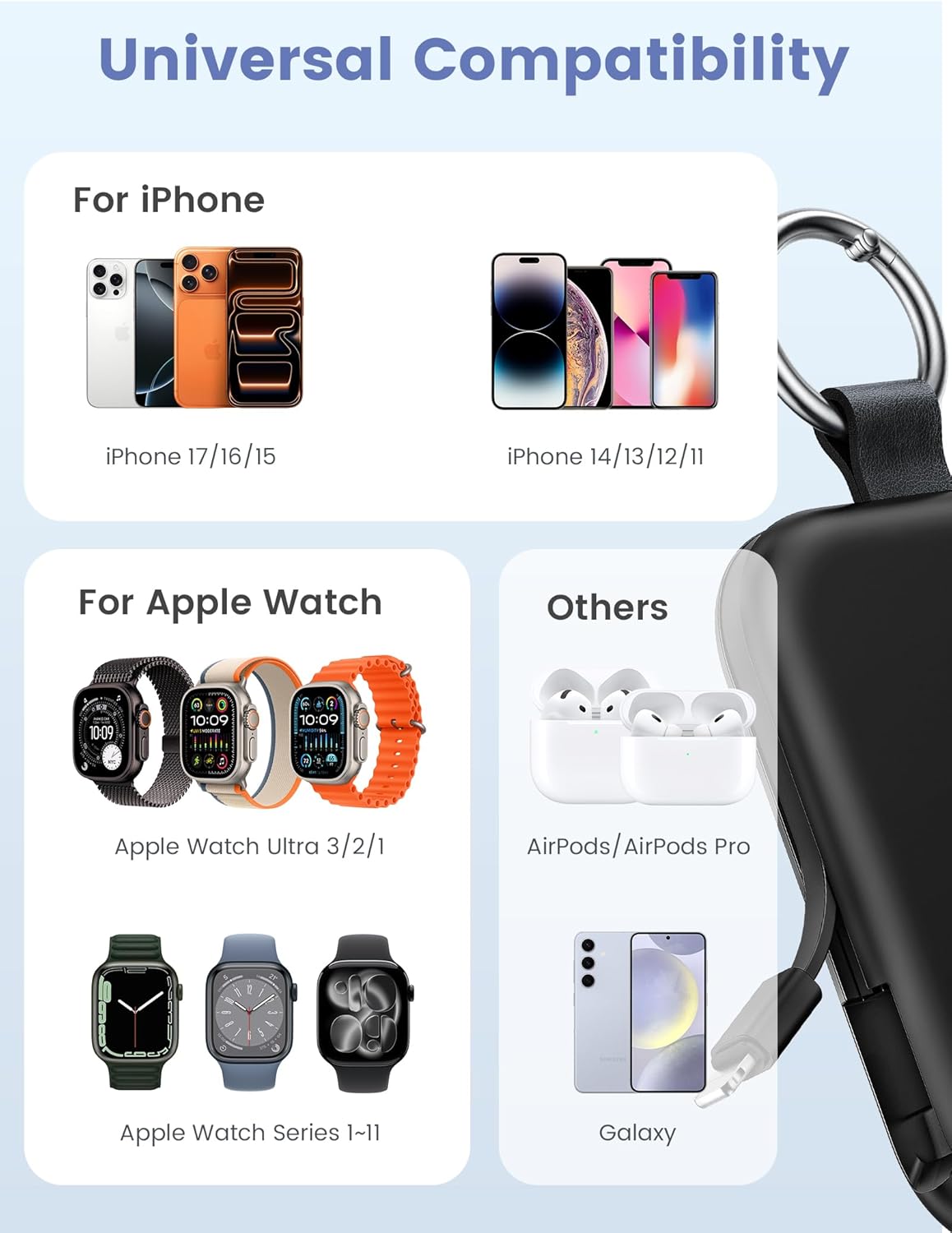
Image: Universal compatibility of the RORRY portable charger with various devices.
3. Is-Setup u l-Iċċarġjar Inizjali
3.1 Iċċarġjar tal-Power Bank
- Connect the provided USB-C to USB-C charging cable to the USB-C input port on the RORRY D2 Portable Charger.
- Connect the other end of the cable to a compatible USB-C wall adapter (not included).
- The LED indicator lights on the power bank will illuminate to show the charging status. A full charge typically takes approximately 2.5 hours.
- Once fully charged, all LED indicators will be solid. Disconnect the power bank from the charger.

Image: Charging the RORRY D2 Portable Charger using the included USB-C cable.
4. Istruzzjonijiet Operattivi
4.1 Charging Apple Watch
- Press the power button on the side of the RORRY D2 Portable Charger to activate the wireless charging pad.
- Place your Apple Watch onto the magnetic charging pad located on the top surface of the power bank.
- Ensure the watch is properly aligned for optimal charging. The watch screen will indicate charging status.
4.2 Charging iPhone and USB-C Devices
- Locate the built-in Lightning cable (for iPhone) or USB-C cable (for Android/other USB-C devices) on the sides of the power bank.
- Gently pull out the appropriate cable.
- Connect the cable to your device's charging port. The device should begin charging automatically.
- To charge multiple devices simultaneously, use the wireless charging pad for Apple Watch and the built-in cables for other devices.

Image: RORRY D2 Portable Charger actively charging an Apple Watch and an iPhone.

Immaġni: Fuqview of charging times and capacities for various devices with the RORRY D2.
4.3 Indikatur tal-Enerġija
The LED lights on the front of the power bank indicate the remaining battery level. Press the power button once to check the current battery status.
Video: Demonstration of the RORRY Portable Apple Watch Charger's features and usage.
5. Speċifikazzjonijiet
| Numru tal-Mudell | D2 |
| Kapaċità tal-batterija | 5000 Milliamp Sigħat |
| Dimensjonijiet tal-Prodott | 3.86 x 2.82 x 0.65 pulzieri |
| Piż tal-oġġett | 4.4 uqija |
| Tip ta' Konnettur | Built-in Cable L+C, USB-C Port |
| Karatteristiċi Speċjali | Compact, Built-in Cables, All-in-one, Keychain Design |
6. Safety Features and Precautions
The RORRY D2 Portable Charger is equipped with multiple safety features to protect your devices and the power bank itself:
- Protezzjoni minn temperatura żejda: Jipprevjeni s-sħana żejda waqt l-iċċarġjar u l-ħatt.
- Protezzjoni ta' Kurrent Żejjed: Salvagwardji kontra fluss eċċessiv ta' kurrent.
- Over-Voltage Protezzjoni: Jipproteġi kontra l-volumtagŻidiet.
- Protezzjoni ta' ċirkwit qasir: Jintefa awtomatikament f'każ ta' short circuit.
Prekawzjonijiet Ġenerali tas-Sigurtà:
- Do not disassemble, squeeze, or hit the device.
- Keep away from fire, water, and heat sources.
- Żomm fejn ma jintlaħaqx mit-tfal.
- Do not use the power bank in extremely high or low temperatures.
- Evita li twaqqa 'l-apparat jew suġġett għal impatti qawwija.
7. Kura u Manutenzjoni
- Naddaf il-power bank b'ċarruta ratba u niexfa. Tużax kimiċi ħarxa jew materjali li joborxu.
- Aħżen l-apparat f'post frisk u niexef meta ma jkunx qed jintuża.
- If the power bank will not be used for an extended period, charge it fully at least once every three months to maintain battery health.
8 Issolvi l-problemi
Apparat mhux qed jiċċarġja:
- Kun żgur li l-power bank huwa ċċarġjat biżżejjed. Iċċekkja l-indikaturi LED.
- Verify that the charging cables are securely connected to both the power bank and your device.
- For Apple Watch, ensure it is correctly placed on the magnetic charging pad and the power button has been pressed.
- Try using a different charging cable or wall adapter to charge the power bank itself.
Iċċarġjar bil-mod:
- Ensure you are using a compatible wall adapter for optimal charging speed.
- L-iċċarġjar ta' diversi apparati simultanjament jista' jnaqqas il-veloċità tal-iċċarġjar għal apparati individwali.
Power bank not turning on:
- Charge the power bank fully. If the battery is completely depleted, it may take a few minutes for the LED indicators to light up.
9. Garanzija u Appoġġ
RORRY products are designed and manufactured to the highest quality standards. For warranty information, after-sales service, or technical support, please refer to the contact details provided in the packaging or visit the official RORRY websit.
Informazzjoni ta' Kuntatt:
- Manifattur: Shenzhen Xianyang Innovation Technology Co., Ltd
- Websit: www.rorry.com (Jekk jogħġbok innota: Dan huwa terminu riżervat) URL, refer to actual product for correct websit)


