1. Introduzzjoni
Thank you for choosing the Baseus AeQur G10 TWS Earphones. This manual provides detailed instructions on how to set up, operate, maintain, and troubleshoot your new earphones. Please read this manual thoroughly before using the product to ensure optimal performance and longevity.
2. Kontenut tal-Pakkett
Iftaħ il-kaxxa bir-reqqa u kun żgur li l-oġġetti kollha elenkati hawn taħt huma preżenti u f'kundizzjoni tajba. Jekk xi oġġetti huma neqsin jew bil-ħsara, jekk jogħġbok ikkuntattja lill-bejjiegħ tiegħek.
- Baseus AeQur G10 TWS Earphones (Left and Right)
- Kawża tal-Iċċarġjar
- USB-A/USB-C Wireless Dongle
- Cable tal-Iċċarġjar tal-USB-C
- Daqsijiet Multipli ta' Ponot tal-Widnejn
- Manwal għall-Utent (dan id-dokument)

Image 2.1: Complete package contents of the Baseus AeQur G10 TWS Earphones.
3. Prodott Aktarview
Familiarize yourself with the components of your Baseus AeQur G10 TWS Earphones.
3.1 Earphones
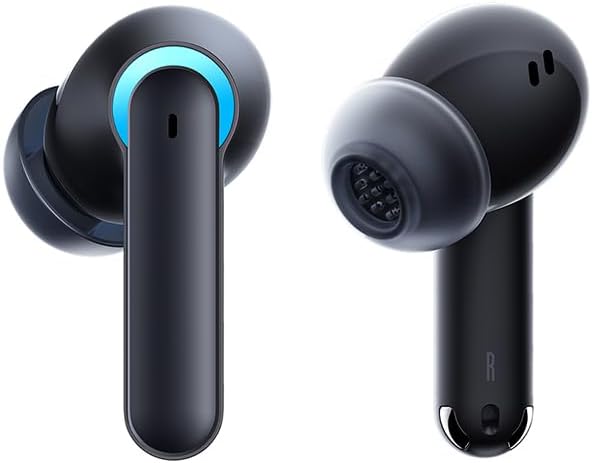
Image 3.1: Left and Right Baseus AeQur G10 Earphones. Each earphone features a touch control area, microphone, and charging contacts.
3.2 Każ ta 'Iċċarġjar

Image 3.2: Baseus AeQur G10 Earphones in their charging case with the lid open. The case has charging slots for each earphone and an LED indicator for battery status.
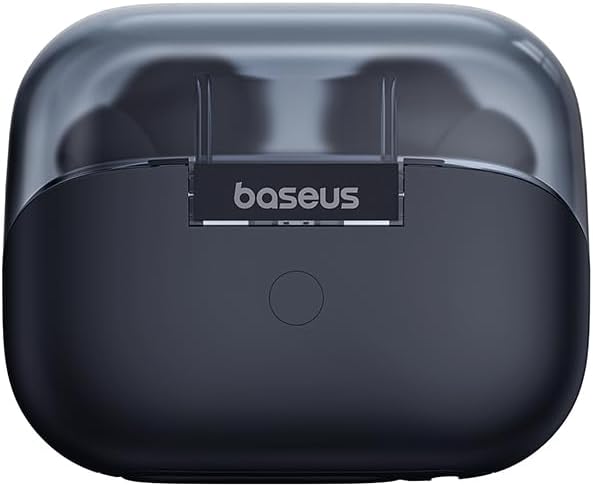
Stampa 3.3: Wara view of the Baseus AeQur G10 charging case, displaying the Baseus brand logo and a USB-C charging port (not explicitly visible but implied by common design).
3.3 USB-A/USB-C Wireless Dongle
The included wireless dongle allows for low-latency connection to various devices, including PCs, laptops, gaming consoles, and mobile devices.

Image 3.4: Compatibility diagram for the Baseus AeQur G10, illustrating connections to Type-C Androids & Tablets, Type-C/USB-A PCs & Laptops, PS5/PS4/Switch, Steam Deck, and VR devices.
4. Setup
4.1 Iċċarġjar inizjali
- Poġġi ż-żewġ earphones fil-każ tal-iċċarġjar.
- Qabbad il-kejbil tal-iċċarġjar USB-C mal-port tal-iċċarġjar fuq il-kaxxa u t-tarf l-ieħor ma' sors ta' enerġija USB (eż., port USB tal-kompjuter, adapter tal-ħajt).
- The LED indicator on the case will show charging status. A full charge typically takes approximately 1.5 hours for the earphones and 2 hours for the case.
4.2 Tqabbil ma' Apparati Bluetooth
- Ensure the earphones are in the charging case and the case has sufficient charge.
- Open the charging case lid. The earphones will automatically enter pairing mode (indicated by a flashing LED on the earphones or case).
- Fuq l-apparat tiegħek (smartphone, tablet, laptop), attiva l-Bluetooth u fittex apparati ġodda.
- Select "Baseus AeQur G10" from the list of available devices.
- Once connected, the LED indicator will stop flashing, and you will hear a confirmation tone.
4.3 Connecting via USB Wireless Dongle
- Insert the USB-A or USB-C end of the wireless dongle into the corresponding port on your device (PC, laptop, gaming console).
- Ensure the earphones are in the charging case and the lid is open.
- The earphones will automatically attempt to connect to the dongle. The dongle's LED indicator will show connection status.
- Once connected, the LED on the dongle will become solid, and you will hear a confirmation tone from the earphones.
5. Istruzzjonijiet Operattivi
5.1 Power On/Off
- Qawwa Mixgħul: Open the charging case lid, or take the earphones out of the case. They will power on automatically.
- Itfi: Poġġi l-earphones lura fil-kaxxa tal-iċċarġjar u agħlaq l-għatu. Dawn jintfew awtomatikament u jibdew jiċċarġjaw.
5.2 L-Ilbies tal-Earphones
- Identify the 'L' (left) and 'R' (right) markings on each earphone.
- Gently insert the earphones into your ear canals.
- Rotate them slightly to find a comfortable and secure fit. Choose the appropriate ear tip size for optimal sound quality and comfort.
5.3 Kontrolli touch
The Baseus AeQur G10 earphones feature touch-sensitive controls on each earbud. The specific functions may vary slightly depending on the device and application.
| Azzjoni | Funzjoni |
|---|---|
| Tektek Waħda (X/L) | Daqq / Issospendi mużika, Tweġiba / Tmiem is-sejħa |
| Tektek Doppju (L) | Track Preċedenti |
| Tektek Doppju (R) | Track li jmiss |
| Tektek Tlieta (Xellug/Lemin) | Attiva l-Assistent tal-Vuċi |
| Agħfas Twil (X/R, 2s) | Irrifjuta Sejħa |
| Agħfas Twil (X/R, 3s) | Toggle Gaming/Music Mode (if applicable) |
6. Manutenzjoni
6.1 Tindif
- Uża drapp artab, niexef u mingħajr suf biex tnaddaf il-earphones u l-kaxxa tal-iċċarġjar.
- For earwax or debris in the ear tips, gently remove the ear tips and clean them with a cotton swab lightly dampened with rubbing alcohol. Ensure they are completely dry before reattaching.
- Tużax prodotti tat-tindif li joborxu, solventi, jew sprejs tal-ajrusol.
6.2 Ħażna
- Dejjem aħżen il-earphones fil-kaxxa tal-iċċarġjar tagħhom meta ma tkunx qed tużahom biex tipproteġihom u żżommhom iċċarġjati.
- Aħżen f'post frisk u niexef, 'il bogħod minn temperaturi estremi u dawl tax-xemx dirett.
6.3 Kura tal-Batterija
- Charge the earphones and case regularly, even if not used frequently, to maintain battery health.
- Evita li tiċċarġja l-batteriji kompletament għal perjodi twal.
7 Issolvi l-problemi
If you encounter issues with your Baseus AeQur G10 earphones, refer to the following common solutions:
7.1 Ebda Ħoss jew Konnessjoni Intermittenti
- Ensure earphones are charged and properly connected to your device (Bluetooth or dongle).
- Iċċekkja l-livell tal-volum kemm fuq il-earphones kif ukoll fuq l-apparat konness tiegħek.
- Ersaq eqreb lejn l-apparat tiegħek biex tevita interferenza jew problemi ta' firxa.
- Try disconnecting and re-connecting the earphones.
- For Bluetooth, forget the device on your phone and re-pair.
- For dongle, unplug and re-plug the dongle.
7.2 Il-Earphones Mhux Qed Jiċċarġjaw
- Kun żgur li l-kejbil tal-iċċarġjar huwa konness sew kemm mal-kaxxa kif ukoll mas-sors tal-enerġija.
- Iċċekkja li s-sors tal-enerġija huwa attiv.
- Clean the charging contacts on both the earphones and inside the case with a dry cotton swab.
- Ipprova kejbil tal-iċċarġjar jew adapter tal-enerġija differenti.
7.3 Only One Earphone Working
- Poġġi ż-żewġ earphones lura fil-kaxxa tal-iċċarġjar, agħlaq l-għatu, stenna ftit sekondi, imbagħad iftaħ l-għatu u oħroġhom mill-ġdid.
- Kun żgur li ż-żewġ earphones huma ċċarġjati.
- Ipprova agħmel reset tal-earphones (irreferi għall-istruzzjonijiet tal-manifattur) web(is-sit għal struzzjonijiet speċifiċi ta' reset jekk meħtieġ).
8. Speċifikazzjonijiet
Key technical specifications for the Baseus AeQur G10 TWS Earphones:
| Karatteristika | Speċifikazzjoni |
|---|---|
| Isem tal-Mudell | A00055400111-00 |
| Brand | Baseus |
| Kulur | Iswed |
| Tqegħid tal-widnejn | Fil-widnejn |
| Fattur tal-Formola | Fil-widnejn |
| Teknoloġija tal-Konnettività | Wireless (Bluetooth) |
| Teknoloġija tal-Komunikazzjoni mingħajr Fili | Bluetooth |
| Batteriji | 1 batteriji tal-jone tal-litju meħtieġa (inklużi) |
| Dimensjonijiet tal-Prodott | 10 x 5 x 1.27 ċm |
| Piż tal-oġġett | 220 g |
| Manifattur | Baseus |
| Użi Speċifiċi | Ivvjaġġar |
9. Garanzija u Appoġġ
Baseus products are designed and manufactured to the highest quality standards. For information regarding warranty coverage, technical support, or service, please refer to the warranty card included with your product or visit the official Baseus websit. Żomm il-prova tax-xiri tiegħek għal talbiet ta' garanzija.
Għal aktar assistenza, tista' tikkuntattja l-appoġġ għall-klijenti ta' Baseus permezz tal-kanali uffiċjali tagħhom.


