Introduzzjoni
Grazzi tax-xiriasing the Baseus S-09 Pro Series Car FM Transmitter. This device allows you to stream audio from your smartphone or other devices to your car's FM radio, and also provides fast charging capabilities. Please read this manual carefully before use to ensure proper operation and to maximize the product's lifespan.
Prodott Overview
The Baseus S-09 Pro Series Car FM Transmitter is designed to enhance your in-car audio experience and provide convenient charging. Key features include:
- Funzjonalità tat-Trasmettitur FM: Ixandar l-awdjo għar-radju FM tal-karozza tiegħek.
- Konnettività Bluetooth 5.3: For stable wireless audio streaming from compatible devices.
- Flash Drive Playback: Supports audio playback directly from a flash drive (up to 512GB).
- Iċċarġjar veloċi: Equipped with a USB-C port supporting PD 18W (Max) fast charging.
- Dual-Mic System: Provides premium sound quality and clear calls.
- Large LED Screen with Dual Display: Shows frequency band and battery voltage alternately.
- Triple Charging Ports: Offers multiple charging options.
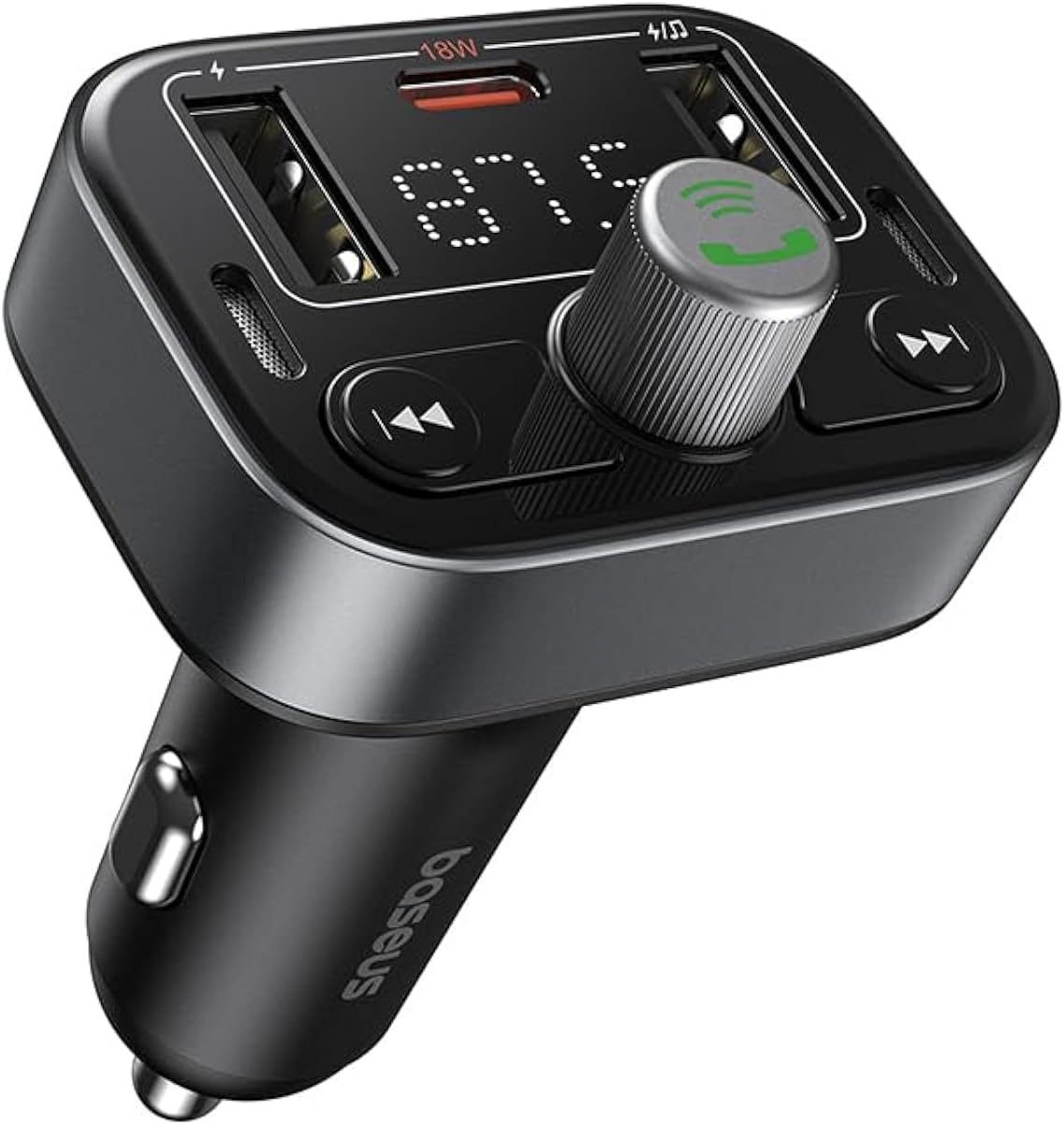
Figura 1: Quddiem view of the Baseus S-09 Pro Series Car FM Transmitter, showing the display, control knob, and USB ports.
Kontenut tal-Pakkett
Jekk jogħġbok iċċekkja l-pakkett għall-oġġetti li ġejjin:
- Baseus S-09 Pro Series Car FM Transmitter
- Manwal ta 'Istruzzjoni (dan id-dokument)

Figure 2: The Baseus S-09 Pro Series Car FM Transmitter shown in its retail packaging.
Setup
- Insert into Car Cigarette Lighter Socket: Plug the Baseus S-09 Pro Series Car FM Transmitter firmly into your car's 12V/24V cigarette lighter socket. The device will power on automatically, and the LED display will light up.
- Sintonizza l-Frekwenza tal-FM:
- On the FM Transmitter, press and hold the multi-function knob (the large central knob) until the FM frequency on the LED display starts flashing.
- Rotate the multi-function knob left or right to adjust the frequency. Choose an empty FM frequency (one with no radio station broadcasting) to minimize interference.
- On your car's FM radio, tune to the exact same empty frequency you selected on the transmitter.
- Once matched, the transmitter is ready to broadcast audio to your car stereo.
- Tqabbil Bluetooth:
- After the device powers on, it will automatically enter Bluetooth pairing mode. The Bluetooth icon on the display may flash.
- On your smartphone or Bluetooth-enabled device, open the Bluetooth settings and search for available devices.
- Select "Baseus S-09 Pro" (or similar name) from the list to connect. Once connected, the Bluetooth icon on the transmitter's display will stop flashing and remain solid.

Figure 3: Illustration showing connection options: via flash drive and Bluetooth 5.3 pairing with a smartphone.
Istruzzjonijiet Operattivi
Daqq Awdjo
- Awdjo Bluetooth: Once paired, play music or audio from your smartphone. The audio will be transmitted to your car's FM radio.
- Flash Drive Audio: Insert a USB flash drive (up to 512GB, formatted to FAT32) containing MP3 audio files into the designated USB port on the transmitter. The device will automatically detect and play the audio files.
- Buttuni tal-Kontroll:
- Pum b'ħafna funzjonijiet: Rotate to adjust volume. Press once to play/pause.
- Previous Track Button (◀◀): Agħfas biex tmur għall-korsa preċedenti.
- Next Track Button (▶▶): Agħfas biex tmur għall-korsa li jmiss.
Sejħat Ħieles bl-Idejn
- Tweġiba/Tmiem Sejħa: Press the multi-function knob once to answer an incoming call or end an ongoing call.
- Irrifjuta Sejħa: Agħfas u żomm il-pum multi-funzjoni għal żewġ sekondi biex tirrifjuta telefonata li dieħla.
- Isemmi mill-ġdid l-Aħħar Numru: Agħfas darbtejn il-pum multi-funzjoni biex terġa' ċċempel l-aħħar numru li ddajljajt.
- Ibdel is-Sejħa għal Telefon: During a call, press and hold the multi-function knob for 2 seconds to switch the call between the transmitter and your phone.

Figure 4: The device highlighting its dual-mic system for premium sound quality during calls and music playback.
Apparat tal-Iċċarġjar
- The transmitter features multiple USB ports for charging your devices.
- Port USB-C: Supports Power Delivery (PD) 18W (Max) fast charging. Use a compatible USB-C to USB-C or USB-C to Lightning cable for fast charging supported devices.
- Portijiet USB-A: Provide standard charging for various devices.

Figure 5: The transmitter connected via its USB-C port to an iPhone for fast charging.
Wiri Informazzjoni
- The large LED screen alternately displays the current FM frequency and the car battery voltage.
- Frekwenza FM: Indicates the frequency the transmitter is broadcasting on.
- Batterija Voltage: Juri l-vol f'ħin realitage of your car's battery, allowing you to monitor its health.

Figure 6: The LED screen displaying both the FM frequency (87.5) and the car battery voltage (12.5V).
Manutenzjoni
- Żomm l-apparat niexef. Tesponihx għall-umdità jew temperaturi estremi.
- Naddaf l-apparat b'ċarruta ratba u niexfa. Tużax kimiċi ħarxa jew prodotti tat-tindif li joborxu.
- Evita li twaqqa’ jew tissuġġetta l-apparat għal impatti qawwija.
- Aħżen f'post frisk u niexef meta ma tkunx qed tuża.
Issolvi l-problemi
| Problema | Kawża Possibbli | Soluzzjoni |
|---|---|---|
| Ebda enerġija/Wiri mitfi | Not properly inserted into cigarette lighter; Car socket fuse blown. | Ensure firm connection. Check car's fuse box. |
| Static/Poor audio quality | FM frequency interference; Volume too low. | Change to a different, empty FM frequency. Increase volume on both transmitter and car stereo. |
| Ma tistax tqabbad il-Bluetooth | Device not in pairing mode; Bluetooth disabled on phone. | Ensure transmitter is in pairing mode. Enable Bluetooth on your phone and search again. |
| Iċċarġjar veloċi ma jaħdimx | Cable not compatible; Device does not support fast charging. | Use a certified fast-charging cable. Ensure your device supports PD 18W. |
Speċifikazzjonijiet
- Isem tal-Mudell: S-09 Pro Series
- Numru tal-Mudell: C10762200113-00
- Interface tal-ħardwer: Bluetooth
- Apparati Kompatibbli: Car Stereo System, Smartphone, Tablet
- Karatteristiċi Speċjali: Trasmettitur FM
- Input Awdjo: 3.5mm AUX
- Modalità tal-Ħruġ tal-Awdjo: Stereo
- Tip ta' Output Awdjo: Radju FM, Bluetooth
- Voltage: 12 Volts (DC)
- Sors tal-Enerġija: Corded Elettriku
- Tip bla fili: Bluetooth
- Verżjoni Bluetooth: 5.3
- Media Type Supported: MP3 (from flash drive)
- Dimensjonijiet tal-pakkett: 17 x 11.6 x 3.9 ċm
- Piż tal-oġġett: 80 Gramm
- Kulur: Iswed
Garanzija u Appoġġ
Baseus products typically come with a standard manufacturer's warranty. Please refer to the warranty card included in your product packaging or visit the official Baseus websit għal termini u kundizzjonijiet dettaljati tal-garanzija.
For technical support, troubleshooting assistance, or warranty claims, please contact Baseus customer service through their official channels or the retailer from whom you purchased the product.
Tista' ssib aktar informazzjoni u appoġġ fuq Ħanut Baseus fuq Amazon.


