1. Introduzzjoni
The QFX VP-110 is a versatile digital multimedia player designed for home entertainment. It supports DVD and CD playback, features an HDMI output for high-definition video, and includes functionalities such as CD ripping to USB and an integrated FM radio tuner. This manual provides essential information for setting up, operating, and maintaining your device.
2. Kontenut tal-Pakkett
Jekk jogħġbok iċċekkja l-pakkett għall-oġġetti li ġejjin:
- QFX VP-110 DVD/CD Player
- Kontroll mill-bogħod (jeħtieġ 2x batteriji AAA, mhux inklużi)
- Kejbil tal-Enerġija
- Manwal għall-Utent
3. Prodott Aktarview
Familiarize yourself with the main components of your QFX VP-110 player.
3.1 Front Panel and Remote Control
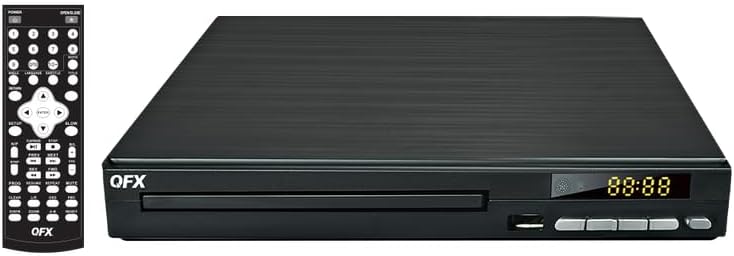
Stampa 1: Quddiem view of the QFX VP-110 DVD/CD Player alongside its remote control. The player features a disc tray, display, and control buttons. The remote control provides comprehensive functions for playback, menu navigation, and settings.

Stampa 2: An angled perspective of the QFX VP-110 DVD/CD Player, highlighting its compact design and front panel layout including the disc tray and display.
3.2 Konnessjonijiet tal-Panew ta' wara

Stampa 3: The rear panel of the QFX VP-110 DVD/CD Player, displaying the HDMI output, composite video output, stereo audio outputs (RCA), and the AC power input. These ports are used for connecting the player to a television or audio system.
4. Setup
Follow these steps to connect your DVD/CD player to your television and power source.
4.1 Konnessjoni ma' Televiżjoni
- Konnessjoni HDMI (Rakkomandata): Qabbad tarf wieħed ta 'kejbil HDMI (mhux inkluż) mal- HD OUT port on the rear of the player and the other end to an HDMI input on your television. Select the corresponding HDMI input on your TV.
- Konnessjoni tal-Vidjo Kompost: If your TV does not have an HDMI input, connect a composite video cable (yellow RCA) to the VIDEO output on the player and the corresponding video input on your TV. Connect the red and white RCA audio cables to the R (lemin) u L (left) audio outputs on the player and the corresponding audio inputs on your TV.
4.2 Konnessjoni tal-Enerġija
- Plug the power cable into the AC IN port fuq wara tal-plejer.
- Ipplaggja t-tarf l-ieħor tal-kejbil tal-enerġija f'sokit elettriku standard.
4.3 Installazzjoni tal-Batterija tal-Kontroll mill-Bogħod
Open the battery compartment on the back of the remote control and insert two AAA batteries, ensuring correct polarity (+/-). Close the compartment securely.
5. Istruzzjonijiet Operattivi
5.1 Disc Playback (DVD/CD)
- Turn on your television and the QFX VP-110 player. Select the correct input source on your TV.
- Agħfas il- FTUĦ/MAGĦLUQ buttuna fuq il-plejer jew il-kontroll remot biex tiftaħ it-trej tad-diska.
- Poġġi diska DVD jew CD bil-mod fuq it-trej tad-diska bin-naħa tat-tikketta tħares 'il fuq.
- Agħfas il- FTUĦ/MAGĦLUQ button again to close the disc tray. The player will automatically begin playback or display a disc menu.
- Use the remote control's navigation buttons (Up, Down, Left, Right) and DĦUL button to navigate menus. Use DĦABBA/PAWŻA, STOP, FF (Avvanza 'l Quddiem), u REW (Rewind) for playback control.
5.2 CD Ripping to USB
The player allows you to convert audio tracks from a CD into MP3 files and save them to a USB drive.
- Daħħal CD awdjo fit-trej tad-diska.
- Insert a USB flash drive into the USB port on the front of the player.
- Waqt id-daqq tas-CD, agħfas il-buttuna RIP button on the remote control (if available) or navigate through the on-screen menu to find the ripping function.
- Follow the on-screen prompts to select tracks and start the ripping process.
5.3 Tħaddim tar-Radju FM
- Agħfas il- MODALITÀ or FUNZJONI button on the remote control to switch to FM radio mode.
- Uża l- INTONA+ u IXXONA- buttons to manually tune to a station, or press SKANJA to automatically search and save available stations.
- Aġġusta l-volum billi tuża VOL+ u VOL- buttuni.
6. Manutenzjoni
Proper care ensures the longevity and optimal performance of your player.
- Tindif tal-Unità: Wipe the exterior of the player with a soft, dry cloth. Do not use liquid cleaners or abrasive materials.
- Diski tat-Tindif: Use a soft, lint-free cloth to wipe discs from the center outwards. Avoid touching the playback surface.
- Ventilazzjoni: Ensure the player has adequate ventilation. Do not block ventilation openings.
- Ħażna: Aħżen il-plejer f'post frisk u niexef 'il bogħod mix-xemx diretta u minn temperaturi estremi.
7 Issolvi l-problemi
Jekk tiltaqa' ma' problemi, irreferi għall-problemi u s-soluzzjonijiet komuni li ġejjin.
| Problema | Kawża Possibbli | Soluzzjoni |
|---|---|---|
| Ebda qawwa | Kejbil tal-enerġija mhux imqabbad; Sokit tal-enerġija difettuż | Kun żgur li l-kejbil tal-enerġija huwa konness sew. Ipprova sokit differenti. |
| L-ebda stampa fuq it-TV | Incorrect TV input selected; Loose HDMI/AV cable | Select the correct HDMI or AV input on your TV. Check cable connections. |
| L-ebda ħoss | TV/player volume too low; Audio cables loose | Increase volume on TV and player. Check audio cable connections. |
| Diska mhux qed tindaqq | Disc is dirty, scratched, or incompatible format | Clean the disc. Try a different disc. Ensure disc format is supported (DVD+/-R, DVD+/-RW, CD, CD-R, CD-RW). |
| Il-kontroll mill-bogħod ma jaħdimx | Batteries depleted or incorrectly inserted; Obstruction between remote and player | Ibdel il-batteriji. Kun żgur li l-polarità hija korretta. Neħħi kwalunkwe ostaklu. |
8. Speċifikazzjonijiet
- Mudell: VP-110
- Appoġġ għat-Tip ta' Midja: DVD+/-R, DVD+/-RW, CD, CD-R, CD-RW
- Konnettività: HDMI, Composite Video (RCA), Stereo Audio (RCA), USB
- Output tal-vidjo: Progressive Scan, Full HD 1080p (via HDMI)
- Karatteristiċi addizzjonali: CD Ripping to USB, FM Radio
- Provvista tal-Enerġija: AC 110V-240V~ 50/60Hz
- Piż tal-oġġett: Madwar 1.94 libbra (0.88 kg)
- Dimensjonijiet (madwar): 9.96 x 9.8 x 2.87 pulzieri (25.3 x 24.9 x 7.3 ċm)
9. Garanzija u Appoġġ
For warranty information and technical support, please refer to the warranty card included with your product or visit the official QFX websit. Żomm l-irċevuta tax-xiri tiegħek bħala prova tax-xiri għal kwalunkwe talba ta' garanzija.
10. Product in Use
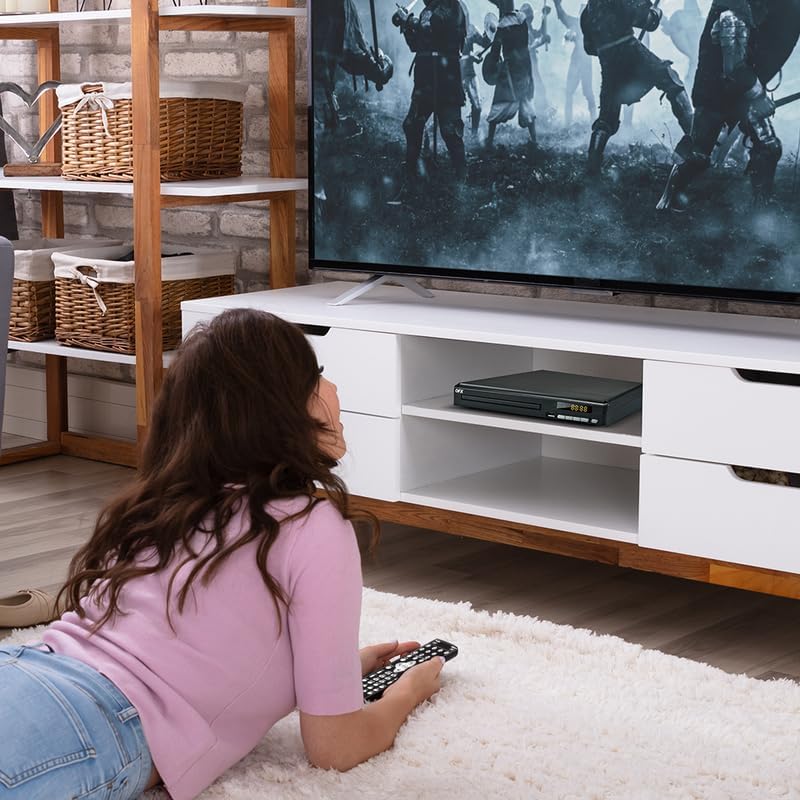
Stampa 4: The QFX VP-110 DVD/CD Player integrated into a home entertainment setup, positioned on a TV stand beneath a television. This illustrates a typical placement for the device in a living room environment.


