1. Introduzzjoni u Fuqview
The Reality Leuchten Francy LED Desk Lamp (Model R52691102) is designed to provide versatile illumination and practical features for your workspace. This lamp integrates a digital display that shows the current time, date, day of the week, and room temperature. It features a 4-step touch dimmer for adjustable brightness and a flexible lamp arm to direct light precisely where needed. Equipped with modern LED technology, the Francy lamp offers high light quality, energy efficiency, and a long lifespan. Additionally, it includes a convenient alarm function.

Image 1.1: The Francy LED Desk Lamp, wirjaasing its sleek design and integrated digital display.

Image 1.2: Icons representing key features: 4-step touch dimmer, 5000K color temperature, adjustable brightness, alarm function, temperature display, and date display.
2. Istruzzjonijiet tas-Sigurtà
- Read all instructions carefully before using the lamp.
- Tiżżarmax jew timmodifikax il-lamp. There are no user-serviceable parts inside, and tampering may void the warranty and pose a safety risk.
- This product contains an integrated LED light source that is not replaceable. Do not attempt to replace the LEDs.
- Uża biss l-adapter tal-enerġija li jiġi mal-lamp. Using an incorrect adapter may damage the lamp or cause a fire hazard.
- Żomm il-lamp 'il bogħod mill-ilma, l-umdità, u temperaturi għoljin.
- Tiżgura l-lamp jitqiegħed fuq wiċċ stabbli u ċatt biex ma jinqalebx.
- Do not look directly into the LED light source for extended periods, as it may cause eye strain.
- Spluggja l-lamp from the power outlet before cleaning or if it will not be used for an extended period.
3. Kontenut tal-Pakkett
Please check the package contents upon unpacking to ensure all items are present and undamaged:
- Francy LED Desk Lamp (Model R52691102)
- Adapter tal-Enerġija
- Manwal għall-Utent (dan id-dokument)
4. Setup
- Spakkjar: Neħħi b'attenzjoni l-lamp and all components from the packaging. Retain the packaging for future storage or transport.
- Pjazzament: Poġġi l-lamp on a stable, flat, and dry surface, such as a desk or table. Ensure there is adequate space around the lamp for ventilation and adjustment of the flexible arm.
- Qabbad l-Enerġija: Insert the small plug of the power adapter into the DC input port located at the back or base of the lamp. Then, plug the power adapter into a standard electrical outlet.
- Qawwa Inizjali Mixgħula: Once connected to power, the digital display should illuminate. The lamp issa hija lesta għall-użu.
- Install Backup Battery (Optional/If applicable): Il-lamp's digital display may require a CR2032 button cell battery (not always included, but often pre-installed or required for memory retention during power outages). Locate the battery compartment, typically on the underside or back of the lamp's base. Insert a CR2032 battery with the positive (+) side facing up. This battery helps maintain time and date settings when the lamp huwa splaggjat.

Image 4.1: The Francy LED Desk Lamp positioned on a desk, ready for use.
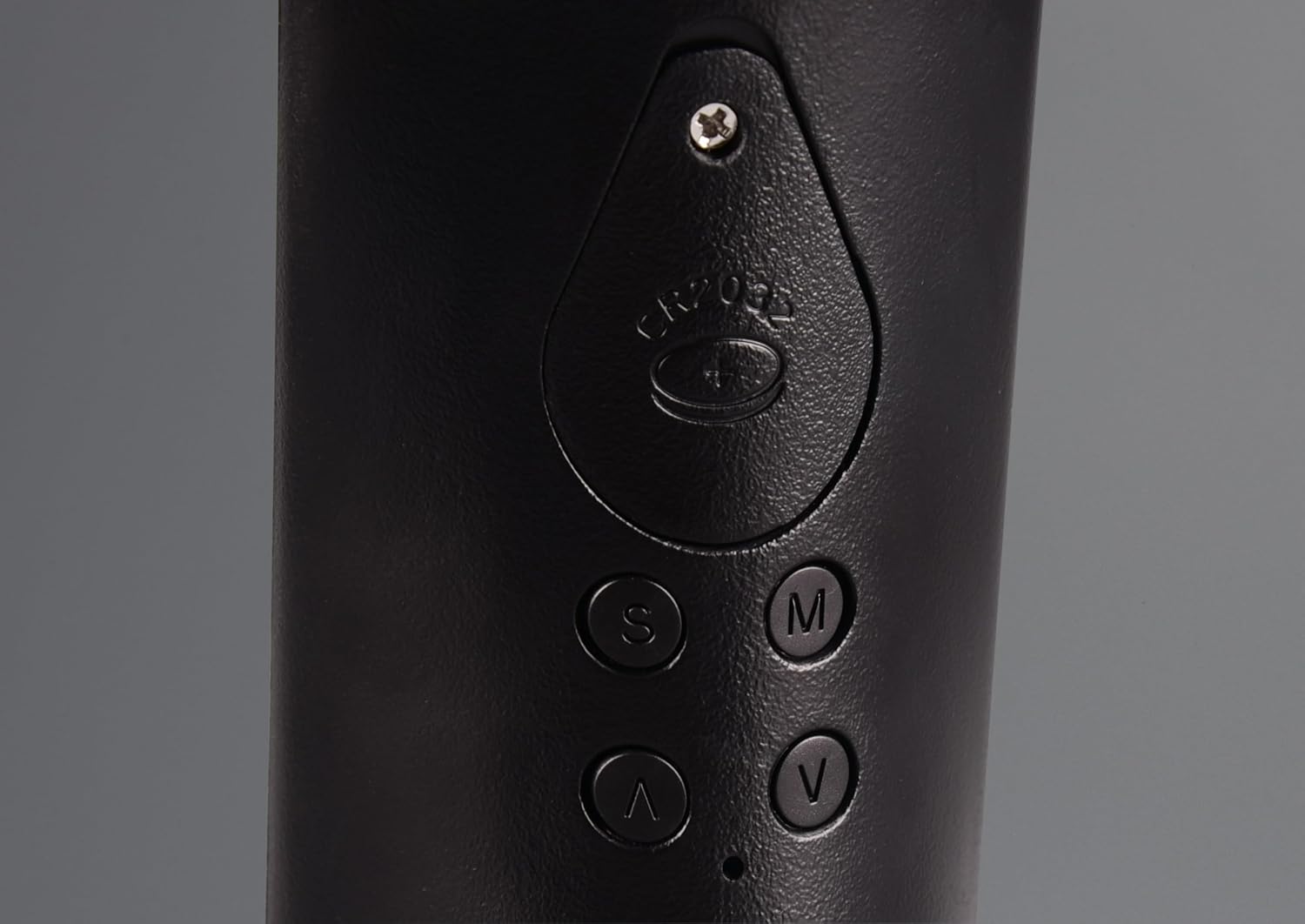
Image 4.2: Detail of the lamp's base showing the CR2032 battery compartment and control buttons (S, M, V, ^).
5. Istruzzjonijiet Operattivi
5.1. Aġġustament tal-Mixgħul/Mitfi u l-Luminożità
Il-lamp features a touch-sensitive power button and a 4-step dimmer integrated into its base.
- Qawwa Mixgħul: Lightly touch the power symbol (⏻) fuq l-lamp's base. The lamp will turn on at the lowest brightness setting.
- Aġġusta l-luminożità: Continue to touch the power symbol repeatedly to cycle through the 4 brightness levels. Each touch will increase the brightness.
- Itfi: After the highest brightness level, touching the power symbol one more time will turn the lamp mitfi.
5.2. Aġġustament tad-Driegħ Flessibbli
Il-lamp head is connected to the base via a flexible arm, allowing you to direct the light as needed.
- Gently bend the flexible arm to position the light source. Avoid excessive force or bending the arm beyond its natural range of motion to prevent damage.

Image 5.2.1: The flexible arm of the Francy lamp allows for various lighting angles.
5.3. Digital Display Functions
The integrated digital display shows time, date, day of the week, and room temperature.

Immaġni 5.3.1: Stampa dettaljata view of the digital display, showing temperature, time, date, and day of the week.
The control buttons (S, M, V, ^) located on the back or side of the lamp's base are used to set these functions.
- S (Set): Enters setting mode and confirms selections.
- M (Modalità): Switches between display modes or setting parameters.
- V (Down/Decrease): Decreases values or navigates down.
- ^ (Up/Increase): Increases values or navigates up.
5.3.1. L-issettjar tal-Ħin u d-Data
- Agħfas il- S Agħfas il-buttuna darba biex tidħol fil-modalità tal-issettjar tal-ħin. Iċ-ċifri tas-sigħat se jteptpu.
- Uża l- ^ or V buttuni biex taġġusta s-siegħa.
- Agħfas S again to move to the minute setting. Use ^ or V biex taġġusta l-minuti.
- Kompli agħfas S to cycle through setting the year, month, and day. Use ^ or V biex taġġusta kull valur.
- Wara li tissettja l-jum, agħfas S one last time to exit setting mode and save your changes.
5.3.2. Funzjoni ta 'allarm
Il-lamp includes an alarm clock feature.
- Agħfas il- M button repeatedly until the alarm time is displayed (often indicated by an alarm icon).
- Agħfas il- S button to enter alarm setting mode. The alarm hour digits will flash.
- Uża l- ^ or V buttuni biex taġġusta s-siegħa tal-allarm.
- Agħfas S again to move to the alarm minute setting. Use ^ or V biex taġġusta l-minuti.
- Agħfas S one more time to confirm the alarm time and exit setting mode.
- Biex tattiva/tiddiżattiva l-allarm, agħfas il-buttuna ^ button while the alarm time is displayed (not in setting mode). An alarm icon will appear/disappear on the display.
- Funzjoni Snooze: When the alarm sounds, touch the power symbol on the lamp's base to activate snooze. The alarm will sound again after a few minutes (typically 5-10 minutes).
- Waqqaf Allarm: To turn off the alarm completely, press any of the S, M, V, or ^ buttons (not the power symbol) when the alarm is sounding.
5.3.3. Wiri tat-Temperatura
Il-lamp displays the ambient room temperature. This feature is automatic and does not require manual setting.
- The temperature is typically shown in Celsius (°C). There might be an option to switch to Fahrenheit (°F) by pressing a specific button (e.g., V or ^) while in time display mode, but this varies by model. Refer to the display for any indicators.
6. Manutenzjoni
- Tindif: Qabel it-tindif, żgura l-lamp is unplugged from the power outlet. Use a soft, dry cloth to wipe the lamp's surface. Do not use abrasive cleaners, solvents, or harsh chemicals, as these can damage the finish.
- Sors tad-Dawl LED: Is-sors tad-dawl LED f'dan l-lamp is integrated and cannot be replaced. If the LEDs fail, the entire lamp unit may need to be replaced.
- Sostituzzjoni tal-batterija: If the time and date settings are lost when the lamp is unplugged, the CR2032 backup battery may need replacement. Follow the instructions in Section 4. Setup for battery installation.
7 Issolvi l-problemi
| Problema | Kawża Possibbli | Soluzzjoni |
|---|---|---|
| Lamp ma jixgħelx. | Not plugged in; power outlet not working; faulty adapter. | Kun żgur li l-adapter tal-enerġija huwa pplaggjat sew fiż-żewġ lamp u sokit elettriku li jaħdem. Ittestja s-sokit b'apparat ieħor. |
| Id-displej diġitali huwa vojt jew jitteptep. | Power issue; backup battery low/missing. | Check power connection. If the lamp is plugged in but the display is off, replace the CR2032 backup battery. |
| Time/Date resets when unplugged. | Il-batterija tal-backup hija mejta jew nieqsa. | Install or replace the CR2032 backup battery (see Section 4. Setup). |
| L-allarm ma jdoqqx. | Alarm not activated; volume too low (if adjustable). | Ensure the alarm function is activated (alarm icon visible on display). Check if there's a volume setting (though typically not on these lamps). |
8. Speċifikazzjonijiet
- Numru tal-Mudell: R52691102
- Ditta: RL LIVE YOUR LIGHT
- Dimensjonijiet tal-Prodott: 7D x 24W x 35H cm (7 x 24 x 35 cm; 625 g)
- Materjal Bażi: Plastik
- Materjal tad-dell: Plastik
- Kulur: Black (with leather-look elements)
- Tip ta 'Finish: Brushed
- Sors tad-Dawl: LED integrat
- Konsum tal-Enerġija: 4.8 Watt
- Fluss Luminuż: Max 430 Lumen
- Temperatura tal-Kulur: 5000 Kelvin (abjad kiesaħ)
- Tul tal-Ħajja Medja: 25,000 sigħat
- Dimming: 4-step touch dimmer
- Tip ta' swiċċ: Mess
- Karatteristiċi Speċjali: Dimmable, Energy-Efficient, Flexible Arm, Digital Display (Time, Date, Day, Temperature), Alarm Function
- Sors tal-Enerġija: Corded Elettriku
- Batteriji Meħtieġa: No (for main operation), CR2032 button cell for display memory (not always included/pre-installed)

Image 8.1: Technical drawing illustrating the dimensions and components of the Francy LED Desk Lamp.
9. Garanzija u Appoġġ
This product is covered by a manufacturer's warranty. For specific warranty terms and conditions, please refer to the warranty card included with your purchase or contact the retailer where you purchased the product.
For technical support, troubleshooting assistance beyond what is provided in this manual, or inquiries regarding parts and service, please contact RL LIVE YOUR LIGHT customer service or your local distributor. Contact information can typically be found on the product packaging or the brand's official websit.
Please have your product model number (R52691102) and purchase date ready when contacting support.


