1. Introduzzjoni
This manual provides essential information for the safe and efficient operation of your Ulefone Armor Pad 2 Rugged Tablet. Please read this manual thoroughly before using the device to ensure proper functionality and to prevent damage. Keep this manual for future reference.
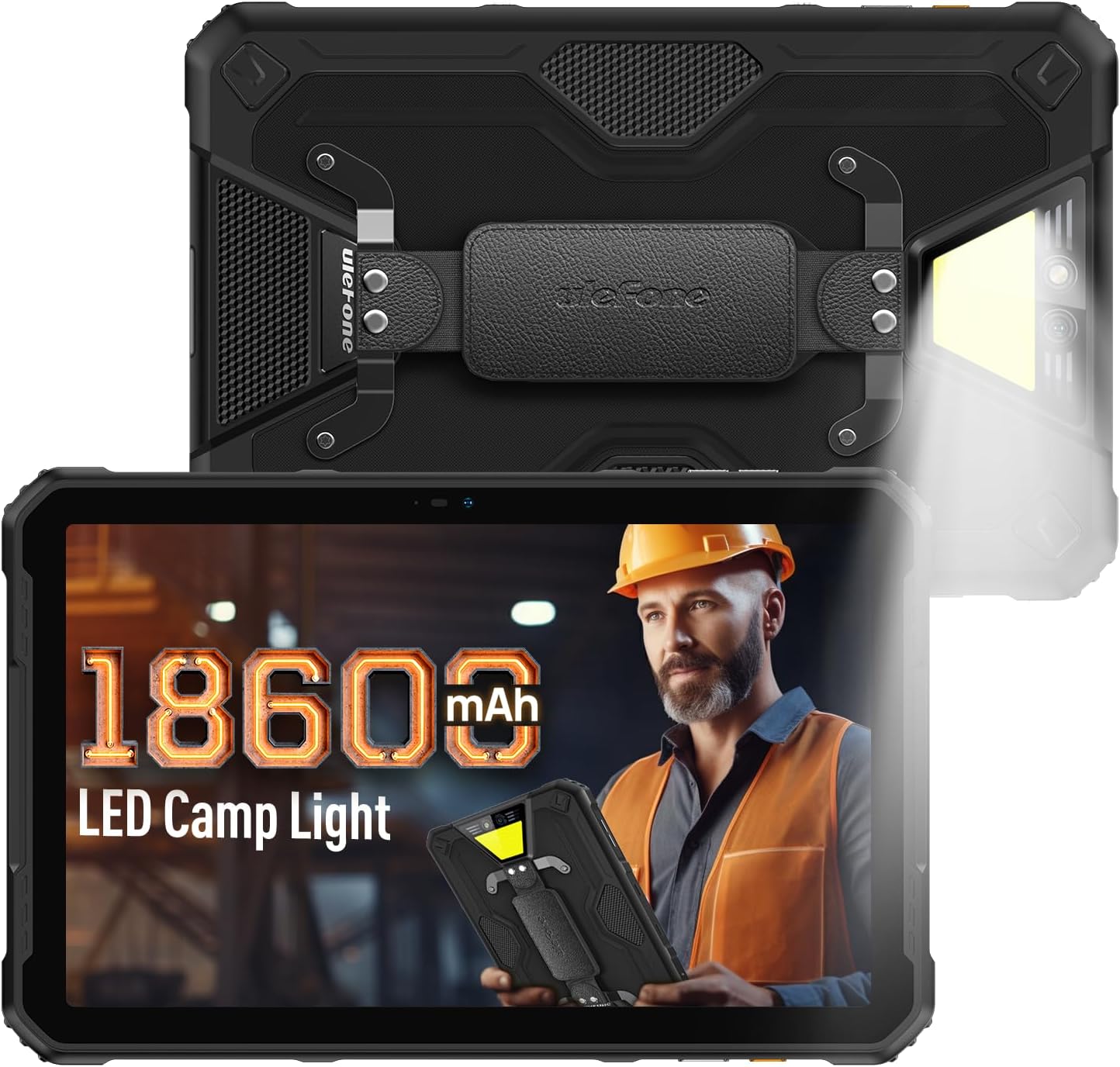
Figure 1: Ulefone Armor Pad 2 Rugged Tablet. This image displays the tablet from both front and back angles, highlighting its robust design and integrated camping dawl.
2. Kontenut tal-Pakkett
Ivverifika li l-oġġetti kollha huma preżenti fil-pakkett:
- 1 x Ulefone Armor Pad 2 Tablet
- 1 x AC Power Charger
- 1 x USB Type-C 2.0 Charging Cable
- 1 x Ċinga tal-Idejn
- 1 x tornavit
- 8 x Screws (for hand strap attachment)
- 1 x Protective Film (Pre-installed)
- 1 x Labra SIM
- 1 x Manwal tal-Utent (dan id-dokument)
Video 1: Armor Pad 2 Unboxing Video. This video demonstrates the unboxing process and shows all included accessories.
3. Layout tal-Apparat
Familiarize yourself with the physical components and ports of your Armor Pad 2 tablet.

Figura 2: Aktarview of Ulefone Armor Pad 2 features. This image highlights various components such as the camera, camping light, uSmart connector, and buttons.
- Kamera ta' quddiem: 16MP għal sejħiet bil-vidjo u selfies.
- Wiri: 11-inch 2K display with Corning Gorilla Glass 5.
- Buttuna tal-Qawwa: Located on the side, typically integrated with the fingerprint sensor.
- Buttuni tal-Volum: Aġġusta l-livelli tal-awdjo.
- Ċavetta tad-dwana: Programmable button for quick access to functions (e.g., PTT, flashlight).
- Port USB tat-Tip Ċ: Għall-iċċarġjar u t-trasferiment tad-dejta.
- Jack Awdjo 3.5mm: Għall-headphones.
- Slott tal-Karta SIM/TF: Supports dual Nano SIM cards and one TF card.
- Kamera ta' wara: Kamera prinċipali ta' 48MP.
- CampDawl li Jdawwal: 750 lumens LED light with multiple modes.
- uSmart Expansion Connector: For connecting compatible external accessories.
- Kelliema Stereo Doppji: Front-facing for clear and balanced audio.
4. Setup
4.1 Qawwa Inizjali
- Press and hold the Power Button (usually on the side) until the Ulefone logo appears.
- Segwi l-istruzzjonijiet fuq l-iskrin biex tlesti s-setup inizjali, inkluż l-għażla tal-lingwa, il-konnessjoni Wi-Fi, u s-setup tal-kont Google.
4.2 SIM/TF Card Installation
- Sib l-islott tal-kard SIM/TF fuq il-ġenb tat-tablet.
- Use the provided SIM needle to gently eject the card tray.
- Place your Nano SIM cards and/or TF card into the tray according to the diagram on the tray. Ensure correct orientation.
- Carefully reinsert the card tray into the slot until it clicks into place.
4.3 Iċċarġjar tat-Tablet
- Qabbad il-kejbil USB tat-Tip Ċ mal-port tal-iċċarġjar tat-tablet.
- Connect the other end of the cable to the AC Power Charger.
- Plug the AC Power Charger into a wall outlet.
- L-indikatur tal-iċċarġjar fuq l-iskrin se juri l-istatus tal-iċċarġjar.
- For optimal charging, use the provided Ulefone charger and cable.

Figure 3: Battery and Charging Features. This image illustrates the tablet's large 18600mAh battery capacity, 33W fast charging capability, and support for reverse charging.
5. Operazzjoni Bażika
5.1 Power On/Off
- Qawwa Mixgħul: Press and hold the Power Button until the device vibrates and the screen lights up.
- Itfi: Press and hold the Power Button for a few seconds, then select "Power off" from the options on the screen.
- Ibda mill-ġdid: Press and hold the Power Button for a few seconds, then select "Restart" from the options.
5.2 Ġesti tat-Touchscreen
Navigate your tablet using standard Android gestures:
- Tektek: Agħżel oġġett jew attiva funzjoni.
- Mess u Żomm: Aċċessa l-menus kuntestwali jew iddreggja l-oġġetti.
- Swipe: Skrollja minn skrins, listi, jew kontenut.
- Agħfas biex Tiżżumja: Iżżumja 'l ġewwa jew 'il barra fuq l-immaġnijiet u web paġni.
5.3 Custom Key Functions
The custom key on the side of the tablet can be programmed for various shortcuts:
- Access settings to assign single-click, double-click, and long-press actions.
- Common assignments include Push-to-Talk (PTT), flashlight, or quick camera launch.
5.4 Modalità tal-Ingwanti
Activate Glove Mode in settings to enable touchscreen responsiveness while wearing gloves, ideal for outdoor or industrial environments.
6. Karatteristiċi ewlenin
6.1 Rugged Design
The Armor Pad 2 is built to withstand harsh conditions:
- Klassifikazzjoni IP68/IP69K: Ċertifikat għar-reżistenza għall-ilma u t-trab.
- Ċertifikat MIL-STD-810H: Meets military standards for durability against drops, shocks, and extreme temperatures.
- Ħġieġ Corning Gorilla 5: Enhanced scratch and drop resistance for the display.

Figure 4: Ruggedness features. This image demonstrates the tablet's water, dust, and drop resistance, highlighting its IP68/IP69K and MIL-STD-810H certifications.
6.2 Wiri
Experience clear visuals on the 11-inch 2K display:
- Daqs: 11-inch.
- Riżoluzzjoni: 2K (2000x1200 pixels).
- Luminożità: 500 nits for visibility in various lighting conditions.

Figure 5: 11-inch 2K Display. This image showcases the vibrant display protected by Corning Gorilla Glass 5.
6.3 Prestazzjoni
The tablet is powered by a MediaTek Helio G99 processor, ensuring smooth operation:
- Proċessur: MediaTek Helio G99 (8-core, 2.2GHz, 6nm).
- RAM: Up to 16GB (8GB physical + 8GB virtual).
- Ħażna Interna: 256GB.
- Ħażna espansibbli: Sa 2TB permezz ta' karta TF.
- Sistema Operattiva: Android 13.

Figure 6: Performance specifications. This image details the MediaTek Helio G99 chipset, RAM, and ROM capabilities of the tablet.
6.4 Kameras
Aqbad il-mumenti bil-kameras integrati:
- Kamera ta' wara: 48MP.
- Kamera ta' quddiem: 16MP.

Figure 7: Camera capabilities. This image shows examples of photos taken with the 48MP rear and 16MP front cameras.
6.5 Konnettività
Stay connected with a range of communication options:
- Ċellulari: 4G Dual SIM Dual Standby (Note: Not compatible with AT&T, Cricket).
- Wi-Fi: Wi-Fi 6 for faster wireless connections.
- Bluetooth: Bluetooth 5.2.
- Navigazzjoni: GPS + GLONASS + Galileo + BeiDou.
- NFC: Għal ħlasijiet mingħajr kuntatt u skambju ta' dejta.
6.6 Awdjo
Enjoy immersive sound with:
- Kelliema Stereo Doppji: Front-facing for clear and balanced audio.
- Jack Awdjo 3.5mm: Għal headphones bil-fili.
6.7 Campdawl
The integrated 750 lumens LED camping light provides versatile illumination:
- Luminożità: 750 lumens, 383 lighting beads, 5.5 watts.
- Modi: 3 lighting modes (e.g., Lighting, Sharp Light, SOS).
- Livelli ta' luminożità: 3 adjustable levels.
- Activated via a physical button for quick access.

Figure 8: 750LM Camping Light. This image shows the tablet's powerful integrated LED light in use during a camping scenario.
6.8 uSmart Expansion Connector
Ulefone's exclusive uSmart Expansion offers fast and stable connections to professional tools with plug-and-play convenience. Compatible expansion devices (e.g., endoscope, 1000x microscope) require additional purchases.
Video 2: Ulefone Armor Pad 2 Rugged Tablet Overview. This video demonstrates various features including the uSmart Expansion Connector.
7. Manutenzjoni
- Tindif: Uża artab, damp cloth to clean the tablet. Avoid harsh chemicals or abrasive materials. Ensure all port covers are securely closed before cleaning with liquids.
- Water/Dust Protection: Always ensure all port covers (USB, audio jack, SIM slot) are firmly sealed to maintain IP68/IP69K water and dust resistance.
- Kura tal-batterija: Avoid exposing the tablet to extreme temperatures. For long-term storage, charge the battery to approximately 50-70%.
- Protezzjoni tal-iskrin: The tablet comes with a pre-installed protective film. For additional protection, consider using a tempered glass screen protector.
8 Issolvi l-problemi
| Problema | Kawża Possibbli | Soluzzjoni |
|---|---|---|
| It-tablet ma jixgħelx. | Low battery or system crash. | Charge the tablet for at least 30 minutes. If still unresponsive, press and hold the Power Button for 10-15 seconds to force restart. |
| It-touchscreen ma jirrispondix. | Software glitch or screen damage. | Restart the tablet. If the issue persists, perform a factory reset (backup data first). If physical damage is suspected, contact support. |
| Ma tistax tikkonnettja mal-Wi-Fi. | Incorrect password, router issue, or tablet Wi-Fi module issue. | Verify Wi-Fi password. Restart router and tablet. Try connecting to other Wi-Fi networks. |
| Poor call quality or no signal. | Weak network signal, incorrect SIM installation, or carrier issue. | Move to an area with better signal. Reinstall SIM card. Contact your mobile carrier for network status. |
| Tablet is slow or freezes. | Wisq apps jaħdmu, ħażna baxxa, jew softwer skadut. | Close unnecessary apps. Clear cache. Free up storage. Check for system updates. |
9. Speċifikazzjonijiet
| Karatteristika | Dettall |
|---|---|
| Mudell | Ulefone Armor Pad 2 |
| Dimensjonijiet | 10.94 x 7 x 0.55 pulzieri |
| Piż | 2.24 liri |
| Sistema Operattiva | Android 13 |
| Proċessur | MediaTek Helio G99 (8-core, 2.2GHz) |
| RAM | Up to 16GB (8GB physical + 8GB virtual) |
| Ħażna Interna | 256GB |
| Ħażna espansibbli | Sa 2TB (karta TF) |
| Wiri | 11-inch 2K (1280 x 800 pixels, 500 nits, Corning Gorilla Glass 5) |
| Kamera ta' wara | 48MP |
| Kamera ta' Quddiem | 16MP |
| Kapaċità tal-batterija | 18600mAh |
| Iċċarġjar | 33W Fast Charging, Reverse Charging (OTG) |
| Durabilità | IP68/IP69K, Ċertifikat MIL-STD-810H |
| Konnettività | 4G Dual SIM, Wi-Fi 6, Bluetooth 5.2, NFC |
| Navigazzjoni | GPS, GLONASS, Galileo, BeiDou |
| Karatteristiċi Speċjali | 750LM Camping Light, uSmart Expansion Connector, Custom Key, PTT, Digital Toolbox, Fingerprint Sensor, Glove Mode, Stereo Dual Speakers |
10. Garanzija u Appoġġ
Ulefone products come with a standard manufacturer's warranty. For detailed warranty information, technical support, or service inquiries, please visit the official Ulefone webis-sit jew ikkuntattja lis-servizz tal-konsumatur tagħhom direttament. Żomm l-irċevuta tax-xiri tiegħek bħala prova tax-xiri għal talbiet ta' garanzija.
Official Ulefone Websit: www.ulefone.com


